Product Walkthrough Videos: Create Step-by-Step Demos That Convert


What Is a Product Walkthrough Video?
A product walkthrough video is a guided, step-by-step video that shows a product in action. It usually uses screen recording, voiceover, annotations, and zoom effects to walk the viewer through a specific workflow or result.
That last part matters. A walkthrough is not just “here is our product.” It is more like, “here is exactly how this product helps you do the thing you care about.”

Comparison Table:
That is what makes it different from other video formats:
A product demo video and a product walkthrough are often used interchangeably, but there is a subtle difference. A demo can be broader and more outcome-focused. A walkthrough is more instructional and step-by-step. Think of a demo as the guided pitch, and a walkthrough as the practical “let me show you how this works” version.
For SaaS buyers, that distinction is huge. People do not just want a promise anymore. They want proof of work. They want to see the interface, the clicks, the flow, the result.
Why Walkthrough Videos Convert Better Than Static Docs
Let’s be honest, most people don’t read documentation because they want to. They read it because they’re stuck.
And that’s exactly where product walkthrough videos quietly outperform static docs in 2026.
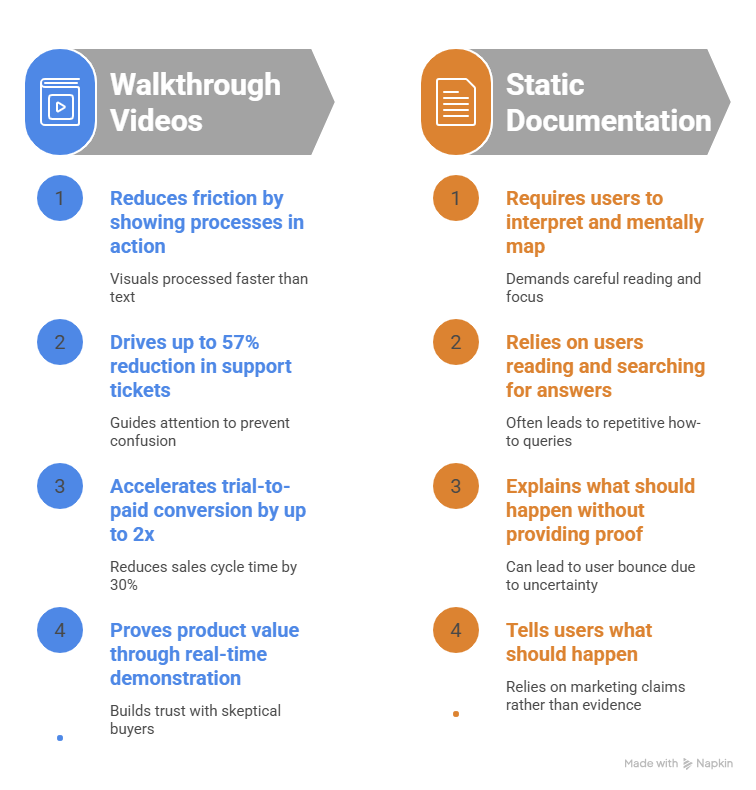
A product walkthrough video removes the friction that written content naturally creates. Instead of asking users to interpret text, imagine workflows, and mentally map steps, you simply show them the process in action. That difference alone has a direct impact on conversion behavior.
1. Video reduces the time to “aha moment.”
In SaaS, the “aha moment” is everything. It’s the point where a user finally understands the value of your product.
With static documentation, users often bounce between tabs, skim headings, and still feel unsure. With a walkthrough video, they see the workflow unfold in real time.
Research insights from 2026 SaaS usage patterns show that:
- Landing pages with embedded walkthrough videos can improve conversion rates by up to 80%
- Email campaigns using video see significantly higher engagement compared to text-only formats
- Visual-first onboarding reduces confusion during early product exploration
The reason is simple: humans process visuals faster than text. A 90-second walkthrough can communicate what a 2,000-word guide struggles to explain.
2. Lower support tickets without changing your product
Here’s where things get interesting from a customer success perspective.
Once SaaS teams start using walkthrough videos for onboarding and feature education, they consistently see a reduction in repetitive support queries.
In real-world SaaS environments:
- Teams report up to 57% reduction in support tickets after introducing structured walkthrough libraries
- Users rely less on “how do I do this?” questions when they can visually follow a step-by-step guide
- Complex workflows become self-explanatory when demonstrated instead of described
It’s not that users stop needing help. It’s that the help becomes embedded in the product experience itself.
And unlike docs, videos don’t assume the user will “read carefully.” They guide attention.
3. Faster trial-to-paid conversion
This is where walkthrough videos quietly become a revenue lever instead of just a support asset.
When users clearly understand how to achieve value inside your product, they move faster from trial to activation—and activation is what drives conversion.
Benchmarks from SaaS video adoption patterns show:
- 25–30% reduction in sales cycle time when walkthrough content is part of the funnel
- Up to 2x improvement in user activation rates when onboarding includes guided video flows
- Strong correlation between video engagement and trial-to-paid conversion rates
Why? Because uncertainty kills conversions.
A user who is slightly confused will “come back later.” A user who is visually guided is more likely to continue immediately.
4. Static docs explain. Walkthrough videos prove.
This is the most important distinction.
Documentation tells users what should happen.
Walkthrough videos show what happens.
That shift builds trust faster, especially for technical or skeptical buyers who don’t want marketing claims—they want evidence.
This is why modern SaaS teams are moving toward experience-led onboarding, where videos are not just optional assets but core conversion tools.
And it’s also why companies investing in demo automation workflows (like those covered in demo automation strategies) are seeing stronger pipeline efficiency compared to teams relying purely on static help centers.
5. Better retention through clearer onboarding
One overlooked benefit is retention.
Users don’t churn only because a product is bad. They churn because they never fully understand it.
Walkthrough videos fix that by:
- Reducing early-stage confusion
- Guiding users toward their first success faster
- Reinforcing correct usage patterns visually
When onboarding is clear, users don’t abandon the product out of frustration. They stick around long enough to see value.
This is also why modern teams combine walkthroughs with broader AI-powered demo experiences (like in AI-driven demo workflows) to ensure every user sees the product in the best possible way, without manual effort scaling issues.
Static documentation still has its place, but it no longer carries the weight it once did.
In 2026, SaaS and walkthrough videos win because they:
- Show instead of explain
- Reduce friction instead of adding cognitive load
- Convert attention into action faster than text ever can
And when combined with strong distribution across onboarding, sales, and support flows, they stop being “content” and start becoming part of your conversion engine.
5 High-Converting Product Walkthrough Examples
The best product walkthrough videos do not try to impress with flashy editing. They win by being clear, fast, and useful.
1. Slack
Slack’s walkthrough style works because it gets to the point fast. It opens with a real communication problem, then shows the interface early, before the viewer loses interest. The pacing is brisk, the visual cues are clear, and the CTA feels natural.
2. Notion
Notion’s walkthroughs are calm, structured, and template-driven. That makes sense because the product itself is flexible. Instead of overwhelming people with options, it shows how a workspace can solve a specific use case. It feels practical, not theatrical.
3. Beehiiv
Beehiiv leans into qualification. The walkthrough is not just there to educate; it moves the viewer toward action. The experience is interactive enough to build commitment, which is why it performs so well for high-intent leads.
4. RB2B ( Retention to B2B )
RB2B makes the value obvious very quickly. It shows the output, not just the process. That matters because users who are evaluating a tool want to see a result they can actually imagine using.
5. Ahrefs
Ahrefs uses a more exploratory format. Rather than forcing a linear story, it lets users dig into the product and validate it on their own terms. For technical buyers, that freedom builds trust.
The pattern across all five examples is simple: each one solves a specific problem and gets to value early. No fluff. No wandering. No five-second logo intro that eats the viewer’s attention before anything useful happens.
How to Create a Product Walkthrough Video in 6 Steps
Here is the part most teams overcomplicate. A strong product walkthrough video does not need a studio, a camera crew, or a three-week post-production cycle. It needs a clear plan, a tight script, and a workflow that does not fight you at every step.
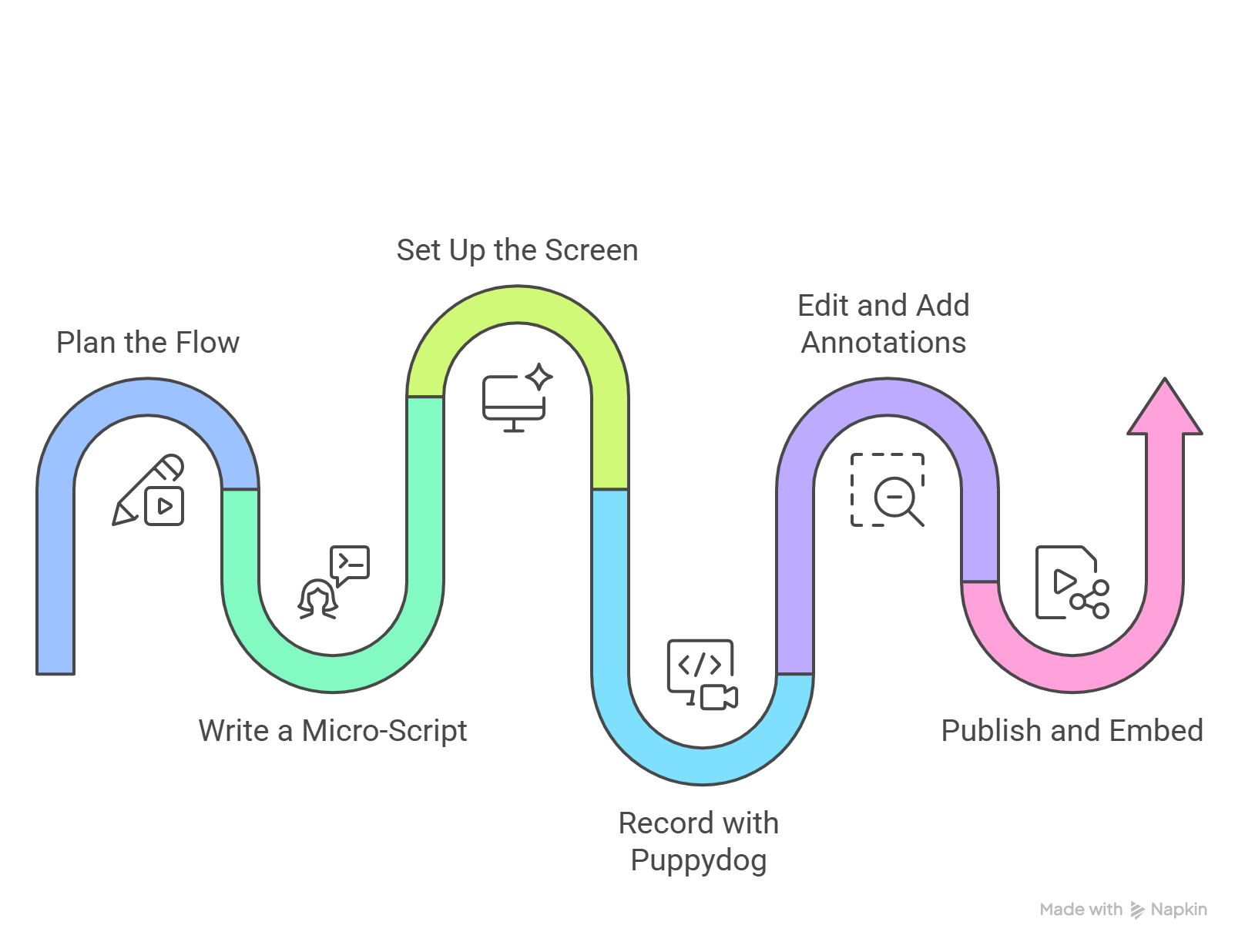
1) Plan the flow before you record
Start with one clear outcome. What should the viewer understand or do after watching?
Do not try to show every feature in one video. That is how walkthroughs turn into feature soup. Pick one workflow, one pain point, and one result. For example: “How to create a personalized product demo in under five minutes” is much better than “An overview of everything our platform can do.”
A good rule: if the viewer cannot describe the purpose of the video in one sentence, the flow is too broad.
2) Write a micro-script
A walkthrough script should sound like a helpful person explaining the process, not a brochure reading itself out loud.
Keep sentences short. Use plain language. Match the words to what is happening on screen. If the cursor clicks a button, say that button’s name. If the viewer is supposed to notice a result, say why it matters.
The best scripts feel conversational. A little personality helps too. “Here is where the magic starts” is usually better than “Now we proceed to the next phase of the workflow.”
3) Set up your screen properly
Before you hit record, clean up the screen. Remove notifications, close unnecessary tabs, and make sure the interface is readable. That sounds obvious, but you would be shocked how many otherwise good walkthroughs get ruined by a random Slack ping or a tiny font size.
Use dummy data when needed. Make sure the cursor is easy to follow. If your product has a dense interface, increase scaling so the viewer does not squint like they are reading medicine labels in low light.
4) Record with Puppydog
This is where Puppydog becomes especially useful.
Instead of forcing your team to wrestle with manual editing, Puppydog helps turn screen recordings or screenshots into personalized product demo videos quickly. That makes it a strong fit for SaaS teams that need speed, consistency, and scale without hiring a full video crew.
For sales follow-ups, internal enablement, or personalized outreach, this matters a lot. You can capture the workflow once and turn it into a polished walkthrough faster than a traditional editing process would allow. That means less time staring at a blank timeline and more time shipping useful content.
If you’re already experimenting with AI-powered demo creation, it’s worth exploring how modern teams are building more engaging demo videos using AI without increasing production time every week.
5) Edit and add annotations
Once the recording is done, polish the video so the viewer never has to guess what matters.
Use zooms to highlight important actions. Add captions for clarity. Use annotations when a button, field, or result needs emphasis. Smooth out awkward pauses or mouse wandering. The goal is not cinematic perfection. The goal is clarity.
Good editing makes the video feel guided. Bad editing makes it feel like someone handed you a recording and said, “Good luck.”
6) Publish and embed it where it matters
A walkthrough video only works if people actually see it. Publish it where the buying or onboarding friction is happening.
That might be a landing page, an email sequence, a help article, a LinkedIn post, or a sales follow-up. The important thing is to place it in context. A viewer should not have to search for the video as if it were buried treasure.
Product Walkthrough Video Script Template
Here is a simple structure you can reuse.
90-second walkthrough script formula
Hook (0–5 seconds)
Name the pain immediately.
Example: “Still losing time because your product demos take too long to build?”
Problem (5–20 seconds)
Show empathy and context.
Example: “Most teams rely on static screenshots or long live calls, which makes it hard for buyers to see value fast.”
Solution walkthrough (20–45 seconds)
Introduce the product and show the flow.
Example: “Here is how [Product Name] helps you create a step-by-step demo in minutes.”
Proof or benefit recap (45–70 seconds)
Show the payoff.
Example: “Now your team can share a clear walkthrough with prospects, reduce back-and-forth, and move buyers forward faster.”
CTA (70–90 seconds)
Give one next step.
Example: “Try it free and create your first walkthrough today.”
Fill-in-the-blank version
Hook: “Still struggling to [solve painful problem]?”
Problem: “That usually means [current pain point], which wastes time and slows down progress.”
Solution: “That is why we built [Product Name], a [category] that helps you [main outcome].”
Walkthrough: “First, you [action 1]. Then you [action 2]. Finally, you [action 3] to get [result].”
Proof: “Teams like [customer example] use this workflow to [business outcome].”
CTA: “Start your free trial and create your walkthrough video in minutes.”
For a Puppydog workflow, you can literally build around: “Record this with Puppydog.”
Best Tools for Creating Walkthrough Videos in 2026
Different teams need different tools. Some want speed. Some want interactivity. Some want deep editing. The right choice depends on your goal.
Here is the practical breakdown:
Puppydog is ideal when you need scale, personalization, and speed. If your team is producing walkthroughs for sales outreach, follow-ups, or targeted demos, it removes a lot of the manual friction.
Supademo is a strong choice for interactive product tours and self-serve flows.
Loom is excellent for quick internal communication, but it is not always the best fit for formal external walkthroughs.
Camtasia is better for high-production educational content or training libraries that need longer-term polish.
The right tool is not the one with the longest feature list. It is the one your team will actually use without groaning every time they open it.
Where to Use Your Walkthrough Videos
A great walkthrough video should live where the buyer is already paying attention.
Product pages
Place a short walkthrough near the top of your product page so visitors understand the value quickly. A 30–60 second version can do a lot of work here. It helps people go from “interesting” to “I get it.”
Onboarding email sequences
Replace generic welcome text with a short video showing the first meaningful action. This is one of the easiest ways to reduce confusion and increase activation.
Help centers
Pair support articles with short walkthroughs. A user looking for help is already signaling intent. Give them a clear visual answer instead of a wall of text.
Sales follow-ups
After a demo call, send a concise recap video focused on the exact pain points the prospect discussed. This is much more memorable than forwarding a long meeting recording and hoping someone watches all of it.
This works especially well inside outbound and post-demo workflows where sales enablement videos help reinforce the exact pain points discussed during the call.
LinkedIn and social media
Use short feature teasers or mini walkthrough clips to spark interest. Social content works best when it is fast, clear, and captioned for silent viewing.
Placement matters more than most teams realize. A good walkthrough in the wrong place is still underperforming.
Mistakes That Kill Walkthrough Video Conversions
A walkthrough can be excellent in theory and still underperform in practice. Usually, the problem is not the product. It is the execution.
1) Starting with your logo
The first few seconds should focus on the viewer’s pain, not your brand intro. People clicked to solve a problem, not to watch a title sequence.
2) Weak audio
Poor audio makes the video feel less trustworthy. Visuals can be imperfect, but bad sound is hard to forgive.
3) Too much mouse wandering
A shaky cursor wandering around the screen is distracting. The viewer should always know what action matters.
4) Showing too many features
A 5-minute video with 15 features often teaches nothing. Focus on one use case and one outcome.
5) Forgetting the CTA
Every walkthrough should lead somewhere. Trial. Demo. Signup. Documentation. Next step. Pick one.
6) Making it hard to watch muted
A lot of people watch videos without sound, especially on mobile. Captions and visual clarity are not optional anymore.
Many of these problems overlap with broader SaaS demo issues, especially when teams overload videos with too many features instead of following proven SaaS demo best practices.
A strong walkthrough respects the viewer’s time. That is really the whole game.
FAQ ( Frequently Asked Questions )
How long should a product walkthrough video be?
For awareness, 30–60 seconds works well. For consideration, 60–120 seconds is a strong range. For detailed technical workflows, 2–5 minutes is reasonable if the audience is highly motivated.
What is the difference between a walkthrough and a demo?
A walkthrough is usually step-by-step and instructional. A demo is broader and often more outcome-focused, especially in live sales settings.
Should a walkthrough video include voiceover?
Yes. Voiceover helps explain what is happening and why it matters. Just make sure the video still makes sense with captions alone.
What is the best tool for walkthrough videos?
For an automated sales scale, Puppydog is a strong choice. For interactive demos, Supademo works well. For training content, Camtasia is a solid option. For quick internal updates, Loom is often enough.
Final Thoughts
Product walkthrough videos are not just another content format. For SaaS teams, they are one of the most practical ways to shorten the path from curiosity to conversion.
The teams that win in 2026 will not be the ones producing the fanciest videos. They will be the ones creating clear, useful, living assets that help buyers understand the product fast and keep them moving forward. That means better scripts, tighter workflows, smarter placement, and tools that remove friction instead of adding more of it.
If your goal is to create walkthrough videos that convert, start with one specific user problem, show the workflow plainly, and keep the next step obvious. And when you need to create those videos quickly without turning video production into a second full-time job, Puppydog makes that process a lot easier.
Create your walkthrough video in 5 minutes: try Puppydog free.

Sarah Thompson is a storyteller at heart and Business Developer at PuppyDog.io. She’s passionate about creating meaningful content that connects people with ideas, especially where technology and creativity meet.