Video Prospecting: Why Your Loom Recordings Stop Converting

Published 31st July 2026
Video prospecting works. More than seven in ten sales reps who use custom, personalized video in their outreach report higher prospect engagement than plain text alone, according to Vidyard's research into virtual selling, and nearly half say it shortens their deal cycles too. So no, this isn't another "video is dead" post. But if you've been sending Looms for more than a few months, you've probably already noticed the catch.
Month one, reply rates spike and everyone on the team is thrilled. By month three, the same rep sending the same style of recording gets met with silence. The videos didn't get worse. The pipeline outgrew them. That gap between what video prospecting promises and what it actually delivers after the honeymoon phase is what this post is about.
What video prospecting actually is (and why it still works in 2026)
Video prospecting is an outbound technique where sales reps or CS teams record short, personalized videos or product walkthroughs and send them via email, LinkedIn, or direct link to move a deal forward. That's it. No fancy definition needed.
The reason it still works, even in a world flooded with AI-written cold emails, comes down to friction. A buyer opens their inbox and sees a wall of text asking them to imagine how a product might solve their problem. Then they open a 45-second video and just... see it. No imagining required. Async video collapses the cognitive work of a cold pitch into something a prospect can absorb in less time than it takes to read the subject line.
It also matches how buyers actually want to shop now. Most B2B buyers say they'd rather research and evaluate a product without talking to a rep at all, at least early on. A short prospect walkthrough sent asynchronously respects that preference. Nobody's forcing them onto a call. They just get to see the thing.
This is where using video for sales prospecting earns its keep across a few specific moments:
Cold outreach that opens with something specific to the prospect, not a generic template with their logo pasted on
Post-call follow-ups that recap what was discussed for the stakeholder who wasn't on the call
Onboarding check-ins that walk a new customer through the exact feature they haven't touched yet
Renewal conversations that show usage data and upgraded functionality instead of just asking for a signature
And it isn't theoretical. 1Huddle sent over 45,000 personalized prospecting videos and landed a 68% open rate with a 12% reply rate, numbers plain-text campaigns rarely touch. Pipedrive's customer success team saw 62% higher engagement and a 25% higher close rate after building video into renewal conversations, plus a 2x jump in upsell revenue. Terminus, an account-based marketing company, built video prospecting into its outbound from day one and had prospects forwarding their videos to internal teams unprompted, which is the kind of organic reach you can't buy.
So yes, video sales prospecting works. The question worth asking is: for how long, and at what point does the format itself start working against you?
The four stages of a video prospecting programme
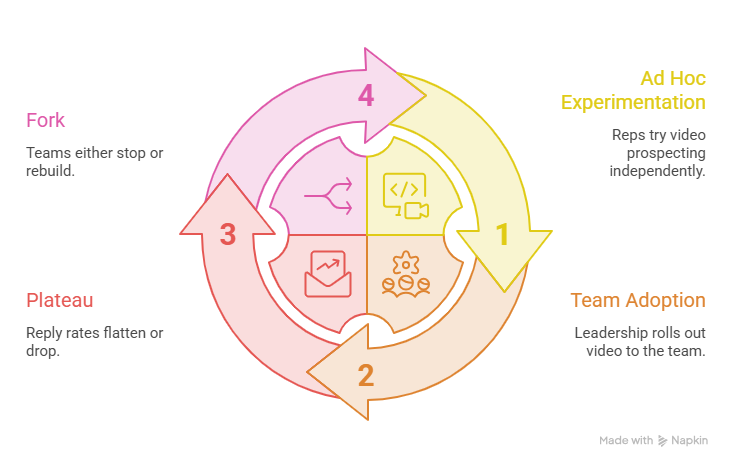
Here's something almost nobody talks about directly, but if you've run a sales team for more than a year, you'll recognize it instantly. Video prospecting programmes tend to move through the same four stages, whether the team knows it or not.
Stage one is ad hoc experimentation. One rep, usually the curious one, starts recording quick Looms off their own initiative. No mandate, no process, just a person trying something new. Reply rates jump because the effort itself is the differentiator. Prospects aren't used to it yet.
Stage two is team adoption. Leadership notices the early wins and rolls video out to the whole team, often with a KPI attached ("send ten videos a day"). This is where things get messy. Reps start optimizing for volume over research, and the personalization quietly shrinks down to swapping out a name and a company logo.
Stage three is the plateau. Somewhere around the three- to six-month mark, reply rates flatten out or drop. Buyers have seen enough near-identical screen recordings to recognize the pattern, the product's UI has probably changed twice since half these videos were recorded, and reps are burning out from re-recording takes that didn't land quite right.
Stage four is the fork. Some teams quietly stop, letting the video licenses sit unused while everyone drifts back to plain-text sequences. Others treat the plateau as a signal to rebuild, moving from ad hoc screen recording toward a proper sales enablement video setup with real personalization at scale, centralized assets, and demos that don't go stale the moment the product ships an update.
If you're reading this and stage three sounds uncomfortably familiar, you're not alone, and you're not doing anything wrong. You've just hit the structural ceiling of what recording-based tools were built for.
Why Loom recordings stop converting
Let's be specific here, because "Loom just doesn't work anymore" isn't a useful diagnosis. There are five concrete failure points, and each one is fixable, just not by recording harder.
Your product changed, and the video didn't
SaaS products ship updates constantly, sometimes weekly. A screen recording captures the product exactly as it looked on the day you hit record, and not a moment after. Six weeks later, that walkthrough shows a navigation bar that no longer exists or a feature that's been renamed. Prospects notice these things. An outdated demo doesn't just look sloppy. It quietly raises doubts about how seriously you maintain the product itself.
Every prospect gets the same take
Here's an uncomfortable truth: pointing at someone's LinkedIn photo for the first ten seconds of a video isn't personalization. It's a party trick, and prospects have caught on. Real personalization means showing their actual use case, their data, their workflow. A generic demo recording with a swapped-out intro is still, fundamentally, the same video everyone else got.
You cannot see what actually landed
Loom will tell you a video was viewed. It won't tell you which ten seconds got rewatched three times, or the exact point where the prospect closed the tab. That's the difference between a view count and real viewer analytics. Without video engagement tracking, you're following up blind, guessing at what mattered instead of knowing.
It looks like a screen recording, because it is one
When a prospect forwards your video to their VP or their procurement team, they're forwarding a raw link on someone else's domain, surrounded by that platform's branding. There's no custom branded video experience, no CTA, nothing that signals "this came from a serious vendor." It just looks like exactly what it is.
One mistake means starting over
Loom's editing tools are intentionally minimal, which is fine for a quick internal message and genuinely painful for anything customer-facing. Stumble over a sentence at the ninety-second mark of a two-minute recording, and there's no trimming your way out of it. You re-record the whole thing. We've already put together a full comparison of 20 Loom alternatives for sales teams if this particular pain point is the one keeping you up at night.
Sales enablement video: what "good" looks like at scale
There's a real difference between a rep's personal pile of Loom links and an actual sales enablement video system, and it's worth spelling out because most teams never build the second thing on purpose. It just sort of doesn't happen.
A one-off recording lives on one rep's laptop, effectively. Nobody else can find it, update it, or reuse it. A proper enablement asset, by contrast, is built once by a team, categorized by persona and deal stage, and made available to every rep without them needing to record a single frame themselves.
The bigger unlock is version control. When your product ships a UI change, you update the master video once, and every previously sent link, across every sequence, every rep's outbound, every follow-up email, reflects that update automatically. Nobody has to hunt down and replace forty stale links. That single feature alone solves the "your product changed and the video didn't" problem completely.
And the metrics shift too. Instead of tracking total plays, mature programmes look at completion depth, forward rate, and time-to-reply after a prospect watches. Those are the numbers that actually correlate with pipeline, not just activity.
Video prospecting tools compared
Not every tool is built for the same job, and pretending otherwise is how teams end up frustrated with a perfectly good product used the wrong way. Here's how the major players stack up if you're evaluating video tools for sales and marketing right now.
Loom: best for quick internal async messages and casual screen sharing. Personalization is manual and per-send. Branding is minimal. No dynamic link updates, so once it's sent, it's fr ozen intime. Free tier available, paid plans from around $12–15 per user monthly.
Vidyard: built for enterprise video hosting with CRM integration. Deep analytics down to per-second heatmaps, strong branding options, and dynamic updates on paid tiers. A solid, mature sales video tool if your team is already living inside a CRM-heavy workflow. Free tier, paid plans starting around $59 per user monthly.
Sendspark: leans hard into AI voice cloning and batch-personalized outbound video. High personalization, decent analytics, dynamic template updates. Pricing scales with outbound volume rather than a flat per-seat fee.
Puppydog: an AI-powered personalized video platform that generates demo videos automatically from screen recordings or screenshots, with per-contact personalization and demos that update as your product evolves, without anyone re-recording anything. Free trial, Pro plans generally in the $249–499 monthly range depending on volume.
Grain: strongest for meeting recording and call intelligence, less suited to cold prospecting. Editing is solid for transcript-based clipping, but there's no dynamic link updating since it's built around fixed meeting files. Free tier, paid plans from roughly $19–29 per user monthly.
Arcade and Storylane: these move away from recorded video entirely into interactive, click-through product tours. Deep analytics on exactly where a prospect clicked and dropped off, strong branding, and updates that propagate across every shared embed. Plans typically start around $42 per seat monthly with free trials available.
Worth saying plainly: Loom genuinely wins if what you need is a fast internal message to a teammate or a quick bug report. It was built for that job, and it does it well. It just wasn't built for the job most sales teams are now asking it to do, which is a different thing entirely.
When to switch from recording to building
At some point, the format itself becomes the ceiling. A recording is a fixed moment in time. However good it is, the prospect just watches it happen to someone else. An interactive, built demo flips that: the prospect clicks through it themselves, at their own pace, exploring the parts that actually matter to them.
This isn't a hypothetical upside either. Zapier saw a 70% lift in contact-sales form submissions after replacing a static follow-up video with an interactive, click-through demo. Quantum Metric reportedly saw double the conversion rate compared to a standard "get a demo" page after making the same switch. RudderStack cut sales training time by over 80% while doubling pipeline, largely because reps could hand prospects a self-guided demo instead of walking them through a recording line by line.
The other piece is durability. Update the underlying product once, and every previously sent demo link reflects it automatically, no re-recording, no stale UI, no hunting down old links across a dozen sequences. That's the whole idea behind Puppydog's demo builder. it turns a screen recording or a handful of screenshots into a demo that personalizes itself per viewer and stays accurate as your product changes, with analytics that show exactly which screen made a prospect lean in.
Worth mentioning, since it's directly relevant here: when Andrew Ng's AI Fund backed Puppydog's early funding round, Ng pointed to exactly this shift, AI finally making truly personalized product demos possible at a scale no rep could ever match by hand.
If your Loom links are starting to feel more like a liability than an asset, this is usually the point to make the switch.
Frequently asked questions
What is video prospecting?
Video prospecting is an outbound sales technique where reps record short, personalized videos or product walkthroughs and send them to prospects via email or direct link, instead of relying on plain text alone.
Does video prospecting actually increase reply rates?
Yes, when it's genuinely personalized. Vidyard's research found over 70% of reps using custom video report higher engagement than text-only outreach, and case studies from teams like 1Huddle show reply rates well above typical cold email benchmarks. Generic, templated video doesn't carry the same lift.
How long should a prospecting video be?
Somewhere between 15 and 60 seconds for cold outreach. Viewer retention data shows roughly 65% of business viewers watch videos under a minute to completion, but that number drops sharply as length increases.
Is Loom good for sales prospecting?
It's excellent for quick internal messages and casual screen shares. For external prospecting at any scale, it lacks the personalization, analytics, and update capabilities that sales teams eventually need.
What is the best video prospecting tool?
It depends on the job. Sendspark leads for AI voice cloning at volume, Vidyard for CRM-integrated hosting and analytics, Puppydog for automated AI-generated personalized demos, and Arcade or Storylane for interactive, click-through product tours.
How do you personalise a prospecting video at scale?
By using an AI platform rather than recording each one by hand. A single master video or demo gets layered with per-prospect variables, names, company details, even relevant screens or data, and generated automatically across an entire outreach sequence.

Sarah Thompson is a storyteller at heart and Business Developer at PuppyDog.io. She’s passionate about creating meaningful content that connects people with ideas, especially where technology and creativity meet.