Product Video Content Audit: Find Outdated, Duplicate, and Unused SaaS Videos

A video content audit is a review of every product video you publish, checked against your current product. List each video, where it lives, and which version it shows. Then mark it as keep, update, merge, or retire. Do it when the product changes, not on a fixed calendar.
How do you build a product video inventory?
A video content audit starts with one plain spreadsheet. Nothing fancy. You can't judge a library you can't see, and most teams find videos they forgot they had.
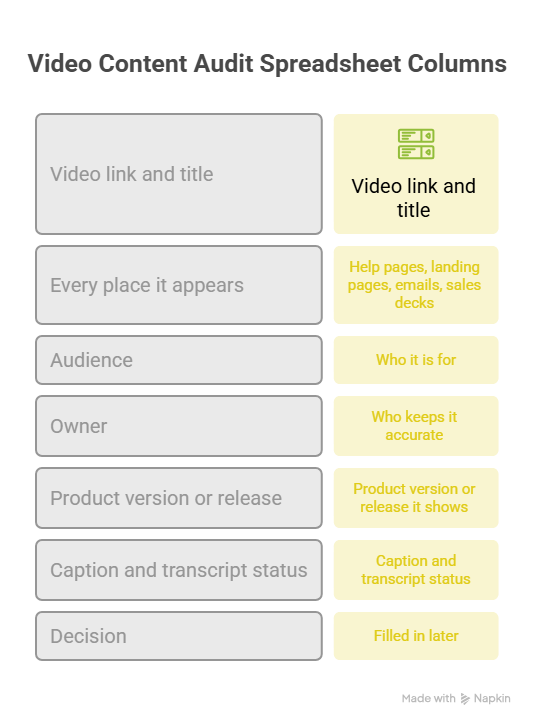
Give every video one row. These columns cover most needs:
- Video link and title
- Every place it appears, including embedded copies on help pages, landing pages, emails, and sales decks
- Audience: who it is for
- Owner: who keeps it accurate
- Product version or release it shows
- Caption and transcript status
- Decision, filled in later
The embedded copies are the part people skip. One video can sit on a pricing page, in a welcome email, and in a help article. If you retire it later, you need to know all three. Your video host's analytics may show where a video is embedded, so check there first. Then ask the teams.
Sample inventory
These rows are made up to show the shape of the sheet. They do not come from a real audit.
How do you identify outdated product videos?
Play the video next to the live product. Honestly, it's the only check that counts. A video can feel fine until you see the new menu sitting beside it.
Check four things:
- Screens: Do the buttons, menus, and layouts match today's product?
- Names: Do spoken and on-screen feature names match your current docs?
- Availability: Does it show features your plans still include?
- Offers: Do prices, trial terms, and plan names match your pricing page?
Use approved sources as the answer key: release notes, product docs, and your pricing page. Not memory.
Captions and transcripts age too. The W3C advises that transcripts should include important visual information, so a transcript can go stale the same day the video does. Review it in the same pass.
How do you identify duplicate video content?
File names lie. "Setup_v2_FINAL" and "Setup_new" can be the same video. Compare what the viewer is trying to do instead.
Ask two questions. What problem is this viewer solving? And which steps does the video show? If two videos share the problem, the steps, and the audience, one of them is duplicate video content.
Some copies are worth keeping. These are legitimate variants:
- A different language
- A different role, such as an admin and an end user
- A different industry walkthrough
- A test version, while the test is still running
Label each variant and link it to a main video. When the main video changes, you know which copies to update. And when a test ends, retire the loser.
How do you evaluate unused video assets?
Start with what you can measure, such as plays and how much of each video people watch. Then add what you can't measure. Ask sales, support, and customer success whether they use it.
Be careful with low numbers. A video pasted into a sales email or shown on a call may leave no trace in your analytics. Zero recorded views can mean no tracking, not no use. So I'd never retire a video on view counts alone.
Value matters too. A security setup guide might get 20 views a quarter, and those 20 viewers could be IT admins about to sign an enterprise deal. Judge a video by its job, not just its traffic.
How do you make video audit decisions?
Every video gets one of four labels. This table shows when to use each.
Four worked examples (illustrative)
These are made-up examples, not results from a real audit.
- Keep: The platform overview matches the current release, sits on the homepage, and still gets watched. Review it at the next big release.
- Update: The analytics dashboard guide is two releases old and names a menu that has since been renamed. People still watch it. Collect new recordings and refresh it.
- Merge: The US and EU SSO videos show the same steps, apart from one dropdown. Make one video, replace the embed on each knowledge base page, and note the one difference in the description. If the screens differed a lot, I'd keep both.
- Retire: The old billing portal tour shows a module that no longer exists. First check help pages, internal wikis, emails, and sales decks for embeds. Then take it down.
Before you retire or replace anything, learn how your video host treats links. Some hosts let you swap a file and keep the link. YouTube doesn't: you can't replace a video file, and a new upload gets a new URL. That means every embed needs changing.
Fixing one video at a time is a separate job. Our Related guide covers it.
How do you choose a video audit cadence?
There is no magic number. "Monthly" sounds tidy, but a quiet month wastes your time, and a busy one is already too late. Tie your checks to two things: what changed in the product and how much each video matters.
Some events should start an audit on their own: a big UI redesign, a rebrand, a pricing change, or a retired feature. Treat them like a fire alarm. Check every affected video right away.
FAQs
How do I know whether an old demo is still accurate?
Play it next to the live product with the release notes open. Check screens, feature names, plan details, and offers. If any of them differ, the demo is outdated, even if the main steps still work.
Should low-view videos always be deleted?
No. Low views can mean low demand, but they can also mean missing tracking or a niche job like a setup guide. Check where the video is used and ask the teams that rely on it before you decide.
What is the difference between a duplicate and a useful variant?
A duplicate answers the same question for the same audience with the same steps. A variant changes something on purpose, like the language, role, or industry. If you can't say why a copy exists, treat it as a duplicate.
Who should approve retiring a product video?
The video's owner should lead, with sign-off from product marketing, customer success, and sales if they use it. Each team may hold a link or deck you can't see. Set up that sign-off in your own team process before the audit starts.
Next step: refresh the source assets your video content audit flags
Your audit ends with a list of videos marked update or merge. Each one needs fresh source material, meaning current screen recordings or screenshots of the live product. Gather them from approved sources first, so the new video shows what's real.
Then turn them into video. With the AI product video maker, PuppyDog can turn approved recordings or screenshots into a product video with a script and narration your team reviews before it goes live. That means professional product videos without a production team. You can see how it works on the product video creation page.

Sarah Thompson is a storyteller at heart and Business Developer at PuppyDog.io. She’s passionate about creating meaningful content that connects people with ideas, especially where technology and creativity meet.


