Sales Enablement Videos: The Complete Playbook for B2B Teams


What Are Sales Enablement Videos? (And What They're Not)
Sales enablement videos are shareable, trackable visual assets designed to help revenue teams communicate value and remove friction at specific deal stages, letting buyers evaluate your solution on their own time, while giving reps the engagement signals they need to follow up at exactly the right moment.
Simple enough, right? But here's where a lot of B2B teams get tripped up: they treat every video the same way. A brand awareness video is not a sales enablement video. A product launch clip on YouTube is not a sales enablement video. And your CEO's all-hands recording is definitely not one either.
The distinction matters more than most teams realize.
Sales Enablement Videos vs. Other Video Types
Let's be honest, most companies produce video content, but very few produce the right video for the right moment in a deal. Here's how the major categories break down:
Sales enablement videos sit at the intersection of all of these. They borrow the polish of marketing, the depth of a product demo, and the timing awareness of a good sales rep, packaged into something a rep can drop into an email thread at 11 pm before a big call the next morning.
Why Video Is the #1 Sales Enablement Format in 2026
There's a stat that should stop you cold: 88% of SaaS buyers now refuse to book a live demo until they've already seen a functional product walkthrough. Read that again. Your prospect has already made most of their evaluation before your rep ever gets on a call.
This is the "async selling" reality that B2B teams are navigating right now. Buyers are self-directing their own journeys, and if you're not showing up in that process with video, you're simply not showing up at all.
The numbers back this up in a big way:
- Companies using video systematically grow revenue 49% faster than those that don't
- Personalized video in outreach drives 4x to 8x improvement in reply rates
- Adding video to a landing page lifts conversions by up to 86%
- Sales cycles shorten by 30–40% when reps use video content throughout the process
And it's not just about engagement anymore. Video adoption as a core sales and marketing tool hit 91% in 2026, a record high. The question is no longer whether your competitors are using video. They are. The question is whether yours is better.
Short-form videos under 60 seconds deliver the highest ROI for attention and recall. Longer deep-dives, we're talking 30 minutes or more, convert at an incredible 65% for prospects who are already deep in the research phase. Different stages, different formats. That nuance is exactly what this playbook is built around.
7 Types of Sales Enablement Videos Every B2B Team Needs
Not all sales videos are created equal. Here are the seven formats that high-performing B2B teams are building into their libraries right now, and when to deploy each one.

1. Interactive Product Demos
What it is: A guided, often clickable walkthrough that lets prospects explore your product at their own pace, no sales rep required.
When to use it: Mid-funnel, during the technical evaluation stage.
Ideal length: 2–4 minutes.
Example: Think "choose your own adventure" where the prospect selects the feature area they care most about and gets taken straight there. The best demos show the solution to the biggest pain point within the first 30 seconds. Everything after that is supporting evidence.
Mistake to avoid: Feature dumping. Show the 20% of features that drive 80% of the value. That's it.
2. Customer Testimonial Videos
What it is: Peer-to-peer proof of a real customer, ideally with the same title and challenges as your prospect, talking candidly about their results.
When to use it: Late-stage, when a prospect is wrestling with final risk concerns.
Ideal length: 60–90 seconds.
Example: The best testimonials are persona-specific. A CFO hearing cost savings from another CFO lands completely differently than a generic "we love this product" clip. Authentic, slightly rough Zoom-style recordings often outperform expensive, studio-produced ones. Buyers can smell over-produced content from a mile away.
Mistake to avoid: Scripting your customer too heavily. If it sounds rehearsed, it won't be believed.
3. Case Study Videos
What it is: A technical deep-dive into how a specific customer implemented your product, focused on the "how," not just the "wow."
When to use it: Mid-to-late funnel, especially during proof-of-concept phases.
Ideal length: 8–12 minutes.
Example: Follow a simple narrative arc: Problem → Transformation → Result. Use real numbers whenever possible. Vague claims like "improved efficiency significantly" don't move buying committees. "Reduced churn by 12% in 90 days." does.
Mistake to avoid: Using generic data or unverifiable claims. Specificity is the currency of trust here.
4. Competitive Battlecard Videos
What it is: A 90-second visual comparison that arms your rep with talking points and gives the prospect a clear, honest differentiation.
When to use it: Discovery or post-demo, whenever a competitor's name comes up.
Ideal length: 90 seconds.
Example: The smartest teams do something counterintuitive here. They acknowledge where the competitor is strong. Being honest about your own weaknesses actually builds more trust than acting like you're perfect. Prospects respect the transparency.
Mistake to avoid: Winging the positioning. These videos must align with the latest updates from product marketing, or you risk a rep quoting outdated pricing or a discontinued feature.
5. Onboarding Walkthroughs
What it is: Step-by-step videos that guide new customers through your product and help them reach their first win as fast as possible.
When to use it: Post-sale, immediately after contract signing.
Ideal length: 2–3 minutes per segment.
Example: Break complex workflows into short chapters or separate micro-videos. Nobody wants to sit through a 45-minute onboarding recording. Give them what they need, when they need it, in small, digestible pieces.
Mistake to avoid: Leaving users with no clear next action. Every onboarding video should end with a specific, unambiguous CTA: "click here," "go here next," "do this now."
6. Micro-Demos for Email Outreach
What it is: Ultra-personalized teaser videos, typically 30–60 seconds, that SDRs use to break through crowded inboxes and book meetings.
When to use it: Top of funnel, in cold or warm outreach sequences.
Ideal length: 30–60 seconds.
Example: The best micro-demos open with something specific to the prospect's website in the background, a reference to a recent LinkedIn post, or a mention of their industry challenge. Generic "Hey there" openers get deleted. Specific, personal ones get replies.
Mistake to avoid: Treating these like mass-blast content. The whole point is personalization. If it doesn't feel made for them, it won't work.
7. Sales Training Recap Videos
What it is: Short internal videos that distill training sessions, new playbooks, or product updates into something reps can actually revisit and use.
When to use it: After a major product launch, a new competitive displacement, or any significant positioning change.
Ideal length: Under 2 minutes per lesson.
Example: Some of the best sales organizations maintain "win call" libraries, recordings of top reps handling objections like pricing pushback or security concerns that new reps can study on demand.
Mistake to avoid: Burying these in a folder nobody can find. If a rep can't locate a training video in under 30 seconds, they won't use it. Accessibility is just as important as quality.
How to Build a Sales Enablement Video Library from Scratch

Building a video library sounds like a big project. And it can be if you approach it the wrong way. The secret is to start with what your reps actually need right now, not with what looks impressive on a roadmap.
Here's the step-by-step process:
Step 1: Audit what sales needs:
Talk to your reps. Ask them where deals are stalling. Where are the objections coming from? What questions do prospects keep asking? This conversation will point you directly to which videos to build first.
Step 2: Prioritize by deal stage:
Don't try to cover everything at once. Pick the one or two stages where deals get stuck most often and start there. A late-stage competitive battlecard video might deliver more immediate ROI than a brand-new onboarding walkthrough.
Step 3: Script before you record:
The biggest bottleneck in video production isn't recording, it's knowing what to say. Use the templates in the next section to get started. You can always refine later.
Step 4: Record with Puppydog:
Puppydog.io is built specifically for this workflow. You can capture a screen recording or screenshot, and the platform's AI will transform it into a polished, personalized demo video. What normally takes a full production day can be done in under ten minutes. If you haven't checked it out yet, this is the part of the process where it changes everything. Check out how it connects to your broader demo automation strategy here.
Step 5: Organize by deal milestone, not content type:
This is where most libraries fail. Reps don't think in formats. They think in deal stages. Organize your library around moments like "Discovery," "Security Review," or "Procurement," and name files consistently so they're searchable in seconds.
Step 6: Track usage and impact:
Views are a vanity metric. What you actually want to track is completion rate, account-level shares (is your champion sharing the video with other decision-makers?), and ultimately, how video engagement correlates with closed-won deals.
3 Sales Enablement Video Scripts You Can Use Today
Scripting is the biggest bottleneck in video production, so here are three ready-to-use templates. Customize the bracketed sections and record with Puppydog in under ten minutes.
Script 1: 60-Second Product Intro (The Hook)
Hook (0–10s): "Most [job title]s struggle with [specific problem], and it's costing them [metric] every single month."
Solution (10–40s): "[Product] solves this by [mechanism]. Here's exactly how it looks in practice [show the workflow]."
CTA (40–60s): "Click the link below to try this specific workflow with your own data. It takes about three minutes."
Script 2: 2-Minute Feature Deep-Dive (The Validation)
Opening (0–20s): "I know you were looking for [specific outcome]. This is exactly how our [feature name] delivers that let me show you."
Demonstration (20–90s): Walk through the workflow A to B. Prioritize ease of use. Don't narrate every click, just show the outcome.
Evidence (90–120s): "[Similar company] used this to save [metric]. Does this map to what your team is trying to do? Happy to dig deeper."
Script 3: 90-Second Competitive Comparison (The Differentiator)
Acknowledge (0–15s): "I know you're also looking at [Competitor]. They're genuinely strong when it comes to [area]."
Contrast (15–60s): "Here's where teams like yours tend to choose us instead [differentiator 1] and [differentiator 2]. Specifically, our [feature] is measurably faster for [use case]."
Pivot (60–90s): "Is [specific concern] a hard requirement for your team? That's worth a conversation. Want to get 20 minutes on the calendar this week?"
How to Measure Video ROI Without Drowning in Data
You might be wondering how I can prove that this is working. The good news is that video is one of the most measurable formats in your entire sales stack. The bad news is that most teams track the wrong things.
Here's what actually matters in 2026:
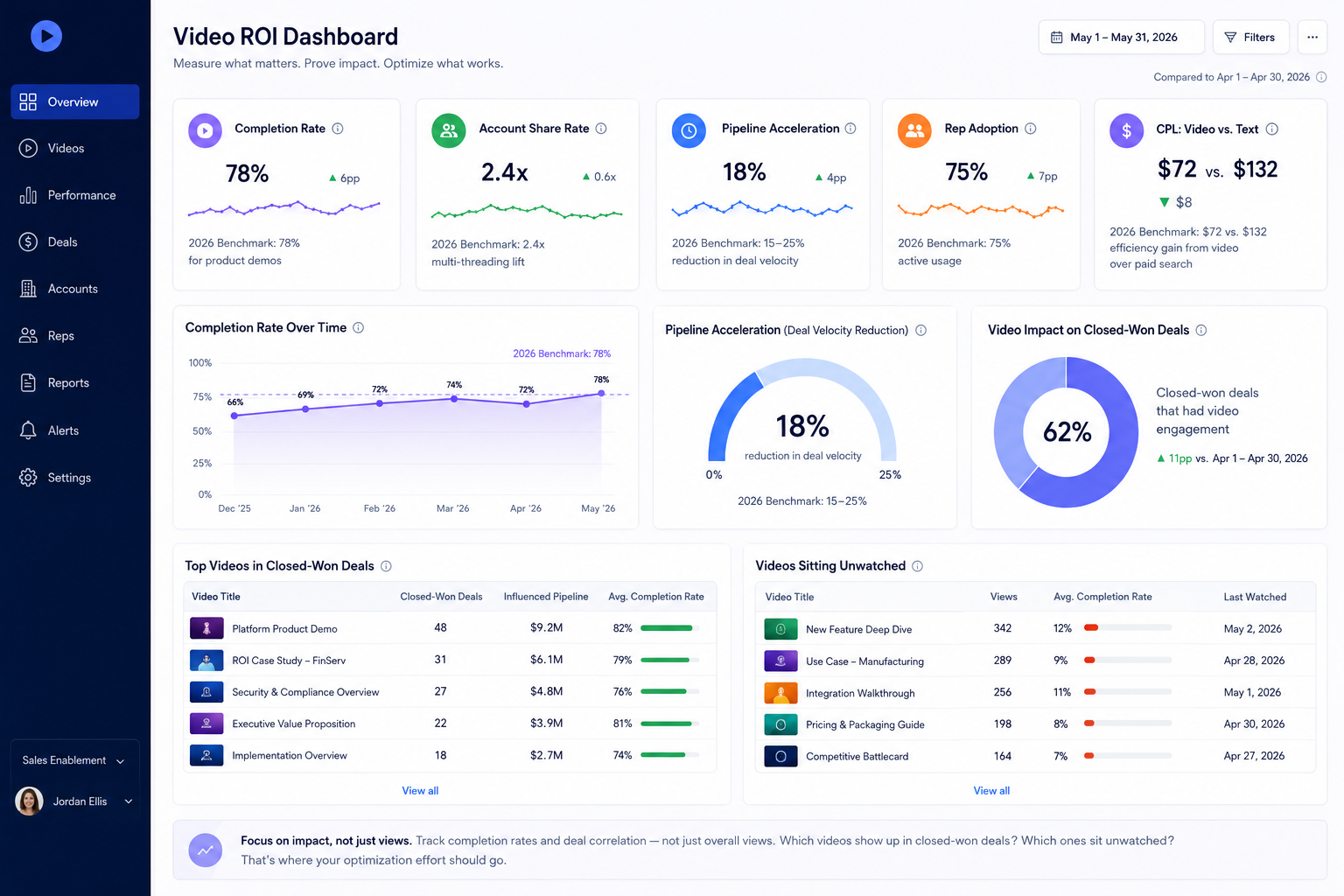
A strong enablement dashboard tracks completion rates and deal correlation, not just overall views. Which videos show up in closed-won deals? Which ones sit unwatched? That's where your optimization effort should go.
Common Mistakes That Undermine Your Sales Video Strategy
Even teams with the right intentions make these mistakes regularly.
Videos are too long: 83% of marketers report that videos under 60 seconds drive the strongest engagement. Attention drops sharply after three minutes. If your product demo is 22 minutes long, it's not a demo, it's a liability.
No personalization: Generic videos feel like spam because they basically are. 80% of buyers are more likely to engage with a company that tailors its content to them. Use the prospect's name, reference their industry, and mention their specific challenge. See how product walkthrough videos can be personalized at scale here.
Weak or missing CTAs: A video that ends without a clear next step is a wasted asset. "Let me know if you have questions" is not a CTA. "Book a 15-minute call using the link below."
Poor organization: If your reps can't find a video within 30 seconds, they will either recreate it poorly or forgo it entirely. Organize by deal milestone. Name files descriptively.
Stale content: Competitive intel changes constantly. A battlecard video from six months ago might have your rep quoting a competitor's old pricing or a discontinued feature. Set a quarterly review cadence for anything competitive.
Frequently Asked Questions
What is a sales enablement video?
A sales enablement video is a short, trackable, shareable video asset that sales reps use to move deals forward, covering everything from personalized outreach to product demos to competitive comparisons.
How long should a sales enablement video be?
It depends on the goal. Outreach micro-demos should be 30–60 seconds. General product walkthroughs work best under 2 minutes. Technical deep-dives can run 5–8 minutes for late-stage, high-intent buyers.
What tools are best for making sales enablement videos?
For B2B teams that need speed and personalization without a big production budget, Puppydog.io is the standout option in 2026. It turns screen recordings and screenshots into polished, personalized demo videos, no editing skills required.
What's the difference between a sales video and a marketing video?
Marketing videos drive awareness at the top of the funnel. Sales enablement videos are tactically designed to handle objections, demonstrate specific features, or accelerate a deal that's already in motion.
Start Building Your Video Library Today
The case for sales enablement videos has never been stronger, and the barrier to entry has never been lower. You don't need a production team, a studio, or a six-figure budget. You need a clear strategy, the right formats for each deal stage, and a tool that makes creation fast enough that your reps will actually use it.
That's exactly what Puppydog.io was built for. Start with one of the three scripts above, record your first video, and see what happens to your reply rates this week.
Ready to give it a go? Start your free trial at puppydog. No credit card required.

Sarah Thompson is a storyteller at heart and Business Developer at PuppyDog.io. She’s passionate about creating meaningful content that connects people with ideas, especially where technology and creativity meet.