Demo Automation: How AI Is Replacing Manual Product Demos (2026)


What Is Demo Automation?
Demo automation is the process of using AI-driven tools to capture, personalize, and distribute product demonstrations without rebuilding the same live demo over and over again. It can include interactive tours, guided walkthroughs, personalized video demos, sandbox environments, and AI-assisted narration.
A simple way to think about it: manual demos depend on a human being available at the right time. Demo automation removes that bottleneck and lets the product speak for itself, while still keeping the experience tailored and persuasive.
That definition matters because people often confuse demo automation with a few related but different formats.
- Interactive demos let users click through a guided experience.
- Product demo videos are more linear and often better for outbound or follow-up.
- Sandbox environments go deeper and simulate a live product environment.
Demo automation is the broader strategy that connects all of them into one scalable system.
How Demo Automation Differs From Other Demo Formats
The best way to define the category is this: demo automation is the infrastructure that helps revenue teams deliver product proof at scale, without forcing every interested buyer into a live meeting.
Why Manual Demos Are Dying in 2026
Manual demos aren’t disappearing overnight, but they are losing their central role. The shift isn’t about preference alone; it’s about how modern B2B buyers actually make decisions now.
First, buyer behavior has changed dramatically. Research shows that around 67% of B2B buyers prefer a self-service experience, meaning they want to explore the product on their own before talking to sales. In fact, by the time a prospect books a demo, they’re often already 60% to 90% through their decision-making process. They’re not looking for a basic walkthrough. They’re looking for confirmation.
This aligns with broader industry insights. According to Gartner, today’s B2B buying journey is largely self-directed and nonlinear. Buyers spend most of their time researching independently, looping through internal discussions, comparing vendors, and validating assumptions, long before they ever speak to a sales rep. If your product requires a scheduled call just to get started, you’re already introducing friction into a process that buyers expect to be fast and flexible.
Then there’s the operational reality inside SaaS teams.
Live demos are expensive, not just in money, but in time and energy. A typical demo isn’t just the call itself. It includes:
- Pre-demo prep (customizing data, setting up flows)
- The live session (often 30–60 minutes)
- Post-demo follow-up and personalization
On average, this adds up to 3–4 hours per standard demo, and even more for complex or enterprise use cases. For sales engineers handling multiple demos per week, this becomes a serious bottleneck. Many teams report that SEs are spending the majority of their time repeating the same introductory demos instead of focusing on high-value technical conversations.
And let’s not ignore the risk factor.
Live demos are fragile. A slow internet connection, a broken environment, or a feature glitch at the wrong moment can derail the entire experience. Studies suggest that over 80% of buyers have experienced a bad demo, and nearly half of sellers admit they avoid showcasing certain features live because they might fail. That’s not just inefficient—it’s risky.
Put all of this together, and the pattern becomes clear:
- Buyers want faster, self-serve access
- Sales teams can’t scale manual delivery
- Live demos introduce inconsistency and risk
Manual demos aren’t “dead,” but they are no longer the default. In 2026, they are being reserved for the moments that truly require human interaction, while everything else is being handled by smarter, more scalable alternatives.
How AI-Powered Demo Automation Works
AI is what makes modern demo automation feel less like a static tour and more like a living experience. The strongest platforms now do more than stitch together screens. They help teams create demos faster, personalize them at scale, and keep them aligned with real product usage.
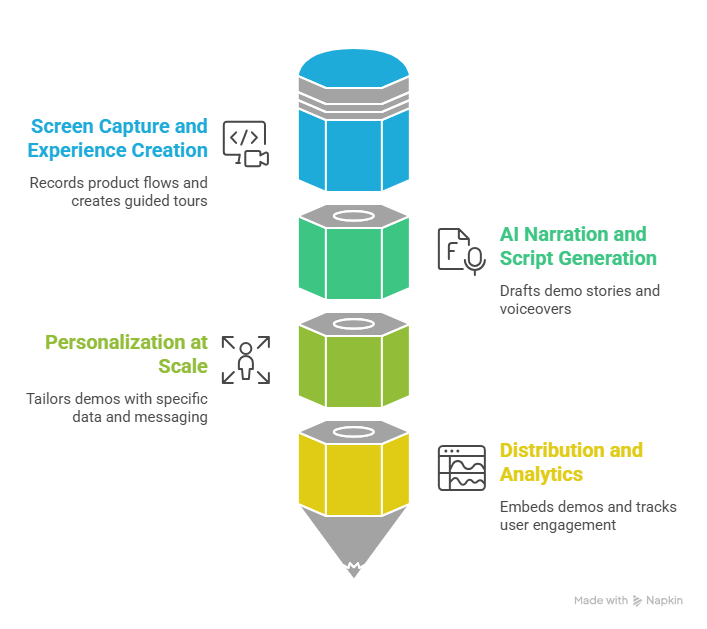
There are four core layers.
1) Screen capture and experience creation
Teams record key product flows or capture screenshots, then turn those into guided experiences. This is the foundation of most automated product demo workflows.
2) AI narration and script generation
Instead of writing every tooltip, voiceover, or step manually, AI can draft the story around the demo. That helps teams focus on business outcomes rather than just listing features.
3) Personalization at scale
AI can swap in company names, industry-specific data, use-case examples, or persona-specific messaging. A healthcare buyer should not see the same generic example as a fintech buyer. That would feel lazy, and buyers notice lazy fast.
4) Distribution and analytics
Once the demo is live, teams can embed it on a website, send it in outbound campaigns, or share it after sales calls. Analytics then show where people drop off, which steps get attention, and which parts may need refinement.
For teams that want to create personalized product demo videos from screen recordings or screenshots, Puppydog fits neatly into the creation layer. It is especially useful when a sales or marketing team wants to turn one product recording into multiple targeted demo videos without rebuilding everything from scratch.
The Main Types of Automated Product Demos
Not every demo should do the same job. A smart revenue team usually mixes formats depending on where the buyer is in the journey.
The mistake many teams make is trying to use one format for everything. That usually creates a bloated experience that feels like a Swiss Army knife with too many tools and not enough usefulness. Better to match the format to the job.
Demo Automation Tools Compared: 2026
Here is a practical comparison of the main tools teams often evaluate.
The right choice depends on your motion. If you want website-led self-serve demos, an interactive platform may be the better fit. If you need personalized outbound or follow-up videos, Puppydog becomes especially relevant because it lets teams turn one recording into many targeted variations without the usual production headache.
A helpful way to think about the market is this: some tools are built for showing the product, some for simulating the product, and some for scaling the story around the product. You do not need every tool. You need the one that matches your funnel.
Why Demo Automation Matters for Revenue Teams
This is not just a nice content trend. It affects the entire revenue engine.
For marketing teams, demo automation creates more ways to capture interest before someone books a call. That means more engagement from website visitors who are not ready to talk yet.
For sales teams, it shortens the gap between first touch and product understanding. Instead of waiting days for a live slot, prospects can get immediate value.
For presales teams, it removes repetitive work and frees them up for the complex deals that actually need human expertise. Not every prospect needs a live explanation of the dashboard. Some just need to see the workflow and decide whether it is worth a deeper conversation.
For product-led companies, automation helps the product act as part of the sales team. That is a powerful shift. It means the product itself becomes a better teacher, not just a feature list wrapped in pretty UI.
The ROI of Demo Automation
The return on demo automation shows up in three places: time saved, faster pipeline movement, and better conversion.
1) Time saved per sales engineer
If a sales engineer spends several hours each week delivering repetitive demos, automation can reclaim a meaningful chunk of that time. That does not just reduce workload. It gives the team room to focus on high-value opportunities.
2) Faster sales cycles
When buyers can access product proof earlier, deals tend to move faster. There is less waiting, less back-and-forth, and fewer “can you show me that again?” loops.
3) Better conversion rates
A sharper demo experience often improves engagement because it meets buyers where they are. Instead of forcing them into a live call too early, it lets them self-select into the right next step.
Here is a simple way to estimate ROI:
Even at a small scale, that time adds up quickly. And once you factor in better routing, more consistent messaging, and fewer missed opportunities, the business case becomes pretty hard to ignore.
How to Implement Demo Automation Step by Step

A good rollout does not start with tools. It starts with the buyer journey.
1) Audit your current demos
Look at the demos your team gives most often. Which ones are repetitive? Which ones are personalized only in name, not in substance? Which ones are actually helping deals move?
2) Identify the “aha” moments
Do not capture everything. Capture the moments where buyers visibly lean in, ask questions, or get excited. Those are the moments that matter.
3) Script the story
A demo is not just a sequence of clicks. It is a narrative. Make sure the workflow tells a story about a problem, a result, and a clear next step.
4) Create the asset
This is where the demo gets built. Teams can record the workflow, turn it into an interactive experience, or create a personalized product demo video. For teams that want a fast, AI-assisted way to turn raw screen recordings into polished demos, Puppydog can support this creation step without making the process feel heavy.
5) Add personalization
Adjust the copy, visuals, data, or use case so the demo speaks to the buyer’s world. A demo that feels generic is easy to ignore.
6) Distribute it where it will be used
Put the demo on your website, in outbound sequences, in follow-up emails, or inside a buyer hub. Good demos do not sit in a folder collecting digital dust.
7) Measure and improve
Track completion rates, drop-off points, click behavior, and conversion movement. Then tighten the flow. Shorter is often better. Clarity usually wins.
Common Mistakes to Avoid

Even a strong demo automation strategy can stumble if the execution is sloppy.
Building around product navigation instead of buyer problems
Buyers do not care about your internal menu structure. They care about outcomes. Frame the experience around use cases, not modules.
Packing in too much information
More screens do not automatically mean more value. A short, sharp demo often works better than a long, wandering one.
Forgetting the call to action
Every demo should lead somewhere. Book a call, start a trial, request pricing, or talk to sales. Do not leave people hanging.
Treating automation like a one-time project
A demo is not “done” when it goes live. It needs updates, reviews, and refinements as the product changes.
Ignoring the analytics
If people are dropping off at step four, that is not random. The demo is telling you something. Listen to it.
Removing humans completely
Automation should support your team, not replace judgment. Some deals still need a live expert. The point is to reserve human time for the moments that truly need it.
Where Demo Automation Fits in a Modern SaaS Funnel
The strongest SaaS teams do not use demo automation in one place only. They weave it through the funnel.
At the top of the funnel, it helps create interest and educate strangers quickly.
In the middle, it helps convert curiosity into real product understanding.
At the bottom, it helps buyers defend the decision internally and bring others along.
That matters because a lot of deals do not die from lack of interest. They die from lack of momentum. A strong demo automation strategy keeps that momentum moving when live calls are not possible.
FAQs
What is demo automation in simple terms?
Demo automation is the use of software and AI to create and deliver product demos without needing a live presenter every time.
Is demo automation the same as an interactive demo?
Not exactly. Interactive demos are one type of demo automation. Demo automation is the broader approach that can include videos, guided tours, and sandbox environments.
How much does demo automation cost?
It depends on the tool and the complexity of the use case. Lightweight tools may start low, while enterprise sandbox platforms can cost much more. The right budget depends on whether you need marketing demos, sales demos, or technical validation.
Is demo automation only for large SaaS companies?
No. Smaller teams often benefit a lot because they have less time and fewer people. In many cases, automation helps smaller teams punch above their weight.
What is the biggest benefit of demo automation?
The biggest benefit is scale. You can show the product to more people, more consistently, without repeating the same work over and over.
Final Thoughts
Demo automation is not just a trend for flashy SaaS teams. It is becoming a practical necessity for companies that want to move faster, sell smarter, and reduce friction in the buying process.
Manual demos will still have a place, especially for complex enterprise conversations. But they should no longer carry the whole load. Buyers want faster access to product value. Sales teams need more scalable ways to educate them. And AI has finally reached a point where it can help bridge that gap in a meaningful way.
The companies that win in 2026 will not be the ones that keep doing the same demo routine and hoping for better results. They will be the ones who build flexible, automated, buyer-friendly demo experiences that meet people where they are.
If you are ready to move from repetitive live demos to a smarter, more scalable approach, start with the one format that fits your team best. Then build from there.
Create your first automated demo in 5 minutes. Try Puppydog free.

Sarah Thompson is a storyteller at heart and Business Developer at PuppyDog.io. She’s passionate about creating meaningful content that connects people with ideas, especially where technology and creativity meet.