Top 12 SaaS Demo Best Practices for 2026 (Demos That Convert)

A SaaS demo used to be a courtesy step.
Today, it’s the deal.
Buyers now arrive informed, skeptical, and surrounded by options that look suspiciously similar on a feature list. By the time a demo is booked, they’re not asking what your product does. They’re quietly evaluating something else: Does this solve our problem better than the alternatives, and is it worth the disruption?
That’s why the demo has become the single most important moment in the SaaS sales cycle. Not the website. Not the pitch deck. The demo.
In high-performing teams, demos are no longer treated as linear walkthroughs or technical tours. They’re designed conversations. Carefully sequenced. Outcome-led. Built to move the buyer forward toward a trial, a deeper evaluation, or a clear buying decision. Everything else is noise.
What’s changed is how demos fit into the broader funnel. A live call is no longer the default starting point. Many teams now introduce the product through short, personalized demo videos or interactive walkthroughs before the first sales conversation even happens. This shift filters out low-intent leads, accelerates serious buyers, and gives sales reps far more context before they ever share their screen. Tools like puppydog.io quietly enable this behind the scenes by making it easier to deliver tailored demo experiences without reinventing the wheel for every prospect.
The common thread across all of this?
Demos that convert are not about showing more. They’re about showing meaning.
This guide focuses on how modern SaaS teams design demos that do exactly that.
In this article, you’ll learn:
- How to run SaaS demos that consistently move deals forward instead of stalling them
- A repeatable demo structure that keeps buyers engaged and aligned
- How to decide between live, pre-recorded, or hybrid demos based on intent and deal size
- Practical prep and follow-up tactics that shorten sales cycles
- How to measure, test, and improve demo performance using real metrics
If your demo is where deals are won or lost, and for most SaaS teams, it is, then getting this right isn’t optional anymore.
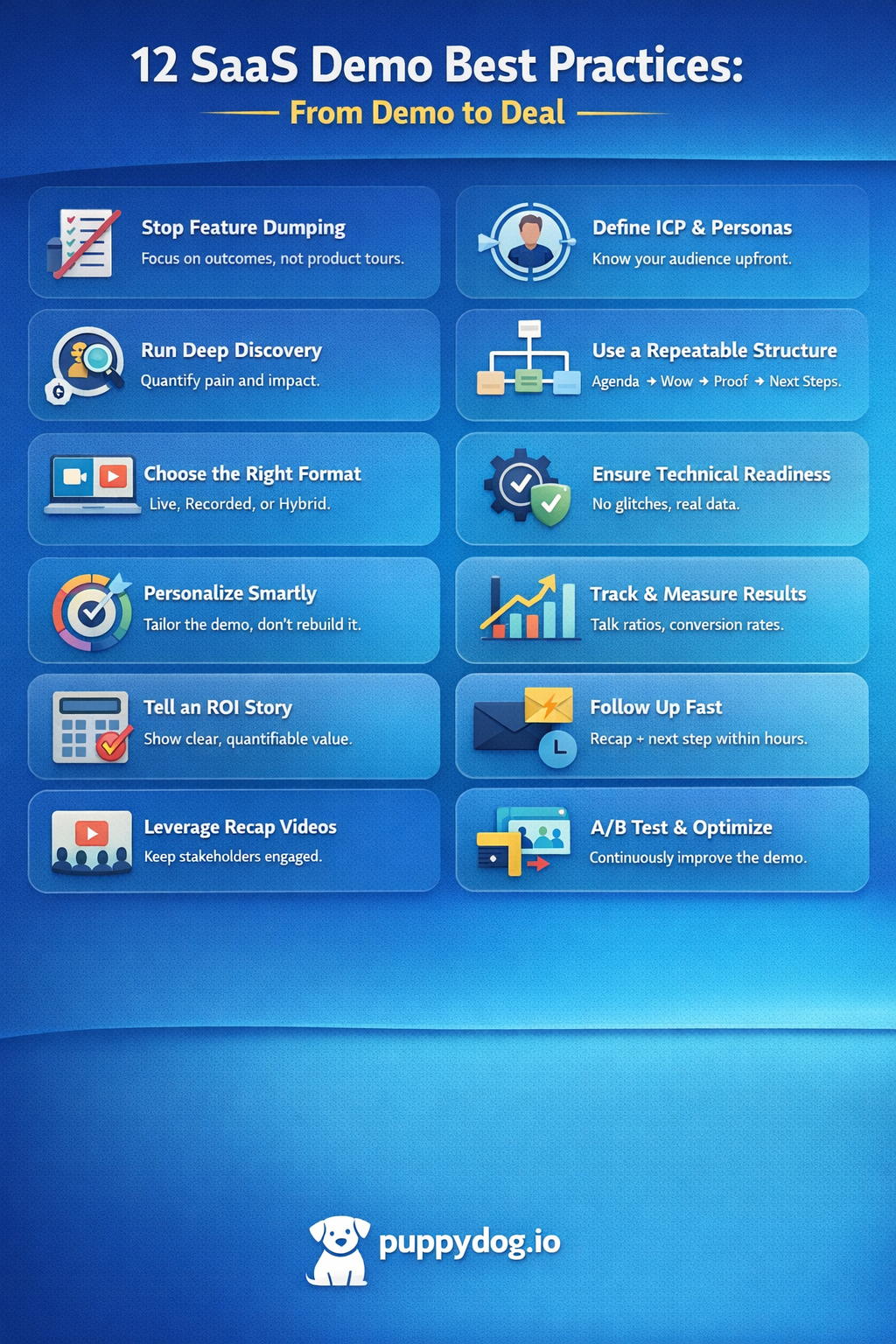
The problem with feature-dump demos (and why buyers tune out)
Feature-dump demos don’t fail loudly. They fail quietly.
The camera is on. The screens are shared. Heads are nodding. But somewhere between tab number five and feature number twelve, the buyer checks out. Not because the product is bad, but because none of what they’re seeing connects to why they showed up in the first place.
Most feature-heavy demos are built from the seller’s perspective, not the buyer’s reality. They follow the product menu, not the customer’s problem. So instead of answering, “Can this fix what’s broken for us?”, the demo turns into a guided tour of everything the product can do. Useful? Maybe. Persuasive? Rarely.
The real issue is cognitive overload. Buyers today are evaluating multiple tools at once, often with different stakeholders in the room, each listening for different signals. When every feature is treated as equally important, nothing stands out. There’s no anchor. No narrative. No clear payoff.
Worse, feature dumping creates a subtle trust problem. When a demo tries to show everything, buyers start wondering what’s being avoided. What’s the catch? What actually matters here? Ironically, oversharing can feel less transparent than saying less, if what you do show is sharply relevant.
This is why feature-dump demos struggle to convert:
- They ignore context: features are shown without tying them to a specific pain or workflow.
- They flatten value: critical capabilities get the same airtime as minor conveniences.
- They overwhelm decision-makers, especially non-technical stakeholders who are listening for outcomes, not controls.
- They leave no memory: buyers remember feelings and results, not navigation paths.
High-performing SaaS teams flip this entirely. They treat features as supporting actors, not the main character. The demo revolves around a problem the buyer recognizes, a story they can follow, and a future state they want to reach. Features only appear when they earn their place by advancing that story.
This shift is also why many teams now introduce products through short, focused demo experiences—sometimes before a live call ever happens. A tightly scoped, personalized demo video or interactive walkthrough forces discipline: you can’t show everything, so you show what matters. When done well, this sets a clearer agenda for the live conversation that follows and prevents the “let me just show you one more thing” spiral.
In short, buyers don’t tune out because demos are too short.
They tune out because demos forget who they’re for.
Prep That Wins: ICP, Personas, and Discovery (The Demo Is Built Before You Share Your Screen)
By the time you start a SaaS demo, the outcome is usually half-decided.
That might sound dramatic, but it shows up again and again in real sales data. The demos that convert don’t feel “smooth” because the presenter is charismatic. They feel relevant because the work was done before the meeting quietly, methodically, and with intent.
Start with a sharp ICP, not a broad audience
A common mistake teams make is trying to make the demo work for everyone. The result is a watered-down story that resonates with no one.
A strong Ideal Customer Profile isn’t just industry and company size. It’s a clear definition of:
- The specific business problems your product solves best
- The workflows it replaces or improves
- The existing tech stack it fits into (and where it doesn’t)
When your ICP is clear, your demo naturally becomes more focused. You stop explaining edge cases. You stop apologizing for what the product isn’t. And you gain the confidence to say, “This is built for teams like yours.”
Map personas before you map features
Most SaaS deals aren’t single-buyer decisions anymore. You’re usually presenting to a mix of roles, each listening through a different lens.
Executives care about outcomes and risk. Managers care about efficiency and adoption. Technical stakeholders care about architecture, security, and integrations. If your demo treats them all the same, it misses all of them.
Before the call, you should know:
- Who will be on the demo (and who isn’t, but influences the decision)
- What each role is accountable for day to day
- Which part of the demo matters to each persona
This doesn’t mean creating three demos. It means shaping one story that signals value to everyone in the room, while going deeper only when it matters.
Discovery isn’t a step. It’s the spine of the demo
The fastest way to sabotage a demo is to treat discovery as something that happens before the demo, instead of something that continues through it.
Strong demos feel conversational because they are. They start with what’s already known, then validate, expand, and sharpen it in real time. The best reps don’t rush to share their screen. They first confirm alignment.
A simple way to do this is to restate what you’ve learned:
- The situation they’re in today
- The pain or friction that triggered the conversation
- The impact of that pain if nothing changes
This does two things. It shows you’ve listened. And it gives the buyer a chance to correct or refine the story before you anchor it to the product.
Go beyond pain, quantify impact
Surface-level discovery sounds like, “This process is manual.”
High-impact discovery sounds like, “This process costs us eight hours a week per rep.”
The difference matters.
When you quantify impact, time lost, revenue delayed, and risk introduced, you turn the demo from a product conversation into a business conversation. Features stop being “nice to have” and start becoming mechanisms for change.
Even rough numbers are powerful. Precision is less important than relevance.
Use a light structure to stay aligned
Frameworks help not because buyers care about them, but because they keep demos from drifting.
Many teams rely on simple structures like:
- Situation: what’s happening today
- Pain: what’s broken or inefficient
- Impact: what it’s costing the business
- Decision context: timing, stakeholders, success criteria
You don’t need to label these out loud. You just need to make sure your demo addresses all of them before it ends.
This kind of prep also makes scaling easier. When teams use personalized, pre-demo experiences, such as short demo videos or interactive walkthroughs, they’re forced to crystallize the story early. Platforms like puppydog.io support this approach by helping teams tailor demos to specific personas and use cases before a live call, so discovery doesn’t restart from zero every time.
The takeaway is simple: great demos don’t begin with a screen share.
They begin with clarity about who the buyer is, why they care, and what success actually looks like.
A Repeatable Demo Structure That Converts
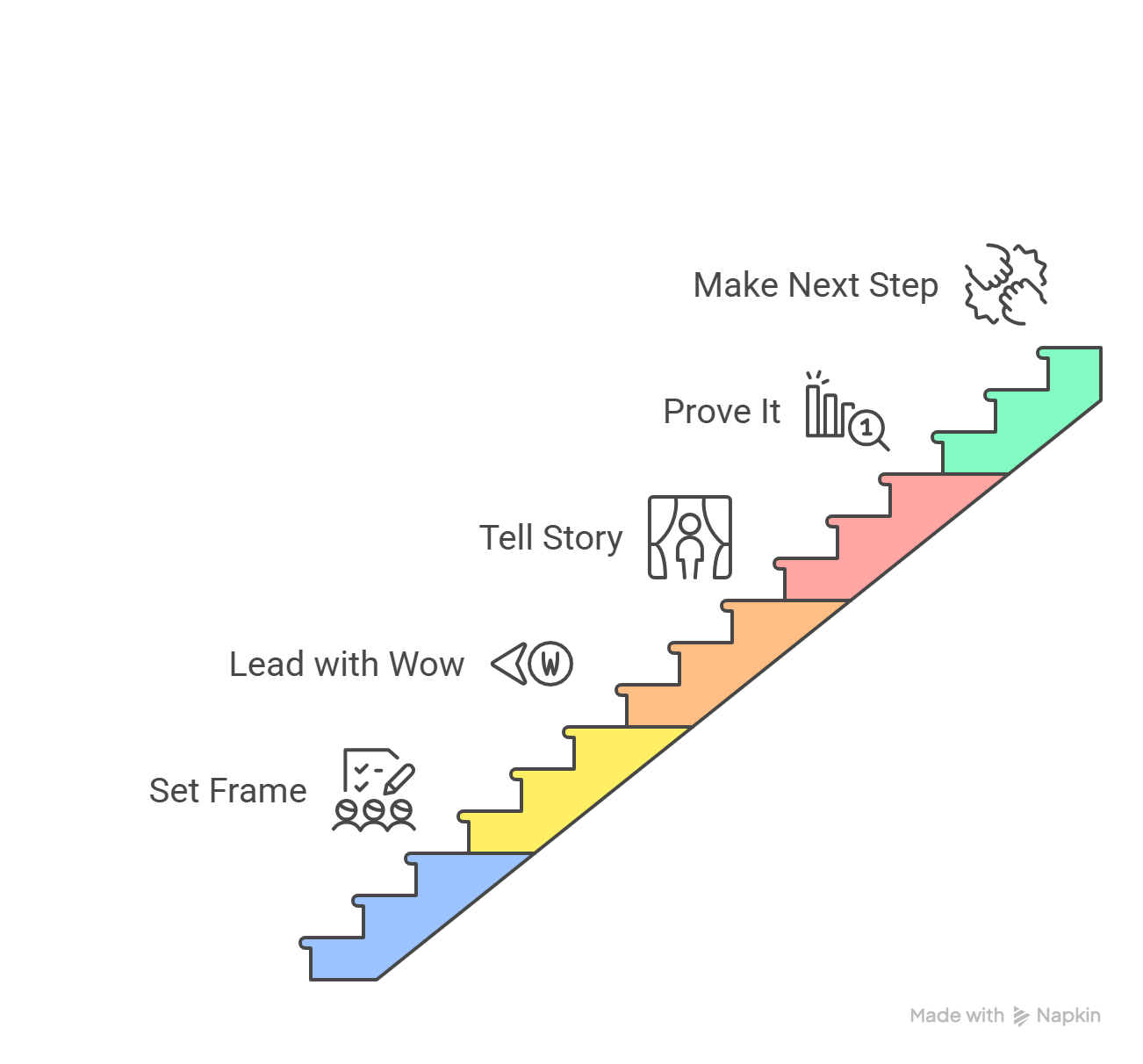
High-converting SaaS demos don’t rely on improvisation. They follow a structure, flexible, yes, but intentional. Not a script you read from, but a path you guide the buyer along. When this structure is missing, demos wander. When it’s present, buyers stay oriented, engaged, and ready to move forward.
Below is a repeatable demo flow used by many top-performing SaaS teams. You can adapt the depth and pacing, but the order matters more than most people realize.
1. Set the frame: agenda and outcome alignment
Before you share your screen, align on why the meeting exists.
This part is short, two minutes, max, but it does a lot of heavy lifting. You confirm the time, the goal of the session, and what a “good next step” looks like for both sides. Without this, demos often end with vague interest and no momentum.
A simple framing sounds like:
- What we’ll cover
- What we won’t cover
- What decision or next step are you aiming to reach
This creates psychological safety. Buyers relax when they know the meeting has a purpose and an end.
2. Lead with the “wow” (do the last thing first)
This is where most demos go wrong.
Instead of starting at the dashboard or settings page, start with the outcome the buyer cares about most. The report they want. The workflow they wish existed. The moment that proves, “Yes, this solves our problem.”
This “wow” moment should appear early, often within the first five minutes. Not because attention spans are short, but because relevance needs to be established fast.
The goal here isn’t to impress. It’s to anchor the rest of the demo. Once buyers see the end state, everything that follows has context.
3. Tell a story, not a tour
After the initial outcome, rewind slightly and walk through how that result is achieved, through the lens of the buyer’s workflow, not the product’s menu.
This is where storytelling matters. You’re narrating a day-in-the-life:
- What happens today without your product
- Where friction or risk shows up
- How does that change step by step with your solution in place
Features enter the demo only when they move the story forward. If a feature doesn’t support the narrative, it waits its turn—or gets left out entirely.
Buyers don’t need to see every button to believe the product works. They need to see themselves using it.
4. Prove it: validation, ROI, and credibility
Once the story lands, buyers start asking quieter questions: Will this actually work for us? Can we justify the cost? Is this vendor credible?
This is where proof comes in.
Proof can take many forms:
- A quick ROI calculation using their numbers
- A customer example from a similar company or use case
- Technical validation from a sales engineer
- A brief nod to security, compliance, or scalability
The key is restraint. Proof should reinforce belief, not derail the flow. One or two strong signals beat a flood of logos or case studies.
5. Make the next step obvious
A demo without a clear next step isn’t neutral. It’s a missed opportunity.
Before the meeting ends, reconnect to the outcome you aligned on at the start. Then propose a concrete path forward: a trial, a pilot, a technical deep dive, or a stakeholder-specific follow-up.
Strong demos don’t ask, “What would you like to do next?”
They say, “Based on what we saw, the next logical step is X. Does that make sense?”
This is also where hybrid demos shine. If certain stakeholders weren’t present, a short personalized demo recap, rather than a full recording, keeps momentum going without forcing others to rewatch an hour-long call. Many teams now use tools like puppydog.io to create these tailored follow-ups quickly, so the story stays consistent even as more people join the conversation.
Why this structure works
This demo flow does three things consistently:
- It anchors the conversation in outcomes, not features
- It respects the buyer’s time and cognitive load
- It creates natural momentum toward a decision
You can shorten it. You can expand it. But when you keep this structure intact, demos stop feeling like presentations and start functioning like decision-making sessions.
Live Vs Pre-Recorded Vs Hybrid Demos: When To Use Each (With Pros And Cons)
Not every buyer deserves a live demo.
And not every product can sell itself through a recording.
Yet many SaaS teams default to one demo format simply because “that’s how we’ve always done it.” The result is wasted sales time on low-intent leads and high-intent buyers forced through the wrong experience.
Choosing the right demo format is a strategic decision. It depends on deal size, buyer intent, and where the prospect is in their evaluation, not on sales preference.
Let’s break down when each approach works best, where it falls short, and how modern teams combine them.
Live demos: high-touch, high-context, high effort
Live demos are still the gold standard for complex or high-value deals. When there’s a real buying committee involved and money on the line, nothing replaces a real-time conversation.
Best used when:
- Deal size is mid-market to enterprise
- Multiple stakeholders are involved
- Technical validation or customization matters
- The buyer is actively comparing vendors
Strengths:
- Real-time discovery and objection handling
- Easier to tailor the story on the fly
- Builds trust through human interaction
Limitations:
- Hard to scale without burning AE time
- Scheduling friction slows momentum
- One missed stakeholder can stall the deal
Live demos work best when the buyer already understands the basics. If you’re explaining what your product does at a high level, you’re probably too early for a live call.
Pre-recorded demos: scalable, consistent, and often misunderstood
Pre-recorded demos get a bad reputation, and usually for good reason. Long, generic walkthroughs rarely hold attention and often feel like marketing videos pretending to be sales tools.
But when done right, pre-recorded demos are powerful.
Best used when:
- You’re dealing with early-stage or inbound interest
- Buyers want to explore on their own time
- You need consistent messaging across channels
- Sales capacity is limited
Strengths:
- Fully scalable and always available
- No scheduling delays
- Ideal for educating before a live conversation
Limitations:
- No real-time interaction
- Easy for buyers to skim or disengage
- Generic recordings rarely convert on their own
The key mistake teams make is treating pre-recorded demos as static assets. Buyers don’t want “a demo.” They want their demo.
Hybrid demos: where most SaaS teams are heading
Hybrid demos combine the efficiency of asynchronous content with the persuasion of live conversation. This is where modern SaaS sales motions are quietly evolving.
In a hybrid flow, buyers see value before they meet sales. Then the live demo builds on that context instead of starting from scratch.
Best used when:
- You want to qualify intent before a live call
- You’re selling to multiple personas
- Speed and personalization both matter
How it typically works:
- A short, personalized async demo introduces the core value
- The buyer self-selects into a live session based on interest
- The live demo focuses on gaps, proof, and decision-making
Why it works:
- Sales time is spent on serious buyers
- Demos become shorter and more focused
- Stakeholders can get up to speed without re-running demos
Tools like puppydog.io support this model by making it easy to create tailored demo videos or product walkthroughs from real screens, without turning every request into a custom production project. The result is a smoother handoff from async discovery to live decision-making.
Quick decision guide: which demo should you use?
Use this as a rule of thumb:
- Low intent or early interest → pre-recorded or interactive demo
- High intent, complex deal → live demo
- Mixed intent or multiple stakeholders → hybrid approach
The format itself doesn’t close deals.
Alignment does.
When the demo experience matches where the buyer is in their journey, friction drops, and momentum takes over.
Most teams don’t realize there are multiple demo formats beyond “live” or “recorded.” In practice, SaaS companies use different demo types depending on deal size, intent level, and buyer maturity.
If you want a deeper breakdown, this guide on the seven types of SaaS demos shows when each format works best across the funnel.
Technical Readiness & Demo Stewardship (Flow Integrity, Data Realism, Compliance)
A strong demo story can still collapse if the product experience feels fragile.
Buyers may not comment when a screen loads slowly, a button leads nowhere, or the data looks obviously fake, but they notice. And once confidence slips, it’s hard to recover. Technical readiness isn’t about perfection. It’s about removing friction that distracts from the value you’re trying to prove.
This is where demo stewardship comes in: treating the demo environment as a product in its own right, not a side effect of production.
Flow integrity: every click must go somewhere
Flow integrity means exactly what it sounds like. Every path you take during the demo should work, every time.
Dead ends, broken links, empty states, or unexpected error messages don’t just interrupt the flow. They introduce doubt. Buyers start wondering how often this happens in the real product, and whether support tickets will become part of their future.
Before any demo, teams should validate:
- All clickable elements in the demo path function correctly
- Load times stay within an acceptable range
- There are no surprise permissions issues or access errors
You don’t need the entire product to be demo-ready. You need the story path to be bulletproof.
Data realism: make it feel lived in
Nothing kills momentum faster than a dashboard full of zeros.
Placeholder data, empty tables, or generic “Lorem ipsum” labels make it harder for buyers to imagine using the product in their own environment. Realism creates emotional buy-in. Buyers lean forward when they recognize their world in what they’re seeing.
Effective demo data is:
- Industry-relevant
- Slightly messy, like real life
- Aligned with the buyer’s use case or role
A finance leader should see numbers that resemble a finance team’s reality. An ops manager should see workflows that feel familiar. This is especially important when demos are shared asynchronously, because buyers don’t have a presenter there to explain away gaps.
Role-based views: relevance over completeness
In multi-stakeholder demos, showing everything to everyone is a mistake.
Modern SaaS products often support role-based access for a reason. Use it. Tailoring views based on persona keeps the demo focused and prevents unnecessary questions or distractions.
For example:
- Executives see outcomes, reports, and trends
- Managers see workflows and controls
- Technical stakeholders see integrations, permissions, and security
You’re not hiding features. You’re respecting attention.
Compliance and security: be ready, not defensive
You don’t need to lead with compliance—but you do need to be ready for it.
Enterprise buyers, in particular, will probe security, data handling, and regulatory alignment once interest is established. When these questions are met with hesitation, trust erodes quickly.
At a minimum, demo teams should be prepared to explain:
- How data is secured (at rest and in transit)
- How access is controlled (roles, permissions, MFA)
- Which compliance standards are supported (SOC 2, GDPR, HIPAA, etc)
The goal isn’t to overwhelm. It’s to signal maturity and preparedness.
Demo environments should not be production environments
Running demos directly from production is risky—and unnecessary.
Dedicated demo or staging environments allow teams to control performance, data, and access without fear of live system issues. They also make it easier to personalize experiences without affecting real customers.
This becomes even more important when demos are reused, shared, or recorded. Platforms that support demo replication and controlled environments help maintain consistency as teams scale.
As more teams introduce personalized, async demos into their funnel, tools like puppydog.io play a supporting role by ensuring the experience remains clean, controlled, and representative, without asking sales teams to become demo engineers.
Stewardship is about trust
Technical readiness isn’t flashy. It rarely gets praise. But it’s foundational.
When the demo environment feels stable, realistic, and intentional, buyers focus on what matters: whether your product fits their world. When it doesn’t, even the strongest narrative struggles to land.
Make Demos Measurable: Metrics, A/B Testing, and Analytics
If you’re not measuring your demos, you’re guessing. And in SaaS, guessing is expensive.
High-performing teams treat demos like growth experiments, not one-off conversations. Every demo generates signals, what buyers care about, where they lose interest, and what actually pushes deals forward. The teams that win are the ones who capture those signals and act on them.
Here’s how to make your demos measurable in a way that actually improves conversion.
The Metrics That Actually Matter (Not Vanity Stats)
Not all demo data is useful. Focus on metrics tied directly to revenue movement:
- Demo-to-next-step rate
(How many demos result in a trial, pilot, or second meeting) - Demo-to-close rate
(Your strongest indicator of demo quality) - Time-to-next-action
(How fast prospects book the next step after the demo) - Engagement depth
Which parts of the demo get attention vs ignored - Drop-off points (for async or hybrid demos)
Where viewers stop watching, and why
If a demo looks “busy” but doesn’t move deals forward, it’s not working.
A/B Testing Your Demos (Yes, You Should)
Great SaaS teams don’t ask, “Was that demo good?”
They ask, “Which version converts better?”
You can A/B test demos just like landing pages:
- Opening: Pain-led vs outcome-led intro
- “Wow” moment timing: Early (first 2 minutes) vs delayed
- Story flow: Persona-based narrative vs use-case-based
- CTA framing: “Start trial” vs “Book technical validation.”
- Length: 7–10 minutes vs 15–20 minutes (especially async)
Over time, these small optimizations compound into massive conversion gains.
Turning Demo Analytics Into Action
Data is useless unless it changes behavior.
Use demo insights to:
- Refine your core demo storyline
- Identify features that sound impressive but don’t influence decisions
- Train reps on what to emphasize and what to skip
- Align sales, presales, and product around what buyers truly value
This is where async and hybrid demos quietly shine. When demos are recorded, personalized, and trackable, you’re no longer blind to buyer behavior.
Platforms like puppydog.io fit naturally here, not as a replacement for live demos, but as a way to capture engagement data, test variations, and scale what works without adding manual effort.
From “Hope It Worked” to Predictable Improvement
The biggest shift is in mindset.
Old approach:
“I think that demo went well.”
Modern approach:
“This demo structure increased next-step bookings by 18%.”
When demos become measurable, they stop being subjective and start becoming one of your most reliable revenue levers.
Follow-Up Playbook: Speed-to-Lead, Recap Videos, and Next-Step Orchestration
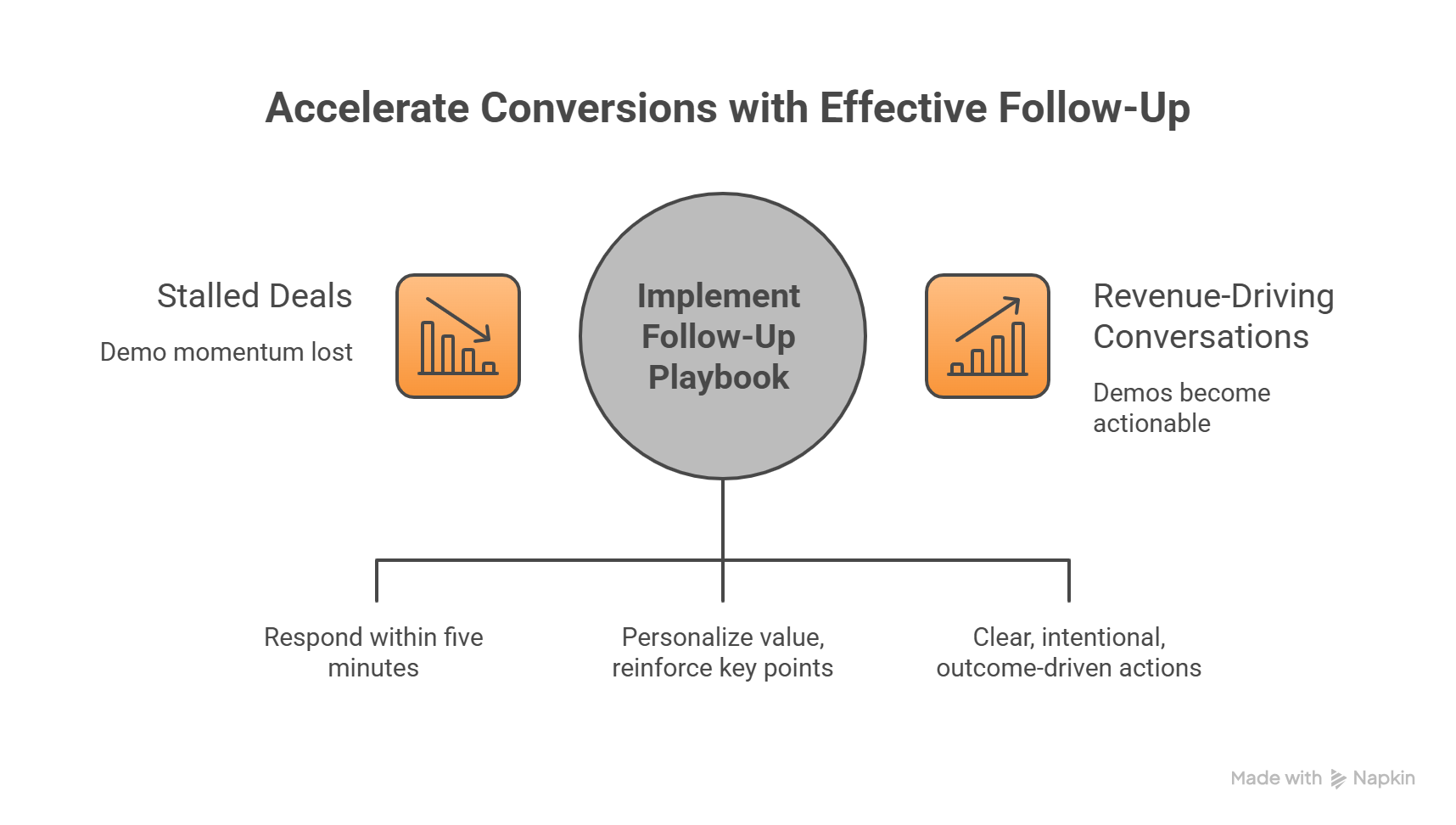
The demo isn’t over when you click “End Meeting.” In fact, that’s when the real work begins. The follow-up phase is where many high-potential deals stall, or where top-performing teams accelerate conversions.
A strong follow-up playbook ensures your demo momentum translates into action, not just applause.
Speed-to-Lead: the five-minute rule
Data doesn’t lie: the faster you respond after a demo request or live session, the higher your odds of converting the lead. Research shows that response times under five minutes can increase conversion by 35–50%.
Key tactics for speed-to-lead:
- Assign leads to the right AE immediately, don’t wait for daily handoffs
- Use automated alerts or CRM triggers to flag demo requests in real-time
- Prepare short, personalized confirmation emails or messages before the demo happens
The goal isn’t just speed. It’s showing the buyer that you care about their time and their pain. Slow follow-up communicates the opposite.
Recap videos: personalization at scale
Live demos are memorable, but buyers forget details quickly. Recap videos act as a bridge between the demo and the next step, reinforcing value while keeping the story aligned for all stakeholders.
Best practices for recap videos:
- Keep it short and focused (1–3 minutes per topic)
- Personalize with names, company references, or metrics discussed during the demo
- Include the “next step” clearly, so viewers know exactly what to do
Tools like puppydog.io make it easy to produce these personalized snippets at scale, keeping messaging consistent across all stakeholders without overwhelming sales teams.
Orchestrating the next step: clear, intentional, and outcome-driven
A demo without a next step is a lost opportunity. Too often, reps end calls with vague promises like “We’ll follow up soon” or “Let’s touch base next week.” This kills momentum.
Effective next-step orchestration includes:
- Summarizing key discussion points and aligning on value
- Proposing a concrete action: trial setup, stakeholder deep dive, or technical validation
- Scheduling the next meeting immediately or providing a self-service scheduling link
- Documenting agreements in the CRM for accountability and visibility
The ACE + Wagon framework is a simple way to structure this:
- ACE (Appreciate, Check time, End goal): Align expectations at the start of the demo
- Wagon (Look back, Follow up, Look forward, Orchestrate outcome): Ensure all questions are answered, and everyone knows the agreed next step
When executed correctly, the follow-up phase transforms demos from passive presentations into actionable, revenue-driving conversations.
Why this matters
Even the best live demo can lose impact if follow-up is inconsistent. A rapid, personalized, and structured post-demo play ensures that:
- High-intent buyers stay engaged
- Multi-stakeholder teams receive relevant messaging without repetition
- Deals move forward predictably instead of stalling in indecision
In other words, the demo sets the story, but the follow-up writes the ending.
Short recap videos are especially effective because buyers can rewatch them, share them internally, and revisit key moments without scheduling another call.
If you’re new to this format, here’s a simple breakdown of what a video demo is and how teams use it across sales and onboarding.
ROI Storytelling and Live Calculators That Close Deals
Buyers don’t just want features; they want proof. They want to know how your SaaS product will impact their business, justify the investment, and make their lives easier. This is where ROI storytelling comes in: translating capabilities into tangible, financial outcomes that resonate with decision-makers.
A demo that convincingly links features to measurable results moves prospects from “interested” to “ready to act.”
Turn features into business outcomes
Instead of showing what your product can do, show what it does for the buyer. This means connecting every functionality to:
- Cost savings
- Time efficiency
- Revenue growth
- Risk reduction
For example:
Instead of saying, “Our automation tool reduces manual entry,” frame it as:
“By automating manual data entry, your team saves 12 hours per week, which translates to £31,200 saved annually, enough to cover the license cost three times over.”
This kind of narrative resonates across roles: executives see ROI, managers see efficiency, and technical stakeholders see risk reduction.
Use live calculators for personalized impact
Static ROI spreadsheets are helpful, but interactive, live calculators are game-changers. They allow buyers to input their own metrics, team size, manual hours, revenue per lead, and see real-time projections. This turns abstract claims into personalized, undeniable proof.
Benefits of live calculators:
- Engagement: Buyers participate actively, rather than passively watching a demo
- Clarity: Immediate answers to “What’s in it for us?”
- Persuasion: Quantified results reduce internal objections and speed up decision-making
Hybrid or async demos pair well here, too. With tools like puppydog.io, sales teams can embed calculator walkthroughs directly into demo snippets or personalized follow-ups. Buyers experience their own scenario without waiting for another call.
Layer storytelling over the numbers
Numbers alone rarely close deals. They need a story:
- Show pain before the solution
- Walk through how your product delivers the outcome
- Quantify the impact with real or proxy data
For example, a “day-in-the-life” story combined with an ROI calculation might look like:
- Jane in operations, spends 15 hours weekly reconciling spreadsheets.
- Your SaaS automates this process in 2 hours.
- That’s a 13-hour weekly time savings → £25,000 annual gain.
Buyers visualize themselves winning. Features become a bridge to impact, not the endpoint.
Why ROI storytelling works
- Aligns with decision-making criteria: Executives and CFOs are thinking in ROI terms, not dashboards.
- Supports multi-stakeholder buy-in: Each persona sees their “win.”
- Reduces friction: When the financial case is clear, internal approvals happen faster.
- Scales personalization: Pre-recorded or hybrid demos can include pre-built ROI scenarios, so buyers see relevance immediately.
Ultimately, ROI storytelling paired with live calculators transforms demos from a feature showcase into a decision accelerator. And when buyers see tangible results before they sign, your demo becomes a revenue engine, not just a presentation.
Optimization Checklist & A/B Test Ideas (Actionable Experiments You Can Run This Week)
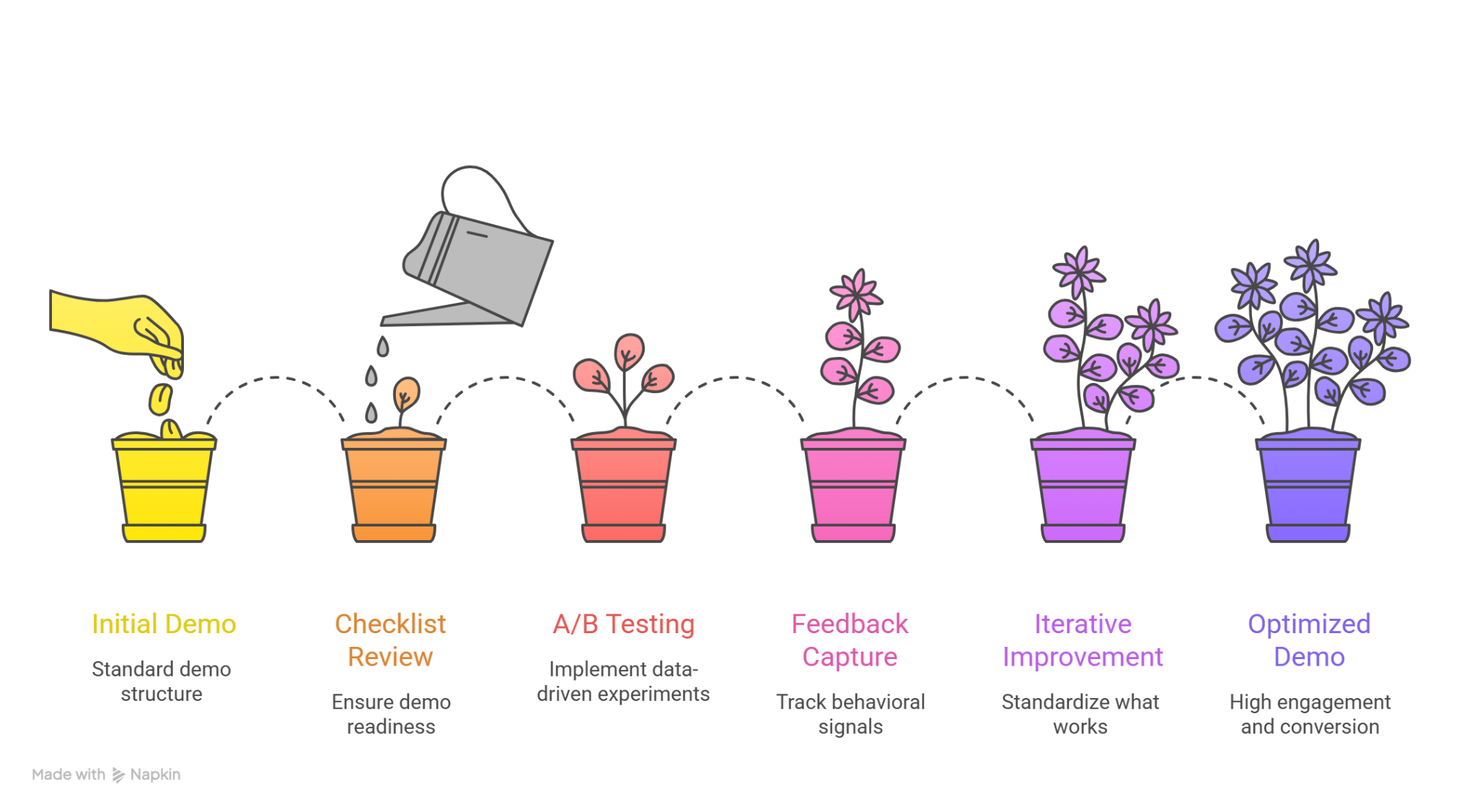
Even the best demo structure and follow-up playbook won’t reach full potential without continuous improvement. Optimization isn’t a one-time task. It’s a mindset. By treating demos as experiments, SaaS teams can systematically refine messaging, engagement, and conversion.
Here’s a practical, actionable guide to start improving your demos this week.
Quick Demo Optimization Checklist
Before every demo, run through these steps to ensure you’re demo-ready:
- Technical Environment
- Verify flow integrity: all clicks and paths work flawlessly
- Ensure load times are fast (<2 seconds for critical pages)
- Use realistic, “lived-in” data relevant to the buyer’s industry
- Verify flow integrity: all clicks and paths work flawlessly
- Persona Alignment
- Confirm the attendee roles and motivations
- Adjust dashboard or workflow views per persona
- Prepare examples that resonate with each stakeholder
- Confirm the attendee roles and motivations
- Story & Outcome Prep
- Identify the “wow moment” for this buyer
- Map key pain points to features and ROI
- Prepare a brief narrative connecting the solution to measurable outcomes
- Identify the “wow moment” for this buyer
- Follow-Up Readiness
- Pre-record short recap videos or snippets (1–3 minutes)
- Draft clear next-step options
- Confirm CRM notes and lead assignment are up-to-date
- Pre-record short recap videos or snippets (1–3 minutes)
A/B Test Ideas You Can Implement Immediately
Small, data-driven experiments can produce significant improvements. Start with one or two tests this week:
- Demo Opening Hook
- Test outcome-first intro vs. traditional feature overview
- Metric: time to next-step commitment or engagement feedback
- Test outcome-first intro vs. traditional feature overview
- CTA Framing
- “Start your free trial” vs. “Book your personalized trial setup.”
- Metric: click-through rate or booked trial sessions
- “Start your free trial” vs. “Book your personalized trial setup.”
- Demo Length / Pacing
- 10-minute story-driven demo vs. 20-minute full walkthrough
- Metric: drop-off rate in async videos or live meeting engagement
- 10-minute story-driven demo vs. 20-minute full walkthrough
- Follow-Up Video Personalization
- Generic recap vs. buyer-specific, role-focused snippet
- Metric: reply rate or next-step completion
- Generic recap vs. buyer-specific, role-focused snippet
- ROI Presentation Style
- Static ROI example vs. live, interactive calculator
- Metric: stakeholder engagement or deal acceleration
- Static ROI example vs. live, interactive calculator
Continuous Feedback Loops
- Capture behavioral signals: Track attention points in recordings, chat reactions, and Q&A patterns.
- Review closed-won vs. lost demos: Identify which parts correlated with success or friction.
- Iterate quickly: Implement one change at a time, measure impact, and standardize what works.
Even minor tweaks, like moving a “wow moment” two minutes earlier or adjusting a CTA button text, can increase demo-to-next-step rates dramatically over a quarter.
Tools like puppydog.io make testing easier, letting you create multiple personalized demo variations quickly, record interactions, and track engagement metrics, all without adding significant workload for your team.
Key Takeaway
Optimization isn’t just about perfection. It’s about learning. Run experiments, capture insights, and adjust your demos iteratively. Over time, small improvements compound, and your demo process becomes a predictable, high-converting revenue engine.
Mini Case Study: A High-Converting SaaS Demo Flow (From First Click to Close)
To make all of this less theoretical, let’s walk through a realistic example. Not a fairy-tale “we 10x’d revenue overnight” story, but a practical demo flow you could realistically replicate.
The scenario
Company: Mid-market B2B SaaS selling to RevOps and Sales Leaders
Problem: High demo volume, low demo-to-trial conversion
Old approach: One 45-minute live demo, heavy on features, inconsistent follow-ups
Step 1: The demo starts before the demo
Instead of jumping straight into a live call, the team sends a personalized pre-demo video immediately after the meeting is booked.
What’s in it:
- A 90-second overview tailored to the prospect’s role
- One key pain call-out (“manual reporting slows forecasting”)
- A clear agenda for the live demo
This does two things:
- Sets context (no cold starts)
- Filters intent (only serious buyers show up engaged)
Using a tool like puppydog.io, this pre-demo video is generated from a standard screen recording but customized with the prospect’s company name, use case, and role—without re-recording every time.
Step 2: The live demo focuses on one story
On the live call, the AE resists the urge to show everything.
The flow looks like this:
- Agenda + outcome alignment (2 minutes)
- “Wow” moment early: A dashboard auto-built from messy CRM data
- Story: “Here’s how RevOps teams go from reactive to predictable.”
- Proof: One customer example + a live metric comparison
- ROI: A simple calculator showing hours saved per rep
Instead of asking “Any questions?” at the end, the AE asks:
“If this workflow were live in your team next month, what would break, or what would improve first?”
Now the demo becomes a conversation, not a presentation.
Step 3: Immediate, personalized follow-up
Within 10 minutes of the call ending, the prospect receives:
- A 2-minute recap video summarizing their pain points
- The exact dashboard shown in the demo
- A clear next step: guided trial setup with success criteria
No generic PDFs. No long emails.
Because the recap video is generated from the original demo flow, tools like puppydog.io help the team personalize this at scale without slowing down AEs.
Step 4: Multi-stakeholder alignment (without another live call)
The buyer shares the recap video internally.
What happens:
- The CFO watches only the ROI segment
- The Sales Manager replays the workflow section
- The RevOps lead focuses on integrations
Everyone gets the same story, no message drift, no re-demo required.
The result
After rolling out this demo flow:
- Demo-to-trial conversion increased meaningfully
- Sales cycles shortened by removing repeat demos
- AEs spent more time on high-intent conversations
No magic. Just better structure, better timing, and better storytelling.
Why this example matters
This isn’t about copying a script. It’s about designing demos as a system, not a one-off event. When live demos, async content, ROI storytelling, and follow-ups work together, the demo stops being a bottleneck and starts acting like a growth engine.
Templates & Swipe Files (Copy-and-Paste Ready)
Good demos don’t always come from inspiration. Most of the time, they come from systems. Templates remove guesswork, reduce inconsistency, and help your team focus on the conversation, not on what to say next.
Below are practical, field-tested swipe files you can copy, tweak, and use immediately.
1. Demo Opening Agenda Template (Outcome-First)
Use when: Starting any live or hybrid demo
“Here’s how I suggest we use our time today.
First, I’ll quickly confirm what you’re trying to solve.
Then I’ll show you one workflow that directly impacts [primary pain].
We’ll look at real outcomes—not every feature.
If it’s useful, we’ll decide the best next step together.
Does that work for you?”
Why it works:
- Sets expectations
- Removes pressure
- Signals you’re not here to pitch
2. “Wow Moment” Setup Script
Use when: Right before your most impressive workflow
“Before I show this, quick question, how are you currently handling [manual process/pain] today?”
(Pause. Let them answer.)
“Got it. Keep that in mind while you watch this.”
This contrast makes the moment land emotionally, not just visually.
3. Feature-to-Outcome Translation Template
Use when: You feel yourself slipping into feature talk
Print this. Seriously.
4. ROI Storytelling Framework (Plug-and-Play)
Pain → Action → Impact
“Right now, teams like yours spend [X] hours on [problem].
With this workflow, that drops to [Y].
Over a year, that’s roughly [ROI number] in time or cost savings.”
No spreadsheets. No jargon. Just clarity.
5. Post-Demo Follow-Up Email Template (Short + Human)
Subject: Quick recap + next step
Hi [Name],
Thanks again—great conversation.
I’ve shared a short recap below covering:
– The [specific pain] we discussed
– The workflow that stood out
– The impact we mapped together
Next step I’d suggest: [clear action].
Let me know if that works, or feel free to share this internally.
Best,
[Your Name]
This works even better when paired with a short personalized recap video, something many teams now generate using tools like puppydog.io to keep follow-ups fast without sounding templated.
6. “Next Step” Close Template (No Pressure)
Use when: Ending the demo
“Based on what we saw, there are two sensible paths forward.
One is [option A].
The other is [option B].
Which feels more useful right now?”
This reframes closing as collaboration, not persuasion.
7. Internal Demo Review Checklist (Team Use)
Use this after recorded demos:
- Did we identify the buyer’s main pain within 5 minutes?
- Did the “wow” moment happen early enough?
- Did we tie features to outcomes at least 3 times?
- Was the next step clear and agreed upon?
If you can’t answer “yes” to most of these, the demo didn’t fail, but it can be better.
Why swipe files matter
High-performing teams don’t rely on memory or improvisation. They rely on repeatable language that still feels human. These templates aren’t scripts. They’re guardrails.
Use them, adapt them, and over time, they’ll quietly raise your demo conversion rate without adding more meetings or pressure.
Conclusion:
SaaS demos don’t fail because teams lack features. They fail because the story, structure, and follow-through aren’t designed for how buyers actually decide. When demos focus on real pain, clear outcomes, and a confident next step, they stop being presentations and start becoming revenue drivers.
The teams that win aren’t doing more demos. They’re running better ones, structured, measurable, and easy to scale without burning out sales.
If you want to turn your demos into consistent conversion engines, it’s worth seeing how personalized, on-demand demos can fit into your workflow.
Start a free trial with puppydog.io and explore how you can deliver relevant, high-impact demos without adding more live calls.
FAQs (Frequently Asked Questions)
How do you start a SaaS demo with a wow/aha moment?
Start by showing the result, not the setup. Open with the outcome your buyer cares about most: saved time, reduced cost, faster revenue, or lower risk. This could be a dashboard already showing results, an automated workflow completing in seconds, or a before/after comparison. The goal is to make the buyer think, “This is exactly what we need” within the first few minutes, before you explain how it works.
How long should a SaaS demo be?
Most high-converting SaaS demos run 20–30 minutes. This keeps energy high while leaving time for questions and next steps. Shorter demos (10–15 minutes) work well for SMB or early-stage discovery, while enterprise demos may run longer, but only if each section is tied to a clear business outcome.
How do you personalize a demo without over-customizing?
Personalize the story, not the product. Use the buyer’s role, industry, and key pain points to guide which workflows, data, and examples you show. Avoid rebuilding the demo environment for every account. Instead, use modular demo paths that let you adapt live without creating fragile, one-off demos that don’t scale.
How do you avoid feature overload during a demo?
Anchor every feature to a single pain and outcome. If a feature doesn’t directly support the buyer’s goal, skip it. A simple rule: one pain → one workflow → one measurable result. If the buyer asks about additional features, treat those as optional branches rather than part of the core demo flow.
What questions should you ask during a demo?
Great demos are two-way conversations. Ask questions that confirm impact, not just interest, such as:
- “How are you handling this today?”
- “What happens if this doesn’t change in the next 3–6 months?”
- “Who else would care about this result internally?”
- “Does this map to how your team actually works?”
These questions keep the demo aligned and help naturally qualify next steps.
What is a “reverse demo” and when should you use it?
A reverse demo starts with the buyer explaining their process or goal first, while you map your product to it in real time. It works best for late-stage deals, technical buyers, or complex workflows, where trust and accuracy matter more than polished storytelling.
What proof should you include (metrics, testimonials, case studies) and where?
Proof should appear immediately after the value is shown, not at the end. Use:
- Metrics after a workflow (“Customers reduce manual work by 42%”)
- Short testimonials when a pain is validated
- Mini case studies before discussing pricing or next steps
This reinforces credibility while the buyer is emotionally engaged.
Should you use live demos, pre-recorded demos, or a hybrid approach?
Most teams perform best with a hybrid approach:
- Pre-recorded or interactive demos for early education and qualification
- Live demos for high-intent, high-value conversations
This reduces sales effort while ensuring that live time is spent on buyers who already understand the basics.
What should you send in a post-demo follow-up email?
A strong follow-up includes:
- A brief recap of the buyer’s key pain and desired outcome
- A short personalized demo clip or walkthrough
- Proof points relevant to their role
- One clear next step (trial, stakeholder demo, proposal review)
Avoid long summaries; clarity beats completeness.
How do you improve demos using data (A/B tests, close-rate analysis)?
Treat demos like a conversion funnel. Track metrics such as:
- Demo-to-next-step rate
- Talk-to-listen ratio
- Feature paths shown vs deals won
- Follow-up response rates
Run A/B tests on demo openings, CTAs, follow-up emails, and demo formats. Small changes, like opening with a different “wow” moment, can significantly impact close rates when measured consistently.

Sarah Thompson is a storyteller at heart and Business Developer at PuppyDog.io. She’s passionate about creating meaningful content that connects people with ideas, especially where technology and creativity meet.