The Seven Types of Demos: Complete Sales Demo Framework

Most B2B demos fail for one simple reason: they attempt to do too much at once.
They start too early, go too long, dive too deep, or worse, show features nobody asked for. The result? Polite nods, muted cameras, and a follow-up email that says, “We’ll get back to you.” (Spoiler: they usually don’t.)
The modern buyer doesn’t want a single, monolithic product tour anymore. Buying committees are larger. Attention spans are shorter. And by the time a prospect agrees to a live call, they’ve already done a good chunk of their research on their own. That shift has quietly changed the role of demos from a one-time event into a strategic, multi-stage experience aligned with the buyer journey.
This is where understanding the seven types of demos becomes a serious advantage.
Instead of forcing one demo to answer every question for every stakeholder, high-performing sales and presales teams use different demo formats at different stages, each with a clear goal, ideal length, and owner. Some demos are meant to inspire. Others qualify. A few are designed to de-risk the decision right before the deal closes.
In this guide, we’ll break it all down in a practical, no-fluff way.
Here’s what you’ll learn in this blog:
- The seven core demo types used in modern sales and presales teams, and when to use each one
- How demo types map to the buyer journey, from early interest to final decision
- The ideal demo length for each stage (and why shorter usually wins)
- Key principles that make demos buyer-focused, interactive, and effective
- How AEs and Sales Engineers can work together to avoid the demo bottleneck
- Where demo automation fits and where it absolutely doesn’t
Whether you’re in sales, presales, product marketing, or engineering, this framework will help you run better demos, protect expert time, and move deals forward with far less friction.
Marketing teams can leverage demo automation to educate prospects at scale. Puppydog offers tailored solutions for Marketing Teams to create engaging product demos that drive leads.
Brief Overview: The Seven Demo Types at a Glance
Before we dive into each demo type in detail, it helps to zoom out and see the full picture.
Think of the seven demo types as a demo toolkit, not a linear script. You don’t use every demo in every deal, and you definitely shouldn’t force them in order. Instead, each demo exists to answer a specific buyer question at a specific moment in the journey.
Some demos are designed to spark interest. Others are meant to qualify, educate, validate, or remove final risk. When used correctly, they work together to keep momentum high and prevent the dreaded “demo overload.”
Here’s a quick, practical snapshot of all seven demo types, what they’re for, when they’re used, and how long they should be.
The Seven Types of Demos, Quick Reference Table
At a glance, you’ll notice a clear pattern:
- Earlier demos are shorter, broader, and easier to automate
- Later demos are longer, deeper, and increasingly human-led
- Not every demo requires a Sales Engineer, but the right ones absolutely do
Product Demo vs Sales Demo Differences
These terms are often used interchangeably, but they serve different purposes.
Product Demo
- Focus: Education
- Audience: Broad market
- Goal: Show how the product works
- Often automated or marketing-led
- Used for inbound leads, website visitors, and early awareness
Sales Demo
- Focus: Persuasion + Validation
- Audience: Qualified buyers
- Goal: Prove fit and reduce risk
- Customized to persona and deal context
- Moves pipeline toward close
In short:
A product demo explains.
A sales demo convinces.
Confusing the two is one reason many teams run overly generic demos that don’t close deals.
The Seven Types of Demos
Below are the seven demo formats you’ll actually use, not the ones on some dusty playbook. For each: what it is, when to use it, who should own it, the ideal demo length, and one practical tip you can apply today.
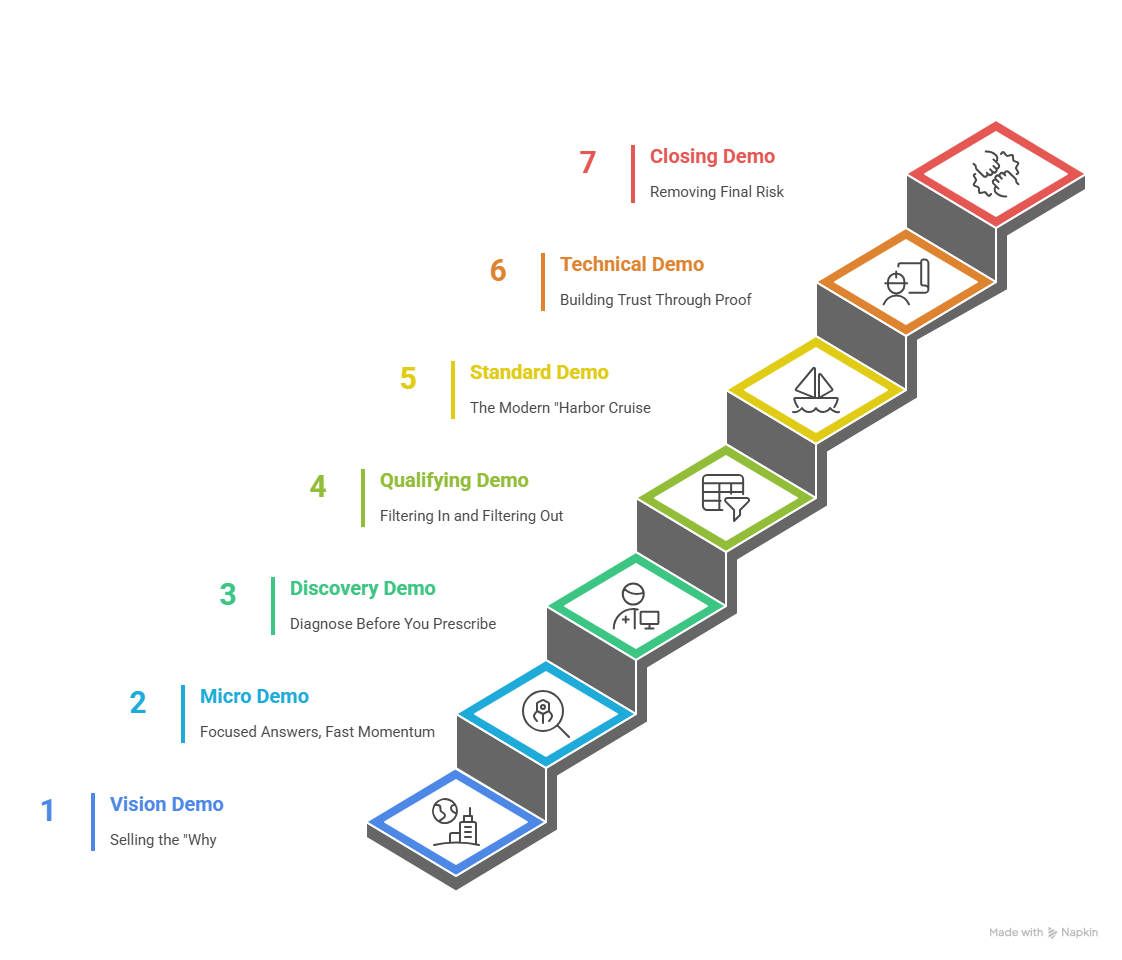
Vision Demo: Selling the “Why”
Purpose: Help stakeholders imagine a better future with your solution.
Buyer stage: Need (Early)
Typical owner: Marketing / Sales / Automated playbooks
Ideal length: 5–7 minutes
The Vision Demo isn’t a feature tour. It’s a story. It quickly answers the strategic question executives care about: Will this help us hit our goals? Keep it light on UI and heavy on outcomes: revenue uplift, cost avoidance, time-to-insight, whatever your buyer’s KPIs are. Because it’s repeatable and standardized, it’s perfect for automation or marketing-driven distribution (think: short, branded video or an interactive landing experience).
Why use it? Because many buyers will watch without a rep present. A crisp vision demo sets expectations, aligns on the problem, and primes the deal so the first live call starts from common ground, not awkward orientation.
Actionable tip: Start with a single slide that states the problem + metric, then show a 60–90 second “before → after” hero clip. End with a single, measurable outcome statement.
Tool: Demoboost, A user-friendly demo platform that lets you build engaging product tours and share them quickly with buyers to illustrate strategic value early in the journey.
Micro Demo: Focused Answers, Fast Momentum
Purpose: Solve one specific buyer question or pain point.
Buyer stage: Learn (Early–Mid)
Typical owner: SE / Automation / AE (as a follow-up)
Ideal length: 2–5 minutes
Micro Demos are the superpowers of modern selling: narrow, sharp, and easy to consume. After a discovery call, instead of sending a 20-minute recording, you send a 2-minute clip that shows exactly how your product handles the buyer’s single concern, integrations, a key workflow, or a particular report. These are perfect as “leave-behinds” that champions can share with other stakeholders.
They maximize perceived value per minute (shorter = higher V/T) and keep the buying motion moving without asking for another live meeting.
Actionable tip: Build a library of 30–60 second micro clips tagged by feature + persona. Use these as your go-to follow-ups.
Tool: Puppydog.io, Create crisp, high-impact clips that highlight specific features or pain-point solutions that can be sent as follow-ups or used in outreach campaigns. (Matches perfectly with focused, short-form demo needs.)
For creating short, compelling Vision or Micro Demos that communicate your product’s value instantly, tools like Puppydog’s AI Explainer Video Generator can save time and maintain consistency.
Discovery Demo: Diagnose Before You Prescribe
Purpose: Uncover root causes, workflow gaps, and decision criteria.
Buyer stage: Learn (Mid)
Typical owner: AE / SE (collaborative)
Ideal length: 15–30 minutes
Discovery is where you stop selling and start listening, but yes, it’s still a demo. The best discovery demos mix short, targeted show-and-tell with high-impact questions that reveal the Critical Business Issue (CBI). Use a Situation Slide: roles, pains, required capabilities, expected delta, and any critical dates. This becomes the prescription for all future demos.
A discovery demo should feel consultative: you diagnose, validate assumptions, and build the scope for deeper technical validation if needed.
Actionable tip: End discovery with a documented Situation Slide and one explicit next step (e.g., “If X is true, schedule a technical deep-dive with SEs”).
Tool: Consensus, A demo automation and interactive walkthrough platform that helps you build guided demo paths while also capturing engagement data to inform deeper discovery conversations.
Qualifying Demo: Filtering In and Filtering Out
Purpose: Quickly verify fit and disqualify non-starters.
Buyer stage: Learn (Mid)
Typical owner: AE / SE / Automated gating
Ideal length: 12–25 minutes
The qualifying demo is pragmatic: both sides decide whether this is worth further investment. Buyers often use it to rapidly eliminate vendors; sellers use it to avoid wasting SE hours. This demo should cover key capabilities at a high level, reveal integration surfaces, and highlight adoption considerations, but it should not require a custom environment.
Automation shines here: an interactive qualifying tour can capture engagement signals that tell you who’s serious and which features matter most.
Actionable tip: Create a short qualifying checklist and link to a 12–15 minute automated demo. Only escalate to a live SE if the checklist and demolytics show strong intent.
Tool: Navattic allows you to build self-guided product tours that prospects can explore themselves, helping you qualify interest before investing in a live session.
Standard Demo: The Modern “Harbor Cruise”
Purpose: Give a structured, high-value overview of the product.
Buyer stage: Learn (Mid–Late)
Typical owner: AE / SE / Automation
Ideal length: 15–20 minutes
Yes, the standard demo is still a thing, but it shouldn’t be a meandering product tour. Use the Inverted Pyramid: lead with the most compelling results (dashboards, core outcomes), then drill down into workflows. Start with the “last thing” the user does that delivers value, and show backwards from there. That way, you hook busy stakeholders immediately.
This demo is often the first one where multiple personas are present, so prepare to pivot and surface persona-specific micro clips on demand.
Actionable tip: Open with an “Aha!” screen, a single result that demonstrates value in the first 90 seconds.
Tool: Storylane, Lets sales and marketing teams design polished, customizable demo experiences that showcase core workflows and value props to a broader audience.
Capture precise workflows or feature interactions easily using Puppydog’s AI Screen Recorder, perfect for Micro and Standard Demos that need clarity and speed.
Technical Demo: Building Trust Through Proof (Engineering Demos)
Purpose: Validate architecture, APIs, security, and integration readiness.
Buyer stage: Buy (Late)
Typical owner: Sales Engineer / Solutions Consultant
Ideal length: 45–60+ minutes
Technical demos are the crucible. Here, the SE earns credibility by mirroring the buyer’s environment, exploring edge cases, and answering hard questions in real time. This is not the place for canned videos. Buyers bring their architects, security, and ops teams to vet the solution and de-risk the decision. The demo should be consultative and highly tailored, often using real sample data, API calls, or a sandbox configured for the prospect.
Because these sessions affect professional reputations, the SE must be ready to pivot, troubleshoot, and translate technical features into tangible risk reduction and ROI.
Actionable tip: Require a pre-demo handoff doc from the AE (environment details, top 3 concerns, success criteria) to ensure the SE shows the right scenarios.
Tool: Reprise, A robust solution for enterprise-level interactive product demos and sandbox environments, ideal for deep-dive sessions with technical stakeholders.
Closing Demo: Removing Final Risk
Purpose: Address last-mile objections and secure commitment-level confidence.
Buyer stage: Buy (Final)
Typical owner: AE / SE / Automated clips library
Ideal length: 1–5 minutes
Think of the Closing Demo as the post-decision safety net. After a verbal go-ahead, stakeholders in legal, security, or IT will want a concise answer to: “How will this work in our stack?” Closing demos are short, targeted, and detail-oriented, often covering API endpoints, data flows, compliance checks, or admin setup. Many companies keep a library of short closing clips to answer these repetitive questions without pulling SEs into every micro-call.
Actionable tip: Maintain a “closing clips” folder (1–3 minute videos) covering common final-stage topics: GDPR, SSO, data migration, and roles/permissions.
Tool: ScreenApp, a simple screen recording and editing software you can use to quickly generate short clips addressing final integration, compliance, or setup questions at the close of a deal.
For creating full-featured, high-quality product demos quickly, check out Puppydog’s Product Demo Video Maker, designed to simplify the demo creation process and scale your sales efforts.
Key Takeaway:
These seven demo types form a flexible toolkit, not a rigid checklist. You’ll mix and match depending on deal size, buyer personas, and timeline. Use shorter, automated demos to create momentum early; save human touch for technical validation and final de-risking. Next up: the principles that make these demos actually work, buyer-focused structure, interaction tactics, and deployment mechanics.
Key Principles for Effective Demos
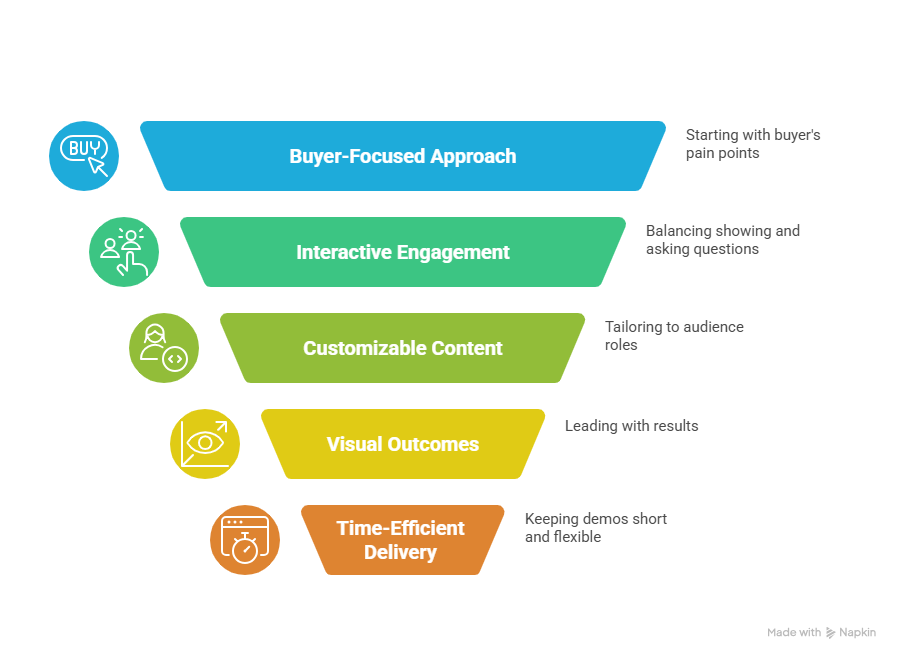
No matter which of the seven demo types you’re running, the difference between a forgettable demo and a deal-moving one usually comes down to how it’s delivered, not what is shown.
High-performing teams follow a few core principles consistently. These aren’t theoretical ideas. They’re practical habits that keep demos relevant, engaging, and aligned with how buyers actually make decisions.
Buyer-Focused: Start With Pain, Not Features
The fastest way to lose a room is to open a demo with a feature checklist.
Effective demos begin with the buyer’s business problem, not the product interface. Before showing anything, anchor the conversation around what’s broken, what it’s costing the business, and why it matters now. Every feature you show should clearly connect back to that pain and move the buyer closer to a tangible outcome.
A simple framing works well here:
- Problem: What’s not working today?
- Solution: What capability addresses it?
- Benefit: What measurable improvement does the buyer get?
When demos follow this structure, the product feels like a necessary solution, not an optional tool.
Interactive: Turn Demos Into Conversations
A demo should never feel like a lecture.
The most effective demos balance showing and asking roughly a 50/50 split. Instead of narrating every click, pause often and invite the buyer into the story. Ask questions that prompt them to imagine using the product in their own environment.
Examples that work:
- “How does your team handle this today?”
- “What would change if this step disappeared?”
- “Who else on your side would care about this result?”
Even in automated or self-guided demos, interactivity matters. Let buyers choose which areas to explore first so the experience feels buyer-led, not seller-controlled.
Customizable: Tailor the Demo to the Role and Context
Not all stakeholders care about the same things, and your demo shouldn’t pretend they do.
Executives typically want strategic impact: revenue, cost, risk, and speed. End users care about usability and time savings. Technical stakeholders want architecture, security, and reliability. A single, generic demo rarely satisfies all of them.
The most scalable approach is modular demos:
- Short segments mapped to roles and industries
- Reusable clips that can be stitched together live or shared asynchronously
- Persona-specific examples that feel “built for me.”
Customization doesn’t mean rebuilding the demo every time it means assembling the right pieces for the audience in front of you.
Visual & Action-Oriented: Show Outcomes First
Demos are visual experiences. Treat them that way.
Avoid narrating navigation or explaining menus unless necessary. Buyers care far more about what changes after the product is used than where the buttons live. Lead with outcomes, dashboards, alerts, completed workflows, or before-and-after comparisons, then drill down only if asked.
A helpful mental model is “do the last thing first.” Show the result your buyer wants, then work backward to explain how it happens. That early “aha” moment is what earns attention for the rest of the demo.
Short & Flexible: Respect Time-to-Value
Long demos don’t feel valuable just because they’re long.
Most effective live demos land in the 15–20 minute range. Automated demos should usually be under five minutes. Shorter demos force clarity, sharpen the message, and respect increasingly tight schedules.
Flexibility matters just as much as length. Meetings start late. Stakeholders drop off. Questions come from unexpected angles. Strong demo teams always have a “50% plan”, a trimmed version of the demo that still delivers the core message if time gets cut in half.
When demos respect time, buyers stay engaged, and decisions move faster.
These principles turn demos from product walkthroughs into buyer enablement tools. Apply them consistently, and every demo, live or automated, becomes clearer, more relevant, and far more persuasive. Next, we’ll look at how sales and presales teams operationalize this in the real world by coordinating roles and solving the demo bottleneck.
Sales Demo Environments
One of the most overlooked factors in demo success is the demo environment itself.
A weak demo environment can derail even the strongest presenter. Broken data, irrelevant use cases, slow load times, or “dummy” workflows that don’t resemble real-world scenarios instantly reduce credibility.
High-performing teams treat demo environments as strategic assets.
There are typically four types of demo environments:
1. Static Demo Environment
A controlled environment with fixed data and preconfigured workflows. Reliable and predictable, but less flexible for customization.
2. Semi-Customized Environment
A reusable base environment that can be lightly tailored per industry or persona (e.g., healthcare vs fintech dashboards).
3. Fully Customized Sandbox
Built specifically for late-stage technical demos. Mirrors the buyer’s tech stack, integrations, and workflows. Usually owned by Sales Engineers.
4. Automated / Simulated Demo Environment
Interactive replicas or guided product tours that simulate workflows without requiring a live backend. Ideal for Vision, Micro, and Qualifying demos.
The key is alignment:
- Early-stage demos → Controlled, automated environments
- Mid-stage demos → Semi-customized environments
- Late-stage technical validation → Customized sandbox
If your demo environment doesn’t reflect your buyer’s reality, your demo becomes theatre instead of proof.
Tools for Demo Automation That Marketing and SEs Can Both Use
The best demo automation platforms aren’t just marketing toys or SE tools. They create shared infrastructure.
Here’s what modern teams look for:
1. Interactive Product Tours
Platforms like Navattic and Storylane allow teams to build self-guided demos for website visitors and early-stage buyers.
2. Screen-Based AI Demo Creation
Tools like Puppydog enable quick creation of personalized, short-form demo clips from screen recordings or screenshots.
3. Sandbox Replication Tools
Reprise allows deeper environment simulation that SEs can use for late-stage validation.
4. Demo Analytics (Demolytics)
Consensus and similar tools track engagement:
- Who watched
- What they replayed
- What was skipped
This data bridges marketing and presales, allowing smarter prioritization of technical resources.
The ideal stack allows:
- Marketing → Educate at scale
- AEs → Personalize quickly
- SEs → Step in only when depth is required
When demo tooling is shared across teams, demo strategy becomes scalable.
Operational Mechanics: AE & SE Coordination and Solving the Demo Bottleneck
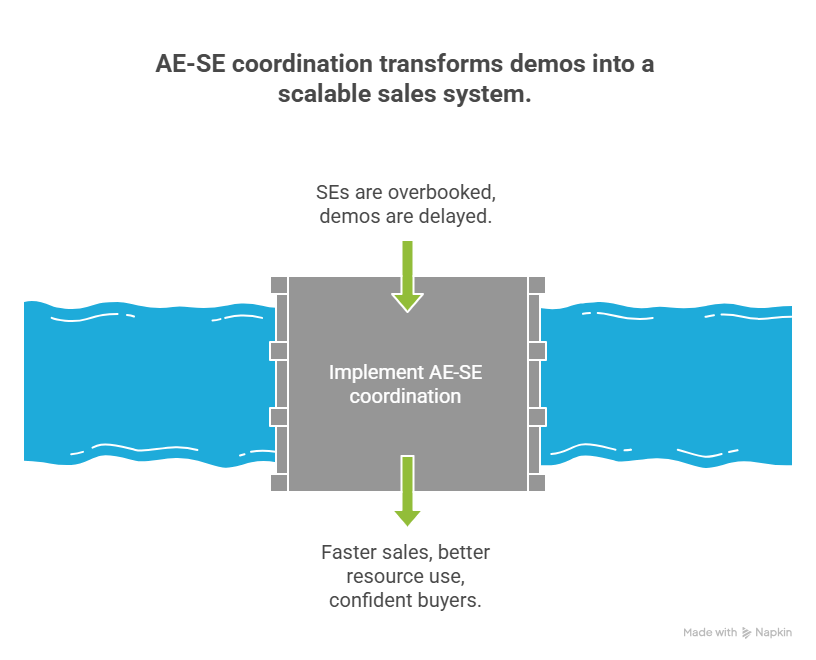
If demos are the engine of modern B2B sales, then AE–SE coordination is the transmission. When it works, deals move smoothly. When it doesn’t, everything grinds, with slow follow-ups, overbooked Sales Engineers, and demos that happen too late (or not at all).
The root issue most teams face is what’s often called the demo bottleneck.
Why the Demo Bottleneck Exists
In many organizations, one Sales Engineer supports anywhere from four to fifteen Account Executives. AEs are hired and ramped quickly; SEs take years to develop deep product and architectural expertise. The imbalance creates pressure, especially when SEs are pulled into early-stage demos that don’t actually require their level of specialization.
The result is predictable:
- SE calendars fill up with repetitive standard demos
- Qualified prospects wait days or weeks for technical validation
- Late-stage deals slow down because expert time is tied up earlier in the funnel
Solving this isn’t about working harder. It’s about assigning the right demo to the right role at the right time.
Clear Ownership Across the Demo Lifecycle
High-performing teams are intentional about who owns which demos.
As a rule of thumb:
- Account Executives own momentum. They handle early-stage conversations, relationship management, qualification, and closing logistics.
- Sales Engineers own risk reduction. They step in when technical depth, architectural validation, or credibility is required.
Mapped to demo types, which usually look like this:
- Vision, Micro, and Qualifying demos: Led by AEs or delivered through demo automation
- Discovery demos: Shared responsibility, with SEs supporting deeper technical probing when needed
- Technical demos: Fully SE-led, highly personalized, and protected time
- Closing demos: Short, targeted sessions or reusable clips, often supported by automation
This division ensures SEs spend their time where it creates the most value, late-stage trust, and proof.
Using Demo Automation to Protect Expert Time
Demo automation isn’t about replacing humans. It’s about removing friction
Automated Vision, Micro, and Qualifying demos allow prospects to engage on their own schedule while AEs gather valuable intent signals in the background. Engagement data, who watched, what they replayed, and what they shared acts as an early indicator of deal seriousness.
When an SE is finally pulled into a deal, they’re not walking in blind. They know:
- Which features matter most
- Which stakeholders are involved (including silent influencers)
- How far along the buyer actually is
This makes technical demos sharper, shorter, and far more relevant.
The AE → SE Handoff: Where Deals Are Won or Lost
One of the most common sources of demo inefficiency is a weak handoff.
Before scheduling a technical demo, AEs should provide SEs with a concise handoff that includes:
- The buyer’s role and decision criteria
- Confirmed pain points and success metrics
- Environment details (stack, integrations, constraints)
- Any red flags or objections already raised
- A clear definition of what “success” looks like for the technical demo
This small discipline dramatically improves demo quality and builds trust with the buyer.
Turning Demos Into a Scalable System
When AE–SE coordination is intentional, demos stop being reactive calendar events and become a repeatable system. Early demos educate and qualify at scale. Mid-stage demos sharpen focus. Late-stage demos build confidence and close risk.
The payoff is real: faster sales cycles, better use of expert resources, and buyers who feel guided, not dragged, through the process.
Demo-to-Close Framework
Most teams treat demos as isolated events. High-performing teams treat them as conversion milestones.
The Demo-to-Close Framework ensures every demo intentionally moves the deal forward instead of simply “showing the product.”
It works in four steps:
1. Anchor the Critical Business Issue (CBI)
Before the demo, define:
- What problem are we solving?
- What metric changes if we win?
- What deadline matters?
If this isn’t clear, you’re presenting, not progressing.
2. Demonstrate Only What Proves the CBI
Cut everything that doesn’t directly support the buyer’s success criteria.
3. Confirm Impact Live
During the demo, ask:
- “If this worked as shown, what would it change for your team?”
- “Who else would need to see this to move forward?”
This turns interest into commitment.
4. Secure a Defined Next Step
Never end a demo with “Let us know.”
Instead:
- Schedule technical validation
- Confirm stakeholder review
- Define procurement timeline
A demo without a next step is entertainment.
A demo with the next step is pipeline movement.
Conclusion
Modern buyers don’t need more demos. They need the right demo at the right moment. When teams align demo types with the buyer journey and fix AE–SE coordination, demos become a growth engine instead of a bottleneck. By combining smart demo strategy with automation, you can scale engagement without sacrificing quality.
If you’re ready to deliver buyer-focused demos faster and more efficiently, try Puppydog.
FAQs: Common Questions About Demo Types in Sales
What are the six types of demos in sales?
Traditionally, sales teams talk about six demo types: Vision, Micro, Discovery, Standard, Technical, and Closing demos. In modern presales, many teams also recognize a seventh format, the Qualifying (or FAQ-style) Demo, to handle early-stage buyer questions efficiently and at scale.
What is a Vision Demo?
A Vision Demo is an early-stage, high-level walkthrough that focuses on why change is needed rather than how the product works. It connects business pain to a future state, helping buyers see what success could look like before they worry about features.
What is a Micro Demo?
A Micro Demo is a short, focused product clip, usually just a few minutes long, that highlights a single feature or use case. It’s ideal for website visitors, inbound leads, or follow-up emails when buyers want quick answers without booking a full call.
What is a Standard Demo?
The Standard Demo is the most familiar format: a structured walkthrough that covers core workflows and value propositions. It’s typically used mid-funnel when buyers already understand the problem and want to see how the product solves it in practice.
When should you use a Technical Demo?
A Technical Demo works best when evaluators need deeper detail, think about integrations, security, architecture, or customization. These demos usually involve sales engineers and are reserved for serious buyers who are close to making a decision.
What is a Closing Demo?
A Closing Demo is tailored for decision-makers near the end of the sales cycle. Instead of broad coverage, it reinforces key value points, addresses final objections, and aligns the product with the buyer’s success criteria.
What is an FAQ Demo?
An FAQ Demo answers the most common buyer questions in a reusable, on-demand format. It’s especially useful for reducing repetitive demo requests and supporting self-serve buyers who want clarity before speaking with sales.
Why are different demo types important in sales?
Because buyers don’t all need the same thing at the same time. Matching demo types to the buyer journey improves relevance, shortens sales cycles, and reduces demo fatigue, while helping teams scale without overwhelming AEs or SEs.
Which demo automation solutions let AEs spin up tailored demos without leaning on the SE team?
Several modern demo automation platforms allow Account Executives to create tailored, lightweight demo experiences without requiring Sales Engineer involvement.
Tools that support this approach typically offer:
- Template-based demo flows
- Drag-and-drop customization
- Screen recording with AI narration
- Interactive overlays
- Engagement tracking
Solutions like Navattic, Storylane, Consensus, and Puppydog are commonly used for this purpose.
The goal isn’t to replace SEs — it’s to protect their time by enabling AEs to handle early-stage personalization independently.
Does the future of sales exclude demos?
No, but it does change them.
Buyers are increasingly self-educating before speaking with sales. This reduces the need for long, generic live demos. However, it increases the need for:
- On-demand interactive demos
- Persona-specific micro demos
- Technical validation sessions for serious buyers
The future of sales doesn’t exclude demos. It distributes them.
Instead of one big presentation, modern sales uses multiple smaller, strategic demo moments across the buyer journey.
Human-led demos will remain critical for complex B2B deals. They just happen later and are more focused.
How to reduce sales engineer time on repetitive demos?
Reducing repetitive SE workload requires structural changes, not just better calendars.
Here’s what works:
1. Standardize Early-Stage Demo Content
Move Vision, Micro, and Qualifying demos into automated formats.
2. Create a Reusable Demo Clip Library
Build short videos answering common technical questions:
- SSO
- Security
- APIs
- Data migration
3. Enforce AE Qualification Before SE Involvement
Require documented pain points, confirmed use cases, and defined next steps before scheduling technical demos.
4. Use Demo Analytics to Filter Serious Buyers
If prospects aren’t engaging with early demos, they likely aren’t ready for deep technical sessions.
When automation handles repetition, SEs can focus on high-impact validation — where they create the most revenue leverage.
Video: Sarah Describing New Sales Demo Framework

Sarah Thompson is a storyteller at heart and Business Developer at PuppyDog.io. She’s passionate about creating meaningful content that connects people with ideas, especially where technology and creativity meet.