HeyGen vs Descript (2026): Avatar Generator or Editor?

Published : 15th September 2026
If you've landed on this page, you've probably typed "heygen vs descript" into Google expecting a straightforward winner. Fair warning: you're not going to get one. Not because we're dodging the question, but because these two tools aren't really fighting over the same job.
Here's the thing that trips people up. Both HeyGen and Descript get lumped into the "AI video tool" bucket, so it's natural to assume they compete head-to-head. They don't, or at least, not in the way you'd assume. HeyGen builds video out of nothing but a script and an avatar. Descript takes footage you already have and lets you cut, polish, and reshape it by editing a transcript instead of dragging a timeline. One creates. One edits. That distinction is the whole article, honestly, so let's get into it.
HeyGen vs Descript at a Glance
Before we go deep on either tool, here's the side-by-side breakdown.
Worth noting: pricing on both platforms shifts fairly often, so treat these as reported figures and double-check the current numbers on HeyGen's and Descript's pricing pages before you commit to anything.
Different Categories: Generation vs. Editing
This is really the crux of the whole "Descript or HeyGen" question, so let's slow down here for a second.
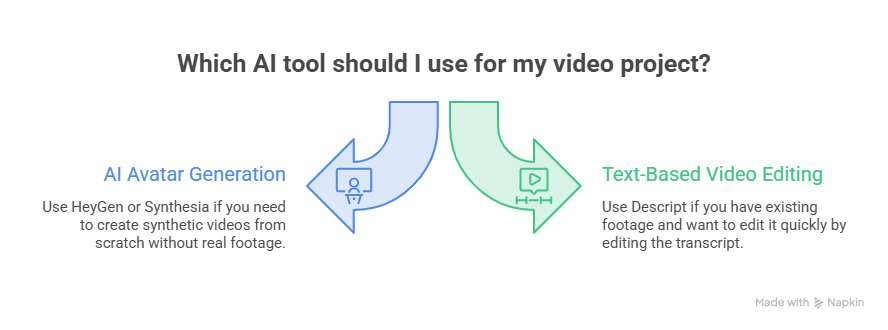
HeyGen sits in the AI avatar generation category, alongside tools like Synthesia. You write a script, pick (or clone) an avatar, and HeyGen renders a full video no camera, no lighting, no actual human being on screen. It's synthetic video from the ground up.
Descript sits in a completely different category: text-based video and audio editing. You record or upload real footage, Descript transcribes it, and then you edit the video by editing the words on the page. Delete a sentence from the transcript, and the matching video clip disappears too. It's still your face, your voice, your actual recording, just edited in a much faster way than a traditional timeline editor.
So when someone asks "Is HeyGen better than Descript," it's a bit like asking whether a word processor is better than a printing press. They can work together in the same project, sure. But asking which one wins assumes they're solving the same problem, and they're just not.
A quick gut-check question: are you starting from a blank page, or from footage you already recorded? If it's the former, you want generation. If it's the latter, you want editing. That single question resolves most of the confusion.
HeyGen: Avatar Video From Text
HeyGen's whole pitch is eliminating the traditional video shoot. No camera, no studio, no talent booking; you write a script, and HeyGen turns it into a presenter-led video using a photorealistic avatar.
The avatar library is the star of the show here. HeyGen offers 500+ pre-built stock avatars across different demographics and settings, plus custom avatar options if you want your own likeness or a team member's. There are two tiers of custom avatars: a quick "Instant Avatar" built from a short webcam clip, and a higher-fidelity "Studio" avatar trained on proper 4K footage. (HeyGen requires a consent video before it'll let you clone someone's likeness, which is a sensible guardrail given how easily this tech could be misused.)
Language support is arguably HeyGen's biggest flex. Paid plans support 175+ languages with automated lip-sync dubbing, meaning you can take one avatar video and localize it into dozens of markets without re-shooting a thing. If you're doing global marketing or training content, that's a genuinely hard thing to replicate any other way.
Where HeyGen is thinner: editing. You get basic trimming, text overlays, auto-captions, and silence removal, but it's not built for assembling a complex multi-source project. It also includes a screen recorder, but that's mostly there to capture training footage for a custom avatar or grab quick b-roll, not to power a full editing workflow.
Descript: Edit Real Footage by Editing Text
Descript flips the model entirely. Instead of generating video, it starts with something real, a screen recording, a podcast, a webcam interview, and gives you an editing interface built around the transcript rather than a timeline.
Delete a filler word from the text, and it's gone from the audio. Rearrange two paragraphs, and the video clips rearrange with them. If you've ever sat through the tedium of scrubbing a timeline frame-by-frame to cut "um"s, you'll get why this feels like a genuine unlock rather than just a gimmick.
Beyond the text editing, Descript packs in a surprising amount: native screen and webcam recording, Studio Sound for cleaning up rough audio, one-click filler-word removal, green screen background swapping, and an AI co-editor called Underlord that can auto-generate chapter markers or pull out clip-worthy moments using plain-language commands.
Then there's Overdub, Descript's voice cloning feature, which lives under its broader "AI Speech" tools now. If a speaker flubs a line, you just retype the word in the transcript, and Overdub generates matching audio to patch it in. No re-recording, no awkward re-take session.
Descript does technically offer AI avatars too, but don't confuse them with HeyGen's. Descript's avatars are photo-based overlays meant to fill gaps in an existing edit, covering missing footage or visualizing an audio-only clip, not full synthetic scenes generated from scratch.
Pricing Compared (Reported: Verify Before You Buy)
Pricing is where a lot of head-to-head comparisons get sloppy, so let's be precise about what we actually know, while flagging that you should confirm current rates directly with each provider.
HeyGen, as of 2026:
- Free: 3 videos/month, capped at 1 minute each, watermarked
- Creator: $29/mo (or $24/mo billed annually): the realistic entry point for regular use
- Pro: starts at $49/mo, scales with volume
- Business: $149/mo base plus $20/seat
- Enterprise: custom pricing
Descript, as of 2026:
- Free: 60 media minutes/month, watermarked, one-time 100 AI credits
- Hobbyist: $16/mo annual or $24/mo monthly: the true entry-level paid tier
- Creator: $24/mo annual or $35/mo monthly: adds 4K export and NLE timeline export
- Business: $50–65/seat depending on billing
- Enterprise: custom pricing
If you're comparing "Descript vs HeyGen pricing" apples-to-apples, the honest answer is: it depends on which tier you're comparing. Descript's cheapest paid tier (Hobbyist) undercuts HeyGen's Creator plan. But if you want Descript's export flexibility and higher media hour allowance, you're looking at the Creator tier, which lands close to HeyGen's price point anyway. Neither tool has a meaningfully "cheap" option if you're using it seriously. Both free tiers are really just for kicking the tires.
Which Fits Your Workflow?
Rather than declaring a winner, it's more useful to sort by who you actually are.
- You're a solo creator or marketer who needs presenter-style video without filming yourself: HeyGen. Write the script, pick an avatar, done.
- You're a podcaster or YouTuber working from real recorded audio or video: Descript. The transcript-editing workflow will save you real hours.
- You're doing global marketing and need the same message in a dozen languages: HeyGen's translation and lip-sync dubbing is hard to beat.
- You're producing tutorials, walkthroughs, or interview content: Descript's screen recording plus text editing is purpose-built for exactly this, pair it with our video editing tips for extra polish.
- You're an L&D or training team building onboarding modules: Often, HeyGen for the presenter content, then Descript to stitch it together with screen captures and polish the audio.
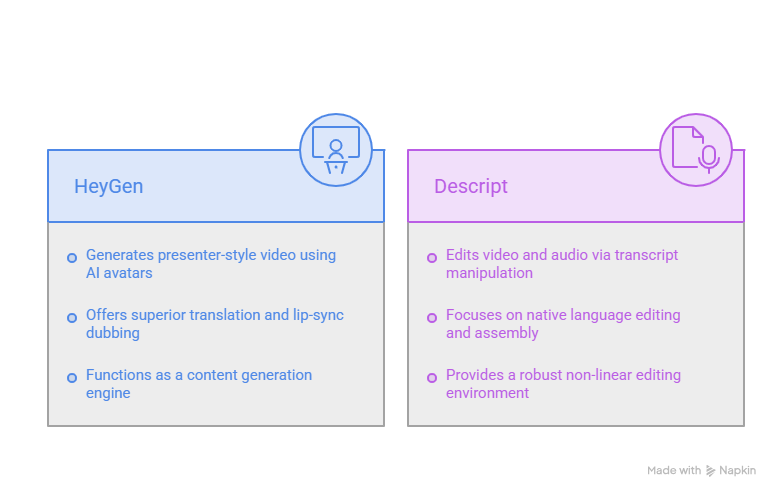
That last point matters more than the outline of this article might suggest. In practice, a lot of teams don't pick one. They use HeyGen to generate an avatar intro or localized segment, drop the exported clip into Descript, and finish the edit there alongside real screen recordings and interview footage. If you're weighing "HeyGen vs Descript for video editing" specifically, Descript wins that framing outright; editing was never HeyGen's job to begin with.
If You Need a Product Demo, Neither Tool Is Quite It
Here's a scenario that comes up a lot and doesn't map cleanly onto either tool: you need a personalized product demo for a specific prospect, fast, without hiring an editor or scripting a full avatar presentation. HeyGen wasn't built to turn your product's UI into a walkthrough, and Descript, while great at editing footage you already recorded, still leaves you doing the recording and structuring work yourself.
That's the gap PuppyDog fills: it takes a screen recording or even just screenshots and turns them into a personalized product demo video automatically, without the scripting overhead of avatar generation or the manual editing lift of a traditional suite. If that's actually your use case rather than general content creation, it's worth a look before you commit to either of the tools above. And if you want a broader menu of avatar-generation alternatives, our roundup of nine HeyGen alternatives ranked for 2026 covers more avatar-generation tools, while our Descript alternatives guide rounds up more editing-focused picks.
FAQs
Are HeyGen and Descript competitors?
Only partially. HeyGen generates avatar video from a script; Descript edits real footage you've already recorded. Many teams end up using both for different parts of the same project rather than picking one over the other.
Which is better for editing?
Descript, without much debate. It's built as an editing-first suite with text-based editing, Studio Sound, and Overdub. HeyGen's editing tools exist mainly to sequence its own generated clips, not to handle outside footage.
Which is cheaper?
Reported entry prices sit close together. Descript's Hobbyist tier starts around $16–24/mo, while HeyGen's Creator plan runs about $24–29/mo depending on billing cycle. Verify current rates directly on each site before deciding, since both have adjusted pricing tiers recently.
Can Descript make avatar videos?
Not the way HeyGen does. Descript's avatars are photo-based overlays for filling gaps in an edit, not full synthetic presenter scenes generated from a script.
What if I need a product demo?
Neither tool is purpose-built for that specific job. A screen-based demo tool like PuppyDog turns a recording (or even screenshots) into a personalized product demo without the scripting or manual editing overhead.

Sarah Thompson is a storyteller at heart and Business Developer at PuppyDog.io. She’s passionate about creating meaningful content that connects people with ideas, especially where technology and creativity meet.