How to make a product launch video (with examples & templates)


Pblished: 27th August 2026
Most "how to make a launch video" guides assume you've got a production company on retainer, three weeks of runway, and a budget that would make your CFO faint. That's not most teams. Most teams are shipping a feature on a Tuesday and trying to figure out, by Wednesday, how to tell the world about it without hiring anyone.
The good news: a great launch video doesn't require any of that. It requires a clear message, the right format for your specific goal, and a process that doesn't collapse the moment your timeline gets compressed (which it always does). This guide walks through exactly that: formats, real examples, a script you can steal, and the fastest path from "we shipped something" to "the internet knows about it."
What a Product Launch Video Actually Is (and Isn't)
A product launch video is a short, distribution-first asset built to announce something new a product, a feature, a platform to an audience that hasn't necessarily asked for it yet. Its job is to stop the scroll, land the value prop fast, and push people toward a landing page or signup flow.
That's a genuinely different job than a product demo video, which is built for someone already leaning in a prospect comparing tools, a customer in an evaluation call, someone who wants to see the actual workflow before they commit. Demo videos can afford to slow down. Launch videos can't. If you're weighing the two, our guide on how to make a product demo video covers that side of it in detail. This post is entirely about the announcement, not the walkthrough.
Why does the distinction matter practically? Because a launch video edited like a demo (slow, feature-by-feature, narrated like a tutorial) will bleed viewers. Cold audiences on social feeds are not patient. You get a handful of seconds to answer three questions: what is this, why should I care, and why now. Everything else is negotiable.
Product Launch Video Formats: Match the Format to the Goal, Not the Budget
Here's a mistake I see constantly: teams pick a format based on what they can afford rather than what the launch actually needs. A tiny feature update doesn't need a cinematic reveal film. A category-defining product launch probably needs more than a phone-shot founder clip. Match the format to the job.
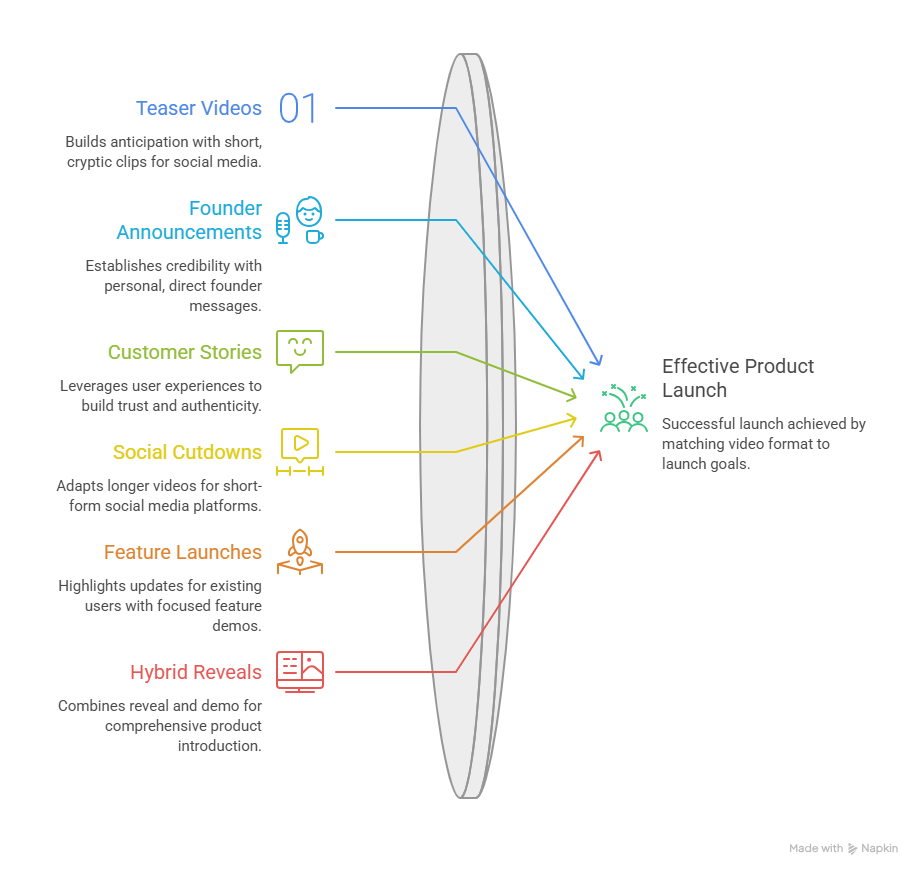
Teaser / reveal videos. Short (15–30 seconds), intentionally light on detail, built to generate anticipation before launch day. Think cryptic UI flashes, countdown energy, minimal narration. These live on social feeds and pre-launch email sends, and their only job is getting someone to care enough to wait.
Founder announcement videos. A founder or product lead talking straight to camera often shot on a laptop webcam or phone, no crew required. What they lack in polish, they make up for in credibility. People trust a human explaining why they built something more than they trust a voiceover artist reading a script.
Customer story / testimonial-led launch videos. These frame the release through a real user's experience rather than the company's own voice. Slack's early growth leaned heavily on this format, more on that below, and it works because it borrows credibility you can't manufacture in-house.
Social cutdowns. Vertical or square clips pulled from a longer master video, each isolating a single hook or feature for sound-off, thumb-scrolling audiences on TikTok, Reels, and LinkedIn. If you only make one full-length video, plan for these from day one. Retrofitting them later is a pain.
Feature launch videos: For existing products announcing an update rather than a net-new release. These skip the "who we are" intro entirely and go straight into what changed and why it matters to people already using the product.
Product reveal/demo hybrids. Some launches blend a short reveal with a quick embedded demo clip further down the landing page. The reveal earns attention. The demo clip validates the claim for anyone still deciding.
How to Make a Product Launch Video, Step by Step
1. Define your goal, audience, and core message (the first-10-seconds rule)
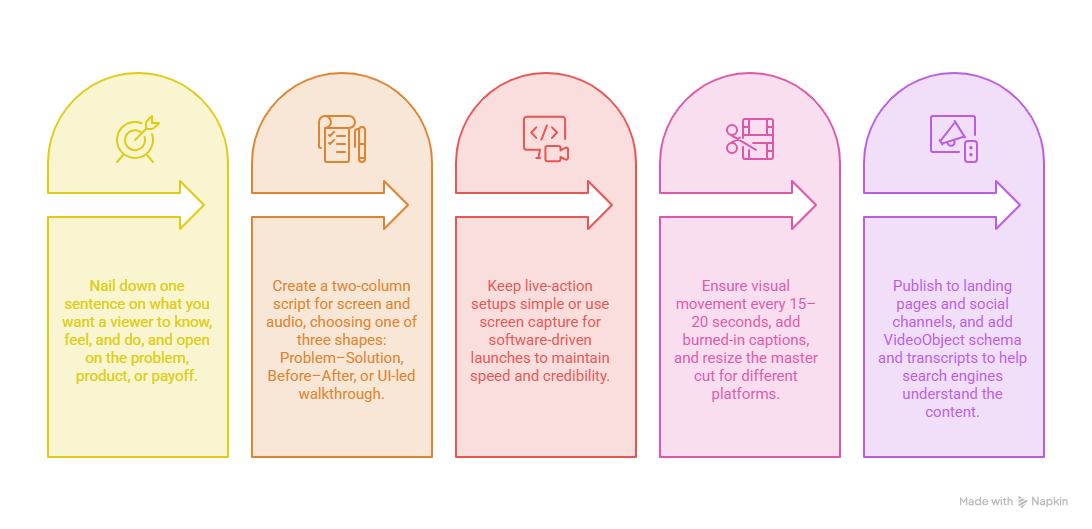
Before you touch a script or a screen recorder, nail down one sentence: what is the single thing you want a viewer to know, feel, and do after watching? Not five things. One.
This matters because of what happens in the opening seconds. Attention on cold, scrolling audiences drops off fast in the early moments of any marketing video enough that if you spend that window on a logo animation or a slow-building metaphor, you've likely already lost a meaningful chunk of your audience before you've said anything. Open on the problem, the product, or the payoff. Save the polish for later.
2. Write the script or storyboard
A workable launch video script is really two columns: what's on screen, and what's being said (or captioned). Keep spoken narration to a natural pace. Roughly two words per second is a decent rule of thumb, and let that math dictate your runtime, not the other way around.
Most launch scripts fall into one of three shapes:
- Problem–Solution: state the friction point, agitate it briefly, introduce the product as the fix, show one or two hero features, close on a single CTA.
- Before–After: show the painful old way, cut to the new way, land on the time or effort saved.
- UI-led walkthrough: open on a finished, impressive result, then rewind to show how quickly it was achieved.
Pick one. Don't try to blend all three into a single 45-second video. That's how you end up with something that feels busy instead of sharp.
3. Capture or generate the footage
This is where teams either self-sabotage with a bloated production timeline or find a genuinely fast path. If you're filming live-action, keep setups simple: natural light, a clean background, and a founder or team member who can talk naturally beats a stiff, over-rehearsed read every time.
If your launch is software-driven (and if you're reading this, it probably is), screen capture is usually your fastest and most honest option. Real product, real interface, real credibility no actors required.
4. Edit, add narration, and create platform cutdowns
Keep visual movement happening every 15–20 seconds or so: a cut, a zoom, a caption change, something. Static shots are where attention goes to die. Add burned-in captions regardless of whether you're posting to social; a large share of feed video gets watched with the sound off, and a captionless video is invisible to that entire audience.
Once your master cut is done, resize it. A horizontal video dropped natively into a vertical feed reads as an afterthought, and audiences (and algorithms) tend to treat it that way.
5. Distribute and optimize for search
Publishing isn't a checkbox at the end. It's part of the strategy. Post to your landing page hero section, YouTube (with a real description, chapters, and captions so it's indexable), LinkedIn, Product Hunt if that's relevant to your launch, and a short email cutdown. If you're hosting video on your own site, add VideoObject schema and an on-page transcript. It helps search engines actually understand what's in the video instead of guessing from surrounding text.
Product Launch Video Examples (and What Each One Gets Right)
Dollar Shave Club is still one of the most-cited launch videos ever made, and for good reason. Roughly 90 seconds, deadpan founder-led comedy, reportedly produced on a shoestring budget, and it opens by directly questioning why razors cost so much. No throat-clearing, no logo sting, straight into the hook. It's widely credited as a major driver behind the brand's early explosion and eventual billion-dollar acquisition.
Slack's "So Yeah, We Tried Slack" is a mockumentary-style piece following a video production company adopting Slack during their own workflow. It's a customer story wearing a launch video's clothes, and it's a smart move: instead of Slack telling you Slack is good, you watch a skeptical team come around to it. It became a foundational asset in Slack's early B2B growth story.
Figma's Dev Mode launch is a keynote-hybrid piece that frames the designer-developer handoff as the actual problem being solved, then shows the tooling side by side. It's a good model for feature-launch videos on established products: skip the "who we are," go straight into what's broken and how this fixes it.
Linear's release video is short, kinetic, dark-mode UI motion graphics with no wasted seconds. There's no cold open, no narration warm-up. It's UI in motion from frame one. If your product is visually clean, this format shows you don't need actors or animation studios to look sharp.
Raycast's extension launches real-time screen capture layered with light narration, often opening with a compilation of actual user requests for the feature. That's a subtle but smart move: it establishes demand before it establishes the product.
Vessi's product overview videos are live-action, lifestyle-driven, with bold text overlays and a hook (a literal water-splash demo of a "100% waterproof" claim) in the first second. Built for sound-off, thumb-scrolling viewers on Reels and Instagram. A good reference if you're in DTC rather than SaaS.
Worth noting: these examples run anywhere from 90 seconds to almost 2 and a half minutes longer than the "keep it under 90 seconds" advice you'll see everywhere, including earlier in this guide. That's not a contradiction so much as a nuance: the short-and-punchy rule applies hardest to teasers and social cutdowns. A hero launch film doing real narrative work like Slack's or Dollar Shave Club's can earn a longer runtime if it holds attention scene by scene. The rule isn't "always short." It's "never boring."
Product Launch Video Script Template
Here's a Problem-Solution skeleton you can copy and fill in:
[0:00–0:08] VISUAL: Open on the pain point in action (a slow manual process,
a frustrated user, a cluttered workflow)
AUDIO: "If you've ever had to [specific painful task], you know how
[time-consuming/annoying/expensive] it gets."
[0:08–0:15] VISUAL: Quick cut showing the cost of the old way
AUDIO: "Teams lose [time/money/hours] doing this the old way."
[0:15–0:20] VISUAL: Product logo or UI reveal
AUDIO: "That's why we built [Product Name]."
[0:20–0:45] VISUAL: Screen capture of the core workflow, 1–2 hero features max
AUDIO: Narrate the transformation: what used to take X now takes Y.
[0:45–0:55] VISUAL: Result/outcome shot of the "after" state
AUDIO: State the concrete benefit in one sentence.
[0:55–1:00] VISUAL: CTA on screen with URL/button
AUDIO: "Try it today at [link]." One ask. Nothing else.
Adjust the timing to your runtime, but keep the shape: hook, agitate, reveal, prove, close.
The Fast Path: Launch-Day Video Without a Production Team
Here's the part most launch-video guides skip, probably because they're written by people who've never actually shipped on a startup timeline: most teams don't have three to six weeks. Traditional agency production usually runs on that kind of clock: script rounds, storyboard approvals, shoot days, editing passes, revision cycles. If your release date is next Tuesday, that math doesn't work.
This is exactly the gap PuppyDog was built to close. Instead of scheduling a production cycle around your launch, you record your product doing the thing a screen capture, a few screenshots, whatever you've already got and PuppyDog turns it into a polished, narrated launch video the same day. No editing software, no voiceover booking, no waiting on an agency's calendar.
The part that tends to surprise people isn't just the speed. It's that you can personalize the output per audience segment without redoing the whole production. Same core release, but the video your enterprise prospects see can lead with a different hook than the one your existing free-tier users see, generated from the same source material in minutes rather than as separate multi-week projects.
Make your launch video in 10 minutes.
Mistakes That Kill Launch Videos
A few patterns show up again and again in launch videos that quietly underperform:
- Burying the value prop. If your product doesn't appear visually or verbally until 20+ seconds in, you've already lost a chunk of your audience to the back button.
- Demo pacing on a launch video. Slow, exhaustive feature tours belong on evaluation pages, not cold social feeds.
- Multiple competing CTAs. Pick one action. "Sign up, follow us, read the blog, book a demo" is not a call to action. It's a menu nobody orders from.
- No captions. A huge share of feed viewing happens muted. A silent, captionless video might as well not exist to that audience.
- One aspect ratio for every platform. A horizontal video letterboxed into a vertical feed looks like it wasn't made for that platform because it wasn't.
- Launching the video after launch day. Momentum is a narrow window. A launch video published a week late is just a video, not a launch asset.
FAQs
What is a product launch video?
A short, distribution-focused video made to announce a new product or feature to an external audience. It prioritizes fast pacing and immediate relevance over exhaustive detail. That's the job of a demo video instead.
How long should a product launch video be?
Most primary launch videos land somewhere between 30 seconds and 2 minutes, with teasers and social cutdowns running shorter (15–30 seconds). Narrative-driven hero films can run longer if every scene earns its place. See Slack and Dollar Shave Club above.
What should a product launch video include?
Five things, in roughly this order: a fast hook naming the problem, a clear product reveal, visual proof (real UI or product footage), a stated benefit or outcome, and one call to action.
How do you make a launch video with no budget?
Write a short script using a free-form Problem–Solution structure, capture your product using free screen-recording tools, edit in something like CapCut or Descript, and record narration on your phone (or use a free-tier AI voice generator). Or skip the manual assembly entirely and generate the whole thing from a screen recording with a tool like PuppyDog.
How much does a product launch video cost?
It ranges wildly by tier, anywhere from under a hundred dollars for a creator-style UGC clip up to tens of thousands for full agency production. Most B2B companies land somewhere in the low-thousands range for a mid-tier produced video, though lean/AI-assisted approaches can bring that down significantly.
Where should I post my product launch video?
Ideally everywhere at once, on launch day: your landing page hero section, YouTube (with captions and a real description for search), LinkedIn, Product Hunt if applicable, and a short cutdown in your launch email. Simultaneous distribution matters more than people expect; a staggered rollout dilutes the moment.
A launch video isn't really about production value. It's about whether you can say, clearly and quickly, why this thing you built matters right now. Get that part right and even a screen recording will outperform a beautifully shot video that buries the point.
If you're planning the whole launch and not just the video, pair this with our SaaS product launch checklist for execution and our product launch plan template for the strategy side. They're built to work together, not overlap.
And when you're ready to actually make the thing, make your launch video in 10 minutes with PuppyDog.

Sarah Thompson is a storyteller at heart and Business Developer at PuppyDog.io. She’s passionate about creating meaningful content that connects people with ideas, especially where technology and creativity meet.