The SaaS product launch checklist (free, step-by-step)

Published : 28 August 2026
Most SaaS launch checklists tell you what to do. Almost none of them tell you who does it or by when, which is exactly where launches quietly fall apart. A landing page gets built, but nobody hands it to sales. A demo video ships, but support never sees the messaging behind it. Everyone was busy. Nothing was actually coordinated.
That gap is the real story behind most launch failures. It's rarely a single catastrophic mistake. It's a dozen small handoffs that never happened, discovered three weeks after launch when someone asks why the sales deck still says the old pricing.
This checklist is built to close that gap. Every item below has a phase, and where it matters, an owner and a rough timeline, so it functions less like a wish list and more like an operating document your team can actually run. We've also broken out the difference between a "checklist" and a "launch plan" near the end, because people search for both and conflate them constantly (they're not the same thing, and using the wrong one at the wrong stage causes its own problems).
How to Use This Checklist
Three phases, each with a different job:
- Pre-launch: research and readiness. This is where most launches quietly fail before they even go live, because a "yes, I'd use that" from a friendly prospect isn't the same as a "yes, I'd pay for that."
- Launch (go-live): the actual event. Shorter than people expect, and mostly about coordination rather than creativity.
- Post-launch: measurement and iteration. Arguably the longest phase, and the one most checklists skip entirely.
Assign an owner to each major item before you start. If nobody owns it, it doesn't get done. That's not cynicism. It's just how cross-functional work behaves in practice.
Phase 1: Pre-Launch (Research & Readiness)
Plan for 6–10 weeks here for a typical launch. Rushing this phase is the single most common and most avoidable cause of a weak launch.
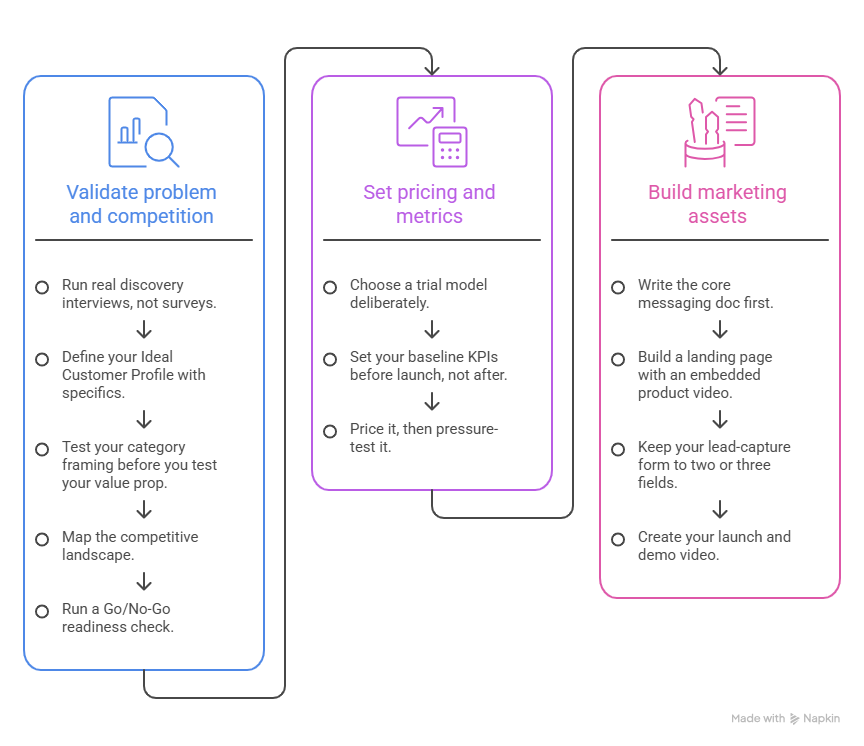
Validate the problem, define your ICP, and check the competition
- Run real discovery interviews, not surveys. Fifteen to twenty conversations with actual prospects, focused on what they've already tried to solve this problem and what they've already spent money on. Surveys collect polite opinions; interviews reveal budget reality. Owner: Product/Founder. Timeline: Weeks 1–2.
- Define your Ideal Customer Profile with specifics, not vibes. Firmographics, tech stack, buying triggers — the more concrete, the faster your messaging converts later. Owner: Product Marketing. Timeline: Week 2.
- Test your category framing before you test your value prop. Interestingly, how you position what you are an "AI agent" vs. a "workflow tool," for instance tends to move conversion more than tweaking your messaging within a fixed category. Worth an early A/B pass if you have any paid traffic to test with. Owner: Product Marketing. Timeline: Weeks 2–3.
- Map the competitive landscape, including who ranks for "[competitor] alternative" searches that's where in-market buyers already are. Owner: Marketing. Timeline: Week 3.
- Run a Go/No-Go readiness check. Score four external factors (market timing, competitive stability, buyer budget, regulatory path) and four internal ones (product stability, sales readiness, marketing assets, support capacity) on a simple 1–5 scale. If your total lands in the bottom third, that's a signal to delay, not push through. Owner: Launch lead. Timeline: Week 4.
Set pricing, packaging, and success metrics
- Choose a trial model deliberately. No-credit-card trials pull in volume but convert a smaller share of it. Requiring a card upfront shrinks signups but tends to convert meaningfully better, since only serious buyers make it through. A middle path asking for a card only once someone hits a real usage threshold is increasingly popular because it captures both worlds fairly well. There's no universally "right" answer here; it depends on your price point and how self-serve your buyer actually is. Owner: Growth/RevOps. Timeline: Week 3.
- Set your baseline KPIs before launch, not after. Activation rate, time-to-first-value, and Day-1 engagement are the three that matter most early on, and they're worth defining precisely (what counts as "activated"?) before you're staring at a dashboard trying to make sense of it retroactively. Owner: Product. Timeline: Week 4.
- Price it, then pressure-test it with a handful of prospects who've already told you they'd buy. Their hesitation at a number is more useful data than a survey ever will be. Owner: Founder/Product Marketing. Timeline: Weeks 4–5.
Build your marketing assets
- Write the core messaging doc first; everything else (landing page, sales deck, email copy) should trace back to it, or you'll end up with three slightly different versions of "what we do" by launch day.
- Build a landing page with an embedded product video. This one's not close: pages with a real demo video reliably outconvert pages without one, and it's often the single highest-impact element on the page. If a page has to carry the whole pitch on its own, a good video does more work than another paragraph of copy ever will.
- Keep your lead-capture form to two or three fields. Every extra field costs you submissions. It's one of the easier wins available, and almost nobody bothers to fix it.
- Create your launch and demo video. This is genuinely one of the easiest boxes to check now that PuppyDog turns a screen recording into a narrated, personalized demo video in about ten minutes, no editing software or production crew required, which matters a lot when this item is competing for time against fifteen others on this list.
For a closer look at building that video specifically, here's a step-by-step walkthrough.
Phase 2: Launch (Go-Live)
This phase is short, usually a week, sometimes just a day, and it's less about creativity and more about not dropping the baton.
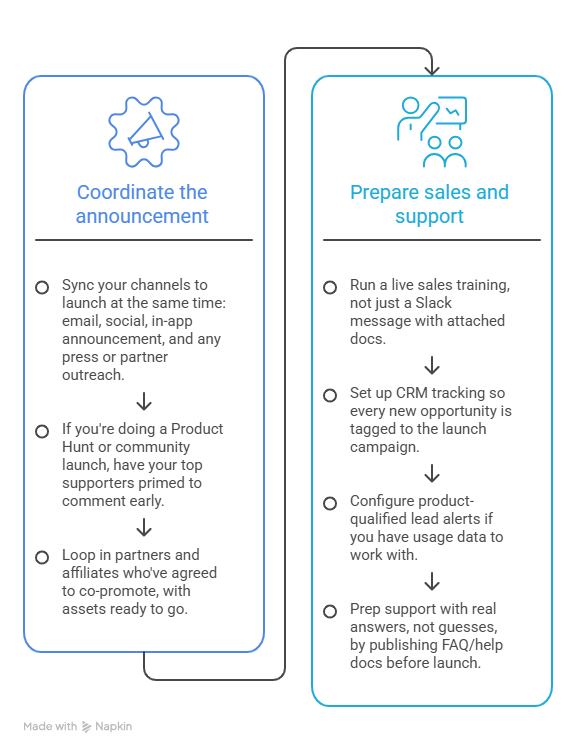
Coordinate the announcement
- Sync your channels to launch at the same time: email, social, in-app announcement, and any press or partner outreach. A staggered rollout where your email goes out a day before your landing page is live looks sloppy and costs you clicks.
- If you're doing a Product Hunt or community launch, have your top supporters primed to comment early. The first hour of momentum matters more than people expect.
- Loop in partners and affiliates who've agreed to co-promote, with assets ready to go rather than a scramble on the day.
Get sales and support genuinely ready, not just informed
This is where most launch checklists get vague, and it's worth being specific: research on sales enablement shows that a large share of launch collateral decks, one-pagers, and win-loss docs never actually gets used by reps within the first month. Handing sales a folder of PDFs isn't enablement. A short live training on messaging and objection handling, backed by two or three sharp battlecards, gets used far more consistently than a thick deck nobody opens.
- Run a live sales training, not just a Slack message with attached docs. Owner: Sales enablement/Product Marketing. Timeline: Launch week, day 1.
- Set up CRM tracking so every new opportunity is tagged to the launch campaign. You'll want this data clean for post-launch reporting, and it's much harder to fix retroactively. Owner: RevOps. Timeline: Before go-live.
- Configure product-qualified lead alerts if you have usage data to work with. Leads who've actually engaged with the product convert at a noticeably higher rate than a cold marketing lead ever will, and sales should know the moment that happens.
- Prep support with real answers, not guesses. Publish FAQ/help docs before launch, staff up for the first 48 hours if you're expecting volume, and set up a fast escalation path to engineering for anything that looks like a bug rather than a question.
Phase 3: Post-Launch (Measure & Iterate)
Here's the part almost every checklist glosses over, probably because "keep watching your metrics for the next six months" doesn't make for a satisfying final bullet point. But this phase is where a mediocre launch either gets fixed or quietly dies.
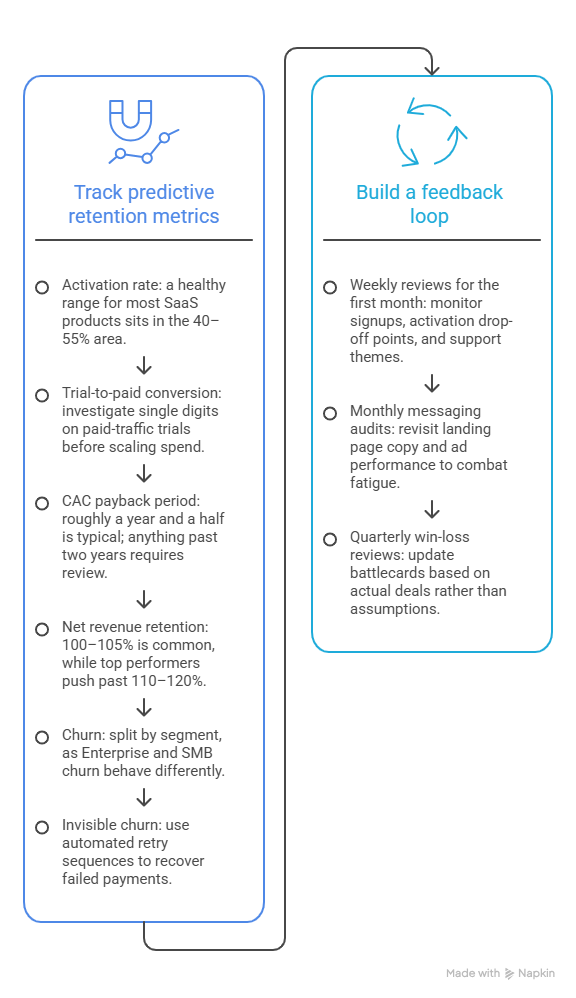
Track the metrics that actually predict retention
- Activation rate. A healthy range for most SaaS products sits somewhere in the 40–55% area, with strong performers well above that. If yours is meaningfully lower, don't wait for churn to tell you why. A low activation number tells you weeks earlier.
- Trial-to-paid conversion. This varies a lot by trial type, but if you're seeing single digits on a paid-traffic trial, that's worth investigating before you scale spend into it.
- CAC payback period. Roughly a year and a half is typical; anything creeping past two years is worth a hard look at your acquisition mix.
- Net revenue retention. Around 100–105% is common; the companies that consistently outperform push well past 110–120%, largely by getting expansion revenue right rather than just plugging churn.
- Churn, split by segment if you can. Enterprise and SMB churn behave very differently, and blending them into one number hides the story.
Worth flagging separately: a meaningful chunk of churn isn't a customer deciding to leave. It's an expired card or a failed payment nobody caught. Automated retry sequences recover a large share of that "invisible" churn, and it's one of the cheaper fixes on this entire list.
Build an actual feedback loop, not a one-time survey
- Weekly reviews for the first month. Signups, activation drop-off points, and early support themes small enough to catch fast, before they compound.
- Monthly messaging audits. Revisit landing page copy and ad performance; what worked at launch tends to fatigue within a few weeks.
- Quarterly win-loss reviews. Update your battlecards based on actual deals, not assumptions made six months ago.
Real Launches, Real Lessons
A checklist is easier to trust when you can see it play out. A few worth knowing:
Figma's Dev Mode launched as a free open beta in 2023 before moving to a paid tier the following year. Releasing it free first let Figma prove the workflow with a whole new audience engineers, not designers before asking anyone to pay for it. That sequencing (prove it, then monetize it) is a pattern worth borrowing even at a much smaller scale.
Notion AI shipped as a native add-on inside Notion's existing product rather than a separate tool. No new account, no context switch just a feature living where people already worked. It's a good reminder that "launch" doesn't always mean "brand-new product"; sometimes the smartest launch is one that removes friction instead of adding a destination.
Quibi, while not SaaS, is the cautionary tale most product teams have at least half-heard: nearly two billion dollars raised, a massive marketing push, and a shutdown within six months. The postmortems mostly land on the same point: nobody had confirmed people would actually pay for what they were building, and by the time that became obvious, the money and the moment were both gone. It's the extreme version of the "no market need" failure mode, and worth remembering the next time pre-launch validation feels like the item you can skip to save a week.
FAQs
What is a product launch checklist?
It's an operational, task-level list of the specific actions and readiness checks a team needs to complete before, during, and after a product goes to market. Unlike a launch plan, it's built for execution, not strategy short, specific, and easy to check off.
What are the stages of a SaaS product launch?
Three, generally: pre-launch (validation, positioning, asset prep), launch day (coordinated go-live across channels), and post-launch (measurement and iteration). Most of the actual work and most of the risk sits in the first and third stages, not the middle one.
What should be included in a SaaS launch?
At minimum: validated positioning, a working pricing model, a landing page with a demo video, sales enablement materials your team will actually use, support readiness, and a plan for tracking activation and retention after go-live.
How do you launch a SaaS product successfully?
Validate the problem with real conversations before you build too much. Get your pricing and trial model deliberate rather than default. Build assets, especially your demo video, that do real persuasive work. Make sure sales and support are trained, not just informed. Then treat the weeks after launch as seriously as the day itself.
How long does a SaaS product launch take?
Pre-launch prep typically runs 6–10 weeks for a solid launch. Launch day itself is short, a few days at most. Post-launch measurement and iteration, if you're doing it right, never really stops.
What's the difference between a launch checklist and a launch plan?
A launch plan is strategic: your positioning, target market, channels, budget, and revenue goals if you haven't built one yet, here's a launch plan template to start from. A checklist is tactical: the specific, checkable tasks: "battlecards sent to sales," "payment webhook tested," "demo video embedded on landing page" that prove the plan is actually being executed.
Ready to Check This Off Your List?
A launch checklist only works if the boxes actually get checked, and if you're staring down "create launch and demo video" wondering how it fits into an already packed six weeks, that's the one item on this list you can genuinely knock out in an afternoon. PuppyDog turns a screen recording into a personalized, narrated demo video without editing software or a production crew- one less handoff to worry about while you're juggling the other nineteen.

Sarah Thompson is a storyteller at heart and Business Developer at PuppyDog.io. She’s passionate about creating meaningful content that connects people with ideas, especially where technology and creativity meet.