A 30-Day Video Content Calendar for SaaS Product Marketing

A video content calendar for SaaS plans a month of product videos around real customer questions, not random ideas. Build it from one library of approved recordings, give each slot a topic, audience, source, channel, and call to action, then review it weekly. You don't need 30 new videos. You need a clear plan for each day.
What belongs in a SaaS video content calendar?
A SaaS video content calendar is a planning grid, not a posting schedule. Each row answers one question: what will we say, to whom, from which recording, and where will it live? If a row can't answer that, it's a wish, not a plan.
Reusable grid
Copy this into a sheet and fill one row per slot.
Which product video content pillars should you use?
Pillars stop a month from turning into random clips. Four cover most SaaS teams, and each answers a different buyer question.
- Feature education: "What does this do?" One capability per video.
- Objections: "Can I trust this?" Security, setup effort, and switching costs, answered head-on.
- Workflows: "How does this fit my day?" Walkthroughs that connect your product to the other tools people use.
- Release news: "What's new?" Updates for current users and stalled prospects.
My take: objections are the pillar most teams skip, and often the most useful. A calm two-minute answer to a hard question can save you a few repeat emails.
How do you handle monthly video planning?
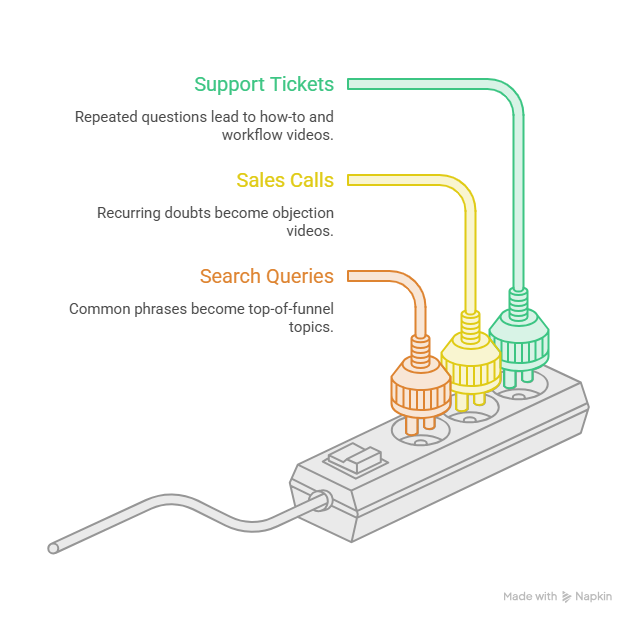
Start with questions, not ideas. Customers are already telling you what to make. Collect it in one place from three sources:
- Support tickets. Repeated how-to questions become feature and workflow videos.
- Sales calls. Doubts that keep coming up become objection videos.
- Search queries. The phrases people type before they know you become top-of-funnel topics.
Then check your release plan. Anything shipping this month earns a slot.
Rank topics by how often they come up and how close they sit to a buying decision. Fill the calendar from the top and stop when the slots run out. I won't hand you a magic posting number. Pace depends on your team and channel, and the FAQ covers it.
How does a video batching workflow reduce repeated work?
A video batching workflow runs on one rule: record once, reuse often. Build a small library of approved source assets, like a screen recording of each major workflow and screenshots of key settings. Every video that month pulls from it.
That skips re-recording the same screens. Each slot still gets its own message: a security video and a setup video can share a screen and say very different things.
Tools can speed up the cutting. PuppyDog turns approved source assets into a product video with a script and narration, so you get professional product videos without a production team. Try it with the AI product video maker.
Every video still needs a human review. Read each script and listen to each narration before anything goes out. Check product names, steps, and claims.
30-day sample calendar (illustrative)
This is a made-up example for an imaginary data pipeline tool. It is illustrative, not a tested result. Four assets feed it: A is a setup recording, B is security settings screenshots, C is an integrations recording, and D is an alerts and dashboards recording. "Updated" means a refreshed version after a release.
Four days are review days, so there are 26 video slots, not 30 videos. Each slot is a short cut from a shared recording, not a new shoot.
How do you build a video distribution calendar?
Treat distribution as its own job. Once a video exists, give it one home and one purpose. The same cut with the same caption everywhere helps nobody.
Keep publishing apart from creation. PuppyDog handles the creation side, including embed code for your site. Scheduling and posting stay in the tools your team already uses, so add a publish date and a publisher to each row.
For the wider funnel, read the related guide. This one stays on the monthly plan.
What should video calendar measurement track?
Pick one outcome per pillar. Total views feel nice, but they don't show whether a video did its job.
I'm leaving out target numbers on purpose. Benchmarks vary by company, channel and length, and a borrowed target misleads. Treat your first month as the baseline.
Watch retention, not just totals. If your viewers leave early, fix the opening first. PuppyDog's analytics show view time and drop-off points, so you can see where that happens.
Each week, mark every slot: keep, rewrite, or replace. Swap replaced ideas for the next question on your list.
FAQs
Does a 30-day calendar require 30 separate videos?
No. In the sample above, four source assets feed 26 video slots, and four days are for review. A slot can be a short cut, a new opening line or the same cut on a new channel. Plan the messages first, then decide how much editing each one needs.
How often should a SaaS team publish product videos?
There is no single right number. Buffer's analysis of more than 2 million LinkedIn posts found that more posts per week brought more impressions per post, with diminishing returns. It didn't look at video on its own, though. Pick a pace you can keep with good quality, then adjust from your own results.
Can I reuse one product recording across the calendar?
Yes, and that's the point of a source library. One workflow recording can support a feature clip, an objection answer, and a release update, as long as each has its own message and a fresh opening. Swap in a new version when the interface changes.
How should feature releases change the calendar?
Give each release one slot and move other slots later if needed. Update the source asset first, so every new video shows the current screen. PuppyDog's site says you can update affected videos in minutes without re-recording, which helps when a release changes a few screens.
Next step
Fill the first week of your video content calendar today. Use three real customer questions and one recording you already trust. Then create your first video from that recording with the AI product video maker, and review the script and narration before it goes anywhere. For a closer look at the process, read about product video creation.

Sarah Thompson is a storyteller at heart and Business Developer at PuppyDog.io. She’s passionate about creating meaningful content that connects people with ideas, especially where technology and creativity meet.