AI Video Hallucinations in Product Marketing: Keep Your Software Demo Accurate

AI video hallucinations are details a video shows or says that don't match your real product, like an invented feature, a wrong button, or a skipped step. You prevent them by tracing every narration line and on-screen action back to an approved source and having a person sign off before the video goes live.
What does AI product video accuracy mean?
A demo can sound right and still show the wrong thing. That's why AI product video accuracy has three layers, and each one fails in its own way.
Three kinds of accuracy
These examples are illustrative. They use a made-up app called Acme Tasks.
- Factual: the narration says reports are free on every plan, but they're Pro only.
- Visual: the video shows a Share button in the top corner, but the latest release moved it into a menu.
- Procedural: the narration says to click Export and pick a format, but an admin has to switch export on first.
When real companies get it wrong
Big companies slip too. Al Jazeera reported that a 2023 promo clip for Google's Bard chatbot gave a wrong answer about the James Webb telescope, and that Alphabet lost more than $100 billion in market value. Futurism reported that the Humane AI Pin launch video named Australia as the place to see the next solar eclipse, and said a handful of almonds has 15 grams of protein.
Those were assistant demos, not UI tours. Still, a public slip costs a lot more than a review pass.
How do AI-generated UI errors happen?
Captured screens versus generated visuals
Start with two kinds of visuals. A captured screen is a real recording or screenshot of your product. A generated visual is something a model draws from patterns it has learned.
Why generated screens go wrong
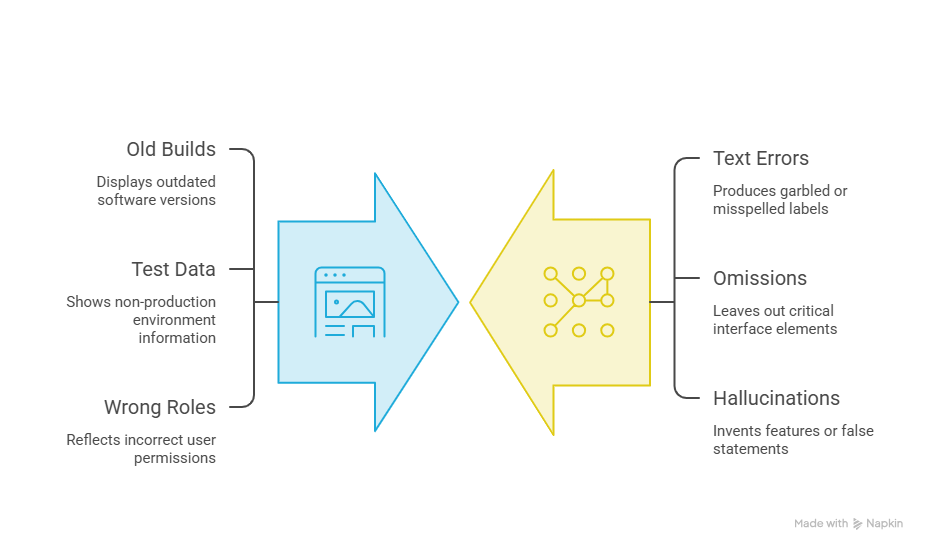
Image generators predict pixels, not interface code. Research on still images lists text misgeneration, omissions, and hallucinations as known problems, which is why a generated button label can come out garbled. I found no source with hallucination rates for video tools, so I won't make up a number.
The script is a risk too. Language models can produce "plausible but false statements," as OpenAI's September 2025 research note puts it. That's how a narration line invents a feature.
Where captured screens fall short
Captured screens aren't spotless either. They can show an old build, test data, or the wrong user role. For a side-by-side look at real UI versus generated visuals, see this Related guide.
How do you perform product claims verification?
Trace every claim to a source
Think of it as a paper trail. Every claim in the script needs a source you can point to.
- Split the script into single claims, one per line.
- Link each claim to released documentation or approved product copy.
- Reject anything planned, in beta, or gated if the video presents it as live.
If you can't point to a doc, the line doesn't ship. A roadmap slide isn't documentation.
Why the FTC cares
This isn't just good manners. The FTC's advertising substantiation policy says advertisers need a reasonable basis for a claim before they publish it. In its 2024 AI sweep, the FTC said DoNotPay never tested whether its chatbot matched a human lawyer. This isn't legal advice, so loop in your legal team on risky claims.
What should software demo fact-checking cover?
Six checks cover the usual trouble spots. Run each one against the live product, not last quarter's slides.
My take: permissions are the sneaky one. Demos are usually recorded by an admin, so everything just works.
How do you run AI video quality assurance?
The accuracy review sheet
Go scene by scene with an accuracy review sheet. It maps each narration line and on-screen action to an approved source, and every row gets an owner and a fix.
This sheet is illustrative, not from a real project.
Separate factual errors from style notes
Now the part people skip. Split factual errors from style notes. A factual error blocks the video. A style note, like loud music, can wait. Mix them, and a debate about taste holds up a sign-off on a fact.
What does an accurate product video workflow look like?
Four steps, in this order
- Gather approved assets: a current screen recording or screenshots, plus the docs and copy behind them.
- Generate: PuppyDog turns those assets into a product video with a drafted script and narration.
- Review: a product reviewer reads the script and narration and checks them against the sheet.
- Correct: fix the flagged lines, update the video, and re-check those scenes.
An illustrative example
This is an example, not a PuppyDog test. The Acme Tasks team records the Reports flow on the latest build and pulls the plan line from the pricing page. PuppyDog drafts the script. The reviewer spots "free on every plan," corrects it, and re-checks scene 3 only.
That's the idea behind the AI product video maker: professional product videos without a production team. The review is the part your team still owns.
FAQs
Can AI invent features that my product does not have?
Yes. Language models can produce plausible but false statements, so a drafted script can describe a feature you never built. Image generators can also draw odd controls, though the research I found covers text in still images. Treat every drafted claim as unverified until you trace it to a source.
Is captured UI safer than generated UI for a software demo?
For visuals, usually, because it shows your real screens. It's not a free pass. Old builds, stale test data, and wrong roles still sneak in. And real pixels can't fix a wrong narration line.
Who should verify AI-generated product claims?
Someone who knows the product. A product manager or technical reviewer checks features and steps, and marketing owns the wording. Add legal or compliance for claims about performance, security, or comparisons. Marketing shouldn't sign off on capability claims alone.
How do I fix an inaccurate scene without changing the whole story?
Fix it at the source. Correct that scene's script line or swap its asset, update the video, then re-check that scene and the ones beside it. Leave approved scenes alone, and note the change on your sheet.
Next step: create a first video and check it for AI video hallucinations
Pick one short flow from your product. Gather the approved recording or screenshots and the docs behind them, build a small review sheet, then create your first video with product video creation from PuppyDog. Check it scene by scene before it goes anywhere.

Sarah Thompson is a storyteller at heart and Business Developer at PuppyDog.io. She’s passionate about creating meaningful content that connects people with ideas, especially where technology and creativity meet.