Video Marketing Experiment: Test a SaaS Product Video Against a Static Screenshot


A fair video marketing experiment changes one thing: the medium. Show the same message, offer, and page to the same audience, once with a product video and once with a static screenshot. Pick one primary metric like signups, set guardrails for speed and mobile, and judge results with confidence intervals, not raw percentages.
What should a video vs static test compare?
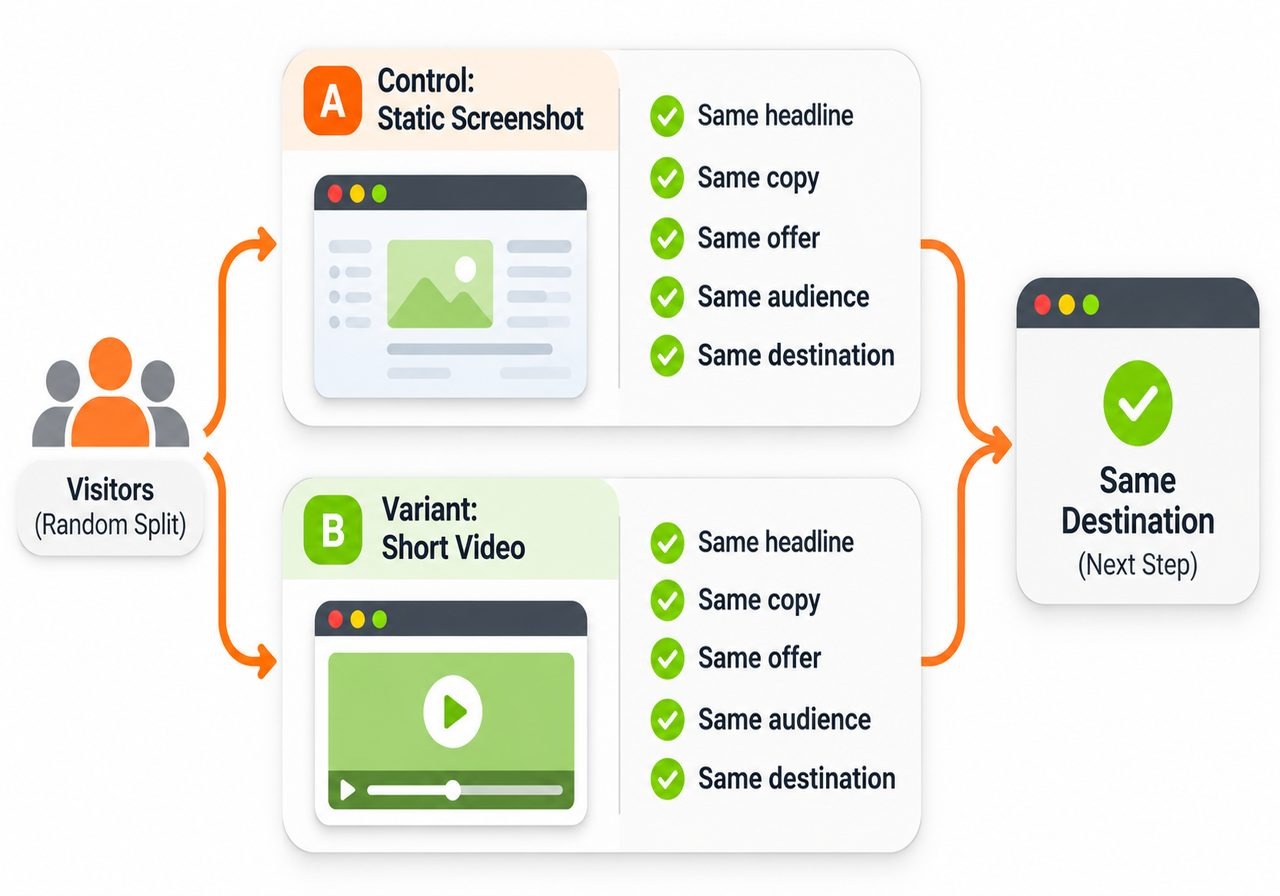
Compare the medium and nothing else. Both versions get the same headline, copy, offer, audience, and destination. The control shows a static screenshot of the feature. The variant shows a short video of that same feature.
Think of a soda taste test. If one cup is also colder and comes in a fancier glass, you learned nothing about the soda. The same goes for a video marketing experiment: if the video also carries a sharper pitch or a new offer, you cannot tell which change moved the numbers.
Split visitors at random, and balance devices across both groups if mobile and desktop behave differently. Send both versions to the same next step. Want to test copy or offers instead? Our Related guide covers that.
How do you write a video experiment hypothesis?
Name one behavior and say why video could change it. A solid video experiment hypothesis has four parts: what you observed, the change you are making, what you expect to happen, and the metric that should move.
Here is an illustrative one. We observed that visitors read the pricing page but leave before the signup form. By swapping the static screenshot for a 60-second walkthrough, we expect more people to understand setup before they decide. That should lift trial starts.
Then list your assumptions. Maybe you assume people will press play. Maybe you assume motion explains the product faster than a screenshot with the same copy. Write these down now. If the test fails, they tell you where to look.
How do you choose a video test primary metric?
Pick a downstream action tied to the page goal, like trial starts, demo requests, or completed signups, counted per visitor who saw the page. Use the same metric for both versions.
Skip plays and watch time as the main metric. They exist only in the video version, so there is nothing to compare. Someone can watch the whole video and still not sign up. Use them as clues that explain the result.
One tracking note. Google Analytics 4 can record video_start, video_progress, and video_complete, but its Help page describes this for embedded YouTube videos with the JavaScript API on. For other players, use your player's analytics or send custom events.
What belongs in video test setup?
Start with the tools you already have. Your testing tool splits traffic at random and counts each visitor once, when they first see a version. PuppyDog's job is the video, not the split.
Plan sample size before launch. Use a calculator with your baseline conversion rate, the smallest lift worth detecting, 95% significance and at least 80% power. Lower baselines need much more traffic, so a quiet page may never give a clear answer.
Now the video. Your team approves the source screenshots or screen recording. The AI product video maker drafts the script and voiceover, and someone on your team reads the script before launch. That is how a small team gets a professional product video without a production team.
Test brief template
Which video experiment guardrails should you monitor?
Guardrails are the things you do not want to hurt while chasing a lift. Watch four.
- Page speed. Google's video performance guide says a video's first frame can count as an LCP candidate, and autoplay videos download right away, even off screen. Google rates LCP of 2.5 seconds or less as good. A poster image and preload="none" help for click-to-play video.
- Mobile experience. Skip unmuted autoplay and keep the layout from jumping. WCAG asks for a way to pause or stop moving content that starts on its own and lasts over five seconds.
- Task completion. Track form_start to form_submit to see if the video pulled people away from the form.
- Other changes. Log promotions, releases and other tests on the same page, since they can blur the result.
Set a stop rule for each one before launch.
How do you handle video test interpretation?
Never call a winner from raw percentages alone. Check the 95% confidence interval, which shows the range of plausible effects, then ask if the lift is big enough to matter. A +0.2 point gain can be real and still not worth the work if you needed +1 point.
A wide interval that crosses zero does not mean video does nothing. It usually means you did not have enough data.
These three examples are illustrative. The numbers are made up.
Finally, split results by device and channel. A desktop win can hide a mobile loss.
FAQs
Should I test video against a screenshot or no visual?
Test against a screenshot. Video against no visual changes two things at once, the visual proof and the motion, so you cannot tell which one helped. A screenshot keeps visual context in both versions.
Can a video with more views still produce fewer signups?
Yes. Views measure attention, not buying intent. A video can pull eyes away from the form or slow the page on mobile. See the first example above, where plays looked healthy, and signups still fell.
How long should a video experiment run?
Run at least one full business cycle, which is seven days, and keep going until you reach the sample size you planned. Peeking early raises false positives, so stop early only for a guardrail you set in advance.
What should I do if the test result is inconclusive?
Do not call it a tie, and do not claim video does nothing. A wide interval means you lacked data, so run longer or use a busier page. A tight interval near zero means the lift is likely too small to matter. Either way, check video_progress drop-offs and segment by device.
Next step
Start small. Pick one page with steady traffic, fill in the test brief above, and set your stop rules. Then use Product video creation to turn your approved screenshots or screen recording into a narrated video, review the script, and launch the split in your testing tool. One clean pilot teaches more than five messy ones.

Sarah Thompson is a storyteller at heart and Business Developer at PuppyDog.io. She’s passionate about creating meaningful content that connects people with ideas, especially where technology and creativity meet.


