How To Make A Product Demo Video In 10 Minutes (No Editing, No Crew)

Publiished : 25 August 2026
Somewhere in your company right now, a feature is finished, tested, and ready to ship, and the video that's supposed to explain it is still stuck in a queue. Maybe it's waiting on an agency. Maybe it's waiting on whoever on your team happens to know Premiere. Either way, engineering hit "deploy" weeks ago, and marketing is still catching up.
That gap is the whole problem with product demo videos as they've traditionally been made. And it's exactly what the new PuppyDog was built to close.
We just shipped an update that lets you go from screen recording to a fully narrated, edited, personalized demo video in about 10 minutes. No editing software. No production crew. No three-week wait for an agency to send you a first draft you'll probably ask them to redo anyway.
But rather than just tell you about the launch, let's actually answer the question that brought most of you here: how do you make a product demo video, fast, without a team of specialists? Here's the real breakdown of what a demo video actually needs to do, why the old production methods can't keep up with modern software teams, and the exact steps to get one done before your coffee goes cold.
What a Product Demo Video Is (and Why It Beats a Static Demo)
A product demo video is a recorded, narrated walkthrough that shows your software actually working real interface, real clicks, real outcomes instead of describing it in bullet points on a landing page. Think of it as the difference between a friend telling you how a restaurant's food tastes and just handing you a fork.
It's not a brand video. Brand and launch videos sell a vision. A demo video sells a mechanism: this button does this, this workflow solves that headache, here's what it looks like thirty seconds after you log in. It's also not a live sales call. It works while you sleep, answering the same questions a rep would, minus the calendar-scheduling back-and-forth.
And buyers clearly prefer it that way. Industry research consistently shows that a large majority of B2B software buyers now do most of their evaluation on their own, before ever talking to sales, and they'd rather watch a short video than read a product page. When you don't give them one, you're making them work harder to understand you. You're giving them a very easy reason to move on to a competitor who did.
Video also just performs better where it counts. Landing pages with video tend to convert meaningfully higher than those without, and viewers retain far more of what they see and hear compared to what they read. Text is fine for reference. It's a poor substitute for watching a product actually do the thing you need it to do.
The Old Way vs. the 10-Minute Way
If you've tried to get a demo video made before, you've probably run into one of four options, and each one comes with a catch.
Agencies:
Hiring a video production agency gets you polish: professional voiceover, motion graphics, tight editing. What it doesn't get you is speed. Expect a multi-week turnaround (commonly three to six weeks) and a budget that starts in the low five figures per finished video. By the time it's delivered, there's a decent chance your UI has already changed.
DIY editors:
Tools like Camtasia, Premiere, and Descript put you in the driver's seat, which is great, until you realize the seat comes with 8 to 20 hours of manual work per video. Screen recording, cursor cleanup, timeline trimming, audio leveling. It's a real skill, and most product marketers didn't sign up to learn it on top of everything else on their plate.
Interactive product tours:
Platforms like Arcade, Storylane, and Navattic let visitors click through a simulated version of your product themselves. They're genuinely useful for certain top-of-funnel moments, but they shift the narrative work onto the buyer. Instead of watching a story unfold, the viewer has to actively hunt for value, and a lot of them won't bother, especially on mobile or during a quick, passive scroll.
AI avatar tools:
HeyGen and Synthesia can generate a talking-head presenter from a script in minutes, which sounds like exactly what you want, until you notice the avatar has never actually seen your product. It can talk about your software. It can't show it. You still need someone to build the actual screen capture and stitch it together.
The 10-minute way:
This is where PuppyDog is different. Instead of choosing between speed and quality, or between narration and real UI, you give it your actual screen recording, and it writes the script, generates the narration, and edits the video around what your product genuinely does. Nobody's guessing what your interface looks like. It already knows, because it watched.
How to Make a Product Demo Video in 10 Minutes (Step by Step)
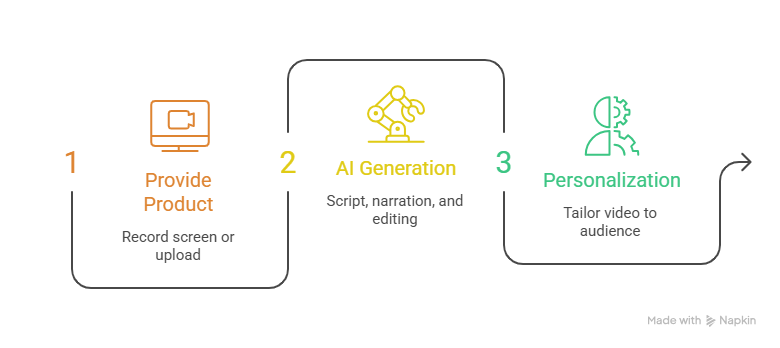
Here's the literal process, start to finish.
Step 1: Provide your product.
Record your screen using PuppyDog's Chrome extension, upload an existing screen recording, or simply hand over a product URL and a few screenshots. There's no special setup. If you can click through your own product, you've already done the hard part.
Step 2: PuppyDog writes the script, narrates, and edits.
This is where most of the "work" of video production disappears. PuppyDog's AI analyzes what's on screen, maps out the key workflows and features, and writes a demo script built around them. It then generates natural narration, syncs it to your cursor movements and screen transitions, and assembles the whole thing into a finished, watchable video. No timeline, no manual cuts, no waiting on a freelancer's calendar.
Step 3: Personalize one video into many, by audience.
This is the step that traditional production simply can't touch at scale. Rather than sending every prospect the same generic walkthrough, you can generate variations tailored to different roles, industries, or pain points automatically, from the same source material. A healthcare buyer and a finance buyer can watch two different videos that both happen to be about the exact same product.
Ten minutes, one screen recording, and you've got something an agency would've charged you thousands for and made you wait weeks to see.
How to Keep the Video Accurate When Your Product Changes
Every demo video eventually faces the same enemy: your own product roadmap. Ship a redesigned dashboard, and suddenly last quarter's "polished" demo video is showing prospects a UI that no longer exists. Marketers even have a name for this product video debt. The slow pile-up of outdated collateral nobody has time to fix.
This is arguably the biggest structural flaw in traditional demo production. Engineering teams ship on a weekly or biweekly cadence. Video production, done the old way, moves on a multi-week cycle. Marketing is permanently playing catch-up.
Because PuppyDog generates video directly from a fresh screen capture rather than a pre-built clone or template, refreshing a demo is as simple as recording the current version of your product again and regenerating. There's no clone environment to rebuild, no agency change order to file. You can genuinely ship the demo video the same day engineering ships the release, which, if you've ever sat through a launch retro asking "why doesn't the video match the product yet," is a bigger deal than it sounds.
Product Demo Video Examples & What Makes Them Convert
The best product demo videos share a pretty consistent shape, whether they're from a five-person startup or a company you've definitely heard of.
- Livestorm opens its demo by immediately laying out an agenda and getting into real product interaction within the first two minutes no long preamble, no logo animation you have to sit through.
- Mixpanel structures its walkthrough around a specific, relatable analytics bottleneck, then shows exactly how the product resolves it, with chapter markers so viewers can jump to what they care about.
- ClickUp takes a segmented approach, producing different demo videos for different personas and use cases rather than one video trying to be everything to everyone.
Strip away the specifics, and you get a pattern worth stealing:
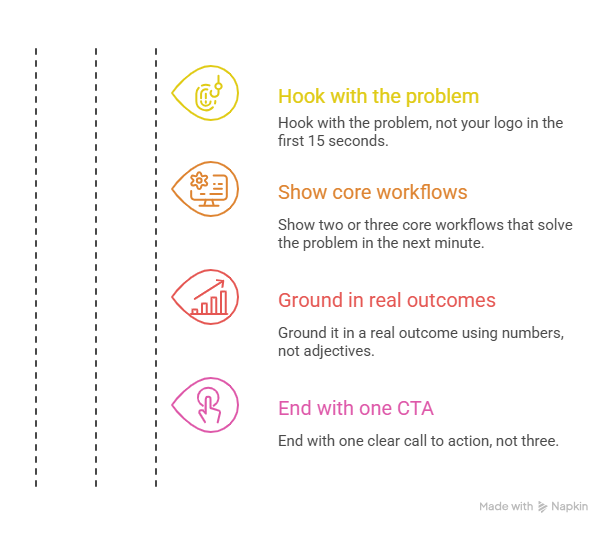
- Hook with the problem, not your logo (first 15 seconds). Nobody clicked play to watch a brand intro.
- Show two or three core workflows that solve that problem (next minute). Screen movement should match the narration. Show, don't just tell.
- Ground it in a real outcome. Hours saved, errors reduced, revenue moved. Numbers, not adjectives.
- End with one clear call to action. Not three. One.
A few production details matter more than people expect: narration around 130–150 words per minute reads as natural rather than rushed, background music should sit well under the voiceover, and captions are non-negotiable. A large share of video today gets watched with the sound off, and a demo that only works with audio on is a demo that's losing viewers before it finishes buffering.
Try It: Make Your First Product Demo Video Free
You don't need to take our word for any of this. PuppyDog offers a free trial with no credit card required, so you can record something you're proud of, hand it a screen capture, and see the finished video for yourself before you commit to anything.
For what it's worth, PuppyDog was co-founded by Fahad Aziz and Omar Javed, and backed early on by Andrew Ng's AI Fund, the same venture studio whose portfolio companies have gone on to raise from firms like Sequoia and NEA. Customers using the platform have generated millions in qualified pipeline from personalized demo videos alone, including SaaS teams in healthcare and other regulated industries that also need to keep an eye on data security. (PuppyDog maintains SOC 2 compliance, for what that's worth to your security review.)
None of that matters much if the product doesn't actually save you time, though, so the honest pitch is simpler: give it your product, and see what it builds in the time it takes to read one more email.
Start free, no credit card required.
Frequently Asked Questions
What is a product demo video?
A product demo video is a recorded, narrated walkthrough of a piece of software showing the real interface and real workflows designed to help a prospective buyer understand how the product actually works without needing a live sales call.
How long should a product demo video be?
It depends on where the viewer is in their buying journey. For top-of-funnel landing pages, aim for 60 to 90 seconds, short enough that people actually finish it. For a deeper technical evaluation, 3 to 5 minutes gives you room to walk through more complex workflows without losing the viewer's attention. Videos that stretch past 15–20 minutes tend to lose the vast majority of their audience before the end.
How do you make a product demo video without editing skills?
Traditionally, you couldn't. Editing skills were the bottleneck. AI platforms like PuppyDog remove that requirement entirely: you provide a screen recording or product URL, and the platform handles scripting, narration, and editing automatically. No timeline software, no cursor-smoothing, no audio mixing.
Can AI make a demo video from a screen recording?
Yes. PuppyDog is built specifically around this workflow. It analyzes your screen capture, identifies the key features and workflows shown, writes a script around them, and generates synced narration and editing automatically.
How much does a product demo video cost?
It varies widely by method. Agency production typically runs from the low thousands into the tens of thousands of dollars per video, plus several weeks of turnaround. DIY editing tools cost relatively little in software fees but demand 8 to 20 hours of internal labor per video. AI-automated platforms like PuppyDog run on a predictable monthly subscription, with a free trial available to test the workflow before you commit to a plan.
What's the difference between a demo video and a product launch video?
A product launch video is a broader marketing asset meant to build excitement and awareness around a new release, with more brand story than a user manual. A product demo video is narrower and more functional: it walks through specific features and workflows so a buyer can evaluate whether the product actually does what they need. (If you're planning both around a release, our product launch video guide covers how to sequence them together.)
Conclusion
Shipping a demo video shouldn't be the thing standing between your product and the people who need to see it. Whether you're launching a brand-new feature or just tired of watching good releases go unexplained for weeks, the fastest fix is usually the simplest one: record it, hand it off, and let the video build itself.
Publish your first product demo video in under 10 minutes. Start free. No credit card required.
For teams planning a full release around a new feature, check out our SaaS launch checklist. The demo video is one line item, but it's the one prospects actually watch.

Sarah Thompson is a storyteller at heart and Business Developer at PuppyDog.io. She’s passionate about creating meaningful content that connects people with ideas, especially where technology and creativity meet.