How to Create a Product Hunt Video from a SaaS Walkthrough


To create a Product Hunt video from a SaaS walkthrough, pick one workflow, cut it down to the part that shows the problem and the result, write a short script around it, and match each line to a real screen. Then upload it to YouTube and paste the full link into your launch.
What should a Product Hunt launch video explain?
A Product Hunt launch video should answer three questions fast. What's the problem? What's the product? What does it look like when it works? Visitors skim, so you get a few seconds to earn the rest.
First, the rules. Video is optional. About 53% of products that reached Product of the Day since 2021 included one, according to Product Hunt's launch guide. It helps, but nobody requires it.
Product Hunt doesn't host video. It supports YouTube links only; the video can't be private, and you need the full URL because shortened links won't load. Upload early, too. Product Hunt's help page says a new upload may need about 12 hours before the link works.
The video isn't the whole page either. The gallery needs at least two images, and your first comment tells the story. So let the video do one job: show the product.
How do you write a Product Hunt video script?
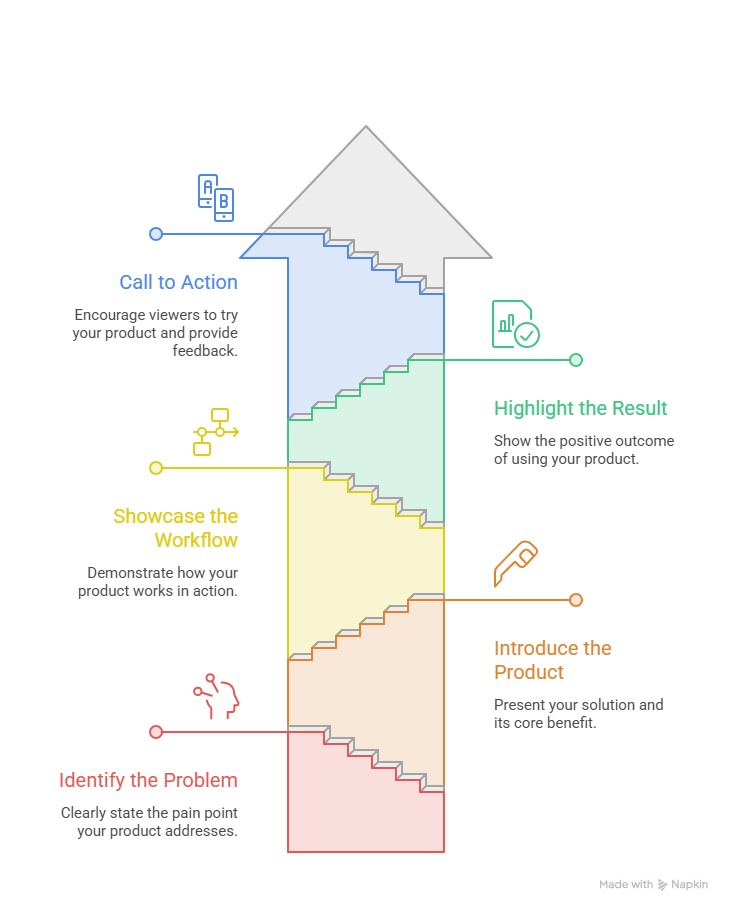
Keep the script to three parts: the problem, the visible workflow and one next step. If you're tempted to add your company history, save it for the first comment.
The hook matters most. For the example below, mine is "Stop rebuilding the Friday status report by hand." It names a pain people know, and it doesn't wait for a logo animation.
Here's a script for BriefBoard, a made-up tool. It's illustrative, not a tested result.
Illustrative script
- Problem: "Every Friday, someone rebuilds the weekly status report by hand."
- Product: "BriefBoard turns your project tickets into a report you can send."
- Workflow: "Pick a project and a date range. BriefBoard groups finished work by theme."
- Result: "Here's the report, ready to review."
- Next step: "Try it on one of your own projects and tell us what's missing."
Product Hunt doesn't set a video length, so don't pad it. Read the script out loud. If you run out of breath, cut a line.
Want a general script template? This Related guide on how to make a product launch video covers formats and a skeleton. This post stays on Product Hunt.
How do you build a SaaS launch storyboard?
A storyboard is your script with pictures. Write the script, split it into scenes, and put the matching visual next to each line. Adobe's storyboard guide describes the same method.
Here's the BriefBoard storyboard. It's illustrative too.
Illustrative storyboard
My rule: when the narration makes a claim, show the real product doing it. If the voice says "groups work by theme," the viewer should watch that happen. A pretty animation can't prove it.
Which Product Hunt demo footage should you use?
Use one workflow, recorded in a clean account. Pick the one that reaches the "oh, nice" moment fastest. Everything else belongs in the gallery or your first comment.
Set up before you hit record:
- Use realistic sample data, never real customer names or emails.
- Turn off notifications and close unrelated tabs.
- Show only what people can use today.
Got a long sales recording? Treat it as raw footage, not a finished video. Cut the small talk, the "ums," the slow loading screens, the unreleased features, and the side questions. What's left is often the single workflow you needed.
How do you use AI launch video creation without a production team?
You can start from what you already have, like a screen recording or a few screenshots. PuppyDog's public pages describe the flow: upload the recording or screenshots, let the AI write a script, add a voiceover or avatar, then edit the script and voiceover. For long recordings, its Highlights feature trims a video to a target length.
That's how a small team gets professional product videos without a production team. I haven't tested these steps myself, so I'm describing what PuppyDog says, not reporting results. I won't promise a speed either.
Your job is the review. Read the script against the real product, fix feature names, and delete any line about something that isn't live yet.
The Product Hunt part stays manual. Export the video, upload it to YouTube, set it to public and paste the full link. PuppyDog's pages don't say it posts to YouTube or Product Hunt for you.
To start, try the AI product video maker.
What should the Product Hunt video CTA ask viewers to do?
Ask for a try and for feedback. Don't ask for upvotes. Product Hunt's help center says asking or incentivizing upvotes may drop a product in the ranks or remove it from the homepage.
Here's the difference, using BriefBoard again:
- Skip: "Upvote us on Product Hunt!"
- Use: "Try BriefBoard on one of your projects and tell us what's missing."
The second one works because it's a single, easy action that invites a comment.
Match the CTA to the link you submit. Product Hunt wants a direct link to your product page, and it doesn't accept shortened or UTM-tracked links. A focused landing page with one clear CTA is its advice, and I'd follow it. Skip any promise about results you can't prove.
FAQs
Do I need a professional shoot for a Product Hunt video?
No. Product Hunt itself suggests a quick demo if you don't have the budget for a high-end video. Show the product working and keep it clear.
Can I reuse an existing SaaS walkthrough?
Yes, once you cut it down. Pick one workflow, drop the small talk, and rewrite the narration as a short script. Don't paste a full sales call and hope.
Should the video explain every feature?
No. One workflow is plenty. Product Hunt's guide suggests listing key features in your first comment, so the extras have a home.
How is a Product Hunt video different from a sales demo?
A sales demo speaks to one buyer who's already evaluating. A Product Hunt video speaks to a curious crowd, so it's shorter and ends with a feedback ask, not a pitch.
Next step: make your launch video
Ready to turn your walkthrough into a Product Hunt video? Start with PuppyDog's product video creation using a short recording of one workflow, then review the script before you export.

Sarah Thompson is a storyteller at heart and Business Developer at PuppyDog.io. She’s passionate about creating meaningful content that connects people with ideas, especially where technology and creativity meet.