How to Create a Feature Announcement Video That Explains What Changed


A feature announcement video explains one shipped change to people who already use your product. Keep it short, show the old action and the new one, say who can use it, and end with one step to try it. Record from the live product so what viewers see matches what they get.
What should a SaaS feature announcement explain?
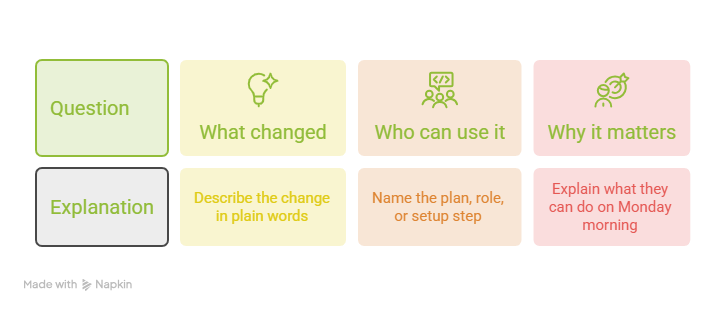
A SaaS feature announcement should answer three questions fast: what changed, who can use it, and why it matters.
Start with the change in plain words. "You can now edit due dates for many tasks at once" beats "We shipped a batch update module." Nobody cares how you built it. They care what they can do on Monday morning.
Next, say who gets it. Name the plan, the role, or the setup step, so nobody hunts for a button that isn't there yet.
Announce only what has shipped. A video for a feature still in testing creates support tickets and awkward replies. If it isn't live, wait.
Linear's public changelog shows the habit: entries state the plan up front, such as Business and Enterprise plans, then explain the feature.
How do you write a feature announcement script?
Use four beats: problem, changed action, visible outcome, and next step. Give each beat a sentence or two. Skip the "Hi, welcome to our update" opener, because honestly, it's the fastest way to lose a viewer.
Example
Here is a filled-in script for a made-up project app called Taskly.
That is about 60 words, so it fits well under a minute of narration. Wistia reports a 52% average engagement rate for videos under one minute, meaning viewers watch about half. Short wins.
How do you structure a before and after product video?
Show only the steps that changed. A before and after product video is not a product tour.
Record every clip from the live product. Staging screens, old layouts, and test data confuse people when their own account looks different. Before you export, check each capture against the version your users have today.
Before-and-after example
This uses the made-up Taskly feature from the script.
I'd give the old way 5 to 10 seconds. After that, the video belongs to the new way.
PuppyDog fits this step well. You upload your approved screen recording or screenshots, and it builds a product video with a script and narration that you review before sharing. That means professional product videos without a production team, and when the feature changes again, you update the video instead of starting over.
What feature availability messaging belongs in the video?
Say who can use the feature in one clear sentence, ideally in the first half of the video. Cover four things: plan, role, prerequisites, and platform, such as web or mobile.
Use approved product facts only. Your product manager or release notes are the source, not your best guess. If you aren't sure whether every plan gets the feature, ask before you write "all users."
Here are sample lines for the made-up Taskly feature:
- "Available on Business and Enterprise plans."
- "Workspace admins turn it on in Settings first."
- "Rolling out on web today. Mobile comes later."
If only some customers can use it, send the video only to them. Showing it to everyone else just earns you "where is it?" tickets. Put the same availability line in the text next to the video, too.
Where should feature announcement distribution happen?
Post where the affected users already are. For existing customers, that usually means inside the product, in email, in release notes, and in the help center.
Posting is a team task. Someone on your team picks the channels, sends the messages, and briefs Support and Customer Success before anything goes out, so they can answer questions. PuppyDog gives you the finished video, and your team decides where it goes.
Which feature adoption video metrics should you measure?
Track three things in order: who saw the video, how much they watched, and who then used the feature.
- Exposure: how many users saw or opened the video.
- Video engagement: plays, watch time, and where viewers drop off. PuppyDog shows view time and drop-off points.
- Feature use: first use and repeat use, taken from your own product analytics.
Pick your time windows before launch, such as first use within 7 days and repeat use within 30 days. Those are examples, so match them to how often your users log in.
If viewers use the feature more than non-viewers, the video may not be the reason. Your most engaged users tend to watch videos and try new things anyway.
For a fair test, hold back a small random group that doesn't get the video, then compare the two groups. Some analytics tools can also match adopters with non-adopters statistically. Mixpanel's Impact report, for example, uses propensity score methods and reports an average treatment effect with a 95% confidence interval. Without a comparison like that, call your result a link, not proof.
FAQs
How is a feature announcement different from a launch video?
A launch video introduces something big to a wide audience, including people who don't use your product yet. A feature announcement video talks to current users about one change in a workflow they already know.
Should I explain the old workflow as well as the new one?
Yes, but keep it short. Five to ten seconds on the old way sets up the problem, and the rest of the video belongs to the new way. If the feature is brand new and has no old workflow, skip the "before" and start with the problem.
What if only some customers can access the feature?
Send the video only to the customers who have access, and say who they are in the first lines. In public places like release notes, put the plan or role right at the top. For everyone else, share only the availability details your team has approved.
How do I measure whether users tried the feature after watching?
Track a feature event in your product analytics, such as first use within 7 days of watching. Match it to the people who saw the video. To show the video helped, compare against a group that didn't get it, since viewers may have tried the feature anyway.
Next step
Ready to create a feature announcement video? Pick one feature you shipped this month, then use PuppyDog, an AI product video maker, to try product video creation with your approved screen recording. Review the script and narration, then share the finished video with the customers who can use the feature.
Planning a bigger release instead? Read the Related guide on automating product launch videos.

Sarah Thompson is a storyteller at heart and Business Developer at PuppyDog.io. She’s passionate about creating meaningful content that connects people with ideas, especially where technology and creativity meet.