Top 16 AI Video Generators in 2026( Tested)


Video used to be the “big production” task on the marketing to-do list. You needed scripts, editors, voiceovers, revisions, and, let’s be honest, a lot of patience. Now? AI video generators are flipping that entire process on its head. What once took weeks can often be done in an afternoon, sometimes before your coffee even gets cold.
In 2026, AI video generators aren’t just experimental tools for early adopters. They’ve become practical, everyday software for marketers, product teams, educators, founders, and creators who simply need videos that work. Whether it’s product walkthrough videos, explainer videos, training content, or flashy promotional clips, AI is now deeply baked into how modern teams create visual content at scale.
But here’s the catch. Not all AI video tools are built the same. Some are brilliant at turning scripts into animated explainers. Others shine when creating realistic avatar presenters. A few focus on transforming screen recordings into polished product demos. And then there are the cinematic text-to-video generators trying to blur the line between AI and traditional filmmaking.
So the real question isn’t “Should we use video creation with AI?” That part’s already answered for most teams. The smarter question is: Which AI-powered video generator actually fits the kind of videos you need to make?
That’s exactly what this guide will help you figure out. We’ll break down the best AI video generators by use case, compare strengths and limitations, and help you choose a tool that matches your workflow, not just the hype.
What to Look for in an AI Video Generator
Choosing between today’s AI video generators can feel a bit like shopping for a phone; they all claim to do everything, but the experience is wildly different once you start using them. The right tool depends less on flashy demos and more on how well it fits your team’s actual workflow. Before committing to any platform, it helps to know what truly matters behind the marketing claims.
Here are the key factors smart teams evaluate before picking an AI video tool.
1. Video Quality and Visual Consistency
This is the big one. No one wants a product demo where buttons shift around or an explainer where characters randomly change appearance between scenes. Strong AI-powered video generators maintain visual consistency across frames, especially in scenes with motion, text overlays, or user interfaces.
For marketing and product videos, clarity matters more than cinematic drama. Your UI, text, and branding need to stay sharp and readable, not “artistically interpreted” by the AI.
2. Ease of Use (Because Your Team Is Busy)
Some video generator tools feel like editing software disguised as AI. Others are genuinely simple: paste a script, upload a screen recording, choose a style, and export. The difference shows up fast when deadlines are tight.
Look for tools that:
- Use guided workflows instead of blank timelines
- Offer templates for common formats like explainer videos or instructional videos
- Minimize manual scene-by-scene editing
If a tool requires a full-time editor to operate, it defeats half the purpose of using AI.
3. Script-to-Video and Automation Features
Modern video creation with AI often starts from text. Whether it’s a blog post, product script, or help center article, strong platforms can automatically turn written content into structured scenes with visuals, captions, and voiceovers.
The more automation a tool offers, the easier it becomes to scale. This is especially important for teams producing:
- Large volumes of product walkthrough videos
- Training libraries
- Ongoing feature update videos
4. Voiceovers, Avatars, and Lip Sync
AI voice quality has improved a lot, but not all tools are equal. Some still sound robotic, while others are surprisingly natural. If your videos rely on narration, test how flexible the voices are in tone, pacing, and language support.
For avatar-style videos, pay attention to lip sync accuracy and facial expressions. Slight mismatches between speech and movement can make a video feel awkward, even if viewers can’t immediately explain why.
5. Customization and Brand Control
Templates are helpful, but brand consistency is critical. The best AI video generators let you control fonts, colors, logos, and layouts so every video looks like it came from your company — not a generic template library.
At a minimum, you should be able to:
- Apply brand colors and typography
- Add logos and watermarks
- Maintain consistent intro and outro styles
This becomes especially important when multiple teams are creating videos across marketing, sales, and support.
6. Support for Different Video Types
Some AI video tools specialize in animated explainers. Others focus on realistic text-to-video outputs or talking-head avatars. Few are equally strong across all formats.
Before choosing, ask:
- Do we mainly need product walkthrough videos or marketing promos?
- Are we creating internal instructional videos or public-facing content?
- Do we need cinematic visuals or clear, informative visuals?
Matching the tool to the primary use case will give you better results than chasing the platform with the longest feature list.
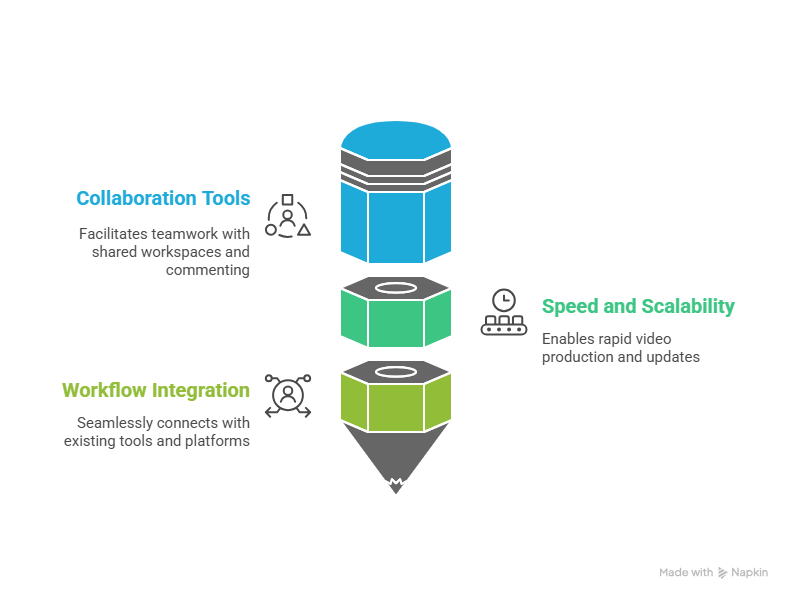
7. Collaboration and Team Features
Video is rarely a solo effort. Marketers, product managers, and sales teams often need to review and update content together. Look for features like shared workspaces, commenting, version control, and easy duplication of videos for localization or personalization.
These features turn AI video generators from one-off tools into scalable team platforms.
8. Speed and Scalability
One of the biggest promises of AI-powered video generators is speed. But speed isn’t just about render time. It’s about how quickly you can go from idea to published video.
Platforms that support bulk creation, easy editing of existing videos, and quick updates (like swapping screenshots or scripts) are far more valuable in the long run than tools that only produce impressive one-off clips.
9. Integration With Your Existing Workflow
Finally, consider how the tool fits into what you already use. Can you upload screen recordings easily? Does it work well with your knowledge base, LMS, or marketing tools? Can you export in formats suitable for social, web, and in-app use?
The best AI video generator comparison isn’t about which tool has the most features. It’s about which one removes friction from your current process and helps your team produce better videos, more consistently.
When you evaluate AI video generators through this practical lens, the decision becomes much clearer and a lot less influenced by hype.
The Best AI Video Generators at a Glance: Top 16
Below is a curated view of the most impactful AI video tools shaping 2026. These platforms stretch from highly specialized engines for cinematic text-to-video generation to practical, workflow-focused tools built for product teams and marketers. I’ve placed Puppydog.io at the top, reflecting its product-demo specialization and growing usage in product and sales workflows.
Top 16 AI Video Generators: Overview Table
Here’s a quick comparison to help you see where each tool fits at a high level before we get into use-case breakdowns:
Note: Some pricing and specific resolution figures can vary by plan, region, or recent updates. Always check official websites for real-time details.
Why This List Matters
In 2026, the AI video landscape isn’t dominated by a single swiss-army-knife tool. Instead, there are distinct strengths:
- Workflow-centric tools that automate repetitive tasks, such as Puppydog.io and Visla.
- Creative engines like Runway, Veo, and OpenAI Sora for high-impact visuals.
- Specialized formats like avatars, instructional interactions, and text-to-video outputs.
Understanding where a platform excels helps avoid the common trap of choosing tools solely based on brand recognition or hype, which often leads to mismatched expectations.
Instead, think tentatively in terms of what you’re trying to produce, and let that guide you. That’s what the next sections break down in detail.
AI Video Generators for Product Walkthroughs
When you’re trying to show how your product actually works, not just talk about it, you need a video that walks viewers through features clearly, step by step. Product walkthroughs can make or break conversions because they answer questions before they’re asked and build confidence in a way screenshots just can’t.
But here’s the rub: traditional demo videos require recording screens, editing cuts, adding voiceovers, and repeated updates, which takes time that few teams have. That’s where AI video generators for product walkthroughs come in: they help you automate that process so you can produce high‑quality walkthroughs more often and with less manual effort.
Below are some of the strongest tools in this category, starting with Puppydog.io, placed first because of its focus on automated and personalized product videos for demos and sales enablement.
Comparison Table – Product Walkthrough AI Video Tools
Puppydog.io: Best for Automated, Personalized Walkthroughs
Why it stands out: Puppydog.io is built specifically to automate product demo and walkthrough creation. no cameras, no lengthy edits, and no headphone‑covering “uhms.”
- Automated video creation: Upload a screen recording, document, or just text descriptions, and the tool generates a professional walkthrough with voiceovers, captions, and pacing already optimized.
- Personalization at scale: Puppydog can tailor demos to individual personas or customer segments, pulling data from your CRM so each video resonates with its viewer.
- CRM & analytics integration: The platform can push viewer data (views, engagement, drop‑off points) back into tools like HubSpot or Salesforce, giving sales teams context for follow‑ups.
This combination makes Puppydog.io particularly effective when your goal is not just to produce demos fast, but to make them more relevant and engaging for specific audiences, whether you’re trying to convert a lead or onboard a new customer.
Visla: Balanced Record + AI Workflow
Visla takes a hybrid approach to product walkthroughs. Unlike tools that purely generate videos from scripts, Visla supports screen recording and AI‑assisted editing in one workspace, making it a good fit for teams that still want control over pacing and visuals.
- Capture plus AI refinement: Record your screen live, then use the platform’s AI to cut, reorder, add voiceovers, b‑roll, or background music.
- Collaboration features: Team members can comment, revise, and approve videos in one shared workspace, helpful when product and marketing teams collaborate.
- Scene‑based editing: Visla breaks your video into editable scenes, making it easier to refine only parts that need polish.
For product teams that want a mix of control and automation, Visla hits the sweet spot: you get hands‑on editing when you want it, plus enough AI support to save time on repetitive tasks.
HeyGen: Script‑Driven Walkthroughs with Voice & Avatars
HeyGen isn’t just an avatar studio. It also offers a strong text‑to‑demo workflow that works for product walkthroughs, especially when combined with narration and branding controls.
- Script to video: Paste your product explainer or step‑by‑step script, and HeyGen builds visuals, timing, voiceovers, and captions.
- Branding & localization: You can apply brand colors, logos, and styles, and even generate multilingual walkthroughs with accurate lip sync.
- Simple export: Finished clips export in multiple aspect ratios, handy when the same demo needs to run on your site, social, or internal portals.
This tool is especially useful if your walkthroughs rely heavily on narrative storytelling, guiding users from problem to solution in a structured, scripted flow.
VideoGen / Vizard: Quick Product Visuals for Marketing
While not as specialized as the previous tools, platforms like VideoGen (or Vizard AI’s product video generator) offer a straightforward solution for teams that want to turn product images, descriptions, and brand visuals into polished demo clips without much setup.
- Fast asset conversion: Upload product visuals and brand assets, and the AI produces professional‑looking demo videos.
- Brand consistency: Logos, colors, and fonts are automatically applied, so outputs remain on‑brand.
- Social dispatch: These tools often make it easy to export in formats optimized for social platforms, great for quick campaign videos.
If you’re focused on marketing and social snippets rather than detailed feature walkthroughs, this category can save time and help maintain your visual identity.
Choosing the Right Tool for Your Walkthroughs
If you’re thinking, “What should I use first?”, here’s a quick guide:
- Automated contextual walkthroughs at scale: Puppydog.io
- Hands‑on control with AI support: Visla
- Narrative, script‑based demos: HeyGen
- Fast marketing visuals: VideoGen / Vizard
These tools reflect the broad spectrum of how teams think about product walkthrough video creation in 2026, from full automation to hybrid workflows with both AI and human direction.
AI Video Generators for Explainer Videos
Explainer videos serve a simple but powerful purpose: take something that sounds complicated on paper and turn it into something that feels clear, engaging, and, most importantly, watchable. When done right, they bridge knowledge gaps, boost conversions, and make your audience feel smarter by the time the video ends.
But not all AI video tools are equally strong at this. Some focus on avatars and narration, others on visuals and scene sequencing, and a few excel at turning text into a structured video flow with minimal effort. Let’s look at the best options for creating explainer content that actually works — not just produces polished clips.
Comparison Table: Explainer Video AI Tools
Puppydog.io: Product‑Focused Explainer Generator
When your explainer video needs to show, not just tell, Puppydog.io deserves top billing. It’s built to transform scripts, screen footprints, and product context into videos that feel more like guided tours than generic explainers. The strength here isn’t just visuals, it’s the workflow. You hand Puppydog.io your product narrative, and it stitches it into a coherent video with pacing, captions, and voiceovers, saving hours of manual sequencing and editing.
For product‑led teams, whether you’re onboarding users, illustrating new features, or training sales reps, this kind of automation can be a game‑changer. The result is both efficient and strategically aligned with your messaging goals, not just a collection of pretty clips.
InVideo AI: Template‑Driven Explainer Powerhouse
If you want a tool that gets you from idea to polished explainer fast, InVideo AI should be on your shortlist. It offers thousands of ready‑made templates geared specifically toward explainer videos, ads, and other narrative formats. These templates act like training wheels: they help you structure your scenes, pace your content, and drop in voiceovers without scratching your head over design decisions.
Where InVideo shines:
- Template Library: Extensive pre‑built designs mean you can start fast without a creative team.
- Stock Media Integration: Scenes often auto‑suggest relevant visuals and soundtracks.
- Drag‑and‑drop Editing: After the AI generates a rough cut, you can tweak layouts, captions, and transitions manually.
This makes InVideo especially effective for marketing teams pushing out regular explainer content, social ads, or campaign videos.
Synthesia: Avatar‑Led Narrative Explain Videos
Going beyond static clips, Synthesia lets you bring a digital presenter into your explainer videos. Instead of just seeing text and visuals, your audience watches a talking head deliver your message, in multiple languages, with natural emulation of human lip movement and cadence.
This avatar‑first approach works especially well in scenarios where:
- You want a human touch without filming actual talent
- Your explainer benefits from a consistent brand spokesperson
- Localization is important (multilingual voiceovers built in)
On the flip side, avatar videos aren’t the best choice for dynamic action or motion sequences. You’ll still need strong background visuals to fully explain complex ideas.
Pictory: Repurpose Written Content Into Explainers
Not every explainer starts as a script. Sometimes you already have valuable long‑form content blogs, articles, and webinar transcripts that would make great videos if converted intelligently. That’s where Pictory excels: paste in a long text or transcript, and it identifies the key points, matches them with visuals, adds voiceovers and captions, and produces a digestible short explainer.
This makes Pictory a smart choice for content marketers who need to turn existing written assets into new video formats, especially for social media and email campaigns.
Vidnoz: Animated Avatars + Quick Visuals
Vidnoz brings another dimension to explainer videos with a strong focus on character‑led storytelling. It provides a large library of avatars and templates that sync with script text and auto-generate subtitles, all with minimal setup.
This is particularly useful if your message needs personality or a friendly face guiding viewers through your explanation. That kind of humanized visual presentation can help keep attention, especially in social feeds or educational content.
Runway (Gen‑4): Creative Visuals and Advanced Scene Generation
For teams pushing beyond templated explainers into visual storytelling with custom motion and transitions, Runway’s Gen‑4 model is worth exploring. It can generate short video clips based on text prompts and reference images, making it a good fit for explainers that need motion graphics or cinematic touches.
This tool isn’t the simplest to use out of the box, but it’s powerful once you’re comfortable defining creative prompts and combining scenes. If your explainer concept leans heavily on dynamic visuals or abstract metaphors, Runway can help you realize that vision.
Choosing the Right Explainer Tool
Here’s a quick rule of thumb to help you match tools to needs:
- Fast, scalable explanation with product focus: Puppydog.io
- Template‑driven, marketing‑ready videos: InVideo AI
- Human presenter feels without cameras: Synthesia
- Repurposing text assets: Pictory
- Animated character explanations: Vidnoz
- Creative visual storytelling: Runway (Gen‑4)
By thinking about both your content goals and workflow, you can pick an explainer video generator that minimizes friction and maximizes impact, instead of settling for the tool that happens to be trending on social feeds.
AI Video Generators for Tutorial / Instructional Videos
Tutorial and instructional videos are a different breed. They don’t just present information, they teach, step by step, guiding learners from confusion to clarity. In 2026, AI video generators have evolved to serve this need far better than simple explainers. The best tools in this category help create clear, structured lessons with voice narration, scene sequencing, and even interactivity where supported.
Whether you’re building onboarding tutorials for a product, employee training modules, or how‑to guides for customers, these tools can drastically reduce production time and help your team scale learning content.
Comparison Table: Tutorial & Instructional AI Video Tools
Puppydog.io: Automated Walkthroughs Turned Tutorial Videos
For teams focused on product training, Puppydog.io moves beyond basic demos into structured instructional content. Instead of manually capturing each step and narrating it, Puppydog.io helps automate:
- Script generation from outlines or product docs
- Scene sequencing that mirrors actual user flows
- Voiceovers and captions that align with timing
This means your training videos feel less like a slideshow and more like a guided tutorial without spending hours in an editor or hiring voice talent.
Why it matters: tutorial content often needs clear pacing and logical sequencing. Puppydog.io’s workflow helps prevent common pitfalls like redundant steps or awkward pauses.
Colossyan: Interactive Learning at Scale
Colossyan steps into a more advanced class of instruction. Beyond passive videos, it offers interactive experiences where learners can make choices, and the AI adjusts the lesson accordingly. That’s especially powerful for compliance training, onboarding sequences, and internal learning paths.
Key strengths include:
- Branching scenarios that mirror real decisions learners might face
- Quiz and checkpoint integration to test understanding
- SCORM export for LMS compatibility
For teams that want to go beyond “watch and repeat,” tools like Colossyan make instruction engaging and measurable.
Synthesia: Business Training with AI Presenters
Not all instructional videos need branching logic, but many benefit from a human presence — especially when content is dense or global in scale. Synthesia excels here with realistic avatar presenters that can deliver training in multiple languages without any cameras or live talent.
Ideal scenarios include:
- Company policy training across regions
- Product onboarding for enterprise customers
- Consistent training message delivery
The visual familiarity of a presenter, even an AI one, can keep learners more engaged than purely text or screen recordings.
Descript: Transcript‑Driven Tutorial Editing
Descript shines when your workflow starts with spoken content. Instead of traditional timelines and tracks, you edit videos the way you edit a document: by changing the text in the transcript.
Descript is particularly strong for:
- Interview‑style tutorials
- Recorded lectures with multiple segments
- Editing out fillers and pacing content efficiently
This workflow flips the traditional editing model on its head and makes quick revisions easier than ever.
Trupeer: AI‑Driven Educational Video Creation
Some tools focus specifically on converting source content, like procedures, lists, or guidelines, into ready‑to‑watch instructional videos. Trupeer’s AI training video generator does just that, turning text, screen captures, or procedural steps into polished training units with narration, visuals, and transitions.
It’s ideal for:
- HR onboarding sequences
- Standard operating procedures (SOPs)
- Quick how‑to lesson videos where pacing and clarity matter
The ability to automatically manage narration, captions, and structure saves countless hours of manual editing.
Pippit: SOP and Document‑Led Training Videos
If you’ve ever wished you could turn internal documents, like manuals or SOPs, directly into training videos, Pippit makes that possible. You upload your source file (PDF, Word, PPT), and the AI creates a step‑by‑step video with visuals, voiceover, and scene transitions.
This is especially valuable for teams that already have well‑written internal resources but lack the bandwidth to produce video versions manually.
Choosing the Right Instructional Tool
Different instructional needs call for different strengths. Here’s how to think about your choice:
- Structured, consistent training with minimal editing: Puppydog.io
- Interactive learning (with quizzes or branching paths): Colossyan
- Global or enterprise onboarding with presenters: Synthesia
- Tutorials centered on dialogue or recorded lectures: Descript
- Automated lesson creation from structured content: Trupeer or Pippit
Instructional videos are where automation really earns its stripes, reducing not only time spent editing but also friction in keeping content up to date as products and processes evolve.
AI Video Generators for Promotional / Launch Videos
Promotional and launch videos are the first impression for your audience, a short burst of energy that announces something new, exciting, and worth watching. Unlike tutorials or explainers, these videos don’t just teach; they entertain, persuade, and spark curiosity. In 2026, AI video generators have matured to the point where cinematic polish, dramatic pacing, and even concept‑level storytelling are within reach of teams without traditional production crews.
But here’s the human truth: promotional videos still need intentional creativity. The AI can generate striking visuals, rhythm, motion, and sound, but the narrative hook, the why this matters, still needs your input.
Below are the top tools that deliver standout promotional and launch content, whether you’re hyping a product release, announcing a campaign, or creating ads for multiple platforms.
Comparison Table: Promotional / Launch AI Video Tools
Puppydog.io: Fast Turnaround Promo Videos (Product Focus)
For many product and marketing teams, promotion doesn’t live in isolation; it’s part of a product narrative. Puppydog.io takes the pain out of creating promotional snippets by transforming product context, screenshots, and feature highlights into short, compelling videos.
Here’s why it’s a strong contender:
- Speed: Generate launch clips from existing assets without building timelines manually.
- Product Emphasis: Built‑in understanding of product structures and workflows means your promotional piece feels relevant, not generic.
- Multi‑format export: Perfect for websites, social feeds, and email campaigns.
Not every promo needs Hollywood sheen. Sometimes, clear feature excitement and crisp pacing are all you need. Puppydog.io hits that balance well.
Google Veo (3.x): Cinematic Polish and Native Audio
If your launch video needs more theatrical impact, Google Veo’s 3.x engine is a standout choice. Beyond just generating visuals, Veo creates synchronized soundscapes, including environmental sound, ambient foley, and even dialogue.
What sets it apart:
- Audio‑native generation: No post‑production compositing required for audio.
- Cinematic depth: HDR‑like lighting, depth‑of‑field touches, and motion continuity.
- Flow automation: The integrated “Flow” system helps spin up multiple variants, ideal for A/B testing in ad campaigns.
This is the kind of tool you reach for when you want a promotional clip that feels like a short film, not a slideshow.
OpenAI Sora: Story‑First Concept Videos
OpenAI’s Sora remains focused on narrative richness. Rather than quick templated outputs, Sora excels at crafting a story arc: opening, conflict, resolution, and a final hook, all from simple text prompts.
Key strengths include:
- Narrative generation: Automated script framing and scene logic help your message unfold naturally.
- Consistent object choreography: No awkward visual glitches mid‑scene.
- Ideal for flagship launches: When your campaign has a core story to tell, beyond features.
Sora is best for teams comfortable with refining prompts and guiding story flow, rather than relying on rigid templates.
Runway (Gen‑4/4.5): Creative Control with Motion and VFX
Runway sits at the creative end of the spectrum. Instead of templated sequences, it gives you directional control, motion brushes, camera paths, and layered effects.
Use it when:
- You want custom motion sequences not tied to presets.
- You’re combining real footage with generative scenes.
- Your promo benefits from stylized visual language.
Runway’s interface isn’t as foolproof for beginners, but for visual editors and creative teams, it lets your imagination lead, and the AI executes.
Higgsfield AI: Director‑Level Toolkit
Higgsfield operates like a studio console built on top of multiple underlying models. You choose the best engine for each segment of your video, one for physics‑based motion, another for film‑style shots, another for quick edits.
Why teams like it:
- Model aggregation: Pick models that match your scene needs.
- Scene sequencing: Timeline work feels more like traditional editing but powered by AI.
- Flexible control: Stronger creative levers than rigid template systems.
This makes Higgsfield ideal for concept‑driven videos where each scene has a specific mood or objective.
InVideo AI: Template‑Led Promotional Clips
Not every campaign needs a bespoke production. For quick, social‑ready promo pieces, especially when you need to churn out multiple variants, InVideo AI remains a reliable choice.
Its strengths:
- Pre‑built promo templates: Ready‑to‑use frameworks for announcements and feature highlights.
- Fast exports: Multiple aspect ratios for TikTok, Reels, YouTube.
- Stock media suggestion: AI recommends visuals based on your script.
InVideo is particularly useful for frequent campaign cycles where speed and volume matter more than cinematic depth.
Choosing the Right Promo Tool for Your Team
Whether you’re launching a major product, teasing a new feature, or creating punchy social promos, here’s a quick guide:
- Product‑centric promos: Puppydog.io
- Cinematic storytelling: Google Veo or OpenAI Sora
- Creative, stylized motion: Runway or Higgsfield AI
- Fast social promo cycles: InVideo AI
Promotional videos are often the first place audiences interact with your brand or product, and with the right AI video generator, you can make that first impression memorable without a full production crew.
AI Video Generators for Avatar‑Style Videos
Avatar‑style videos are a compelling blend of personality and efficiency. Instead of filming a real person in a studio, you use an AI‑generated presenter to deliver your message, with natural speech and expressions, at a fraction of the cost and time. These videos work especially well for internal comms, learning content, sales outreach, social engagement, and personalized messaging at scale.
But not all avatar tools deliver equal realism or flexibility. Some focus on visual fidelity, others on language support, and others on real‑time interaction. Here’s a look at the top AI video generators for avatar‑style experiences in 2026, starting with Puppydog.io where relevant for product and sales use cases.
Comparison Table: Avatar‑Style AI Video Tools
Puppydog.io: Avatar‑Powered Product Communication
While Puppydog.io isn’t solely an avatar maker like some other tools, it offers avatar integration in the context of product walkthroughs and personalized messaging. That means you can embed a virtual presenter into your product demo or feature announcement videos, adding a human touch without extra production work.
What makes this useful:
- CRM‑linked personalization: Tailor avatar dialogues based on lead or user data (name, use case, segment).
- Integrated workflows: Avatars can present demos or guide viewers through key screens and features.
- Multichannel export: Works across email, web, and chat sequences for consistent messaging.
If you’re using videos to convert prospects or train users, this kind of avatar presence increases engagement without shooting live footage.
Synthesia: Global Business Communication with Avatars
Synthesia is one of the most established AI video tools for avatar‑led content, especially where clarity, consistency, and language support matter.
Highlights:
- Large avatar library: Choose from professional presenters that suit different tones and styles.
- Multilingual support: Over 140 languages and dialects for global reach.
- Localization at scale: One script, multiple regional versions, all with accurate lip sync.
This makes Synthesia a go‑to for internal training videos, compliance updates, or customer support overviews where a consistent human face, even virtual, builds trust.
HeyGen: Realistic Talking Head Experiences
HeyGen has made a name for itself with avatar videos that feel remarkably natural, not robotic, which is especially valuable for sales and marketing.
Key strengths:
- Expressive avatars with natural gestures: Many users note that HeyGen’s AI presentations feel more human than typical text‑to‑speech narrators.
- Instant clone creation: Upload a short clip or photo and generate a likeness that can deliver future scripts.
- Social‑ready exports: One‑click aspect ratio switching for TikTok, LinkedIn, and YouTube formats.
Marketing teams and sales integrators often choose HeyGen when they want personable outreach videos that feel tailored without heavy production.
D‑ID: Interactive Avatars and Real‑Time Engagement
D‑ID takes a slightly different approach. Its technology supports real‑time avatar interaction via streaming APIs, meaning your virtual presenter can respond dynamically within a web app or customer interface.
This opens up new possibilities:
- 24/7 conversational agents: Virtual assistants that talk back instead of just playing a static video.
- On‑site engagement: Customers can ask questions and get spoken answers via an avatar.
- Brand depth: Immersive interfaces that blur the line between video and interaction.
For companies experimenting with real‑time personalization and interactive support, D‑ID moves beyond standard pre‑rendered video.
Colossyan: Avatar‑Enhanced Learning Scenarios
Colossyan blends avatar presence with interactive instructional design. Instead of static training slides with voiceovers, you get an avatar presenter that guides learners through branching scenarios, checks comprehension, and reinforces key points.
Strengths include:
- Avatar + interactivity: Learner choices influence the next segment of the video.
- Assessment and tracking: Works with LMS tools like SCORM for formal training.
- Engagement metrics: More than just a video, it’s measurable learning.
Organizations focused on structured learning outcomes will appreciate the added depth avatar presence brings to instructional content.
Choosing the Right Avatar Generator
Avatar video tools can serve very different purposes depending on your goals:
- Personalized product or sales outreach: Puppydog.io
- Enterprise training and global reach: Synthesia
- Human‑like marketing & social engagement: HeyGen
- Real‑time interactive experiences: D‑ID
- Avatar‑led education with branching: Colossyan
In practical terms, pick the tool that fits your audience's expectations first (professional vs friendly vs interactive) and then your distribution workflow (email, LMS, web app, social platforms).
Avatar‑style videos have become a staple in 2026, not because they replace human presenters, but because they extend human presence at scale without film crews or studios.
AI Video Generators for Text-to-Video
Turn written ideas into motion. That’s the promise of text-to-video generation, and in 2026, this capability has become one of the most practical ways to produce short, shareable content fast. Whether you’re repurposing blog posts, summarizing reports, generating social shorts, or creating quick brand videos from scripts, text-to-video tools help you jump from words to visuals without traditional editing.
But here’s the nuance: not all text-to-video generators are built for every purpose. Some are lightning-fast and template-driven, others offer deeper creative control, and a few excel at fidelity and realism. Below are the most effective tools in this space, with Puppydog.io featured top because of its strength in turning text assets into polished product-oriented videos.
Comparison Table, Text-to-Video AI Tools
Puppydog.io: Text-to-Video with Product Intelligence
Puppydog.io stands out because it doesn’t treat text-to-video as a generic generator. Instead, it uses your product context, screenshots, UI elements, descriptions, and feature logic to build videos that feel custom-made. This is especially useful for product marketing teams who want to repurpose documentation, feature blogs, or release notes into clear, engaging short videos.
Key advantages:
- Narrative modeling: The tool structures your text into logical scenes that reflect user flows and product states.
- Automated pacing: Voiceovers and transitions are timed to fit the length of your script naturally.
- Multi-context export: Outputs tailored for web, email, and social platforms without manual reformatting.
If your primary goal is product storytelling from text, Puppydog.io turns static assets into dynamic video formats faster than manual workflows.
InVideo AI: Fast Repurposing + Social Outputs
InVideo AI is built for speed and simplicity. Give it a block of text, such as a blog section or a social script, and it uses templates, AI narration, and stock visuals to generate a polished video in minutes.
Where InVideo really shines:
- Large stock library: Vast collections of visuals and audio keep videos from feeling repetitive.
- Pre-designed templates: Tell the AI the style you want, and it adapts your text to fit.
- Aspect ratio presets: Export versions for TikTok, Instagram, LinkedIn, and Facebook with one click.
This makes InVideo a favorite for marketers and content teams that need volume and speed over bespoke precision.
VEED.io: Social-Focused Text-to-Video Creator
VEED.io sits comfortably between simplified templates and manual editing. It’s particularly appealing if you want text-to-video plus built-in tools like auto-subtitles, translations, and caption styling, which are essential for social engagement.
Standout features include:
- AI subtitles and translations: Generate and style captions automatically.
- Dubbing options: Use AI voiceovers or upload your own audio.
- Smart editing tools: Trim, sync, and pace clips with minimal effort.
For teams that live on social platforms and prioritize accessibility, VEED.io streamlines the path from text asset to shareable post.
Pika Labs: Stylized Short-Form Clips
If your text-to-video goals lean toward creative expression or experimental visuals, Pika Labs deserves a look. It’s not the tool for rigorous brand narratives, but where you want visual punch and creative flair, like quick teasers, attention-grabbing shorts, or campaign snippets, Pika’s rapid generation and stylized aesthetic can make content stand out.
Key points:
- Fast, iterative generation: Multiple versions in minutes.
- Creative visual flair: Ideal for social teasers and brand moments.
While it might lack precise brand controls, Pika Labs is fun and effective when visual impact is your priority.
Runway (Gen-4/4.5): Advanced Narrative Control
Runway’s text-to-video approach gives creative teams more directional power. Instead of a strict template path, you work with prompts and creative levers (like motion brushes and camera cues) to build more personalized scenes that match your narrative needs.
It’s a strong choice when:
- You want custom motion rather than plug-and-play templates.
- Your text includes scene direction (e.g., “camera zooms in as voiceover says…”).
- You’re blending generated footage with real assets.
Runway bridges automated generation and creative control, though it does require a bit more input from the creator to get the most out of it.
Luma AI (Ray3) – Realistic Visual Interpretation
For text that calls for realistic scenes, especially where you want believable environments and coherent visuals, Luma AI’s Ray3 engine generates outputs with higher fidelity. It’s not as template-driven as others, but its strength lies in turning descriptive text into scenes that feel grounded and visually strong.
Good use cases:
- Brand storytelling with real-world aesthetics
- High-quality visuals for intros or narrative segments
- Contexts where realism matters more than speed
Think of Luma as closer to a visual interpreter, great at nuance and scene coherence, though not as focused on rapid template outputs.
Choosing the Right Text-to-Video Generator
Text-to-video tools are incredibly useful for turning written ideas into motion, but the best choice depends on what you want your video to feel like:
- Product-context narratives: Puppydog.io
- Fast repurposing for social: InVideo AI or VEED.io
- Stylized short-form: Pika Labs
- Creative narrative with custom control: Runway
- Realistic scene interpretation: Luma AI
In practice, many teams blend tools, using one generator to create raw clips and another to polish or localize them. Whatever route you take, text-to-video continues to be one of the fastest ways to scale visual content from existing assets without expensive production cycles.
Choosing the Right AI Video Generator for Your Team
At this point, you’ve seen how different AI video generators shine in different scenarios. The tricky part isn’t finding a good tool; it’s finding the right one for your team’s goals, skills, and workflow.
Here’s a practical way to make that decision without overcomplicating it.
1. Start With the Type of Videos You Create Most
Different tools are built for different outcomes. Be honest about your main use case.
- Product walkthrough videos → Look for tools like Puppydog.io that understand product flows and turn screens or screenshots into guided narratives.
- Explainer videos → Avatar or animation-based platforms such as Synthesia or Animaker work well.
- Instructional videos → Tools with structured sequencing and clarity are ideal for training and onboarding.
- Promotional videos → Creative AI video tools like Runway or InVideo AI help with storytelling and visual impact.
- Text-to-video content → Choose platforms that turn scripts or blog posts into ready-to-share visuals.
If most of your videos fall into one category, optimize for that first instead of chasing an all-in-one solution.
2. Consider Who on Your Team Will Use It
A powerful platform is useless if your team avoids it because it feels complicated.
Ask:
- Is this for marketers who need speed and templates?
- Presales or product marketing teams who need structured demos?
- Trainers or educators who need step-by-step clarity?
- Social media managers who need fast, short-form output?
The best AI video tools balance capability with ease of use. If it takes weeks to learn, adoption drops. Fast.
3. Match the Tool to Where Videos Will Be Used
Distribution matters more than most teams expect.
Your videos might live in:
- Sales emails and landing pages
- Product onboarding flows
- Social media platforms
- Help centers or LMS systems
Some AI-powered video generators are optimized for interactive embeds, while others focus on downloadable MP4s or vertical social formats. Make sure the output fits your channels without extra editing.
4. Look for Personalization and Automation
If you’re producing videos at scale, manual editing quickly becomes a bottleneck.
Prioritize tools that offer:
- Template-based workflows
- Data-driven personalization
- Easy duplication and versioning
- Bulk video creation features
For example, sales and product teams benefit from platforms like Puppydog.io that can tailor product walkthrough videos for different audiences without rebuilding from scratch each time.
5. Think About Scalability (Future You Will Be Grateful)
Your needs today are probably smaller than your needs six months from now.
Check whether the tool supports:
- Team collaboration
- Brand consistency controls
- Multi-language voiceovers or captions
- Growing video libraries without chaos
Switching platforms later can be painful, so choosing a scalable system early saves time and budget.
Quick Decision Framework
If you want a simple filter, use this:
- Need product storytelling and demos? → Puppydog.io
- Need AI presenters speaking to the camera? → Synthesia or HeyGen
- Need creative marketing visuals? → Runway, Pika, or InVideo AI
- Need training and learning videos? → Colossyan or structured tutorial tools
- Need script-to-video automation? → Text-to-video focused platforms
The right AI video generator should feel less like another tool to manage and more like a shortcut to consistent, high-quality video output. When your video workflow becomes faster, easier, and more repeatable, that’s when video creation with AI really starts to pay off.
Implementation Roadmap & ROI Case
Adopting AI video generators sounds exciting, and it is, but results don’t come from the tool alone. They come from how you roll it out, who uses it, and how well it fits into your existing workflows. A structured approach makes the difference between “cool experiment” and “serious business impact.”
Let’s break this into two parts: how to implement and what kind of ROI you can realistically expect.
Step-by-Step Implementation Roadmap
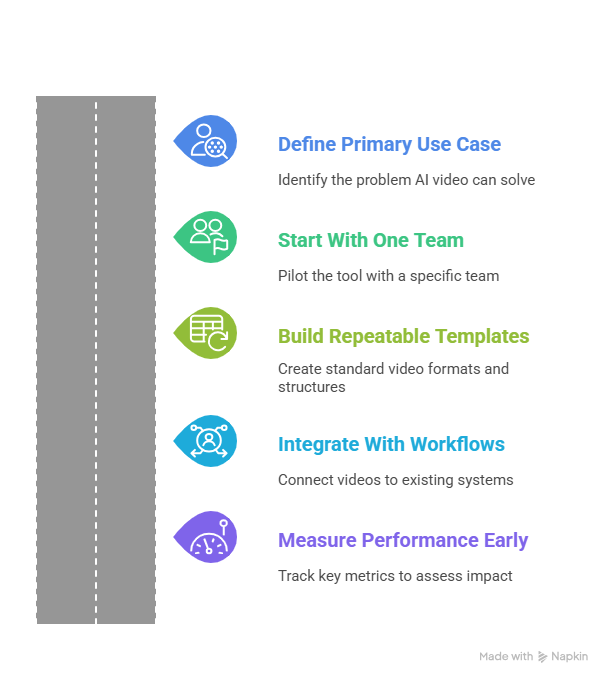
1. Define Your Primary Use Case First
Before picking features, decide what problem you’re solving.
- Too many manual product demos?
- Slow onboarding or training content production?
- Expensive promotional video creation?
- Low engagement with text-heavy explanations?
For SaaS and product-led teams, this often starts with product walkthrough videos or feature explainers. That’s where platforms like Puppydog.io can immediately reduce production time while keeping messaging consistent.
2. Start With One Team, Not the Whole Company
Rolling out AI video tools to everyone at once can get messy.
Instead:
- Choose one team (e.g., product marketing, presales, or customer success)
- Pick one video type (like demo overviews or onboarding tutorials)
- Run a 30–60 day pilot
This controlled rollout helps you identify workflow gaps, training needs, and quick wins before scaling.
3. Build Repeatable Video Templates
The real power of AI-powered video generators comes from repeatability.
Create:
- Standard intro and outro formats
- Consistent branding (colors, logos, tone)
- Reusable video structures (problem → solution → feature → CTA)
Templates mean your team isn’t “starting from zero” every time. Over time, video creation with AI becomes a system, not a creative scramble.
4. Integrate With Existing Workflows
AI video tools work best when they plug into what you already use.
Look for ways to connect videos to:
- Sales emails and CRM sequences
- Product onboarding flows
- Help centers and knowledge bases
- Marketing landing pages
For example, personalized demo videos created with a platform like Puppydog.io can be embedded directly into sales outreach, making follow-ups more engaging without extra manual work.
5. Measure Performance Early
Don’t wait six months to check results. Track performance from the start.
Key metrics might include:
- Video engagement rates (views, watch time)
- Demo-to-meeting conversion rates
- Onboarding completion rates
- Support ticket reduction after tutorial videos
- Time saved compared to traditional production
These numbers help justify expansion and budget allocation later.
ROI Case: What This Looks Like in Practice
Let’s imagine a mid-sized SaaS company that adopts an AI video generator for product demos and onboarding.
Before AI video:
- Sales engineers spend hours repeating live demos
- Marketing waits weeks for edited promo videos
- Onboarding relies on long documentation
After implementation:
- Product marketing uses an AI video tool to create reusable product walkthrough videos
- Sales reps send personalized demo videos instead of scheduling every intro call
- Customer success shares short instructional videos instead of lengthy guides
The Results Over 3–6 Months
- Time savings: Video production time drops by 60–80%
- Higher engagement: Prospects watch short demos more often than reading PDFs
- Faster sales cycles: Buyers understand the product earlier
- Reduced support load: Clear tutorial videos answer common questions
The financial ROI comes from both cost reduction (less production time, fewer live demo hours) and revenue impact (better conversion and retention).
The Big Picture
AI video generators are not just creative tools. They’re workflow multipliers. When implemented with clear goals, templates, and performance tracking, they turn video from an occasional project into a scalable communication channel.
That’s when you stop asking, “Should we be using AI for video?” and start asking, “How did we ever manage without it?”
Future Trends to Watch
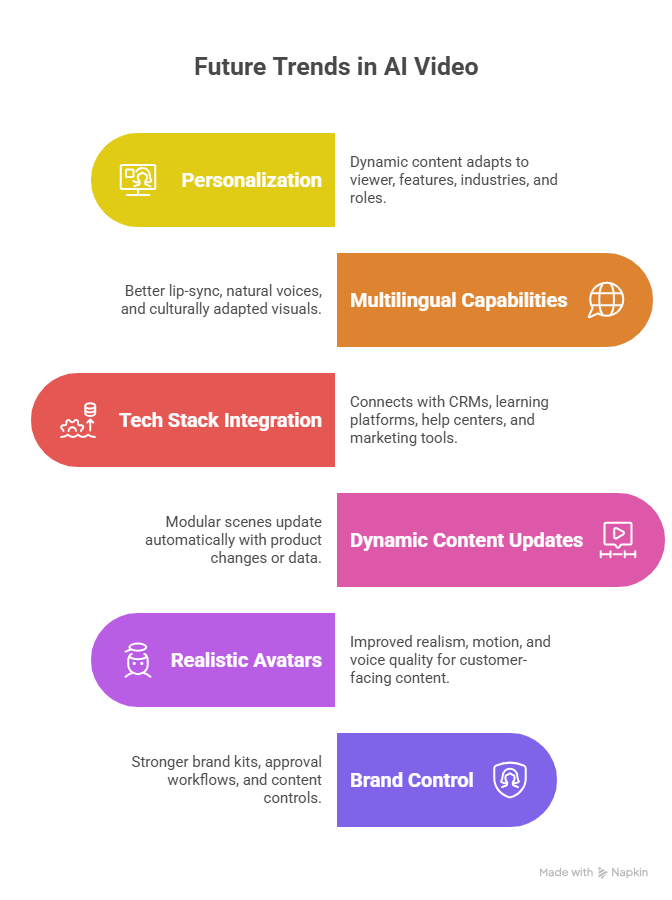
AI video is evolving fast. Here are the key shifts that will shape how teams create videos next:
1. More Personalization, Less One-Size-Fits-All
AI video generators are moving toward dynamic content that adapts to the viewer, different features highlighted in a demo, different messaging for different industries, and even role-based onboarding videos.
2. Stronger Multilingual & Localization Capabilities
Expect better lip-sync, more natural AI voices, and culturally adapted visuals, not just translated scripts. This will make global video production faster and more affordable.
3. Deeper Integration With Your Tech Stack
AI video tools are increasingly connecting with CRMs, learning platforms, help centers, and marketing automation tools. Video will become a direct output of your existing workflows, not a separate production task.
4. Faster Updates With Dynamic Content
Instead of re-recording videos for every product update, more platforms will support modular or auto-updating scenes tied to product changes, scripts, or data sources.
5. More Realistic Avatars and Generative Scenes
AI-generated presenters and text-to-video visuals will keep improving in realism, motion, and voice quality, making AI video suitable for more customer-facing and brand content.
6. Better Governance and Brand Control
As AI video scales across teams, companies will demand stronger brand kits, approval workflows, and content controls to prevent inconsistent or off-brand output.
Bottom line: AI video generators are shifting from simple production tools to fully integrated content systems. The real advantage will go to teams that combine automation with clear messaging and strong workflows.
Conclusion:
AI video generators have moved from “cool experiment” to essential business tool faster than most teams expected. Whether you’re creating product walkthroughs, explainer videos, training content, or promotional campaigns, the right platform can dramatically cut production time while increasing output. The key is choosing tools that fit your workflow, not just the most hyped features.
Ready to create high-converting product demo and walkthrough videos with AI? Start here
FAQs ( Frequently Asked Questions )
1. What are AI video generators?
AI video generators are tools that use artificial intelligence to create videos from inputs like text prompts, scripts, images, screen recordings, or templates. Instead of filming and editing everything manually, you describe what you want, and the tool generates scenes, voiceovers, animations, or even AI presenters.
2. How are AI video generators different from traditional video editing software?
Traditional editors (like Premiere Pro or Final Cut) require you to record footage and edit it manually.
AI-powered video generators can:
- Create visuals from text
- Auto-generate voiceovers and subtitles
- Turn blog posts or scripts into full videos
- Produce videos much faster with less manual work
They reduce production time from days or weeks to hours.
3. Are AI-generated videos good enough for professional use?
Yes, many of today’s best AI video generators are used for:
- Product walkthrough videos
- Explainer videos
- Training and instructional content
- Social media promotional videos
While high-end TV commercials may still use traditional production, AI tools are more than capable for most marketing, sales, and education use cases.
4. Which AI video generator is best for product demos?
Tools built for product walkthroughs and software demos usually work best. Look for features like:
- Screen recording + AI editing
- Zoom and highlight effects
- Easy voiceover and subtitle tools
- Fast updates when your product changes
Platforms focused on demo and walkthrough videos are ideal for SaaS, apps, and digital products.
5. Can AI video tools create videos in multiple languages?
Yes. Many AI video generators now support:
- AI voiceovers in dozens of languages
- Automatic subtitles and translations
- AI avatars with multilingual lip-sync
This makes it much easier to create localized training, marketing, and onboarding videos without hiring multiple voice actors.
6. Are AI video generators expensive?
Compared to traditional video production, AI video creation is much more affordable.
Instead of paying thousands of dollars for filming, editing, and voiceovers, most AI video tools offer:
- Monthly subscription plans
- Credit-based pricing for video generation
- Lower costs for social, training, and demo videos
This makes video creation accessible even for small teams and startups.
7. Do I need video editing skills to use AI video generators?
Not necessarily. Many modern AI video tools are built for non-designers and include:
- Drag-and-drop editors
- Ready-made templates
- Script-to-video automation
- One-click subtitles and voiceovers
Advanced tools offer more control, but beginners can still create professional-looking videos quickly.
8. Can AI completely replace human video creators?
AI video generators are powerful, but they work best with human guidance. AI can handle:
- Speed
- Automation
- Variations at scale
Humans are still essential for:
- Storytelling
- Brand voice
- Creative direction
- Final quality control
The most successful teams use AI as a production assistant, not a full replacement.
9. What types of videos can I create with AI video generators?
You can create a wide range of videos, including:
- Product walkthrough videos
- Explainer videos
- Instructional and training videos
- Promotional and launch videos
- Social media shorts
- Avatar-style talking head videos
- Text-to-video cinematic clips
Different tools specialize in different formats, so the best choice depends on your goal.
10. How do I choose the right AI video generator?
Start by defining:
- Your main video type (demos, ads, training, social, etc.)
- Your team’s skill level
- How often do you need to produce videos?
- Your budget and scalability needs
Then choose a tool that fits your workflow, not just the one with the flashiest AI visuals.
Further Reading
To explore more options and comparisons in AI video generation, check out these helpful resources:
- Top VEED Alternatives for AI Video Creation – Discover tools that rival VEED for text-to-video, editing, and social media content.
- Best Synthesia Alternatives for Avatar Videos – Compare platforms that offer AI avatars, multi-language support, and personalized video experiences.

Sarah Thompson is a storyteller at heart and Business Developer at PuppyDog.io. She’s passionate about creating meaningful content that connects people with ideas, especially where technology and creativity meet.