Video Prospecting: Book More Meetings in 2026

Cold email is dying. Inboxes are flooded. Spam filters are smarter. And buyers have seen every templated pitch imaginable. Video prospecting gives your outreach a face, a voice, and a reason to click. It works, and the data in 2026 proves it.
What Is Video Prospecting?
Video prospecting is the practice of sending short, personalized video messages to potential buyers as part of your outbound sales outreach. Instead of a wall of text, the prospect sees a real person speaking directly to them.
These videos are typically 30 to 90 seconds long. They show your face, your screen, or both. The goal is simple: earn a reply and book a meeting.
In 2026, two main approaches exist:
- Manual video prospecting: You record each video individually. Best for Tier 1, high-value accounts where deep personalization matters.
- AI-personalized video: You record one base video. AI clones your voice, inserts the prospect's name, and swaps in their website or LinkedIn profile as the background. Best for high-volume outbound campaigns.
Both approaches beat traditional cold email. But AI-powered video is where the real scale happens.
Takeaway: Video prospecting turns cold outreach into a warm, human experience at any volume.
Why Video Prospecting Beats Cold Email in 2026
Let's be honest, cold email has had a rough few years. In late 2025, Google and Microsoft moved to hard SMTP-level rejections for bulk senders who fail authentication checks. AI-powered spam filters now catch lookalike templates before they hit the inbox.
The result? Traditional cold email reply rates have fallen below 2%.
Video-first sequences tell a different story. Here is how the numbers compare:
Adding the word "video" to your email subject line alone drives a 19% increase in open rates and reduces unsubscribes by 26%. And 96% of B2B buyers say they prefer video over static text when researching a product.
This is also why video lead generation has become a core part of modern outbound strategy, not just a nice-to-have.
Takeaway: Video prospecting cuts cost per meeting in half and delivers 10x the reply rate of standard email.
What Does a Great 30-Second Video Prospecting Script Look Like?
Short videos perform best. Research from Wyzowl and Wistia shows 65% of viewers watch a video under 60 seconds all the way through. Engagement drops sharply after 90 seconds.
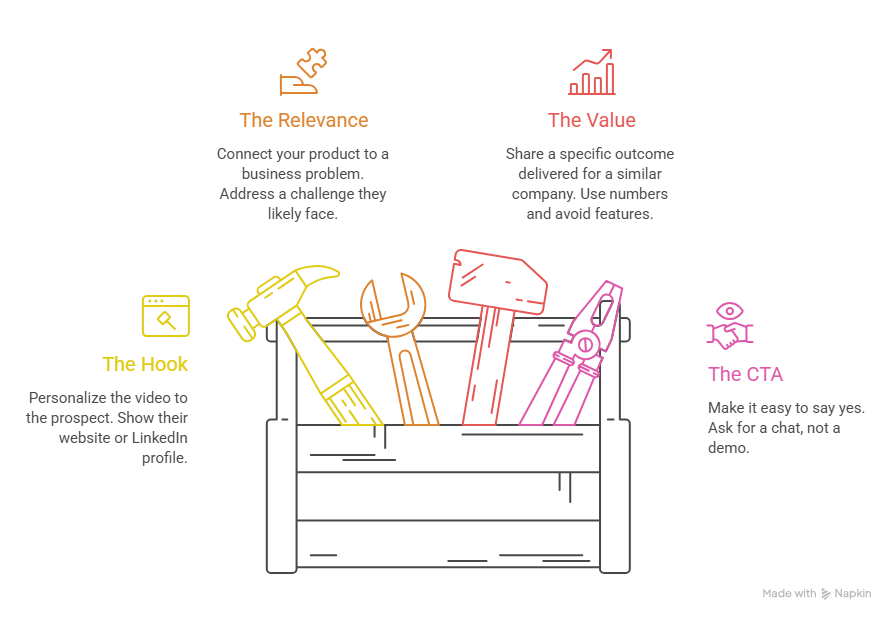
Stick to this four-part structure:
1. The Hook (0 to 10 seconds): Show their website, LinkedIn profile, or a whiteboard with their name on it. Prove the video is built for them, not blasted to thousands.
2. The Relevance (10 to 20 seconds): Connect what you saw to a real business problem they likely face right now.
3. The Value (20 to 35 seconds) Share a specific outcome you delivered for a similar company. Use numbers. Skip the feature list.
4. The CTA (35 to 45 seconds) Make it easy to say yes. Ask if they are open to a chat, not to book a 45-minute demo right now.
Here is a script template you can use today:
"Hey [First Name], I pulled up your careers page at [Company Name] and saw you are hiring three new AEs. Congrats on the growth. Scaling that fast usually creates serious ramp bottlenecks for existing reps. We helped [Similar Company] cut SDR ramp time by 40% in six weeks. Not sure if the timing is right, but I dropped a booking link below. Let me know if a quick chat makes sense."
Takeaway: A four-part, 30-second script is all you need to earn a reply from a cold prospect.
5 Video Prospecting Examples by Use Case
Match your video style to where the prospect is in your pipeline.
1. Cold Outbound Introduction
Screen-share their website or LinkedIn profile while your webcam appears in a small overlay. Call out a specific growth signal. Keep it under 45 seconds.
2. Cold Call Follow-Up
Send within 30 minutes of a call. Acknowledge what happened on the call and clarify anything that was unclear. This shows professionalism and builds trust fast.
3. High-Value ABM Outreach
Hold a whiteboard with their name and company written on it. For executive buyers, this level of effort signals you are serious. Reserve this for Tier 1 accounts only.
4. Re-Engaging Dormant Leads
Show their recent press release, funding news, or award on screen. Tie it back to why the timing might be better now. This approach works because it proves you have been paying attention.
5. Post-Event Follow-Up
Send one video referencing a conference or webinar you both attended. Pair it with personalized email copy for each recipient. This lets you follow up with dozens of leads quickly without sacrificing relevance.
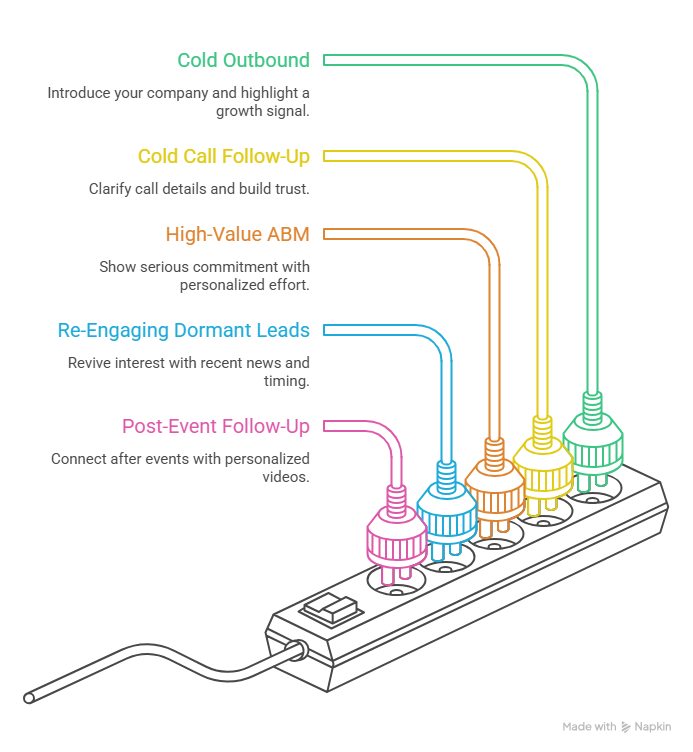
Takeaway: Aligning your video format to the sales situation increases relevance and drives higher reply rates.
What Are the Best Tools for Video Prospecting in 2026?
The right tool depends on your team size, budget, and outreach volume.
Puppydog.io stands out for product-led sales teams. It turns raw screen recordings into polished, branded demo videos with AI-generated scripts and voiceovers. It also hosts personalized walkthrough pages for up to 10,000 contacts. A 50% discount is available for small teams across all plans.
If you are exploring b2b sales techniques beyond video, pairing the right tool with a structured outreach framework makes a significant difference in results.
Takeaway: Match your tool to your use case. High-volume teams need AI personalization. ABM teams need quality and customization.
How Do You Personalize Videos at Scale With AI?
Recording individual videos for every prospect does not scale. AI-powered personalization solves this without killing authenticity.
Here is how the workflow runs:
Step 1: AI Voice Cloning:
Record a clean two-minute voice sample. The AI builds a replica of your voice. It then stitches your cloned greeting, including the prospect's name spoken in your voice, into every video automatically.
Step 2: Dynamic Visual Backgrounds:
The platform pulls company URLs or LinkedIn profiles from your CRM. It overlays those pages behind you in real time. The prospect sees their own website in your video. That visual signal earns the watch.
Step 3: Signal-Triggered Sends:
AI agents monitor intent signals, such as funding rounds, leadership changes, or website visits. When a trigger fires, the system selects the right video template, personalizes it, and sends it through your sequence automatically.
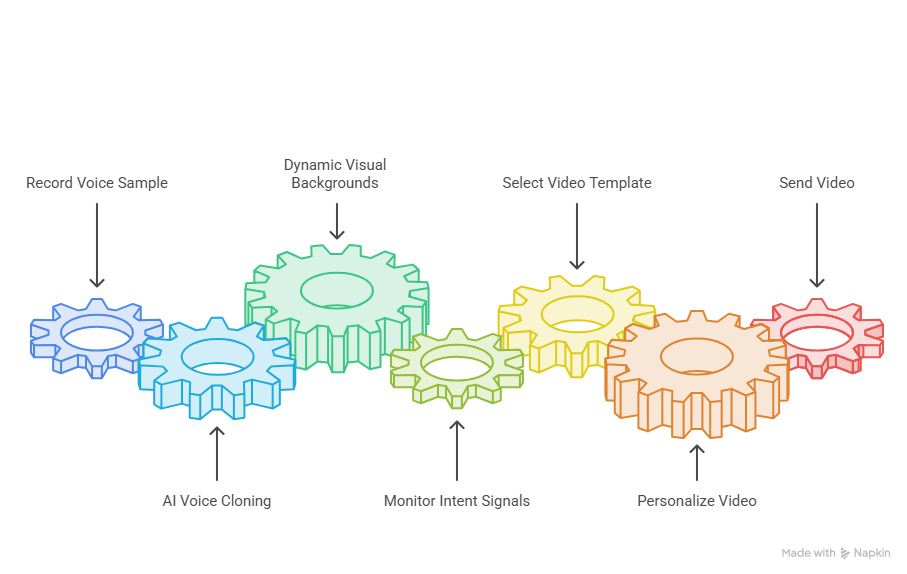
The production numbers support the shift. AI video generation has cut average production costs by 40% since 2024. SDR editing time is down 3.5 hours per video. And teams using AI video report a 4.8x increase in outbound media output.
This is exactly where personalized marketing videos are reshaping the playbook for modern sales teams.
Takeaway: AI personalization lets one SDR do the work of an entire video production team.
What Mistakes Tank Video Prospecting Reply Rates?
A few common errors can wipe out your results fast.
Using fully synthetic AI avatars: Around 60% of B2B buyers can spot a fully AI-generated face within three seconds. When they do, trust drops and reply rates fall. Keep a real human on camera. Use AI only for background visuals and voice-cloned greetings.
Over-editing your videos: Polished, ad-style videos feel like marketing content, not outreach. Buyers scroll past them. A natural webcam recording with minor imperfections builds more trust than a studio production.
Sending videos through email only: Email-only campaigns leave pipeline on the table. Teams that add LinkedIn video messages, DMs, or voice notes to their sequence see a 93% lift in response rates. Introduce video between Day 2 and Day 20 of your sequence.
Attaching video files directly to emails: Never attach an MP4 to an outbound email. It triggers spam filters and destroys deliverability. Use a hosted video link wrapped in an animated GIF preview instead. Also, configure Global Custom Domain Tracking (GCDT). Without it, deliverability can drop to 40%.
Takeaway: Small execution errors kill great video content before it ever gets seen.
FAQs
What is video prospecting?
Video prospecting is the practice of sending short, personalized video messages to prospects as part of a sales outreach sequence. The goal is to earn a reply and book a meeting.
How long should a prospecting video be?
Keep it between 30 and 60 seconds. Engagement drops sharply past 90 seconds. A four-part structure: hook, relevance, value, and CTA. fits comfortably within 45 seconds.
Does video prospecting actually improve reply rates?
Yes. Video sequences achieve reply rates of 15% to 20% in 2026, compared to under 2% for traditional cold email. Including the word "video" in your subject line alone lifts open rates by 19%.
How many videos can a sales rep send per day?
Manual recordings should be limited to 20 to 30 per day to protect quality. AI-powered platforms can scale to hundreds of personalized sends daily without harming deliverability.
Do I need expensive equipment to start?
No. A window for natural light and a quiet room are enough to start. A USB microphone improves audio quality and trust, but it is not required on day one.
What is the best platform for video prospecting in 2026?
It depends on your use case. Vidyard works well for enterprise CRM integration. Sendspark is built for high-volume SDR teams. Puppydog.io is the best option for SaaS teams automating product demo videos.
Can I use AI to personalize videos without losing authenticity?
Yes, if you keep a real human on camera. Use AI to clone your voice for personalized greetings and swap in dynamic visual backgrounds. Avoid fully synthetic avatars, as most buyers can detect them immediately.
What is the biggest mistake in video prospecting?
Attaching video files directly to emails. It kills deliverability. Always use a hosted video link with an animated GIF thumbnail preview.
Conclusion
Video prospecting is no longer a growth hack. In 2026, it is the standard for high-performing sales teams. Cold email volumes are up, and reply rates are down. Buyers want relevance, not another template.
A 30-second personalized video does what a 300-word email never could. It shows your face, earns trust, and gives the prospect a reason to reply.
Start with one use case. Cold outbound introduction or post-call follow-up, and build from there. Pair it with AI personalization as your volume grows. And always keep a real human on camera.
Your next booked meeting could be one short video away.
Ready to turn your screen recordings into personalized demo videos that actually convert? See how Puppydog.io makes it happen.

Sarah Thompson is a storyteller at heart and Business Developer at PuppyDog.io. She’s passionate about creating meaningful content that connects people with ideas, especially where technology and creativity meet.