Video Storyboard Template for AI SaaS Product Videos


A video storyboard template is a scene-by-scene plan that pairs each narration line with the real screen that proves it. For an AI SaaS product video, fill in one task, around six scenes, and five fields per scene: source asset, narration, timing, on-screen text, and CTA. Approve it before you generate anything.
What should a SaaS video storyboard show?
You have a screen recording, a few screenshots, and a launch on Friday. Someone says, "Just make the video." Then everyone finds out they pictured different videos.
That is the problem a storyboard solves. A script says what a video says. A storyboard shows what it looks like, in order. Fabulous Media says each frame should hold the image, any movement, the audio, on-screen text, and a duration. For narration basics, see our Related guide.
For SaaS, I add three questions to every scene:
- Purpose: why is this scene here?
- Product evidence: which real screen proves it?
- Transition: how do we get to the next scene?
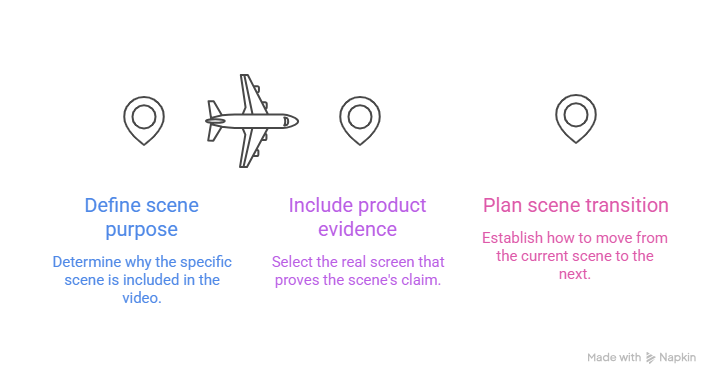
Honestly, product evidence is the one teams skip. A scene without proof is just a claim with nice music.
How do you approach product video scene planning?
Start with one user task and the result it produces. Two tasks? Plan two videos.
Short helps here. Vidyard's 2025 benchmark report found that 65% of viewers stay engaged to the end of videos under one minute, against 20% for videos over 20 minutes. Vidyard adds that length is only part of the story, because viewer intent matters too.
Front-load the point. In one Wistia example, cutting a long intro put the key information in the first 10 seconds. Engagement rose 5 percentage points and early viewer loss was cut in half. That's one video, not a rule.
A common demo shape is problem, solution, a few steps, proof, and a call to action, as Swarmify lays it out. The example below follows it.
Blank video storyboard template
Copy these fields for each scene:
- Scene purpose:
- Source asset (file name, version, crop):
- Narration:
- On-screen text:
- Timing:
- Transition:
- CTA (last scene only):
Six-scene example
This is illustrative. StockPilot is a made-up inventory tool, and the timings are examples, not tested results.
Check the math. Natural narration runs 125 to 150 words per minute, according to Swarmify. The example has 145 words in 63 seconds, about 138 a minute, so it fits.
How do you select UI storyboard assets?
Give every scene one approved asset. Write the file name and version in the Source asset field, so nobody grabs last month's screenshot. Fabulous Media also suggests numbering board versions so everyone reviews the same draft.
Then hunt for gaps. In the example, Scene 5 needs a screenshot of the alert email. If you don't have one, you've found a hole on paper, which beats finding it after the video is generated. Capture it or cut the scene.
Think small screens. If a detail matters, board it as a close-up, since tiny text disappears on phones. Planning a vertical cut? Mark a 9:16 safe area on key frames.
How do you match storyboard narration to the visuals?
Put each sentence beside the screen that proves it. Swarmify's advice for demo scripts is that every claim needs a matching visual demonstration.
Test each line: can the viewer see this happening? If not, change the line or get a better screen. Scene 5 says the email links back to the product page, so the screenshot must show the link.
Let the narration add meaning, not just describe clicks. Fabulous Media's checklist warns against any frame where the voice only describes the picture. Skip "now I click Save." Say why it matters.
What should an AI video storyboard prompt include?
Any text AI can draft a first-pass board for you. That's planning help, not a PuppyDog feature, and the AI knows nothing about your product unless you tell it. Official prompting guidance says to be explicit about the output format and constraints, and to add context.
Here is an illustrative prompt:
Check the answer against the real product. Fix names and delete anything that isn't live.
PuppyDog's public pages describe the next step: upload your recording or screenshots, let the AI write a script, add a voiceover or avatar, then edit the script. I haven't tested these steps, so I'm describing what PuppyDog says. It's how a small team gets professional product videos without a production team.
How do you use a storyboard review checklist?
Run one review before generating. Fabulous Media suggests reviewers answer three things only: is the story clear, is anything missing, is anything wrong for the brand. Comments about drawing quality are noise.
Use this short checklist:
- Can a reviewer state the one message?
- Does every scene have an approved source asset?
- Can viewers see what each narration line says?
- Is the UI text readable on a phone?
- Do the timings add up to the runtime?
- Are the claims accurate for the current product?
- Is there one CTA?
Why bother? A wrong line costs minutes to fix on paper. Once the video exists, it costs another review round.
FAQs
Do AI product videos still need a storyboard?
Yes, if you care what the video shows. AI can draft a script and narration quickly, but it can't decide which screen proves which claim. A storyboard is where you decide that, before you generate.
What is the difference between a script and a storyboard?
A script is the words: narration and timing. A storyboard puts those words beside the visuals, in order, with on-screen text and the CTA. Use the script for what you say and the storyboard to check that viewers can see it.
Can screenshots be used to storyboard a SaaS video?
Yes. A board can be built from screenshots or reference frames, as long as the image, text, and timing are clear. PuppyDog's public pages also say screenshots or a short recording can be the starting point for a video.
How many scenes should a short feature video contain?
There is no fixed number. Use one scene per step and one for the result, plus a problem and a CTA. The example here uses six scenes for about a minute, which is an illustration, not a rule.
Next step: create your first video
Fill in the video storyboard template for one real task. Then upload your recording or screenshots to the AI product video maker and review the script against your product. Want to see more of the flow? Read about Product video creation.

Sarah Thompson is a storyteller at heart and Business Developer at PuppyDog.io. She’s passionate about creating meaningful content that connects people with ideas, especially where technology and creativity meet.