Video for Lead Generation: The B2B Playbook for Personalized Demo Videos That Actually Convert


Here's a hard truth most B2B marketing teams don't want to sit with: your video isn't underperforming because it looks bad. It's underperforming because it looks the same for everyone.
The conversation around video for lead generation has been dominated by a production mindset. Record it faster. Edit it cleaner. Host it somewhere prettier. And while your team is busy optimizing render settings, your prospects, a CISO, a Marketing Director, and an Operations Lead, are all watching the same generic demo and wondering if your product is actually built for them.
It isn't a production problem. It's a personalization problem.
The numbers back this up. 83% of marketers now cite video as a primary lead generation driver, and companies using video grow revenue 49% faster than those that don't. But here's what those headline stats don't tell you: the gap between average video ROI and exceptional video ROI almost always comes down to one thing, relevance to the individual viewer.
That's the playbook this article is built around. Not just "use more video." But how to use personalized, AI-generated demo videos that speak directly to each prospect's role, pain point, and use case, automatically, at scale, without a production team.
Here's what we'll cover:
- Why video consistently outperforms every other B2B lead gen channel
- The four types of video that actually move prospects through the funnel
- Why manual video workflows are quietly killing your pipeline velocity
- How to map the right video to the right buyer at every funnel stage
- How AI platforms like PuppyDog.io auto-generate personalized demos from a single source, no recording, no editing required
- The metrics that actually matter (hint: views aren't one of them)
- Real results from teams already doing this at scale
Why Video Is the Highest-Converting Lead Gen Channel in B2B
Let's be honest, B2B buyers don't read the way they used to. Today's decision-makers are time-poor, inbox-overwhelmed, and completing up to 70% of their buying journey before they ever talk to a sales rep. By the time your SDR gets on a call, the prospect has already formed an opinion. The question is: what content shaped it?
Increasingly, the answer is video.
The human brain processes visual information approximately 60,000 times faster than text. For B2B products, which often involve complex workflows, technical integrations, and multi-stakeholder approval chains, that speed of comprehension isn't just a nice-to-have. It's a competitive advantage. A two-minute video can communicate what a ten-page whitepaper struggles to.
And the data is hard to argue with.
The Numbers That Should Make Every Demand Gen Manager Pay Attention
- 83% of marketers cite video as a primary driver of lead generation
- 59% of B2B decision-makers prefer video over text when evaluating a product
- Companies integrating video into their go-to-market strategy grow revenue 49% faster than competitors who don't
- Video marketing generates 66% more qualified leads per year
- Landing pages with video see conversion rate increases of 80% or more
That last one is worth pausing on. An 80% lift in landing page conversions doesn't require a bigger ad budget or a new campaign strategy. it requires swapping out static content for video. That's a meaningful efficiency gain for any demand gen team trying to lower cost-per-lead without sacrificing pipeline volume.
Video Doesn't Just Generate Leads: It Qualifies Them
Here's where it gets interesting for RevOps and Sales leaders. Video isn't just a content format. It's a behavioral data layer. When a prospect watches your demo, every second of that interaction is a signal. Did they watch the full thing? Did they replay a specific feature walkthrough three times? Did they click the CTA at the 90-second mark?
That's intent data. Rich, granular, actionable intent data, the kind that transforms a cold handoff from marketing to sales into a warm, informed conversation.
High-performing B2B teams are already using video engagement metrics to bridge the MQL-to-SQL gap. Instead of handing sales a name and an email, they're handing over an intent profile: what the prospect watched, how long they watched it, and which features captured their attention. The first sales call stops being a discovery session and starts being a value-confirmation conversation.
The Personalization Multiplier
Here's the stat that tends to stop people mid-scroll: personalized video outreach drives up to 5x higher reply rates compared to standard text-based outreach.
That isn't a marginal improvement. It's a channel-level difference. And it points directly to what separates the teams generating exceptional video ROI from those getting mediocre results. It's not production quality. It's not video length. It's whether the prospect feels like the video was made for them, their role, their industry, their specific problem.
A CISO watching a demo that leads with data encryption and compliance frameworks is going to engage very differently than if you'd shown them the same generic product tour you send to everyone. Relevance is the variable that everything else depends on.
That's the core premise of this entire playbook, and the reason personalization isn't a nice-to-have feature. In B2B video lead generation, it's the whole game.
The 4 Types of B2B Video That Actually Generate Leads
Not all B2B videos are created equal, and more importantly, not all of them belong at the same stage of your funnel. One of the most common mistakes marketing teams make is treating video as a single asset type, blasting the same demo to a cold LinkedIn audience and a bottom-of-funnel prospect who's three emails deep into a sales sequence.
The fix isn't making more videos. It's making the right video for the right buyer at the right moment. Here are the four types that consistently deliver results.
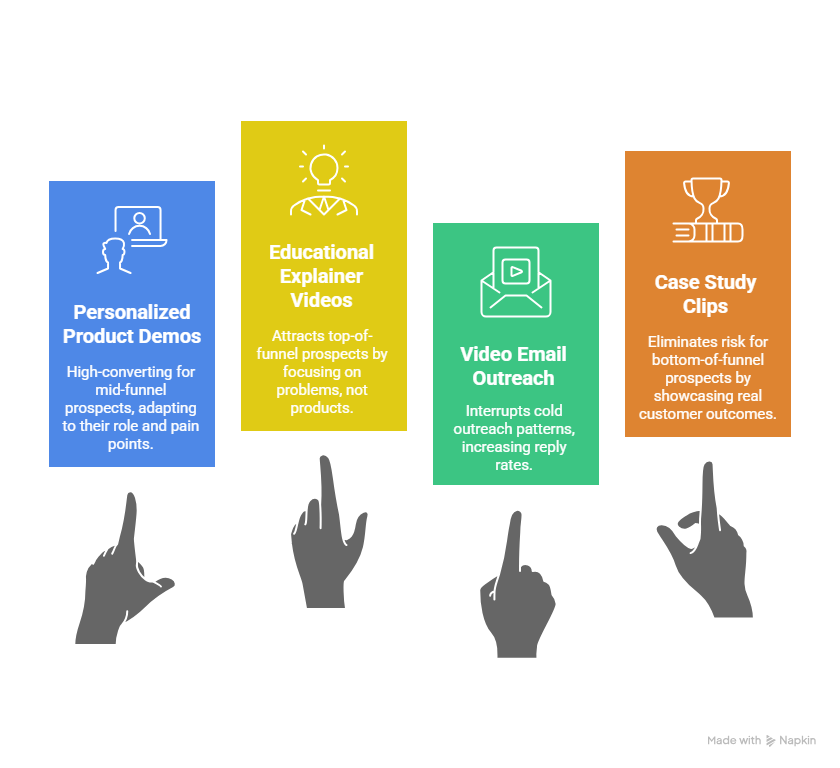
1. Personalized Product Demos, The Mid-Funnel Conversion Engine
This is the big one. Personalized product demos are the highest-converting video asset in the B2B toolkit, and the most underutilized, largely because teams don't have a scalable way to produce them.
The keyword is personalized. A generic product tour that walks every prospect through the same feature set in the same order isn't a demo, it's a brochure with a play button. A genuinely personalized demo adapts to the viewer's role, industry, and pain point. The CISO sees a security-first walkthrough. The Marketing Director sees campaign analytics and attribution. The Operations Lead sees workflow automation and team efficiency.
Same product. Completely different story. That's what moves MoFu prospects toward a buying decision.
2. Educational Explainer Videos: The Top-of-Funnel Attractor
At the awareness stage, your prospect isn't looking for a vendor; they're looking for clarity. They're trying to understand their problem, put language around it, and figure out what a solution even looks like. Educational explainer videos meet them exactly there.
These should be short, ungated, and focused on the problem — not the product. Think "How to reduce churn in your SaaS onboarding flow" rather than "Here's what our platform does." The goal is visibility and trust-building, not immediate conversion.
The numbers support prioritizing this format early: 95% of people say they've watched an explainer video to learn about a product or service. And on LinkedIn, where 75% of B2B executives watch work-related videos weekly, short explainers consistently outperform static content in reach and engagement.
3. Video Email Outreach: The Pattern Interrupt for Prospecting
Cold outreach is brutal right now. Inboxes are saturated, open rates are declining, and the generic "just checking in" email has a near-zero conversion rate. Video email outreach changes the dynamic entirely.
Replacing a text-based prospecting email with a short, personalized video clip, even 60 to 90 seconds, creates what sales teams call a "pattern interrupt." It stands out, it humanizes the outreach, and it gives the prospect something worth opening. The results reflect that personalized video outreach generates up to 5x higher reply rates than standard email sequences.
There's also a secondary benefit that RevOps leaders tend to appreciate. When video emails are integrated with your CRM, every view triggers a notification. Your rep knows the moment a prospect watches the video, and can follow up while they're still thinking about it. Timing that used to rely on instinct becomes a data-driven trigger.
4. Case Study and Testimonial Clips: The BoFu Risk Eliminator
By the time a prospect reaches the decision stage, they're not really comparing features anymore. They're managing risk. They're asking themselves: "What if this doesn't work? What do I tell my team if this goes wrong?"
That's the emotional state that case study and testimonial videos are built to address. Not written case studies, which, let's be honest, most prospects skim, but short video clips of real customers talking about real outcomes. Revenue gained. Time saved. Problems actually solved.
The authenticity of hearing a peer describe their experience carries a weight that no marketing copy can replicate. Distributed through retargeting campaigns to warm leads who've already watched a product demo, these clips provide the final push that converts evaluation into commitment.
How the Four Types Work Together
The teams seeing the strongest video-influenced pipeline aren't picking one of these formats and hoping for the best. They're running all four in a coordinated system, with each video type handing the prospect smoothly to the next stage, and engagement data flowing back into the CRM the entire time.
The Old Way vs The AI-Powered Way: Why Manual Video Creation Kills Pipeline
Let's walk through what actually happens when a B2B marketing team decides to "do video."
A Product Marketing Manager identifies five key buyer personas. The team agrees they need personalized demos for each. Someone books time with a screen recorder, writes five scripts, records five takes, sends them to a video editor, waits two weeks, gets the files back, realizes the product UI changed in the meantime, and starts over. By the time those videos are live, the campaign they were built for has already peaked.
This is the manual video trap, and most B2B teams are stuck in it without realizing it's a pipeline problem disguised as a production problem.
The Real Cost of "Record, Edit, Upload, Blast"
The traditional workflow, tools like Camtasia or Loom, a script doc, a screen recorder, and an editor, was never designed for personalization at scale. It was designed to produce one video at a time. And at that rate, the math just doesn't work for modern demand gen.
Consider this: if your team identifies ten personas across five industries, you're theoretically looking at 50 separate videos. Each one takes two to four weeks to produce and costs anywhere from $1,000 to $5,000 per asset. That's before you factor in what happens when your product's UI updates, which, in a fast-moving SaaS environment, could happen every sprint. Every one of those 50 videos becomes instantly outdated. You're not building a video library. You're accumulating static content debt.
There's also a subtler cost that rarely shows up in the budget conversation: time-to-market friction. A demand gen team that needs to react to a competitor launch, a new ICP signal, or a seasonal campaign can't afford a four-week production queue. By the time the video is ready, the moment has passed.
And here's the part that stings most. After all that effort, the video is still generic. Because producing truly 1:1 personalized content manually, at any meaningful volume, is simply not humanly possible.
The PuppyDog Approach: Personalization Is the Product
This is where the frame shifts entirely. Most demo video platforms position themselves as production tools, "record better, edit faster, host smarter." PuppyDog.io is built around a fundamentally different premise: video lead generation is a personalization problem, not a production problem.
Instead of recording a video, you assemble one. Upload a screen recording or a series of product screenshots. That's your source material. From there, PuppyDog's AI agents take over. They generate a tailored script for each prospect or persona, apply a voiceover, and produce a fully personalized video version automatically. No editing suite. No production queue. No re-recording when the UI changes.
One source. Thousands of distinct, personalized versions. Each one reflects the viewer's role, company, industry, and specific pain points.
A Security Architect gets a demo that leads with SOC 2 compliance and access controls. A Marketing Director gets one that opens with campaign attribution and lead conversion analytics. Same product. Different story. Zero additional effort from your team.
Side by Side: What the Numbers Actually Look Like
The cost difference alone is significant. But the real competitive gap is in that last row. Binary view data, "did they watch it or not," tells you almost nothing useful. Granular engagement data tells you who watched, what they cared about, and when they're most likely to convert. That's the difference between a lead list and an intent profile.
🎬 See It in Action

https://player.puppydog.io/play/qruak1?sourceId=lJ06Ge
The teams that crack B2B video lead generation aren't outspending their competitors on production. They're outpacing them on relevance, delivering the right message to the right persona, automatically, before a competitor even finishes their first edit.
Now let's talk about where each of those personalized videos should actually live in your buyer journey.
How to Map Video to Your B2B Buyer Journey
Most B2B teams think about video as a campaign asset. You need a demo? Make a demo. Running a webinar? Clip it and post it. That reactive approach produces a scattered content library with no clear purpose, and prospects who slip through the gaps because the right video never reached them at the right moment.
The better approach is mapping. Every video you produce should have a defined place in the buyer journey, a specific emotional state it's designed to address, and a clear next action it's pushing the prospect toward. Get that alignment right, and video stops being a content format and starts being a conversion system.
Here's how it breaks down across the three core funnel stages.
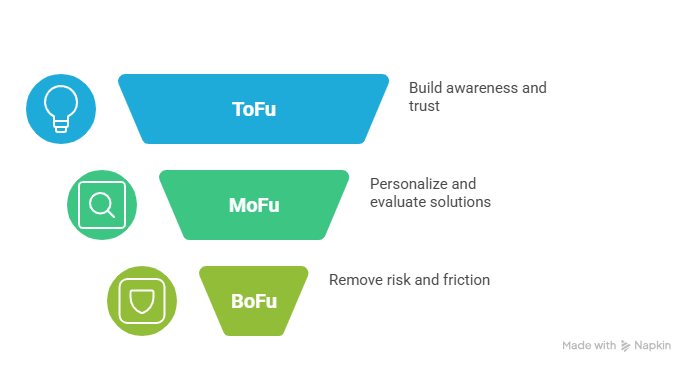
ToFu: Meet the Prospect Where Their Mind Actually Is
A top-of-funnel prospect isn't thinking about your product. They're thinking about their problem. They might not even have the language to describe it yet. Pushing a feature-heavy product demo at this stage is one of the fastest ways to lose someone who could have become a qualified lead six weeks later.
What works at this stage is educational, problem-focused content. Short explainer videos that name the challenge, frame the stakes, and position your brand as someone worth listening to. These should be ungated, widely distributed, and deliberately un-salesy.
LinkedIn is the natural home for this content. With 75% of B2B executives watching work-related videos on the platform weekly, short explainers placed in the feed consistently outperform static posts on reach and engagement. The goal here isn't conversion. It's recognition and trust. You want prospects to finish the video thinking "that company gets our problem" before they've ever heard your product name.
MoFu: This Is Where Personalization Becomes Non-Negotiable
The middle of the funnel is where most B2B video strategies fall apart. The prospect is now actively evaluating solutions, comparing vendors, and sitting through demos that all look suspiciously similar. They're not asking "does a product like this exist?" They're asking, "Is this product actually built for someone like me?"
That question is what personalized product demos are designed to answer.
A MoFu prospect who works in financial services needs to see compliance workflows and audit trails, not a generic feature tour. A prospect in a high-growth startup needs to see speed, simplicity, and integration with the tools their team already uses. When the demo reflects their reality, the cognitive distance between "watching a video" and "making a purchase decision" collapses significantly.
This is the stage where gating content makes sense. A persona-specific demo landing page, with a form or a calendar embed, converts far better than a generic "watch our demo" CTA because the value exchange feels proportional. The prospect gives you their information; in return, they get something that actually feels relevant to their situation.
BoFu: Remove the Risk, Remove the Friction
By the time a prospect reaches the decision stage, feature comparison is mostly done. What's holding them back is risk aversion. Will this actually work for our team? What happens if implementation goes sideways? Can I defend this decision internally?
One-to-one video outreach from a sales rep addresses this in a way that no other content format can. A short, custom video that walks the prospect through a specific use case relevant to their business, answers a technical question they raised on a previous call, or shows them a tailored implementation scenario signals something important: this team has actually been paying attention.
Paired with testimonial clips from customers in similar industries or roles, this combination of personal attention and social proof is incredibly effective at pushing stalled deals across the line. The CTA at this stage should be direct and low-friction: book a call, start a trial, get a custom implementation review.
The Full Picture
One thing worth calling out: the handoffs between these stages matter as much as the stages themselves. A prospect who watches 80% of a MoFu demo and clicks the CTA should not land in a generic email nurture sequence. They should be surfaced immediately to sales with their engagement data attached. That's the loop that separates a video strategy from a video system.
Which brings us to exactly how PuppyDog closes that loop.
How Personalized Demo Videos Capture and Qualify Leads
Most lead generation tools do one thing: collect contact information. A name, an email, maybe a job title if you're lucky. What happens after that is largely guesswork. Sales gets a list, works through it, and hopes the timing is right.
Personalized demo videos work differently. They don't just capture leads, they qualify them, score them, and hand them to sales with a level of context that traditional forms simply cannot provide. The mechanism is more elegant than most teams expect.
It Starts in the CRM, Not the Studio
Here's what makes PuppyDog's approach genuinely different from every other video tool in the market. The personalization doesn't begin when someone presses play. It begins the moment a lead enters your CRM.
When a new contact is created, whether from a LinkedIn ad, a website form, or an outbound sequence, PuppyDog's AI agents get to work. They read the available CRM data: job title, company size, industry, and any custom fields your RevOps team has configured. From that data, the AI builds a tailored demo script that emphasizes the features, use cases, and outcomes most relevant to that specific prospect.
A lead tagged as "Security Architect" gets a script that opens with data encryption, access controls, and SOC 2 compliance. A lead tagged as "Marketing Director" gets one that leads with campaign attribution, lead conversion analytics, and reporting. No human intervention. No production queue. The video exists and is ready to send before your SDR even opens their outreach tool.
That is what "personalization at scale" actually looks like in practice.
The Capture and Qualify Loop
Once the video is delivered, via email, an embedded landing page, or a direct sales sequence, the real data collection begins. And this is where PuppyDog's CRM integration earns its keep.
Every second of viewer interaction is tracked and logged. Not as a vanity metric, but as a structured intent signal that flows directly back into the CRM record. Here's what that data actually tells you:
Watch Time reveals genuine interest level. A prospect who watches 90% of a personalized demo is signaling something fundamentally different from one who drops off at the 20-second mark. Both interactions are useful data points. One triggers a high-priority follow-up, the other triggers a re-engagement sequence with different content.
Segment Engagement shows feature-level intent. If a prospect replays the API integration walkthrough three times, that's not accidental. It tells your sales rep, before they've said a word, that technical integration is either a key priority or a potential concern. That information transforms the opening minute of a discovery call entirely.
CTA Interaction captures decision-stage readiness. Did the prospect click "Schedule a Call" at the 45-second mark, or did they wait until the very end? Did they click at all? Each behavior maps to a different follow-up strategy and a different position in the buying cycle.
What This Means for Sales and RevOps
For a RevOps leader, this is the piece that changes everything about lead scoring. Instead of assigning points based on page visits and email opens, signals that are broad and often misleading, you're scoring based on demonstrated product comprehension and feature-level engagement. A contact who watches 85% of a personalized demo and clicks the CTA can be automatically elevated to "High Intent" status in the CRM, triggering an immediate Slack notification to the assigned Account Executive.
That rep doesn't walk into the follow-up blind. They know the prospect's role, they know which features captured attention, and they know the prospect has already seen a demo tailored to their specific situation. The conversation starts three steps ahead of where it normally would.
💡 Social Proof "Our re-engagement campaign with PuppyDog was a major success, far exceeding our expectations in terms of reply rates, meetings booked, and reactivated leads. Their platform made it incredibly easy to launch a high-impact campaign." — Krista Schubert, Overproof
For teams with large lead volumes, this automated qualification layer also acts as a natural filter. Salespeople don't need to manually sort through hundreds of lukewarm contacts hoping to find the buyers. The system surfaces them automatically based on actual engagement behavior. The result is a sales team that spends its time on conversations worth having, with prospects who have already shown they understand the product and are actively evaluating it.
That is not a marginal efficiency improvement. For most B2B revenue teams, it's a fundamental shift in how the pipeline gets built and how sales time gets allocated.
The Full Loop at a Glance
- Lead enters CRM from any source, ad, form, or outbound
- PuppyDog AI reads CRM data and generates a persona-specific demo script and voiceover
- Personalized video is delivered via email, landing page, or sales sequence
- Viewer engagement is tracked in real time, watch time, replays, and CTA clicks
- Engagement data is logged back to the CRM contact record automatically
- Scoring rules trigger based on engagement thresholds, and high-intent leads are surfaced to sales instantly
- Sales rep follows up with full context, informed by exactly what the prospect watched and cared about
The loop is continuous, automated, and self-improving. Every campaign adds more behavioral data to the system, which sharpens the scoring model and tightens the handoff between marketing and sales over time.
Setting Up Your Video Lead Generation System: Step-by-Step
There's a meaningful difference between running a video campaign and building a video system. Campaigns have start and end dates. Systems run continuously, improve over time, and generate a pipeline while your team is focused on other things. What follows is the implementation path for the latter.
This isn't a six-month roadmap. With the right platform, most teams can have a functioning version of this live within a week.
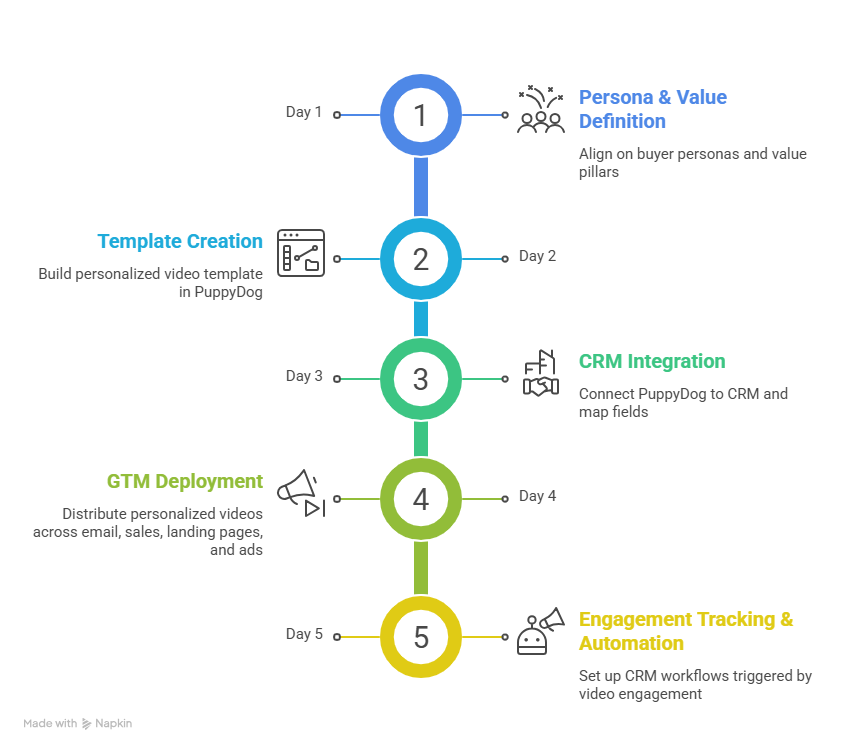
Step 1: Define Your Persona Segments and Value Pillars
Everything downstream depends on how well you define your segments upfront. Before touching any video tool, your Product Marketing Manager and Demand Gen team should align on the primary buyer personas and, critically, the specific value each persona cares most about.
For a typical B2B SaaS platform, the segmentation breaks down roughly like this:
- The Individual Contributor cares about UX, speed, and making their daily workflow less painful
- The Department Head cares about team visibility, reporting, and cross-functional collaboration
- The Executive or C-Suite cares about ROI, strategic alignment, and risk mitigation
Each persona gets its own "Value Pillar," the primary angle the AI will use when generating that segment's demo script. This is the creative foundation of the entire system. Get it right, and every video downstream feels genuinely relevant. Skip it, and you're back to generic.
Step 2: Build Your Personalized Video Template in PuppyDog
This step replaces what used to take weeks. Upload a screen recording or a set of high-fidelity product screenshots into PuppyDog. That becomes your visual source library, the single master asset from which every personalized version will be generated.
From there, define the logic paths for the AI. For each persona segment, instruct the platform on which features to highlight, which tone to adopt, and which outcomes to emphasize. A compliance-heavy persona gets a formal, detail-oriented script. A growth-focused persona gets something faster and more energetic.
The result is a template architecture that can generate thousands of distinct, brand-consistent videos from one source without anyone recording a new take or opening an editing suite.
Step 3: Connect Your CRM and Map Your Fields
This is the step that transforms video from a content play into a revenue system. Connect PuppyDog to HubSpot or Salesforce and configure your field mapping carefully.
Your RevOps team needs to ensure that the CRM properties driving personalization — job title, industry, company size, lead persona- are cleanly populated and correctly mapped to the corresponding video logic paths defined in Step 2. Garbage in, generic video out. When the field mapping is solid, the AI knows exactly which script to generate the moment a new lead enters the system.
This integration also activates the engagement tracking loop covered in the previous section. Watch time, CTA clicks, and replay behavior all flow back into the CRM record automatically once the connection is live.
Step 4: Distribute Across Your Full GTM Motion
A personalized video sitting in a folder no one visits is still a missed opportunity. Once your system is live, deploy it across every channel in your go-to-market motion.
Email Marketing: Embed personalized video links directly into HubSpot nurture sequences. A prospect who downloads a whitepaper at the ToFu stage can receive a persona-specific demo within the same automated workflow, 48 hours later.
Sales Outreach: Add personalized demo links to Outreach or Salesloft sequences. Reps stop sending the same boilerplate and start sending something the prospect will actually watch.
Landing Pages: Use PuppyDog's embed code to turn static campaign pages into interactive demo hubs. Instead of a wall of text and a contact form, visitors get a personalized walkthrough the moment they arrive.
LinkedIn Ads: Drive paid traffic to a personalized demo landing page rather than a generic homepage. The relevance gap between a targeted LinkedIn ad and a tailored demo landing page is one of the highest-leverage optimizations available to a demand gen team right now.
Step 5: Track Engagement and Trigger Smart Follow-Up Workflows
The final step is where the system pays for itself. Set up CRM automation rules that trigger based on video engagement thresholds rather than passive behaviors like email opens.
A practical starting configuration might look like this: if a target account lead watches more than 60% of a personalized demo, the system automatically increases their lead score by 20 points, sends a Slack alert to the assigned Account Executive, and adds them to a high-intent retargeting audience in Google Ads.
That's three meaningful actions, all triggered by a single behavioral signal, without anyone manually reviewing a lead list.
Over time, as more engagement data accumulates, these workflows get sharper. You'll start to see which personas convert fastest, which features generate the most CTA clicks, and which segments need a different script angle. The system learns as it runs, and your team gets smarter about personalization with every campaign cycle.
The mindset shift that makes this work: Stop thinking about video as something you produce for a campaign. Start thinking about it as infrastructure, a permanently running, automatically personalizing engine that qualifies leads and feeds sales context around the clock.
Metrics That Matter: How to Measure Lead Gen from Video
Here's a trap a lot of B2B teams fall into: they invest in video, the view count climbs, someone puts a screenshot in the monthly report, and everyone feels good about it. Then the quarter ends, and nobody can draw a clear line between those views and the actual pipeline.
Views are a vanity metric. They tell you people pressed play. They tell you nothing about whether those people are buyers.
The metrics that actually matter are the ones that connect video engagement to revenue behavior. Here's what to track and what each number is actually telling you.
Video Completion Rate: The Relevance Indicator
Completion rate is the most direct measure of whether your personalization is working. If prospects are dropping off in the first 30 seconds, the problem isn't your product. It's that the video doesn't feel relevant to the person watching it.
For B2B demo videos, a completion rate of 30% to 50% is considered strong. That might sound low, but remember your audience. These are busy professionals watching a product walkthrough during a working day. A 40% completion rate on a four-minute persona-specific demo means a meaningful portion of your target audience stayed engaged long enough to form a real opinion about your product.
If completion rates are consistently below 20%, revisit your persona segmentation. The video may be targeting the wrong pain point or leading with features the prospect doesn't care about yet.
CTA Click-Through Rate: The Intent Signal
A prospect who watches your demo and clicks "Book a Call" or "Start a Free Trial" has done something significant. They've moved from passive consumption to active intent. That's the moment a lead becomes a lead worth calling.
Target a CTA click-through rate of 2% to 5% for embedded video CTAs. Personalized videos consistently outperform generic demos on this metric because the call-to-action feels like a logical next step rather than an interruption. When the video has just walked a Marketing Director through exactly how their team would use the platform, "Book a demo for your team" lands very differently than it would at the end of a generic product tour.
Track this metric by persona segment. If one persona has a dramatically lower CTA rate than others, the issue is usually a misalignment between the video content and the actual buying trigger for that role.
Video-to-Lead Conversion Rate: The Pipeline Proof Point
This is where you start connecting video performance to revenue metrics. Video-to-lead conversion rate measures the percentage of video viewers who become MQLs, either by submitting a form, booking a meeting, or hitting a lead score threshold triggered by their engagement.
The B2B average sits around 4.8%. For personalized demos delivered to a well-segmented audience, this number should be meaningfully higher. If it isn't, the gap usually lives in one of two places: the post-video experience (a weak landing page or a slow follow-up) or the targeting (the video is reaching the right personas but through the wrong channels).
Watch Time by Persona: The Segmentation Optimizer
Aggregate watch time broken down by buyer persona is one of the most underused metrics in B2B video strategy. It tells you something that completion rate alone cannot: which segments are most engaged with your content, and by extension, which personas represent your most receptive audience.
If your "Department Head" persona consistently generates 40% more total watch time than your "Individual Contributor" segment, that's a signal worth acting on. Increase the investment in content for that persona, refine the script to go deeper on the topics generating the most engagement, and consider building out a dedicated nurture track for that segment.
Watch time by persona also surfaces underperforming segments before they become a pipeline problem. A persona with low watch time and low CTA clicks isn't a lost cause. It's a feedback signal that the script angle needs reworking.
CRM Deal Influence: The Budget Justification Metric
This is the one that matters most when it's time to defend your video budget in a quarterly review.
CRM deal influence tracks how many closed-won opportunities had meaningful video engagement somewhere in the buyer's journey. By analysing the watch history of contacts within won deals, marketing can calculate a "video-influenced pipeline" figure, a dollar amount that represents the revenue touched by personalized video at some point before close.
For a Demand Gen Manager, this is the most persuasive number in the room. It reframes video from a content expense into a revenue driver with a calculable return. It also answers the question that every CFO eventually asks: "What are we actually getting from this?"
The Metrics Dashboard at a Glance
One final point worth making: these metrics are only as useful as the system feeding them. If your video platform isn't natively connected to your CRM, you're working with incomplete data and making decisions based on partial signals. The integration isn't a technical nicety. It's what makes the entire measurement framework function.
Real B2B Results: What Happens When You Personalize at Scale
At some point, strategy has to give way to proof. The framework is sound, the metrics make sense, the technology is clearly capable, but what does this actually look like when a real revenue team deploys it against a real pipeline problem?
Here's what happens.
Reactivating Dead Leads Without Increasing Ad Spend
Every B2B CRM has a graveyard. Leads that came in warm went cold somewhere in the funnel and have been sitting untouched for months. Most teams either ignore them or blast them with the same generic nurture email that didn't convert them the first time.
Personalized video changes the re-engagement equation entirely. Instead of sending another text-based "just checking in" message, teams using PuppyDog deploy a custom video built around the lead's specific role and business profile, something that feels less like a follow-up and more like a relevant, timely insight arriving at exactly the right moment.
The results from this approach consistently exceed what teams expect going in.
What makes this particularly valuable for Demand Gen Managers is the economics of it. Re-engaging an existing CRM contact costs a fraction of acquiring a new one. When you can automate that re-engagement at scale, with content that actually feels personal, you're effectively unlocking a pipeline that already exists in your database without touching your acquisition budget.
An "always-on" reactivation campaign running in the background, surfacing warm leads through behavioral triggers rather than manual outreach cadences, is one of the highest-ROI applications of AI-powered personalized video available right now.
SARC MedIQ: 20,000 Personalized Demos, 300 New SQLs, Zero New Hires
The challenge SARC MedIQ faced is one that every scaling B2B company recognizes. Their product was genuinely complex. Manual demos were creating a bottleneck, sales engineers were stretched thin, the product marketing team couldn't keep up with the volume of persona variations needed, and the time between a lead expressing interest and actually seeing a relevant demo was long enough to lose them entirely.
They implemented PuppyDog's AI-powered personalized video system across their global sales force. The outcomes were significant enough to be worth examining closely.
Volume: The team generated over 20,000 personalized demo videos, each tailored to a different buyer profile across their target markets. That number is not achievable through any manual production process at any reasonable cost or timeline.
Conversion: Those 20,000 personalized demos resulted in 300 new qualified leads moving directly into the SQL stage after viewing their custom video. These weren't leads who filled out a form and needed nurturing. They were prospects who had watched a demo built specifically for their role and context, understood the product's relevance to their situation, and were ready to talk to sales.
Scale without headcount: Perhaps most importantly, SARC MedIQ achieved all of this without hiring additional product marketers or sales engineers. The growth was entirely decoupled from headcount, which is exactly the kind of operational leverage that finance teams and RevOps leaders get genuinely excited about.
That last point deserves a moment. One of the most persistent myths in B2B marketing is that personalization at scale requires proportionally more people. More personas, more writers, more editors, more coordinators. PuppyDog's model breaks that assumption entirely. The AI handles the variation. Your team defines the strategy.
The Aggregate Picture: $3.6 Million in Qualified Leads
Individual case studies are compelling. But sometimes the most persuasive number is the one that reflects what an entire customer base is achieving collectively.
📊 Platform Impact
Since April 2024, PuppyDog.io customers have collectively generated over $3.6 million in qualified leads by leveraging AI-powered demo personalization to accelerate their sales funnels.
It's worth being precise about what "qualified leads" means in this context. This isn't a measure of impressions, video views, or even MQLs in the loosest sense. These are high-intent prospects who engaged with a personalized value proposition, demonstrated meaningful product comprehension through their viewing behavior, and moved toward an active purchase decision.
For a Sales Leader, that distinction matters enormously. The persistent frustration in B2B sales isn't a lack of leads. It's a lack of leads worth calling. Reps spending their days on Feature 101 conversations with prospects who have no real buying intent is an expensive, demoralizing, and entirely avoidable problem. A system that filters for genuine intent before the first call ever happens changes the quality of life for the entire sales organization.
The $3.6 million figure is the aggregate proof that personalized video, delivered at scale and connected to a CRM-driven qualification system, produces a categorically different quality of lead than generic content ever could.
What These Results Have in Common
Look across the re-engagement campaign results, the SARC MedIQ case study, and the platform-wide pipeline data, and a consistent pattern emerges. None of these outcomes came from producing more video. They came from producing more relevant video content that reflected the specific reality of each prospect, delivered at the moment they were most receptive, with engagement data flowing back into the revenue system in real time.
Conclusion
The B2B buyers have changed. They're self-directing their research, tuning out generic content, and making shortlists before a sales rep ever enters the picture. The teams building a pipeline in that environment aren't producing more video. They're producing more relevant video. One that speaks directly to each prospect's role, pain point, and use case. Automatically. At scale.
That's what PuppyDog.io was built to do. One source recording. Thousands of personalized versions. Every engagement signal is piped back into your CRM. No production queue. No re-recording. No guesswork on follow-up.
If your current video strategy is built around a single demo that everyone watches, the gap between where you are and where your pipeline could be is a personalization problem, and it's a solvable one.
Start your free trial and generate your first personalized demo today →
Or explore how the platform works for your specific use case: See the Product Demo Video Maker →
Frequently Asked Questions
How is a personalized demo video different from a regular product demo video?
A regular product demo shows every prospect the same walkthrough regardless of their role, industry, or pain points. A personalized demo video dynamically adapts the script, voiceover, and feature focus to match each viewer's specific context. A CISO sees a compliance-focused walkthrough. A Marketing Director sees attribution and analytics. Same product, entirely different conversation, and that relevance gap is what drives conversion.
Do I need a video production team to use PuppyDog?
No. That's precisely the point. PuppyDog's AI agents handle script generation, voiceover, and video assembly from a single screen recording or set of product screenshots. There's no editing suite, no production queue, and no need to re-record when your product UI changes. Your team defines the strategy; the AI handles the execution.
How does PuppyDog integrate with HubSpot or Salesforce?
PuppyDog connects natively with both platforms. Once integrated, the AI reads CRM contact properties — job title, industry, company size, lead persona- to generate the appropriate personalized video for each prospect. Engagement data, including watch time, segment replays, and CTA clicks, flows back into the CRM record automatically, updating lead scores and triggering sales workflows based on thresholds your RevOps team configures.
What kind of results can I realistically expect from personalized demo videos?
Results vary by industry and audience, but the benchmarks are strong across the board. B2B teams using personalized video typically see landing page conversion lifts of 80% or more, video-to-lead conversion rates averaging around 4.8%, and reply rates up to five times higher than standard text-based outreach. PuppyDog customers have collectively generated over $3.6 million in qualified leads since April 2024.
How long does it take to get the system up and running?
Most teams can have a functioning personalized video system live within a week. The core steps, defining persona segments, building the video template, connecting the CRM, and configuring distribution, are straightforward with PuppyDog's setup process. The more time you invest upfront in persona segmentation and value pillar definition, the sharper your personalization will be from day one.
Related resource:

Sarah Thompson is a storyteller at heart and Business Developer at PuppyDog.io. She’s passionate about creating meaningful content that connects people with ideas, especially where technology and creativity meet.