How to Create a Product Migration Video for Customers Moving to a New Workflow

A product migration video shows existing customers how to move from an old workflow to a new one. It names who is affected, maps old steps to new steps, lists what to prepare, and ends with a quick check that the move worked. Keep it to one task, label the old screens, and link to help.
What should a SaaS migration video explain?
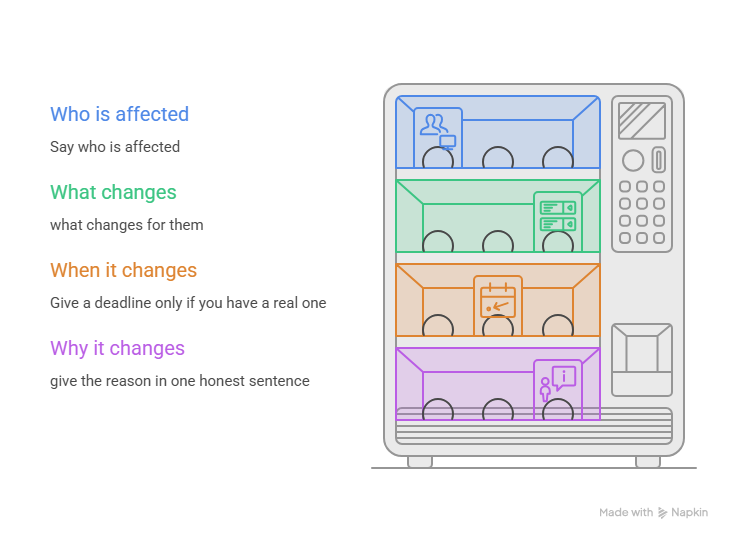
A good product migration video starts with the people, not the product. Say who is affected, what changes for them, and when. Your customers already know the app, so they only need the difference.
Give a deadline only if you have a real one. Some changes do. HubSpot's old v1 contact lists API stopped working on April 30, 2026. Others don't. Salesforce closed new agent creation in its legacy builder in July 2026, but existing agents keep working. If your change has no date, say that. Don't invent urgency.
Then give the reason in one honest sentence. A short "why" beats a paragraph of marketing.
How do you show the old-to-new workflow?
Map one task at a time. Show how the customer did it before, then how they do it now. Same task, same data, two versions. Label old screens with a clear "Old view" badge, so nobody mistakes them for the new product.
Keep one or two things that look the same in both versions, like the top menu or the search bar. They give viewers something familiar to hold on to.
Here is an old-to-new workflow action map you can copy. AcmeDesk is a made-up app, so every detail is an illustrative example.
Sort by risk when you plan. The high-risk rows are where your narrator should slow down.
Which migration prerequisites should viewers know?
Think of it as a pre-flight check. Before they start, viewers should know what they need: the right role, the right settings, clean data, and a supported path.
Real migration tools check these things before anything moves. Atlassian's Jira Cloud Migration Assistant, for example, blocks a migration until every user has a valid, unique email address, and Atlassian tells admins to fix duplicate group names and confirm they have enough licenses. Zendesk asks admins to stop chat traffic before they start its Agent Workspace move.
For your own video, build the list from your product docs, not from memory:
- Which roles can run the migration
- Which settings must be on or off
- What data needs cleaning first
- Which starting versions or plans are supported
Not sure about an item? Leave it out until someone confirms it.
How do you write a migration video script?
Write it in the order the customer will act. Open with who the video is for and what they need. Then show the old step, the new step, and the result. End with a check.
Say each action in plain words. "Click Assign" beats "use the assignment feature." If a step can't be undone, say so before the click, not after. Only say that when it's true for your real product. Zendesk, for one, warns that its chat department merge can't be reversed.
Keep each video to one task. A well-known study of 6.9 million course video sessions found median viewing time was about six minutes, and the authors suggested segments under six. That was school video, not SaaS, so treat it as a nudge.
Here is a sample walkthrough with made-up data (illustrative example):
- Intro: "This is for AcmeDesk admins at Northwind Co. moving from Classic Inbox to New Inbox."
- Old step: show Classic Inbox with an "Old view" badge.
- New step: show where Jordan Lee's saved replies now live.
- Warning: "Deleting old tags can't be undone."
- Check: open New Inbox and send one test reply.

Sample: PuppyDog's editor shows the script next to the video timeline. Read it against your docs before you use it.
What belongs in a migration troubleshooting video?
Cover the problems your docs already list, and nothing else. A troubleshooting video is no place for clever workarounds. If you guess, you may make things worse.
Pick the top two or three blockers from your support tickets or docs. Atlassian's checks are a good model: they flag invalid and duplicate emails, and the assistant has a fix screen for each. Show the error, show the fix, and show how to confirm it worked.
Then show the way out. Say where to get help, such as a support form or your customer success manager. Be honest about rollbacks too. Some moves can be reversed and some can't, so only mention a rollback if your product has one.
What should a migration completion CTA ask users to check?
Ask them to check the finished result, then point to the next task. Don't stop at "Done." The viewer needs to know whether it worked.
Pick one or two checks they can finish in a minute. In the AcmeDesk example, that could be: open New Inbox, confirm your saved replies are there, and send one test reply. Then name the next task, such as setting up Shortcuts for your team.
Last, say where to go if the result looks different. A help link or support address on the final screen is enough. My take: a calm migration completion CTA beats a big banner.
FAQ
How is a migration video different from onboarding?
Onboarding teaches new users what the product does. A migration video speaks to people who already know it and need to learn what moved. It's narrower, and it leans on old-way, new-way comparisons. For the new-user side, see our Related guide on customer onboarding videos.
Should I show the old interface?
Yes, briefly. People rely on what they already know, so the old screen shows them where to start. Add an "Old view" badge and keep it up only long enough to point out the old spot. Then switch to the new one.
What should I do if customers have different migration paths?
Make one short video per path, not one long video for everyone. Salesforce's migration page splits its advice the same way, with one path for agents not yet in production and another for live ones. Add a simple "Which path are you on?" table at the top so viewers can pick.
How do I check whether viewers completed the migration?
Watch the product, not just the video. A view count only tells you people pressed play. Look for the real change: accounts that now use the new workflow, or fewer tickets about the old one.
Next step: create your migration video
Ready to try it? Start with one approved screen recording or set of screenshots of your new workflow. PuppyDog, an AI product video maker, turns them into a video with a script and voiceover that you review before you share it. The idea is professional product videos without a production team. Open Product video creation to make your first product migration video.

Sarah Thompson is a storyteller at heart and Business Developer at PuppyDog.io. She’s passionate about creating meaningful content that connects people with ideas, especially where technology and creativity meet.


