LinkedIn Video Marketing for SaaS: Show One Product Workflow per Post


Good LinkedIn video marketing for SaaS shows one workflow per post: one job your viewer needs done, one clear action, and one visible result. Add captions so it works on mute. Write post copy that adds context instead of repeating the video. Then track clicks and signups, not just views.
What should a B2B LinkedIn video show?
Start with your viewer's job, not your product. A RevOps lead doesn't want a feature menu. She wants her weekly ad report to stop eating her Friday.
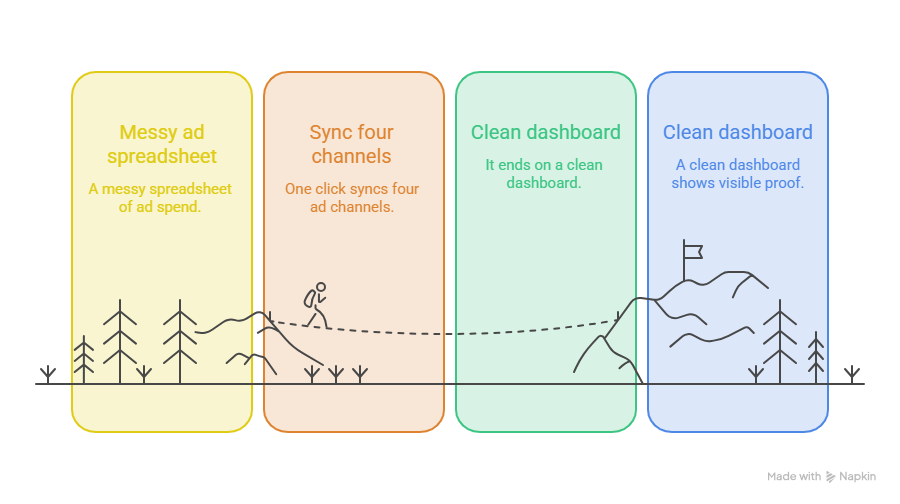
So pick one job, one action, and one result. Here's an illustrative example from a made-up analytics tool called FlowPulse. The video opens on a messy spreadsheet of ad spend. One click syncs four ad channels. It ends on a clean dashboard.
That's visible proof. Nobody has to take your word for it.
Cramming five features into 40 seconds does the opposite. Honestly, if you can't describe the video in one sentence, it's two videos.
How do you choose a LinkedIn product video format?
LinkedIn has real limits, so check them first. For a regular video post, LinkedIn's help page lists a file size from 75 KB to 5 GB and a length from 3 seconds to 15 minutes. It accepts aspect ratios from 1:2.4 to 2.4:1 and frame rates from 10 to 60 fps (Share videos on LinkedIn). Ad specs differ, so don't copy numbers from the video ad specifications by mistake.
Specs are the easy part. Readability is harder. A full desktop screen shrinks to a postage stamp on a phone.
What helps:
- Record only the area where the action happens.
- Zoom in on the click and the result.
- Crop out side menus the viewer doesn't need.
- Keep text and logos away from the edges, where LinkedIn's own buttons can cover them.
My pick for a UI demo is 4:5 vertical, because it fills more of a phone feed. That's a preference, not a rule. Check your export on a real phone before posting.
How do you write a LinkedIn video opening?
The first moments decide if someone keeps watching or keeps scrolling. Here are three openings for the same FlowPulse workflow (all illustrative):
- Problem-led: "Still spending five hours a week on ad spend spreadsheets?"
- Result-led: "Four ad channels, one dashboard, zero CSV exports."
- How-to: "How to sync all your ad spend in one click."
Which one wins? It depends on who's watching. Problem-led suits people who feel the pain but aren't shopping yet. Result-led suits people already comparing tools. How-to suits people who like to learn by watching.
I won't claim one is best, because none always is. Run all three on different posts with the same workflow, then compare clicks and comments.
How do LinkedIn video captions support understanding?
Plenty of people scroll LinkedIn with the sound off, so your video has to make sense without narration.
Think in two layers. Captions cover the spoken words. Short on-screen labels, like "Auto-sync all channels," point out the key moment in the interface.
When you upload a video, LinkedIn lets you add auto captions or attach your own SRT file. Auto captions are supported in 10 languages (Share videos on LinkedIn). Review them before you post, since software names often get mangled.
Then do a small-screen check. Play the video on your phone, on mute. If you can't follow the workflow, your viewers can't either.
What should LinkedIn video post copy add?
The video shows what happens. Your post explains why it matters and what to do next. It shouldn't repeat the voiceover.
Put your main point in the first line or two, because longer posts get cut off behind "see more." Then add one sentence of context and one next step. One step, not three.
Here are three examples that pair with the openings above (illustrative):
Notice what the copy adds: who it's for, why it matters, and where to go. None of it repeats what the viewer already sees.
How do you handle LinkedIn video measurement?
Views are the loudest number and the least useful. For regular video posts, LinkedIn's analytics show impressions, members reached, video views, watch time, and average watch time. They also show reactions, comments, reposts, and your viewers' job titles, locations, and companies (View analytics for your videos). A view there means someone watched for more than two seconds.
Ad reports work differently. Campaign Manager counts a view as two or more continuous seconds with at least half the video on screen (Video metrics in Campaign Manager). Don't mix the two sets of numbers.
Clicks and signups live outside LinkedIn. Add UTM tags to your post link, such as utm_source=linkedin and utm_medium=social_video, then read the results in your own web analytics.
Know the limits. Someone might watch on Tuesday and sign up through a search on Friday. Your tagged link won't connect those dots, so treat every number as a clue, not proof.
FAQs
Should a SaaS LinkedIn video show UI or a presenter?
Show the UI for most workflow posts. Buyers want proof the product does the thing. A presenter or voiceover can add a short intro, but keep the screen on the software.
Can I post a product video without a voiceover?
Yes. Use captions, short on-screen labels, and a zoom on the action. Plenty of viewers watch on mute anyway, so a silent video that makes sense is a strong start.
What should the accompanying post say?
Lead with the problem in the first line. Add one sentence of context and one next step. Skip the play-by-play, since the video already covers it.
Which metric matters more than the view count?
Tracked clicks and signups from your tagged link, because they show real intent. Inside LinkedIn, members reached and average watch time tell you whether the right people stayed.
Next step
Ready to put LinkedIn video marketing into practice? Pick one workflow and record it once. With the AI product video maker, PuppyDog turns that approved screen recording into a professional product video without a production team. It drafts the script and narration; you review both, and you can add zoom and subtitles in the editor.
Head to Product video creation to create your first social video. Want the wider picture on short video? Here's a Related guide on video marketing trends.

Sarah Thompson is a storyteller at heart and Business Developer at PuppyDog.io. She’s passionate about creating meaningful content that connects people with ideas, especially where technology and creativity meet.