JPG vs PNG: Which Is Better? (2026 Quick Guide)

Quick Verdict Table
What Is a JPG?
JPG, also written as JPEG, is the most common image format on the internet. It was created in 1992 by the Joint Photographic Experts Group. The name "JPG" exists only because old Windows systems could not handle 4-letter file extensions. JPG and JPEG are the same file format. There is no quality difference.
JPG uses something called "lossy compression." This means the file removes small bits of image data to make the file size smaller. Your eyes usually do not notice the loss. But every time you save a JPG, more data is thrown away. After many edits, a JPG starts to look blurry or blocky. This is called "JPG degradation."
JPG supports 16.7 million colors (24-bit color). That is enough for almost any photo.
What Is a PNG?
PNG stands for Portable Network Graphics. It was made in 1995 as a free, open replacement for the older GIF format.
PNG uses "lossless compression." This means the file gets smaller, but no image data is thrown away. A PNG always looks the same as the original. You can save and re-save a PNG 1,000 times and it will look the same as the first save.
PNG also supports something JPG does not. It supports a transparent background. This is called an "alpha channel." If you have a logo and you want it to sit cleanly on any color background, you need a PNG.
PNG supports up to 48-bit color, which is even more than JPG. That is why PNG looks sharper for graphics with bold colors, hard edges, and text.
JPG vs PNG: The Full Side-by-Side Comparison
The 5 Real Differences (In Plain English)
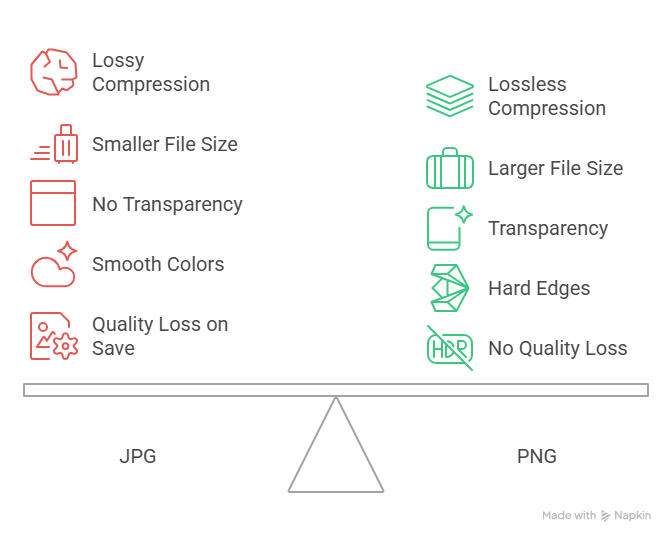
1. Compression: Lossy vs Lossless
JPG throws away data to save space. PNG keeps every pixel.
Think of JPG like packing a suitcase by squishing your clothes. They fit, but they get wrinkled. PNG is like folding everything neatly. It takes more room, but nothing gets damaged.
2. File Size
A photo saved as a JPG might be 500 KB. The same photo saved as a PNG might be 3 MB. That is six times bigger. On a website, that matters. Slow images mean slow pages. Slow pages mean lost visitors.
3. Transparency
JPG cannot have a see-through background. If you save a logo as a JPG, it will always have a white box around it. PNG can have a fully transparent background, which is why every logo and icon online is a PNG.
4. Color and Sharpness
JPG is built for smooth color shifts, like sky, skin, and shadows. It is great for photos. PNG is built for hard edges, like text, lines, and flat color blocks. It is great for screenshots, charts, and graphics.
5. Edit Friendliness
If you plan to open, change, and re-save an image many times, use PNG. JPG loses quality every save. PNG never does.
When Should You Use JPG?
Use JPG for photos on websites, email images, social media posts, photo archives, and hero banners with no text.
When Should You Use PNG?
Use PNG for logos, screenshots, charts, app icons, product images on clean backgrounds, and any image with a transparent background or sharp text.
JPG vs PNG for Common Tasks
Photos: JPG. Smaller files, fast loading, and the human eye cannot tell the difference.
Logos: PNG. Transparency and sharp edges matter most.
Screenshots: PNG. Text stays crisp. JPG makes screenshot text look fuzzy.
Social media: JPG for photos. PNG for graphics with text or logos.
Thumbnails and video previews: PNG keeps text crisp. For more help making thumbnails that get clicks, see our Video Editing tips.
Email signatures: PNG. You need transparency, and the file is small.
Printing photos: A high-resolution JPG is fine. For graphics, use PNG.
What About WebP and AVIF?
In 2026, most websites should not pick between JPG and PNG anymore. WebP, made by Google, gives JPG-level file size with PNG-level quality, and it supports transparency. AVIF gives even smaller files. Both work in all modern browsers. If your CMS supports WebP, use it. If not, JPG for photos and PNG for graphics is still a safe choice.
JPG vs PNG: Impact on SEO and Page Speed
Google uses page speed as a ranking signal through Core Web Vitals. Heavy images are the top cause of slow pages. PNG files are often 4 to 8 times bigger than JPG files for the same photo. A 2024 HTTP Archive report found PNG made up about 30 percent of web images but more than 50 percent of total image weight. The fix is simple. Use JPG for photos. Use PNG only when transparency or sharp text are needed.
How to Convert JPG to PNG (and Back)
You have 3 easy options:
- Built-in tools. Mac Preview or Windows Paint/Photos. Use "Save As" or "Export."
- Online tools. CloudConvert or TinyPNG.
- Design tools. Figma, Canva, or Photoshop.
Note: turning a JPG into a PNG will not restore quality the JPG already lost. Going from PNG to JPG will shrink the file but cost some quality.
The Bottom Line
The JPG vs PNG choice is simple once you know what each format is built for. JPG is the workhorse for photos. PNG is the specialist for graphics, logos, and anything with transparency. When in doubt, ask one question. Does the image have text, a logo, or a transparent background? If yes, choose PNG. If no, choose JPG.
For most modern websites, the best move in 2026 is to use WebP or AVIF when possible, with JPG and PNG as the fallback. This gives you the smallest file size and the best quality at the same time.
If you create product demos, screenshots, or training content, the format you pick shapes how your work looks online. Tools like Puppydog help teams turn product screenshots into clean, branded videos without worrying about format trade-offs.
FAQs
Are JPG and JPEG the same? Yes. Same format. The shorter "JPG" extension existed for old Windows systems that could not handle 4-letter extensions. Renaming .jpeg to .jpg does not change quality.
Which is better, JPG or PNG? Neither is better overall. JPG wins for photos. PNG wins for graphics, text, and transparent backgrounds.
Can a JPG have a transparent background? No. JPG does not support transparency. Any clear area gets filled with white. Use PNG, WebP, or GIF.
Which loads faster on a website? JPG. A 2 MB photo might be 300 KB as a JPG and 2 MB as a PNG. Smaller files mean faster pages and better Core Web Vitals.
Is PNG better for printing? For graphics, logos, and text, yes. For photos, a high-resolution JPG is fine. For posters or brochures, ask your printer (many want TIFF or PDF).
Does Google prefer JPG or PNG for SEO? Google does not prefer either. It cares about file size and speed. JPG usually wins on speed. WebP wins on both, which is why Google built it.
Can I convert JPG to PNG without losing quality? You can convert the file, but you cannot recover data the JPG already removed. The PNG will look the same as the JPG.
Which format is best for screenshots? PNG. Screenshots have text and sharp lines. JPG makes those look blurry.
Is JPG dead in 2026? Not yet. JPG still powers most of the photo web. But WebP and AVIF are growing fast.
Which is better for Instagram and Facebook? JPG for photos, PNG for graphics with text or logos. Both will be re-compressed by the platform.
Conclusion
JPG vs PNG is not a battle. It is a choice based on the job. Pick JPG when you want small, fast photos. Pick PNG when you need transparency, sharp text, or graphics that will be edited many times. And in 2026, do not forget that WebP and AVIF can do both jobs better for the modern web.
Once you know the rule, the choice takes less than a second. Photo? JPG. Logo, screenshot, or transparent background? PNG. Modern site with full browser support? WebP. That is it.

Sarah Thompson is a storyteller at heart and Business Developer at PuppyDog.io. She’s passionate about creating meaningful content that connects people with ideas, especially where technology and creativity meet.