How to Create How-To Videos for Your SaaS Customers at Scale


If you’ve ever worked with a Customer Success team, you’ve probably heard the same frustration: “We know customers need better guidance, we just don’t have time to create it.”
How-to videos are one of the most effective ways to help users understand a product. They show exactly what to do, step by step. But creating those videos the traditional way is surprisingly time-consuming. Recording the screen, correcting mistakes, editing clips, adding voiceover, and publishing can easily take several hours to produce a short tutorial.
And then, of course, the product changes. A button moves. A workflow update. Suddenly, that carefully recorded video is slightly wrong, or worse, completely outdated.
There’s another challenge: a single generic tutorial rarely works for everyone. A product manager, a support agent, and a CFO might all use the same tool, but they care about very different workflows.
This is where many SaaS teams hit a wall. They know video education works, yet scaling how-to videos for SaaS customers feels impossible. The good news? A new generation of AI-powered tools is changing how companies create and maintain how-to videos, enabling faster production, personalization, and updates without starting from scratch each time.
Why SaaS Companies Need How-To Videos More Than Ever
The Knowledge Gap in Modern SaaS Products
Let’s be honest: modern SaaS platforms are powerful, but also complex. Features multiply, interfaces evolve, and what was intuitive yesterday can feel like a puzzle today. The reality? Most users only tap into a fraction of a product’s capabilities. And when customers aren’t fully equipped to use your platform, they struggle to see the value you promised. Poor education doesn’t just frustrate users. It directly impacts your bottom line. Churn spikes, support tickets pile up, and teams spend more time firefighting than driving growth. Closing this knowledge gap isn’t optional anymore; it’s a survival strategy for SaaS companies aiming to scale.
Why Video Works Better Than Documentation
Here’s where video really shines. Humans process visuals far faster than text, and most people actually prefer watching a quick tutorial over reading a wall of instructions. Videos reduce cognitive load by showing users exactly how a feature works, rather than leaving them to interpret screenshots and paragraphs. The result? Faster comprehension, higher retention, and fewer “Wait…how do I do this?” moments. In B2B SaaS, where onboarding delays can cost serious revenue, this makes a measurable difference.
Key Takeaway: Well-placed how-to videos help customers reach the “aha moment” faster, turning confusion into confidence and occasional users into loyal advocates.
The Scaling Problem: Why Traditional How-To Video Production Breaks Down
The Typical Workflow for Manual Video Creation
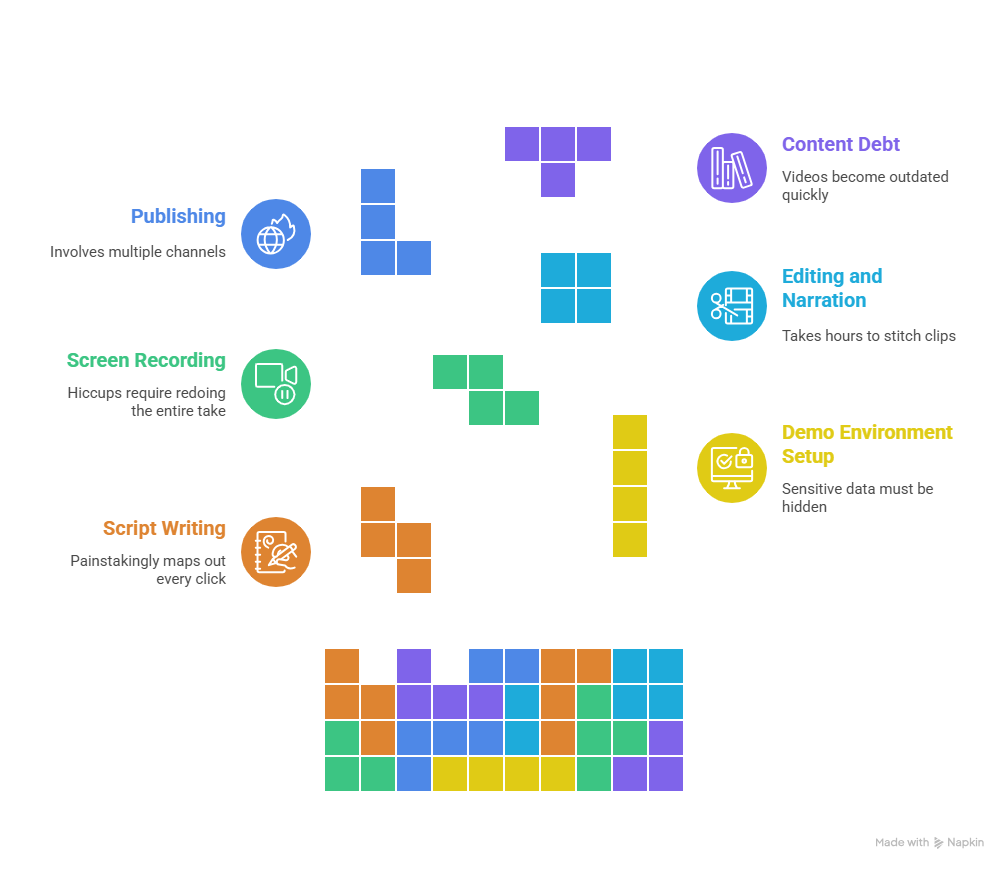
Creating a single how-to video the old-fashioned way is no small feat. It usually starts with script writing, where someone painstakingly maps out every click, menu, and tooltip. Next comes the demo environment setup, ensuring sensitive data is hidden, and the interface is pristine. One misconfigured element and the whole video feels unprofessional. Then you move to screen recording, where even a minor hiccup, a notification pop-up, or lag can require redoing the entire take.
Once the recording is done, the work is far from over. Editing and narration take hours: stitching clips, adding annotations, syncing voiceovers, and polishing the final cut. Finally, there’s publishing, which may involve multiple channels such as a help center, onboarding emails, or internal portals. For a single video, this workflow can easily require 40–80 hours of effort, depending on complexity.
Why Manual Production Doesn’t Scale
Here’s the hard truth: what works for one or two videos falls apart at scale. Manual production is time-intensive, expensive, and painfully fragile. SaaS products evolve constantly, a button moves, a workflow changes, and suddenly, videos are outdated. Teams accumulate what’s known as “content debt”: a library of videos that are only partially accurate. Updating one video often feels like starting from scratch, and before long, the entire library becomes difficult to maintain.
Mini Insight: What starts as a helpful video library can quickly become a maintenance nightmare. Instead of enabling customers, it creates more friction and drains resources from teams that should be focusing on high-value initiatives.
The Modern Approach: Automating How-To Video Creation
From Screen Recording to AI-Generated Video
The days of painstakingly recording every click on your screen are fading fast. Today, AI-powered platforms are transforming how-to video creation by capturing workflows rather than pixels. Instead of recording a static screen, the system understands the steps behind a task, the clicks, inputs, and sequences that define a successful outcome. From there, it can automatically generate a polished script, removing the guesswork and inconsistencies that plague manual videos.
But it doesn’t stop at visuals. AI also handles voiceovers and localization, producing professional narrations in multiple languages instantly. No more booking a voice actor or worrying about accent consistency. The result is a video library that’s not just accurate, but globally accessible and ready to reach the exact audience that needs it.
Why Automation Enables Scalable Video Production
The biggest advantage? Scale. Automation dramatically speeds up production, turning what used to take hours into minutes. When your product changes—a button moves, a workflow updates, a new feature launches, AI makes it simple to update existing videos without starting over. And because the process is automated, you can generate hundreds of videos across features, personas, and languages without increasing team workload.
In short, the modern approach lets SaaS teams scale how-to video production effortlessly. No more content debt, no more bottlenecks, just accurate, personalized, and up-to-date tutorials that guide users exactly when and where they need them.
What Makes a Great SaaS How-To Video
Keep It Short and Focused
When it comes to SaaS tutorials, less is more. Users rarely have the patience to watch a 10-minute walkthrough for a task they need done in 30 seconds. The sweet spot? 1–3 minutes per video, each focusing on a single task or workflow. This keeps the content digestible, ensures higher engagement, and makes it easier to update when product changes occur. Think of it as giving your users a clear step-by-step roadmap rather than a sprawling lecture. They get the information they need without feeling overwhelmed.
Match the Video to the Viewer
Not every user approaches your product the same way. A CFO might care about ROI and reporting dashboards, while a Product Manager wants to see feature depth and workflow efficiency. That’s why persona-based tutorials are essential. By tailoring the content to specific user types, you increase relevance, comprehension, and adoption. Videos that speak directly to the viewer’s goals naturally boost engagement and help ensure each user can extract value from your platform.
Embed Videos Where Customers Actually Need Them
Placement is just as important as content. The most effective how-to videos are contextual, appearing exactly when users encounter friction. Embed short clips in in-app tooltips, onboarding emails, help center articles, and even support responses. Done correctly, this approach to video-based customer guidance not only helps users but also reduces support tickets significantly.Instead of calling or emailing for help, customers can find answers instantly, turning reactive support into proactive education.
Key Insight: Great SaaS how-to videos are short, personalized, and strategically placed. They don’t just teach, they guide users seamlessly, reducing frustration and increasing feature adoption.
A Simple Framework for Scaling How-To Video Production
Identify Your Highest-Impact Workflows
Before diving into production, it’s crucial to prioritize the workflows that matter most to your users. Start with onboarding tasks, ensuring new customers can quickly reach their “aha moment.” Next, tackle frequently asked support questions, which often account for a large volume of repetitive tickets. Finally, focus on core product features that drive value and adoption. By concentrating on these high-impact areas first, you make the most of your time and resources while maximizing user satisfaction.
Break Tutorials into Micro-Videos
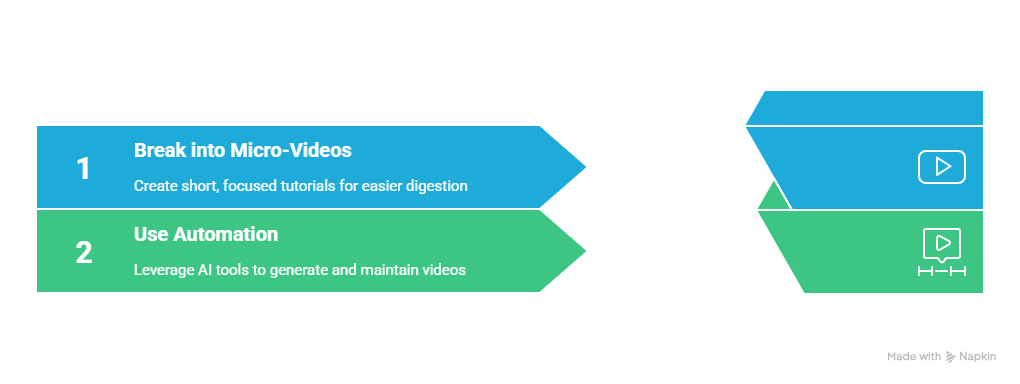
Once you’ve identified the workflows, break each task into short, focused micro-videos. These bite-sized tutorials are easier for users to digest, quicker to produce, and far simpler to update when your product evolves. Instead of a single long video that might become outdated or overwhelming, a library of micro-videos allows you to maintain accuracy and relevance at scale.
Use Automation to Generate and Maintain Videos
This is where automation transforms the game. Modern automated how-to video SaaS tools can turn screenshots or short recordings into fully narrated, polished videos in minutes. Platforms like PuppyDog go a step further by personalizing videos for different personas, automatically updating content when your product changes, and tracking engagement. The result is a video library that scales effortlessly, reduces maintenance burden, and keeps users engaged and informed without overloading your team.
Key Insight: By prioritizing high-impact workflows, breaking content into micro-videos, and leveraging AI automation, SaaS teams can finally scale how-to video production without burning out resources.
How Tools Like PuppyDog Make Scalable Video Possible
AI-powered platforms like PuppyDog transform how SaaS teams approach customer education, making how-to videos for customer success faster, easier, and more effective. Instead of spending hours manually recording screens, these tools can:
- Turn screenshots or short recordings into polished videos in minutes
- Automatically generate scripts and narration, keeping messaging consistent and smooth
- Personalize videos for different audiences, so each user sees content tailored to their role (CFO, Product Manager, Support Agent, etc.)
- Track engagement and usage, providing insights on which videos resonate, where users drop off, and which workflows need more support
Why This Matters for Customer Success Teams
Using PuppyDog allows teams to:
- Reduce repetitive support tickets – users find answers instantly without needing help from CS.
- Accelerate onboarding – short, role-specific videos guide users quickly to their “aha moment.”
- Keep content up-to-date effortlessly – AI updates videos automatically when your product changes.
- Scale education without increasing headcount – hundreds of personalized videos can be produced without adding extra team members.
The result is a scalable, low-friction video strategy that keeps users engaged, educated, and confident while freeing your team to focus on high-value initiatives. Tools like PuppyDog make creating and maintaining a library of effective, personalized how-to videos not just possible, but simple.
Conclusion:
The challenge for SaaS teams isn’t just creating one tutorial. It’s producing hundreds of accurate, relevant videos that keep up with a constantly evolving product. Manual workflows simply cannot match the speed and complexity of modern SaaS platforms. Automated how-to video production allows teams to educate users faster, more consistently, and with far less effort.
By scaling customer education effectively, companies can boost adoption, reduce support tickets, and improve retention across their user base. Well-executed video education turns confusion into confidence, helping customers reach their “aha moments” more quickly.
If you want to see how automated, personalized video creation can transform your customer success efforts, exploring tools like PuppyDog is a great place to start.
Frequently Asked Questions
What is a how-to video for customer success?
A how-to video for customer success is a short, focused tutorial that guides users through specific workflows or tasks within a SaaS product. These videos help users understand features quickly, reduce confusion, and increase adoption.
How long should a SaaS how-to video be?
The ideal length is generally 1–3 minutes per video, focusing on one task or workflow. Short, digestible videos are easier for users to watch, remember, and apply without feeling overwhelmed.
Can AI tools really replace manual video creation?
Yes. AI-powered platforms automate script generation, voiceovers, and video assembly, allowing teams to produce hundreds of videos quickly. While some human oversight helps with quality and messaging, AI dramatically reduces production time and costs.
How do how-to videos reduce support tickets?
When videos are embedded in the right places, like in-app tooltips, onboarding emails, or help center articles, users can find answers instantly. This prevents repetitive questions from reaching support teams, saving time and resources.
How can I personalize videos for different users?
AI tools like PuppyDog can tailor videos based on user roles or personas. For example, a CFO sees content focused on ROI, while a Product Manager sees feature workflows. Personalization ensures relevance and higher engagement.

Sarah Thompson is a storyteller at heart and Business Developer at PuppyDog.io. She’s passionate about creating meaningful content that connects people with ideas, especially where technology and creativity meet.