How to Create Employee Training Videos with AI (No Editing Required)

Creating employee training videos used to be a lot.
You needed editing skills, multiple tools, and hours (sometimes days) just to produce one decent video. For most teams, that level of effort simply wasn’t practical.
- HR and L&D teams are already overloaded with onboarding, compliance, and daily operations
- SaaS teams ship updates constantly, but training content struggles to keep up
So training often gets delayed, outdated, or skipped altogether, and employees are left figuring things out on their own.
That’s where things have changed.
AI has quietly removed the biggest barrier: video editing. Today, you can turn a simple screen recording or workflow into a polished training video complete with script, narration, and structure without touching a timeline editor.
In this guide, you’ll learn:
- How to create employee training videos step by step
- The easiest way to turn your existing knowledge into videos
- The key types of training videos every SaaS company needs
- Best practices to make sure employees actually watch them
- And a real example of how teams are reducing onboarding time with AI
The best part? You don’t need editing skills or a production team. Modern AI video tools handle everything from script to sharing, so you can focus on what actually matters: helping your team learn faster.
Why Employee Training Videos Matter More Than Ever in 2026
Faster Learning in a Fast-Moving Work Environment
Work isn’t slowing down, and neither is the software your team uses.
In SaaS environments, especially, tools evolve constantly. New features roll out, workflows change, and what worked last month might already be outdated. In this kind of environment, long documents just don’t cut it anymore.
Video does.
People process visual information much faster than text, and more importantly, they remember it. A quick walkthrough showing how something works is far more effective than a page explaining it.
Think about it: if an employee needs to learn a new tool, would they rather read a 10-step guide or watch a 2-minute video that shows everything in action?
Exactly.
Remote & Hybrid Teams Need Consistency
With teams spread across locations, time zones, and even continents, consistency becomes a real challenge.
You can’t rely on one manager to explain the same process over and over again. And even if they do, the experience won’t be the same for everyone.
Training videos solve that.
They ensure every employee gets the same clear, repeatable experience, no matter where they are. Whether someone joins today or three months from now, the quality of training stays consistent.
And as a bonus, it reduces the constant back-and-forth where managers have to answer the same questions repeatedly.
Real Business Impact (Not Just “Nice to Have”)
It’s easy to think of training videos as a “nice extra.” In reality, they directly impact business performance.
Companies using video-based training are seeing:
- Higher employee retention because onboarding feels smoother and less overwhelming
- Faster time-to-productivity, with employees getting up to speed quicker
- Reduced support load, as fewer people need to ask for help or clarification
In simple terms, better training doesn’t just help employees, it saves time, reduces costs, and improves overall efficiency.
From Documentation to “Living Knowledge”
Traditional documentation has one big problem: it gets outdated. Fast.
PDFs, internal docs, and static guides often sit untouched while workflows evolve around them. Before you know it, they’re no longer reliable.
Video-first training changes that.
Instead of static information, you create living knowledge, content that can be easily updated, replaced, or improved as things change. And with AI in the mix, updating a training video can be as simple as tweaking a script or re-recording a quick workflow.
The result? Training that actually stays relevant.
Types of Employee Training Videos Every SaaS Company Needs
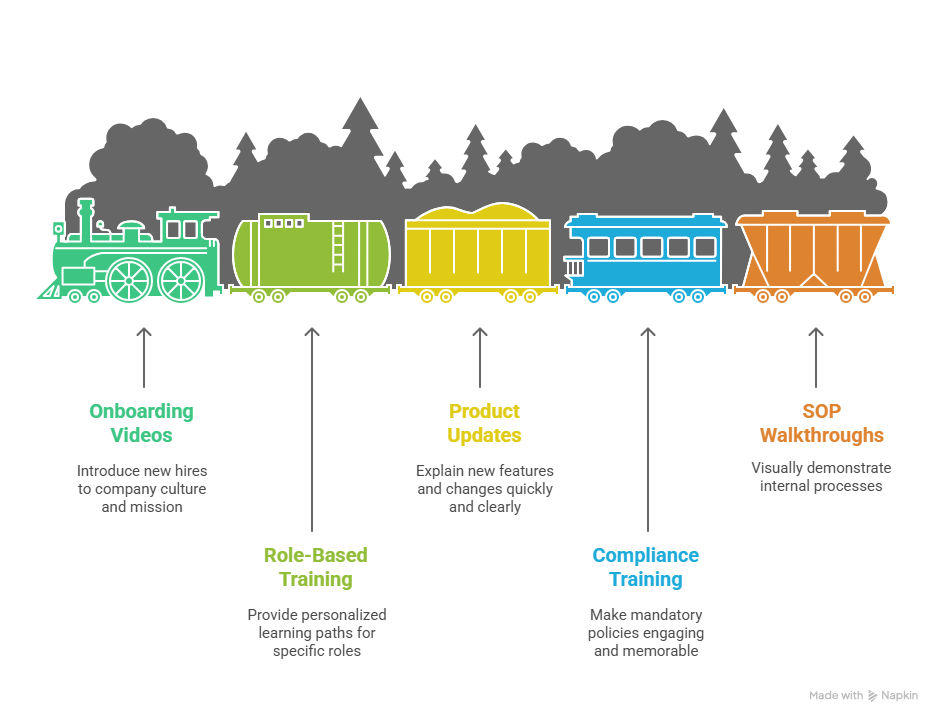
1. Employee Onboarding Videos
First impressions matter. Onboarding videos are your chance to introduce new hires to your company’s culture, mission, and expectations. A well-crafted video can reduce first-day confusion, helping employees feel confident and connected from day one. Rather than overwhelming them with forms and manuals, these videos immerse new hires in the company’s story, values, and people, setting the stage for a smoother transition.
2. Role-Based Training Videos
Generic training is a thing of the past. Sales reps, developers, and support teams all have different workflows and priorities, and their training should reflect that. Role-based videos create personalized learning paths that focus on the tasks, tools, and skills each team member actually needs. Employees spend less time figuring out “what’s relevant to me” and more time learning how to excel in their role.
3. Product & Feature Update Videos
In SaaS, products evolve constantly. If teams aren’t kept up to date, knowledge gaps appear, and mistakes happen. Product update videos bridge this gap. They provide quick, clear explanations of new features or changes, showing the problem solved and the expected outcome. AI can even generate these videos automatically from screen recordings, ensuring that your team stays aligned in real time without waiting for traditional production cycles.
4. Compliance & Security Training Videos
Compliance and security training often gets a bad rap for being dull, but it doesn’t have to be. AI-powered storytelling can turn mandatory policies into engaging scenarios, simulations, or interactive lessons. Employees not only learn the rules, but they also experience them in context. For SaaS companies handling sensitive data, this makes critical procedures memorable and actionable.
5. SOP & Process Walkthrough Videos
Standard Operating Procedures (SOPs) and internal processes are often buried in dense documents that few people actually read. Screen-based walkthrough videos fix that. By visually demonstrating each step of a process, employees can follow along easily and retain information more effectively. It’s a faster, more intuitive way to replace long, text-heavy documentation and ensure that knowledge is actually applied.
The Old Way vs the AI Way: How Training Video Creation Has Changed
The Old Way (Why It Didn’t Scale)
Traditional training video production was slow, expensive, and resource-heavy. Creating a single video often meant hiring a production crew, learning editing software, and waiting weeks for a polished final product. Updating content was just as painful, as any small change could require reshooting or heavy editing. For growing teams, this model simply didn’t scale.
- High cost per video
- Needed specialized editing skills
- Long turnaround times
- Difficult to update or revise
The AI Way (What Changed)
AI has flipped the script entirely. Today, you can go from script to finished video without touching a timeline. Updates are quick, and scaling content across multiple teams or languages is easy. AI-driven platforms democratize production, making professional training videos accessible to anyone, regardless of editing experience.
- No editing required
- Script → video instantly
- Easy updates and revisions
- Scalable content creation across teams
Quick Comparison Table
This comparison makes it clear: AI isn’t just faster, it’s transformative. It turns training video creation from a bottleneck into a scalable, cost-effective solution.
How to Create Employee Training Videos with AI: Step by Step
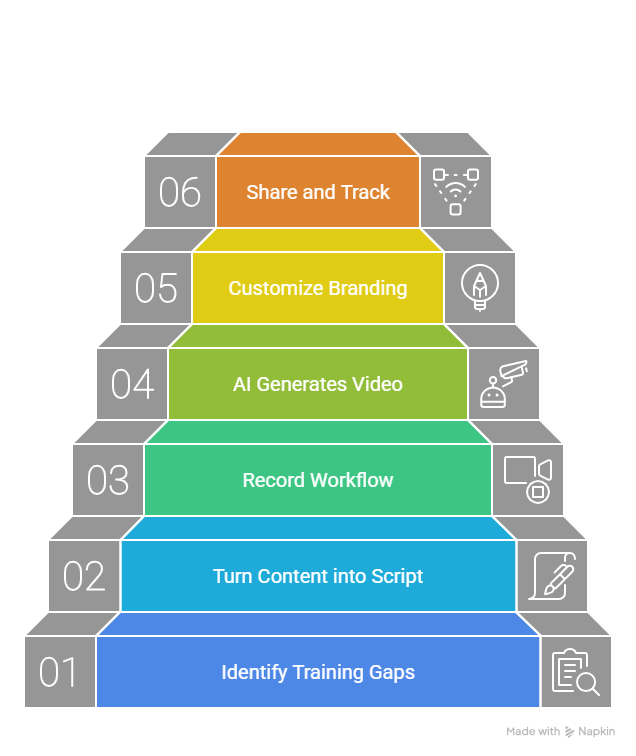
Step 1: Identify Training Gaps
Before you create anything, start with the real problem.
Look at where employees are getting stuck:
- Repetitive questions in Slack or email
- Common onboarding issues
- Support tickets or internal confusion points
These are your best training opportunities. If the same question is asked five times, it probably deserves a video.
Step 2: Turn Existing Content into a Script
You don’t need to start from scratch.
Most companies already have content scattered across:
- SOP documents
- Internal guides
- Notes, slides, or even chat explanations
AI can turn this raw material into a clean, structured script in seconds. Instead of writing like a copywriter, you’re simply organizing what already exists.
Step 3: Record or Capture Your Workflow
Now comes the easiest part just show what you do.
Open your tool, perform the task, and record your screen. No need for perfect takes or polished delivery. A simple walkthrough is enough.
This works especially well for:
- Software tutorials
- Internal processes
- Step-by-step workflows
Step 4: Let AI Generate the Video
This is where the real magic happens.
Once you have your recording or script, AI takes over:
- Generates narration
- Structure the video into clear steps
- Adds visuals or highlights key actions
And the best part? There’s no timeline editing involved. You’re not trimming clips or syncing audio manually. It’s all handled for you.
Step 5: Customize Branding & Messaging
Even though the process is automated, you still stay in control.
You can easily adjust:
- Your brand (logo, colors)
- Tone of voice (formal, conversational, instructional)
- Messaging based on the audience
This ensures your training videos don’t feel generic. They feel like your company.
Step 6: Share and Track Engagement
Once your video is ready, getting it in front of your team is simple.
You can:
- Share via link
- Embed in internal docs or knowledge bases
- Add to onboarding flows or LMS
Many tools also let you track engagement so you can see who watched the video, where they dropped off, and what might need improvement.
Where Tools Like Puppydog.io Fit In
If you’re wondering how this actually comes together in practice, this is where modern tools play a big role.
Platforms like Puppydog.io are designed to simplify this entire workflow:
- Turn screen recordings into structured training videos automatically
- Generate scripts and narration without manual effort
- Personalize videos for different teams or use cases
- Share via links and track engagement from one place
Instead of stitching together multiple tools, everything happens in a single, streamlined flow, which is exactly why creating training videos no longer feels like a “project.”
Best Practices for Training Videos That Employees Actually Watch
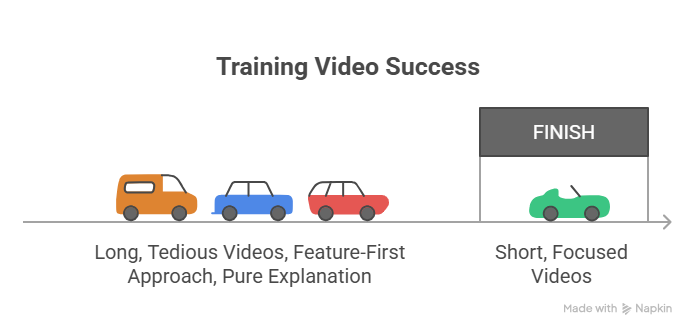
Creating training videos is one thing. Getting employees to actually watch (and remember) them is another. A few small shifts in how you design your videos can make a huge difference.
Keep It Short (Microlearning Wins)
Long training videos sound productive, but they rarely work.
Most employees don’t have the time or attention span to sit through 20–30 minute sessions. Short, focused videos perform much better.
- Aim for 3–10 minutes per video
- Stick to one concept or task per video
This way, employees can quickly learn what they need and move on. It also makes it easier to revisit specific topics later without rewatching everything.
Focus on Real Problems, Not Features
One of the most common mistakes? Starting with features.
Instead, flip the approach:
- Start with a real problem the employee faces
- Show the outcome or solution
- Then walk through the steps to get there
This makes the content immediately relevant. When people see how something helps them in their day-to-day work, they’re far more likely to pay attention.
Show, Don’t Just Tell
Explaining something is good. Showing it is better.
Use:
- Screen recordings
- Visual highlights (clicks, movements, key areas)
- Simple cues to guide attention
A quick visual walkthrough often replaces paragraphs of explanation. And honestly, it just feels easier to follow.
Keep It Human
Even with AI, your videos shouldn’t feel robotic.
A slightly conversational tone works best like a helpful teammate explaining something, not a scripted announcement. You can even include small touches like:
- Simple language instead of jargon
- Occasional real-world context
- A bit of personality where it fits
Perfectly polished isn’t always the goal. Clear and relatable usually wins.
Reinforce Learning
Training doesn’t end when the video does.
To make learning stick:
- Share videos in relevant moments (not just once during onboarding)
- Encourage repeat viewing for key workflows
- Use follow-ups or quick refreshers when needed
The more employees see and apply the content, the more it becomes part of their routine, not just something they watched once and forgot.
Real Example: How a SaaS Company Used AI Training Videos to Cut Onboarding Time by 40%
The Problem
A growing SaaS company was struggling with onboarding.
Every new hire went through the same process:
- Long onboarding timelines
- Repetitive, manual training sessions
- Heavy reliance on managers to explain the same workflows again and again
It wasn’t just inefficient. It was slowing the entire team down. New hires took longer to become productive, and experienced employees were constantly pulled away from their actual work to provide support.
The Solution
Instead of scaling the old process, the company changed the approach.
They introduced AI-generated training videos:
- Created onboarding videos for core workflows
- Built role-based content for sales, support, and product teams
- Replaced repeated live sessions with on-demand video training
Using simple screen recordings and AI tools, they quickly turned existing knowledge into structured, easy-to-follow videos. No editing bottlenecks. No production delays.
The Results
The impact was noticeable almost immediately:
- Onboarding time reduced by 40%
- New hires reached productivity much faster
- Managers spent less time repeating instructions
- Internal support requests dropped significantly
Instead of relying on memory or constant guidance, employees had clear, visual resources they could revisit anytime.
Key Takeaways
If you’re looking to apply this approach, here’s what stands out:
- Start with repeatable processes. Anything explained more than once should become a video
- Create role-specific training, not one-size-fits-all content
- Focus on speed over perfection. Done is better than overproduced
- Make videos easily accessible so employees can learn on demand
The takeaway is simple: you don’t need a bigger training team, you need a smarter system.
Conclusion:
Not long ago, creating employee training videos felt complex, slow, and expensive. Today, it’s the opposite. AI has removed the biggest barriers, editing, production time, and technical skills, making it possible for any team to create high-quality training content quickly. What used to be a bottleneck is now a scalable system that helps teams learn faster, stay aligned, and adapt without friction.
If you’re just getting started, keep it simple. Create one workflow video, test it with your team, and build from there. Experiment with AI tools, refine your approach, and turn training into a repeatable process instead of a one-time effort. Tools like Puppydog.io make this easier by handling everything from script to sharing, so you can focus on helping your team succeed, not on editing videos.
FAQs
How long does it take to create an employee training video with AI?
With modern AI tools, you can create a professional training video in minutes, not days. In many cases, it takes under 10 minutes to go from a simple screen recording or input to a fully structured video with narration and visuals.
Do I need video editing experience to create training videos?
Not at all. That’s the biggest advantage of AI. You don’t need to worry about timelines, cuts, or syncing audio. The AI handles everything from generating the script to adding voiceover and structuring the visuals so you can focus on the content itself.
What’s the ideal length for an employee training video?
Shorter is better. The most effective training videos are typically under 6 minutes per topic. This keeps the content focused, easier to digest, and more likely to be watched rather than skipped.
Can I personalise training videos for different employee roles?
Yes, and you absolutely should. Different roles have different needs, so creating persona-based training videos helps employees learn faster and stay engaged. AI makes it easy to tailor content for sales, support, product, or any other team without starting from scratch each time.
How do I update training videos when my product changes?
Updating is simple with AI. Instead of re-recording everything, you can regenerate videos using updated inputs—like new screenshots or workflows in just a few minutes. This keeps your training content accurate without the usual production hassle.

Sarah Thompson is a storyteller at heart and Business Developer at PuppyDog.io. She’s passionate about creating meaningful content that connects people with ideas, especially where technology and creativity meet.