Video Landing Page Best Practices for SaaS: Placement, Readability, and Next Steps


Video landing page best practices come down to four things: answer one visitor question, place the video where it supports the page promise, keep it fast and readable, and give people one clear next step. Then test it against a static page instead of guessing.
What should a SaaS landing page video explain?
Your visitor just landed with one question: "What does this do, and is it for me?" The video has one job. Answer that, fast.
Match the video to the page promise. If the headline says "Turn screen recordings into demo videos," the first seconds should show exactly that. Skip the logo animation and the company story.
Here's an illustrative example. A sprint tool promises "Plan a sprint in ten minutes," so the video shows a sprint going from an empty board to a finished plan. No feature tour.
My take: one video, one question. A video that covers every feature ends up answering nothing.
How do you choose landing page video placement?
No spot wins on every page. The right pick depends on your product and your visitor. Here are two illustrative layouts.
Sample layout A: video in the hero
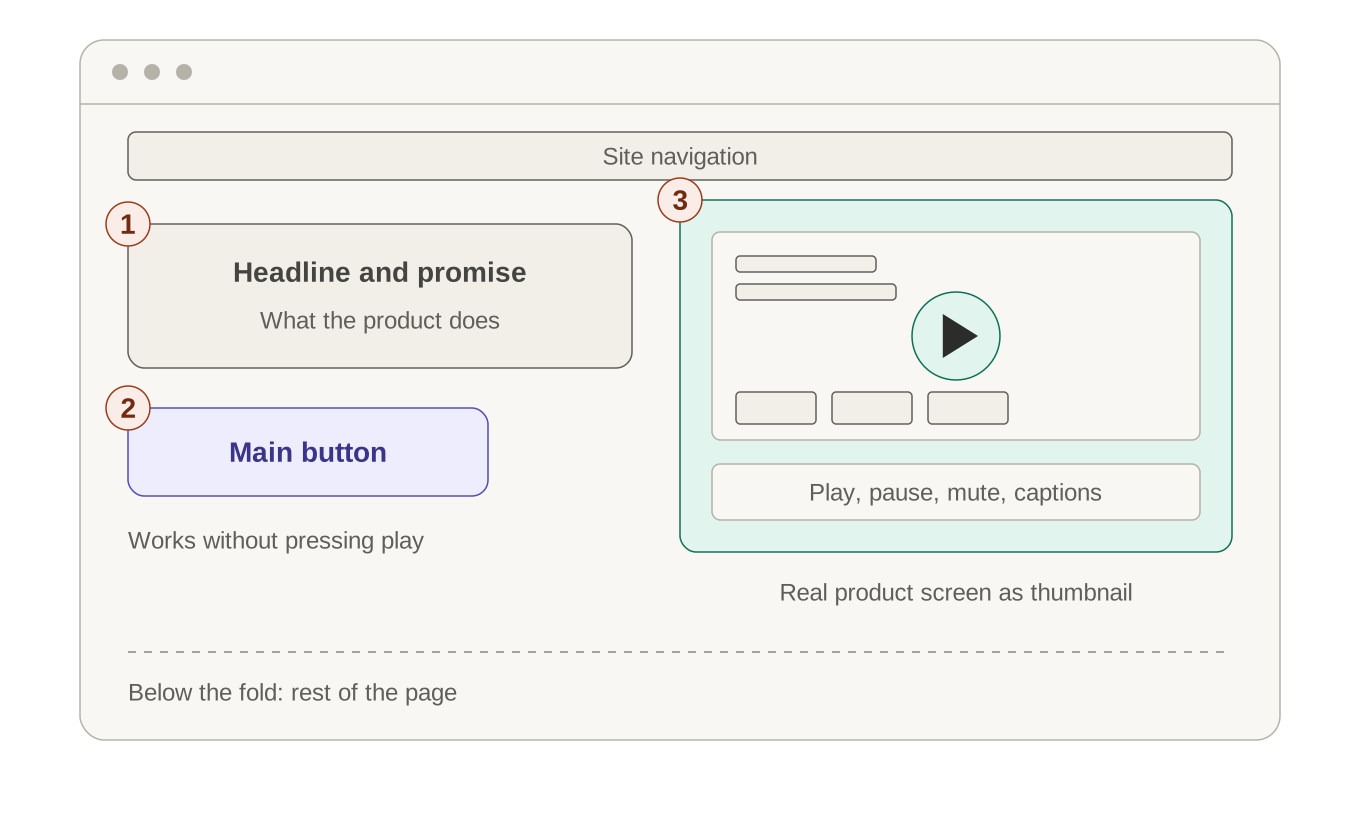
- Headline and promise: one line on what the product does.
- Main button: right under the headline, for visitors who never press play.
- Video player: beside the headline, with a real product screen as the thumbnail.
Everyone sees this video, so it must load fast and never push the headline off a phone screen. It suits new or hard-to-picture products.
Sample layout B: video in a supporting section
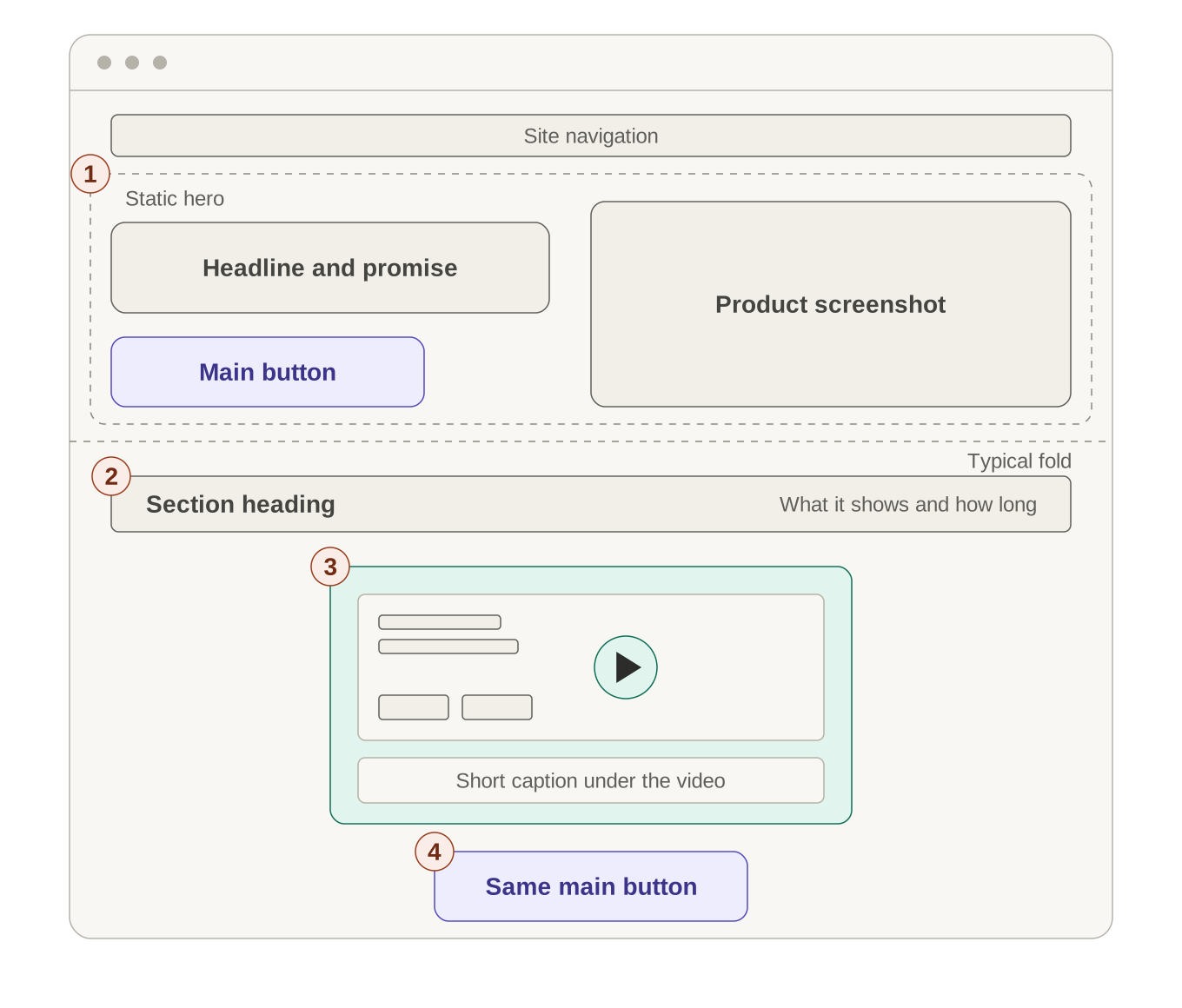
- Static hero: headline, product screenshot, and main button.
- Section heading: says what the video shows and how long it runs.
- Video player: a clear thumbnail and a short caption.
- Repeat button: the same main button beneath the video.
Fewer people reach this video, but those who scroll to it have already shown interest. It suits simpler products.
Honestly, I'd start with B for a simple product and A for a complex one, then let a test decide. More plays don't always mean more sign-ups.
How do you approach video thumbnail design?
The thumbnail is a promise about what happens on play. Show a readable frame of the real product, with text big enough to read on a phone. If visitors can't tell what the product does from it, they have little reason to press play.
Keep the promise honest. Don't paste a play icon on a static image that never opens a video, and don't show a screen the video never shows. Visitors notice, and trust drops fast.
A quick check: view the thumbnail on your phone at arm's length. If you make the video with PuppyDog, you start from your own screen recordings or screenshots, so a frame from those real screens makes an honest thumbnail.
How do you protect landing page video performance?
A slow video can hurt the page it is meant to help. Google's Largest Contentful Paint metric tracks how fast the main content shows up, and a good score is 2.5 seconds or less. On a video page, the poster image can be that main element, so compress it.
For a video below the fold, don't make the browser download it before anyone scrolls. The lazy loading video guide suggests a poster image and the preload attribute set to "none."
- Set a fixed size or aspect ratio so the page doesn't jump.
- Test on a real phone with mobile data.
- Check that the headline and button are still easy to find on small screens.
- Check the controls: play, pause, mute, and captions.
Developers should confirm details in current hosting and browser documentation, since these rules change.
Where should the video landing page CTA appear?
Right beside the video, on the page itself, not only inside the player. Not everyone presses play, and everyone should still see the same button.
Match the words. If the video ends with "Create your first video," the button should say the same. Then remove anything that competes with it, like a newsletter pop-up, a "watch on YouTube" link, or three different buttons. One page, one main request.
An end-of-video button can still help as a backup for people who watch to the end. It supports the page button and does not replace it.
How do you run landing page video testing?
Test the video page against a static page, and change only the media block. Same headline, copy, offer, form, and button. Change five things at once and you won't know which one did the work.
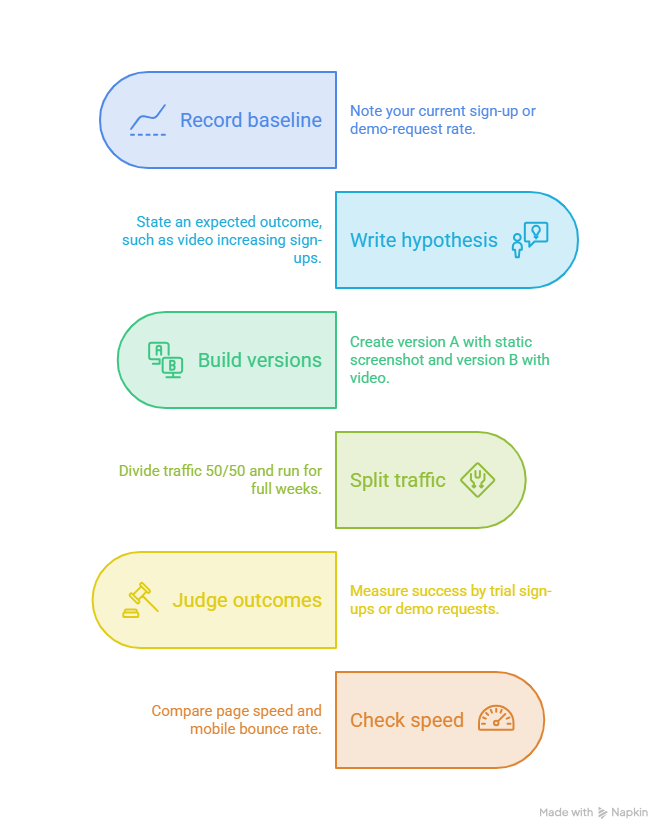
A simple video-versus-static test plan
This plan is illustrative. Adjust it to your own traffic.
- Record your baseline. Note your current sign-up or demo-request rate.
- Write one hypothesis. For example: "A 90-second product video in the hero will increase trial sign-ups."
- Build two versions. Version A has a static screenshot and version B has the video. Keep everything else identical.
- Split traffic 50/50. Use a sample size calculator to estimate the visitors you need, and run full weeks so weekday swings even out.
- Judge by qualified outcomes. Trial sign-ups or demo requests count. Plays and watch time are clues, not the result.
- Check speed too. Compare page speed and mobile bounce rate so a slower page doesn't cancel the gain.
Don't call a winner after three great days. Early results swing a lot.
FAQs
Should the product video autoplay on a landing page?
Usually not. Browsers often block autoplay with sound, and MDN's autoplay guide notes Safari also needs the playsinline attribute. Under WCAG, moving content that starts on its own and lasts over five seconds needs a way to pause, stop or hide it. Letting people press play is simpler.
Does a longer video always hurt conversion?
No. Length should match what the visitor needs: a ready buyer needs less, while someone comparing tools may watch more. Cut anything that doesn't answer the page question, and test short against long if you have the traffic.
Should the CTA sit inside or beside the video?
Beside it, as the main button. Add a matching button at the end of the video as a backup, use the same words in both places, and keep other links out of the player.
How do I compare a video page with a static page?
Run the split test above. Only the media block changes, half your visitors see each version, and you judge by qualified sign-ups or demo requests, not plays.
Your next step: put these video landing page best practices to work
Pick one landing page and write down the one question its visitor wants answered. Then make a video that answers it.
If you don't have a production team, start with the AI product video maker. PuppyDog turns your screen recordings or screenshots into a product video, with a script and narration you review before you use it. That's professional product videos without a production team.
Ready to create a page video? Head to Product video creation and build the one your test needs. Wondering whether your page can host it? The Related guide covers embedding, so this post stays on design and testing.

Sarah Thompson is a storyteller at heart and Business Developer at PuppyDog.io. She’s passionate about creating meaningful content that connects people with ideas, especially where technology and creativity meet.