AI Product Video Approval Workflow: Product Accuracy, Brand Review, and Sign-Off

A video approval workflow gives every product video one owner, a set order of reviews, and a signed record. Check the script first, then the product screens, then the brand details. Name one person who says yes, log what they approved, and send changed scripts back through review.
Who owns product video approval?
One person. Not a committee.
PMI's RACI guide says every outcome needs exactly one Accountable owner. Two owners invite a turf fight, and none means dropped balls. Atlassian's DACI play agrees: one Approver decides, and contributors get a voice but no vote.
For most SaaS teams, I'd pick the product marketing manager. They know the message, the buyer, and the launch date. Product leads advise on what's true. Brand and legal advise on how it's said. That's my take, not a rule.
AI doesn't change this. PMI says AI agents can do bounded work, but a human stays accountable. If a tool drafts your script, a person still owns it.
Example responsibility matrix
Illustrative only. Swap in your own job titles.
What should video script approval cover?
Check the script before you generate anything. Fixing a sentence takes seconds. Fixing a finished video means a re-render and another round of reviews.
Four things need a yes:
- Feature names match the released product, letter for letter.
- Audience is one role with one problem.
- Factual claims have proof, or they go. The FTC's policy statement says advertisers need a reasonable basis for objective claims before publishing them. I'm not a lawyer, so send big claims to someone who is.
- CTA is one action, not three.
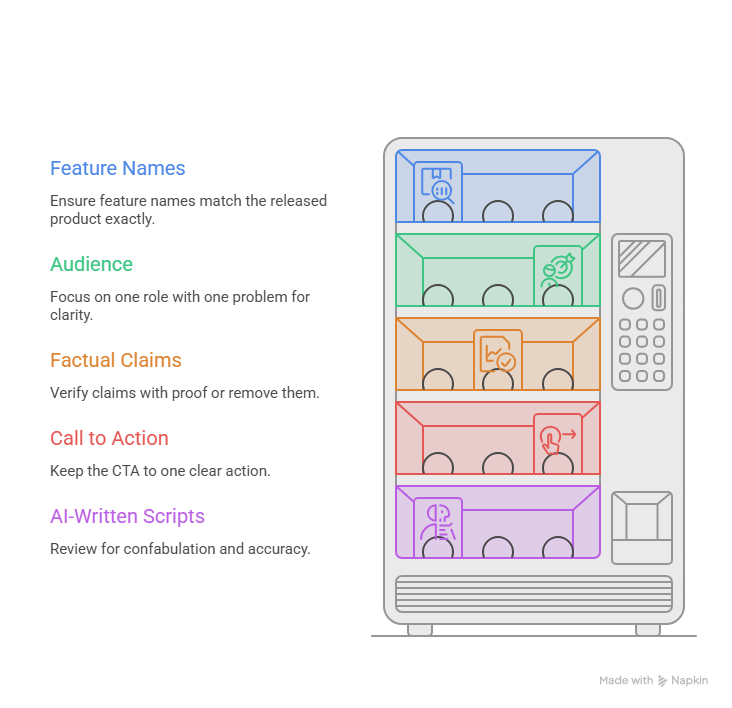
AI-written scripts need extra care. NIST's generative AI profile names confabulation, meaning confident but false output, as a risk. It notes this is mostly a text problem, which makes the script the place to look.
Accept and revise examples
Illustrative, using a made-up app called Ledgerly:
- Accept: "Ledgerly exports any report as a PDF." The product lead confirmed it in the released build.
- Revise: "Ledgerly cuts reporting time in half." There's no proof. Cut it or mark it as evidence needed.
- Revise: "Click Smart Export." The button is called Export. Fix the name.
How do you run a product accuracy review?
Play the video next to the live product and pause at every screen. Does each button, label, and menu match what a customer sees today? Here's my method:
- Open the released build, not staging. Staging shows things that may change or never ship.
- Check every screen in the video against it.
- Check who sees each screen. Some only appear for admins or certain plans. If the video shows one, say who it's for.
- Check prerequisites. If a step needs a setting turned on first, the script should say so.
- Check availability. Never show what isn't live yet.
PuppyDog turns approved source assets, like screenshots or a screen recording, into a product video with a reviewed script and narration. So catch a wrong screen at the input and draft-script stage, not after the video is done.
What belongs in a brand review checklist?
The details people notice but can't explain. Run this list after the accuracy review:
- Names and terms: product, feature and plan names spelled and capitalized the way you write them everywhere else.
- Pronunciation: AI voices can stumble on invented product names and acronyms. Listen to the full narration once with the script open.
- Visuals: current logo, colors, and fonts. Nothing from the old design.
- Tone: it sounds like your brand, not a brochure.
- Captions: WCAG 1.2.2 is a Level A rule calling for captions on prerecorded audio in video. Captions should also name speakers and meaningful sounds, and some viewers watch muted.
Related guide: it covers setting brand standards once, so each video starts on brand. This checklist is the quick check at the end.
How do you organize the video feedback process?
Give the job to one person and give feedback in one home. In DACI terms, that's the Driver, the person who collects input and gets the decision made.
Three rules keep it calm:
- One list. Reviewers comment in the same place, and the owner merges the notes.
- Timestamps. "0:42: the button is called Export" beats "the middle feels off." That's my habit, not a standard.
- Two labels. Mark every comment Required or Optional. Google's engineering guide suggests labels like "Nit," "Optional" and "FYI" so authors don't treat every comment as a must-do. It's written for code review, but the idea travels well.
Set a comment deadline, and let the owner settle conflicts. Otherwise, you'll spend a week debating logo size.
How do you record video sign-off?
Use a team tracker. A spreadsheet is fine. For each video, log four things:
- Approver's name
- Version (file name plus version number)
- Date
- Destination (landing page, email, or help center)
NIST's generative AI profile also suggests keeping version history for AI-generated content, so you can trace what changed.
When does a change need another review? Here's my rule. If the edit touches a claim, a feature name, a screen or the CTA, it goes back to the reviewer who owns that area. A typo or caption timing fix can be approved by the owner alone. APM's change control guide describes the same idea: changes to an approved baseline get evaluated, then approved, rejected, or put off.
Reusable approval checklist
Illustrative, not tested. Adjust it for your team.
FAQs
Should product and marketing review the same draft together?
Review the same draft, but not always at the same time. Have the product lead check accuracy first, because brand polish on a wrong screen is wasted effort. Then marketing checks tone and CTA. No standard fixes this order, so treat it as a sensible default.
Who approves an AI-generated product script?
A named person, usually the video's owner. PMI says AI can do bounded work but a human stays accountable, and NIST flags confabulation as a real risk. So someone who knows the product should read every line before you generate.
How many revision rounds should a team plan for?
There's no authoritative number, and I looked. Set your own cap and write it down. As an illustration, a team might allow two rounds: one for required fixes and one to confirm them. After that, the owner decides.
Does a localized video need a separate approval?
I'd say yes. A native speaker can catch wording that sounds off or a term your market doesn't use. Log each language as its own version, with its own approver. That's my recommendation, not a published standard.
Next step
Pick one real video and write down its owner, review order and tracker fields before you start. Then bring your approved screenshots or recording into the AI product video maker and create your first video. Product video creation has the details on how PuppyDog builds it, so you can run your video approval workflow on a real draft.

Sarah Thompson is a storyteller at heart and Business Developer at PuppyDog.io. She’s passionate about creating meaningful content that connects people with ideas, especially where technology and creativity meet.