How to Make a Product Demo Video with AI in 2026

Published : 17th August 2026
Here's a scenario that's probably familiar: your team records a screen walkthrough, runs it through an AI platform, gets a decent voiceover and some auto-personalization, and sends it out to a list of 300 prospects. Reply rates don't move much. Somebody asks why you're not seeing the results everyone's blog post promised.
You're not imagining the gap. Marketing teams are using AI at close to universal rates now, but proving it's actually working is a different story entirely. Recent survey data from Jasper puts AI adoption among marketing teams at 91%, up from 63% just a year earlier, while the share who can confidently prove ROI has actually dropped, from 49% to 41%. Everyone adopted the tools. Fewer people figured out how to make them pay off.
That gap is showing up in AI-powered demo videos specifically, and for a pretty identifiable reason: most teams are optimizing for the wrong variable. They're chasing "did we use AI" instead of "did we use it in a way a prospect actually responds to." Those are not the same question, and the data on buyer behavior in 2026 makes that distinction pretty stark.
This post digs into what's actually driving results with AI demo videos right now, not the pitch-deck version. The real one, with the trade-offs included.
The Adoption Gap Nobody Talks About
Let's sit with that Jasper number for a second, because it's a useful diagnostic for the whole category. Near-universal tool adoption. Declining confidence in whether it's working. That's not a story about AI being overhyped. It's a story about a lot of teams treating AI tools as a checkbox rather than a system.
The same pattern shows up when you zoom into video specifically. Teams that generate a demo, ship it, and never touch it again are the ones stuck in the "can't prove ROI" bucket. Teams that treat the first version as a hypothesis, something to test, measure, and revise, are the ones seeing the return. The tool isn't the differentiator anymore. Almost everyone has access to roughly the same AI video capability now. What separates the results is what you do with the output after it's generated.
So before getting into tactics, it's worth naming the actual goal here: not "make an AI video," but "make a video that changes what a specific prospect does next." Everything below is in service of that.
Why Buyer Trust in AI Video Is Getting Harder to Earn, Not Easier
Here's the part that catches a lot of teams off guard. As AI-generated content has flooded sales outreach, buyer skepticism toward it has grown right alongside the volume. Research from Salesforce shows trust in businesses using AI ethically fell from 58% in 2023 to 42% in 2026 a meaningful drop, and one that lines up with what a lot of sales teams are noticing anecdotally: prospects have gotten sharper at spotting low-effort automation.
Think about it from the buyer's side. They've now seen dozens of videos with their first name and company logo dropped into an otherwise identical script. The novelty wore off fast, and what's left is a kind of pattern recognition: "oh, this is one of those." That reaction is the opposite of what personalization is supposed to produce.
This is where personalization depth actually matters, and it breaks down into roughly three tiers:
Level 1: Surface personalization.
A name, a logo, a company field dropped into an otherwise generic script. This barely moves the needle and can actively backfire; prospects clock it instantly, and the visual mismatch between a "personalized" video and obviously templated content creates dissonance rather than connection.
Level 2: Segmented personalization.
Instead of one script for everyone, you build variations by industry, role, or region. A fintech prospect sees language about compliance. A logistics prospect sees language about operational workflows. This is a meaningfully bigger lift in relevance, and it doesn't require touching every single video by hand.
Level 3: Contextual personalization.
This is where AI agents pull in real signals, a recent leadership hire, a tech stack change, a funding announcement, and adjust the script based on what's actually happening at that account right now, not just what industry it's in. This is the tier where the reply-rate gains get dramatically larger, according to Optifai's analysis of AI-personalized outreach across its customer base, though it's worth flagging that it's vendor-reported data from a company selling exactly this kind of tool, so treat the specific multiplier as directional rather than gospel.
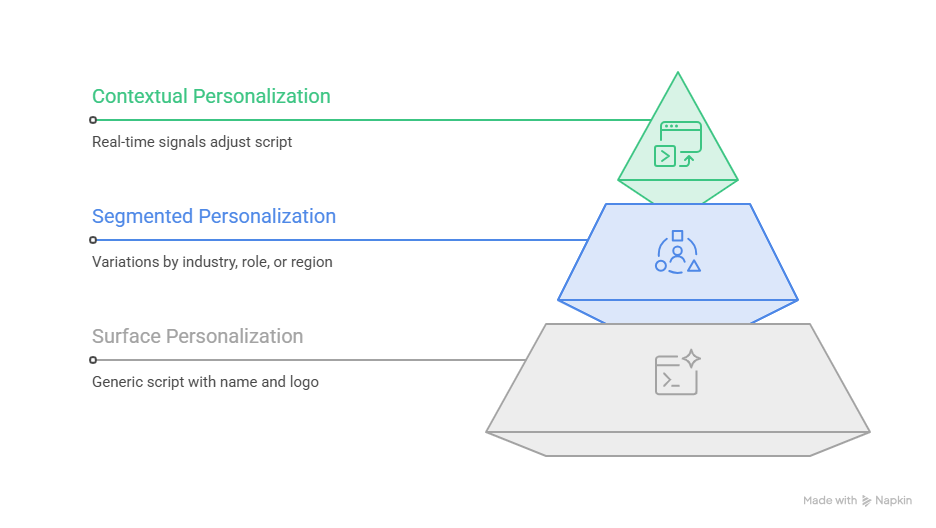
The practical takeaway: if your "personalization" stops at inserting a name, you're closer to Level 1 than you think, and Level 1 is where buyer patience is thinnest right now.
Matching Video Length to Where the Prospect Actually Is
One thing that hasn't changed in 2026, and probably never will: attention is scarce, and it gets scarcer the earlier someone is in their evaluation. Buyer behavior data on business video consistently shows the same shape. Short videos hold viewers to completion at much higher rates than long ones, and that gap widens the further out you get.
Sub-60-second videos tend to get watched all the way through at meaningfully higher rates than anything in the 5-to-20-minute range, where drop-off climbs fast. That's not a reason to avoid longer content altogether. it's a reason to be deliberate about when you use it.
Here's roughly how that maps to a real funnel:
- Cold outbound or a first LinkedIn touch: under 60 seconds. This is a teaser, not a walkthrough. Its only job is to earn the next click.
- Inbound qualification or a landing page embed: 1–2 minutes. Enough room for one feature or one value prop, not a tour.
- Mid-funnel technical evaluation: 2–5 minutes. This is where a fuller walkthrough belongs, once someone's already leaning in.
- Post-sale onboarding or deep documentation: 5+ minutes is fine here, because the audience has already opted into detail.
The mistake teams make constantly is sending the 5-minute walkthrough to a cold list. It's the video equivalent of handing someone a 40-page proposal before they've agreed to a first call technically thorough, practically ignored.
The 2026 AI Demo Tool Landscape, Actually Explained
"AI demo tool" has become a category label stretched over four genuinely different kinds of products, and mixing them up is how teams end up disappointed with a tool that was never built for their use case in the first place.
Async recorders (Loom).
Built for internal updates and lightweight sales follow-ups, record your screen, share a link. Loom's AI features (since its Atlassian acquisition) focus on post-recording cleanup: auto titles, filler-word removal, meeting recaps. It's not built for prospect-level personalization or CRM-triggered delivery, and it was never trying to be. One practical note if you're on it: Atlassian's workspace migration has been quietly converting unreviewed free "Creator Lite" seats into paid seats at renewal, so it's worth an audit of your user roster before your next billing cycle catches you off guard.
Interactive UI-capture tools (Arcade, Storylane).
These build click-through, browser-based product tours rather than traditional video files. Arcade leans into product-URL-aware capture; Storylane leans into no-code interactive tours with native HubSpot and Salesforce logging. Both are strong for embedding self-guided experiences on a website. Storylane's own customer data shows demo completion and engagement rates well above what a static page tends to pull. Neither ships AI avatars or voice cloning, and personalization in both tends to be more manual than the marketing copy implies.
CRM-connected video sales platforms (Vidyard).
This is the category built specifically for outbound and ABM. Vidyard integrates directly with Salesforce, HubSpot, Outreach, and Salesloft, and its Video Agent add-on can trigger a personalized avatar video automatically off a CRM event, a form fill, a deal-stage change. without a rep touching it. This is genuinely different from "record once, send everywhere"; it's closer to "the video responds to what the prospect just did."
Real-time conversational video (Tavus).
A newer category entirely: instead of a pre-rendered video file, Tavus builds live, back-and-forth video conversations with sub-second latency, powered by its Phoenix rendering model. It's less "watch a demo" and more "talk to an AI rep who can see and respond to you in real time." It's a fit for teams running high-volume outbound where the deal economics justify a more developer-heavy setup, overkill for a five-person startup, genuinely powerful for an enterprise motion.
Autonomous demo generators (this is the newest lane, and worth watching).
A handful of newer tools. Demosmith is the clearest example. Skip the recording step entirely. You hand it a product URL and a short prompt describing the flow you want, and an AI agent navigates the live product itself, captures the screens, writes the script, and renders a finished video, no screen recording required at all. That's a genuinely different starting point than every platform above, all of which still assume a human sat down and recorded something first.
Where does a platform like PuppyDog sit on that map? Closest to the Vidyard model conceptually: one recording, CRM-connected personalization, and analytics in a single workflow, but built specifically around the demo-video use case rather than sales video broadly. The category gap that actually matters for most B2B teams isn't "does it have AI," it's whether screen-recording-to-video, prospect research, and CRM-triggered delivery live in one connected system or three disconnected tools you're stitching together manually.
Where Agents Fit In Before the Video Even Gets Made
Level 3 personalization doesn't happen by magic. It's powered by a layer of automation that sits upstream of the video itself, and it's worth understanding because it's quietly becoming the more important half of the workflow.
The basic idea: instead of a rep manually researching each prospect before deciding what a demo script should emphasize, an AI agent does that research automatically, scanning for a recent leadership change, a funding round, a relevant job posting, a tech-stack shift, and feeding that context into the script generation step. The video isn't personalized after the fact. It's built to be personalized from the start.
This matters for speed as much as relevance. Standard human response time to an inbound lead averages somewhere in the range of a day and a half; conversational AI agents can engage within seconds of that same signal firing. That's not a small gap. Response speed alone is one of the more reliable predictors of whether a meeting gets booked at all, since a prospect's interest tends to cool fast once the moment that triggered it has passed.
None of this replaces a rep's judgment. A signal-driven script still benefits from a human sanity check before it ships, same as any AI-generated first draft does. But the teams treating agent-driven research as table stakes, rather than a nice-to-have add-on, are the ones actually reaching Level 3 personalization at any kind of scale. Doing that by hand, prospect by prospect, simply doesn't hold up once a list gets past a few dozen names.
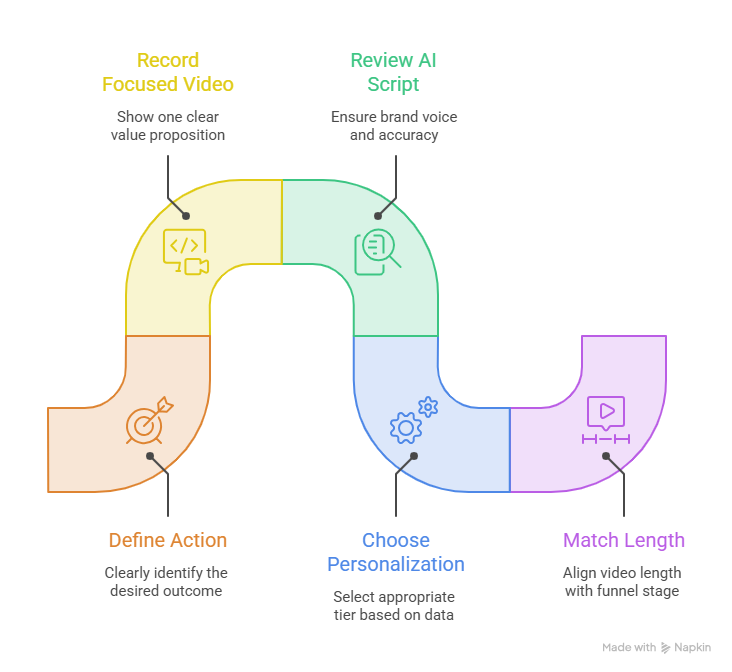
A Framework for Actually Building One That Converts
Enough landscape. Here's what to do with it.
1. Define the one action before you record anything.
Book a call, start a trial, expand a plan, pick one. Every downstream decision (length, tone, CTA) flows from this, and skipping it is the single biggest reason AI-generated scripts come out unfocused.
2. Record once, focused on one workflow.
Resist the urge to show everything. A silent, clean screen recording of one clear value prop, with realistic sample data, gives any AI platform a much stronger starting point than a rambling narrated tour.
3. Let the AI generate the base, then review before it goes anywhere.
Script, voiceover, avatar, enhancement: this is where the AI does the heavy lifting. But an AI-generated script is a first draft, not a final one. Read it like you'd read a rep's cold email. Does it actually sound like your brand, or does it sound like AI wrote it?
4. Choose your personalization tier deliberately.
Don't default to Level 1 just because it's the easiest toggle to flip. If you have CRM data and any kind of segment structure, Level 2 is achievable without much extra lift, and it closes most of the trust gap that Level 1 opens up.
5. Match length to funnel stage, every time.
Cut a teaser for cold outreach. Save the full walkthrough for people who've already shown intent. Sending the wrong length to the wrong stage is one of the most common and most fixable mistakes in this whole workflow.
6. Track engagement and actually act on it.
Watch rate, drop-off point, per-prospect viewing behavior this data tells you what to fix next. A prospect who rewatched your demo three times is a different follow-up conversation than one who bailed at fifteen seconds. If your platform gives you that signal and nobody's looking at it, you're leaving the most useful part of the workflow unused.
Mistakes Worth Naming Directly
A few patterns come up often enough to call out specifically.
Trusting a stat without checking where it came from. This one's a little meta, but it matters more now than ever: AI research tools make it trivially easy to generate a paragraph full of confident-sounding numbers, and not all of them hold up under a second look. A widely cited case study about a company saving "25 hours a week" using self-serve demo tours, for instance, actually measured cumulative prospect viewing time across six months, a real and good result, just a different metric than the headline implies. Before a number goes into your own deck or blog post, it's worth tracing it back to the original source. The same scrutiny applies to a stat like an 80–90% booking rate from one company's internal sales motion, genuinely impressive, but it's one company's self-reported result, not an industry guarantee.
Confusing "has AI" with "is personalized." Covered above, but worth repeating because it's the single most common gap between effort and result: a name swap is not a personalization strategy.
Sending the wrong length to the wrong stage. The instinct to show everything in one video is understandable and almost always counterproductive.
Letting video analytics sit unused. Engagement data is the fastest feedback loop available for figuring out what's actually landing. Treating deployment as the finish line wastes it.
Putting It Together
AI hasn't made product demo videos easier just by existing. it's made the gap between doing it well and doing it lazily much more visible to the people watching. Adoption is basically universal now; differentiation comes from personalization depth, funnel-appropriate length, and actually using the engagement data you're collecting.
If you're a product marketer or sales leader still treating your demo video as a one-and-done asset, the teams pulling ahead right now are the ones treating it as a system: one clean recording, tiered personalization, length matched to funnel stage, and a feedback loop that actually gets used. PuppyDog is built around exactly that workflow: one recording in, AI-generated personalization and CRM-connected delivery out, with the engagement data to know what's working. You can start a free trial and have a real demo video, not just an AI-flavored one, ready today.

Sarah Thompson is a storyteller at heart and Business Developer at PuppyDog.io. She’s passionate about creating meaningful content that connects people with ideas, especially where technology and creativity meet.