How to Make a Meme in 2026: The Complete Step-by-Step Guide

What Is a Meme?
A meme is an image, GIF, or short video with a funny caption that spreads online. The word was first used in 1976 by biologist Richard Dawkins. He meant a unit of culture that copies itself, like a gene. Today, the word means any funny image with text that people share for laughs.
Memes work because they take a feeling everyone knows and put it in a single picture. A good meme makes you laugh, nod, or tag a friend in under 2 seconds.
Why Memes Matter in 2026
Memes are not just for jokes. Brands use them to grow audiences. Sales teams use them to break the ice. Marketers use them to ride trending topics. A 2024 HubSpot report found that memes get 60 percent more organic reach than standard posts. They are the cheapest content format that still works on every platform.
For creators and small businesses, memes are a fast way to build voice and grow followers without a big budget.
The 5 Main Types of Memes
Before you make a meme, know which type you need.
- Image macro: A photo with bold text on top and bottom. The classic format.
- Reaction meme: A still image of a face or scene that shows a feeling.
- GIF meme: A short looping clip, often from a movie or TV show.
- Video meme: A short edited clip with captions or music.
- Text meme: A funny screenshot of a tweet, chat, or note.
Each one fits a different mood. For fast jokes, use a reaction meme. For deeper humor, use a video meme.
How to Make a Meme in 5 Easy Steps
You do not need fancy software to make a meme. Here is the simple flow that works every time.
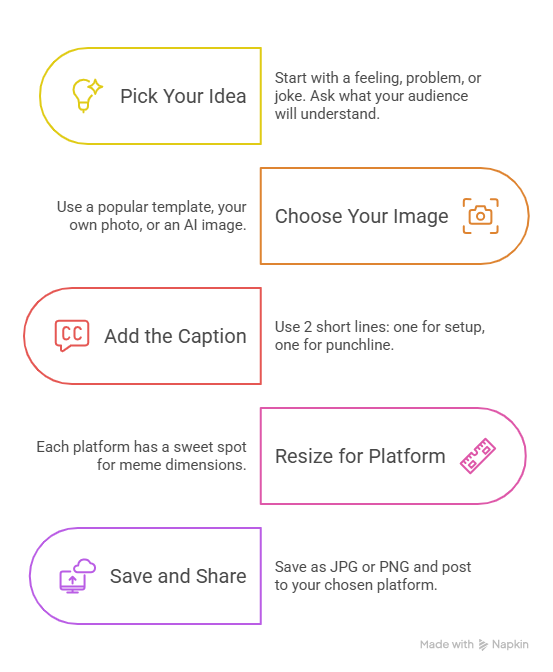
Step 1: Pick Your Idea
Start with a feeling, a problem, or a joke. Ask: what is something my audience will instantly understand? The best memes are about pain, awkward moments, or shared workplace stuff. Bad memes try too hard to be clever.
Step 2: Choose Your Image or Template
You have 3 options:
- Use a popular template. Sites like Imgflip and KnowYourMeme have thousands of trending templates.
- Use your own photo or screenshot. Good for brand and team memes.
- Use an AI image. Tools like Midjourney and DALL-E can create a custom image in seconds.
If you are new to memes, start with a known template. People recognize it, and your meme will land faster.
Step 3: Add the Caption
Most memes use 2 short lines. One on top, one on bottom. The top line sets up the situation. The bottom line is the punchline.
Use white bold capital letters with a black outline. The font is usually Impact or Arial Black. Keep each line under 10 words.
Example:
- TOP: "When the client says..."
- BOTTOM: "...just one small change"
Step 4: Resize for Your Platform
Each platform has a sweet spot. Use these dimensions for the best look in 2026.
Posting the wrong size means your meme gets cropped or shrunk, and the joke gets lost.
Step 5: Save and Share
Save the file as a JPG for photos or PNG for crisp text and graphics. For GIFs and videos, use MP4 if the platform supports it. Then post.
For social media, add 2 to 4 hashtags that match the joke. Avoid spammy hashtags. They hurt reach.
The Best Free Meme Makers in 2026
You do not need a fancy tool. These free ones cover 99 percent of needs.
- Imgflip: Huge template library. Fast caption editor. Free.
- Kapwing: Best for video and GIF memes. Free tier is generous.
- Canva: Best for brand-safe memes. Great fonts and design polish.
- Adobe Express: Free image meme maker with strong design tools.
- MemeMaker.net: No sign-up needed. Quick image macros.
For paid power tools, Photoshop and Affinity Photo give you full control.
AI Meme Generators Worth Trying
In 2026, AI meme tools are a real shortcut. They write the caption and pick the image for you.
- Supermeme.ai: Type your idea, and it generates a meme.
- Imgflip AI Meme Generator: Free tier with strong results.
- Memegen.ai: Useful for marketing teams that need bulk memes.
AI memes are great for first drafts. The best memes still need a human to polish the punchline.
How to Make a Meme Go Viral
There is no magic recipe, but viral memes share 5 traits:
- Relatable: It hits a feeling lots of people share.
- Simple: You get the joke in under 2 seconds.
- Timely: It links to a trend, event, or season.
- Visual: The image alone tells half the story.
- Shareable: It begs to be sent to a specific friend.
Post your meme when your audience is online. For most niches, that is between 10 AM and 1 PM local time, or after 7 PM on weeknights.
Memes at Work: The Dos and Don'ts
Workplace memes can lift team mood, but they can also get you in trouble. Use these rules.
Do:
- Make memes about shared frustrations (slow Wi-Fi, Monday meetings).
- Use your own brand voice.
- Credit the original meme creator when possible.
Don't:
- Make memes about coworkers without consent.
- Use copyrighted images for ads without rights.
- Touch politics, religion, or sensitive social topics.
For brand memes, run them past one extra person before posting. Two sets of eyes catch most mistakes.
Memes and Copyright: What You Need to Know
Most memes use copyrighted images (movie stills, celebrity photos). For personal use and small social posts, this is mostly fine. For paid ads, you need a license or you risk a takedown.
Safe options:
- Use royalty-free image sites like Unsplash or Pexels.
- Use AI-generated images.
- Use your own brand photos.
When in doubt, do not use celebrity faces in paid ads.
How to Make a Video Meme
Video memes get more reach than image memes on TikTok, Reels, and YouTube Shorts. The flow is simple:
- Pick a short clip (under 15 seconds).
- Add captions in white with a black outline.
- Add trending audio if it fits.
- Export at 1080 x 1920 px.
For better-looking video memes with sharper captions and faster edits, see our Video Editing tips.
For product teams, video memes are also a great way to show feature wins and bug fixes in a fun way. Tools like Puppydog turn product screenshots into clean videos, which makes meme-style content easy to produce in bulk.
FAQs
How long does it take to make a meme? Two to five minutes for a simple image meme. Ten to fifteen minutes for a polished video meme.
What font do memes use? Impact is the classic meme font. Arial Black, Anton, and Bebas Neue also work. All caps, bold, white text with a black outline.
Can I make a meme on my phone? Yes. Apps like Imgflip, Kapwing, and Canva all have full mobile apps that match the desktop tools.
Can I make a meme for free? Yes. Imgflip, Kapwing, Canva, and Adobe Express all have free plans that cover image, GIF, and short video memes.
What size should a meme be for Instagram? 1080 x 1080 px for feed posts. 1080 x 1920 px for stories and reels. Both at 72 dpi for the web.
How do I add my logo to a meme? Use the watermark or text tool in your meme maker. Place the logo small in a corner. Do not cover the joke.
Are memes still relevant in 2026? Yes. Memes remain the top organic content format on X, Instagram, TikTok, and LinkedIn. They beat most other formats on shares and saves.
Can AI make a meme for me? Yes. Tools like Supermeme.ai and Imgflip AI can write the caption and pick the image. Always edit the caption to add your voice.
Is it legal to use a movie still in a meme? For personal social posts, yes in most cases. For paid ads or merchandise, you need a license. Use AI images or royalty-free sites when in doubt.
What is the easiest meme to make for beginners? A classic image macro with a Drake or distracted boyfriend template. Use Imgflip. The whole job takes 90 seconds.
Conclusion
Making a meme is one of the fastest ways to win attention online. You pick a template, write a short caption, resize for your platform, and post. The tools are free. The skill is in the joke, not the software.
In 2026, the best meme makers are Imgflip, Kapwing, and Canva. For AI shortcuts, try Supermeme.ai. For video memes, you need clean editing and bold captions to win on TikTok and Reels. Keep the text short, match the image to the feeling, and post when your audience is online.
The best memes feel like an inside joke between you and the reader. That is the goal. Now go make one.

Sarah Thompson is a storyteller at heart and Business Developer at PuppyDog.io. She’s passionate about creating meaningful content that connects people with ideas, especially where technology and creativity meet.