Product Demo Video: 12 Best Practices That Convert Enterprise Buyers


Imagine your best sales rep is articulate, persuasive, and always available. Now imagine they could be on a hundred calls simultaneously, never have a bad day, and never go off-script. That's what a great product demo video does. And the numbers back it up: companies using demo videos see up to 86% higher conversions.
And yet, most SaaS teams are still treating their product demo video as an afterthought. Something you throw together before a product launch, park on a landing page, and forget about. That's a costly mistake, especially in enterprise sales.
Think about it this way. Your buyers aren't waiting for a discovery call to understand your product anymore. Nearly 88% of software buyers want to see the product in action before they agree to speak with a sales rep. Your demo video isn't just content. It's your first impression, your pitch, and your proof of value all rolled into one.
Done right, a product demo video builds trust faster than any whitepaper, email sequence, or cold call ever could. It works while your team sleeps, travels with your buyer into internal meetings you'll never be invited to, and speaks directly to every stakeholder on the buying committee.
But "done right" is the critical part. Not every demo video converts. Most don't.
That's exactly why we put together this guide, 12 battle-tested best practices to help you create product demo videos that actually move enterprise buyers from curious to convinced.
What Makes a Product Demo Video Effective? (The Framework)
Before diving into the 12 best practices, it's worth stepping back and asking a more fundamental question. What actually separates a demo video that converts from one that gets clicked away in 15 seconds?
It's not a production budget. It's not a professional voiceover artist. It's not even the product itself.
It comes down to three foundational pillars that every high-performing product demo video is built on. Think of these as your non-negotiables before you hit record.
Pillar 1: Clarity — Show Value, Not Features
Enterprise buyers don't care about your feature list. They care about what changes for them after they start using your product. Clarity means every single thing you show on screen should be tied to a business outcome, not a menu option or a toolbar. Instead of "here's our reporting dashboard," say "here's how your team cuts reporting time from two days to two hours." That's the difference between a feature walkthrough and a value demonstration.
Pillar 2: Relevance — Speak Directly to Your Viewer
A generic demo is a forgettable demo. The most effective product demo videos feel like they were made specifically for the person watching because ideally, they were. A CFO watching your demo cares about ROI and cost reduction. A CTO cares about security and integration. Personalization isn't a nice-to-have in enterprise sales; it's the baseline expectation. Research shows that 72% of B2B buyers expect vendors to understand their specific needs before the first conversation even happens.
Pillar 3: Speed — Respect Your Buyer's Time
Attention is the scarcest resource in enterprise buying. For top-of-funnel awareness, keep your product demo video under three minutes, ideally closer to 90 seconds. Save the detailed product walkthrough video for later-stage prospects who are already qualified and actively evaluating. Matching your video length to the buyer's funnel stage isn't just good practice. It's one of the most overlooked product demo video best practices out there.
Get these three pillars right, and you've already done more than most SaaS teams ever will. Now let's get into the specifics.
12 Best Practices for Product Demo Videos That Convert Enterprise Buyers
Alright, let's get into it. These aren't generic tips you've seen recycled across a dozen marketing blogs. Each practice below is grounded in real buyer psychology, enterprise sales dynamics, and what actually moves the needle on conversion.
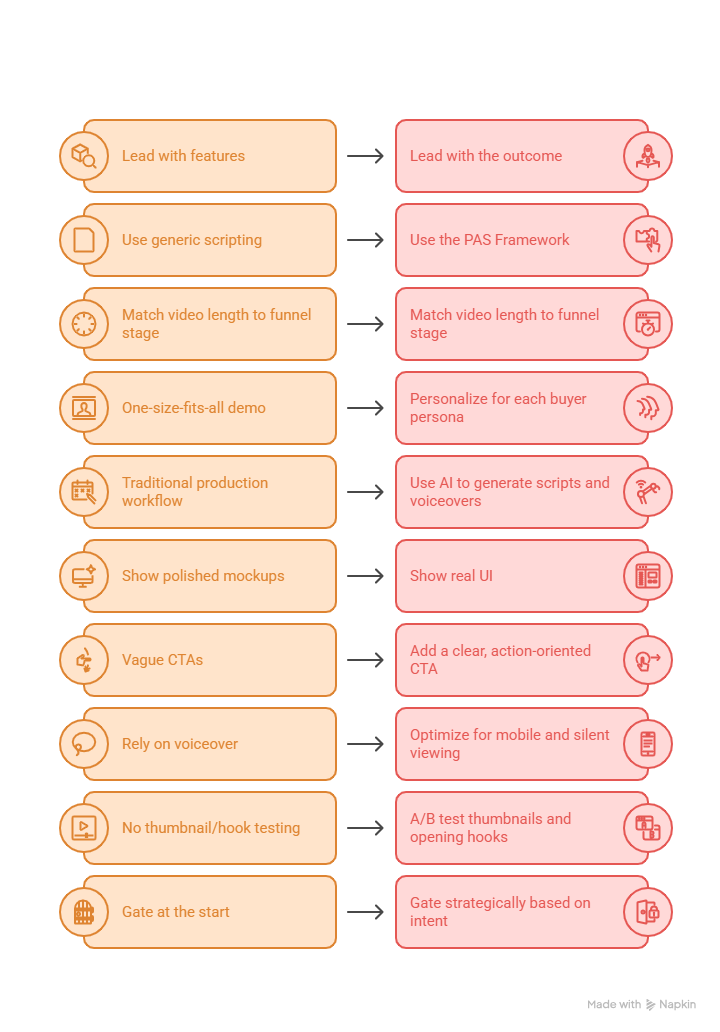
1. Lead With the Outcome, Not the Feature
Enterprise buyers have one core question when they hit play on your demo: "What changes for my business?" Answer that question in the first 30 seconds or risk losing them entirely.
The instinct for most product teams is to start with a product tour. Don't. Instead, open with the transformed state. Show a marketing team launching campaigns 50% faster. Show a finance team closing books in half the time. Let the viewer picture themselves in that future state before you show them a single button click.
This approach, often called "Tell, Show, Tell," frames every feature in the context of its business impact. You state the value, demonstrate it visually, then reinforce it. It's a simple shift in structure, but it's the difference between a demo that educates and one that actually persuades.
2. Use the PAS Framework to Script Your Narrative
The Problem-Agitate-Solution (PAS) framework is one of the most effective structures for a product demo video script, and it's criminally underused in SaaS.
Here's how it works. Start by naming the problem your buyer is living with right now, not a vague pain point, but a specific, frustrating reality. Then agitate it. Highlight what that problem is actually costing them: time, money, missed opportunities, late nights. By the time you present your product as the solution, the viewer is psychologically primed to receive it.
Why does this work? It leverages loss aversion, one of the most powerful cognitive biases in decision-making. Buyers are more motivated by the fear of continued loss than by the promise of future gain. PAS meets them exactly where that fear lives.
3. Match Video Length to Funnel Stage
Let's be honest, nobody in enterprise sales is sitting through a 20-minute demo on a Tuesday afternoon unless they're already deep in evaluation mode. Attention is finite, and wasting it is a conversion killer.
For top-of-funnel content, keep your demo under three minutes. Ninety seconds is even better. The goal here isn't to show everything. It's to make the viewer want to see more. For mid-funnel prospects who are actively comparing solutions, a five to ten-minute product walkthrough video that addresses specific use cases is appropriate. Reserve the deep, 15–30 minute walkthroughs for late-stage buyers who are essentially replacing a live sales call.
Matching length to intent isn't just about respecting the viewer's time. It's about delivering the right level of information at the right moment in their decision journey.
4. Personalize for Each Buyer Persona
A one-size-fits-all demo is increasingly a conversion liability in enterprise sales. Different stakeholders have radically different priorities, and a video that tries to speak to everyone often ends up resonating with no one.
Think about the buying committee you're typically dealing with. The CFO wants to see ROI and cost justification. The CTO wants security architecture and integration capabilities. The end user wants to know the product won't make their day harder. Each of these people needs a different version of your story.
Modern AI-powered demo creation tools make this kind of personalization scalable generating persona-specific variants without requiring your team to manually record a separate video for every stakeholder. That's not a luxury anymore. Research shows personalized video content can increase sales effectiveness by up to 19%.
5. Use AI to Generate Scripts and Voiceovers at Scale
The traditional demo production workflow, brief, script, record, edit, revise, publish, can take anywhere from two to eight weeks. For fast-moving GTM teams, that's simply not viable.
AI has fundamentally changed what's possible here. With the right product demo video maker, you can generate a tailored script from a simple product narrative, pair it with a professional AI voiceover, and have a publish-ready asset in hours rather than weeks. AI-powered workflows report up to 28% faster turnaround on video assets, and that speed compounds when you're producing dozens of personalized variants.
The AI script generator from Puppydog.io, for instance, pulls from product context to generate scripts that are already aligned with your messaging without starting from a blank page every time.
6. Show Real UI, Not Polished Mockups
Enterprise buyers are savvier than they've ever been. They can tell the difference between a slick animation of what your product could look like and an actual recording of how it works today. And when they sense a gap, trust erodes fast.
Show the real interface. Yes, even if it's not pixel-perfect. Real UI builds visual credibility. It signals that your product is production-ready and that you're not hiding anything. Use techniques like cursor smoothing, automatic zoom, and focused annotations to make the interface look polished without replacing it with abstract visuals.
The goal isn't perfection. The goal is authenticity. And in enterprise sales, authenticity is a competitive advantage.
7. Add a Clear, Action-Oriented CTA
A product demo video without a strong call to action is a missed conversion opportunity, full stop. Vague CTAs like "Learn More" or "Visit Our Website" don't give the buyer a clear next step, and in the absence of clarity, most people do nothing.
The most effective CTAs in enterprise demo videos are specific and low-friction. Think "Schedule a 15-Minute Technical Review" or "Start Your Interactive Tour." Even better, place your CTA mid-roll, not just at the end. Buyers reach their peak engagement somewhere in the middle of a video, and capturing them there often outperforms waiting until the final frame.
One CTA clearly stated, with a specific action attached. That's all it takes.
8. Optimize for Mobile and Silent Viewing
Here's a stat that surprises a lot of enterprise marketers: 48% of B2B video views happen on mobile devices. And a significant portion of those are watched without sound in waiting rooms, on commutes, and between meetings.
If your demo relies entirely on voiceover narration to communicate value, you're invisible to nearly half your audience. Optimize for the sound-off experience by adding high-contrast captions, on-screen text callouts, and visual storytelling that makes sense without audio. Think of it less as accessibility and more as basic reach. Your buyers are mobile. Your demo should be too.
9. A/B Test Your Thumbnails and Opening Hooks
Your thumbnail and first three seconds determine whether anyone watches the rest of your video. That's not an exaggeration; the play rate is decided before a single feature is shown.
Test different thumbnail approaches: a human face versus a UI screenshot versus a bold data point. Test different opening lines: a provocative question, a striking statistic, versus a direct pain statement. Structured demos with clear introductory chapters see up to 72% higher play rates than those without. Small creative decisions at the top of the video can have an outsized impact on everything that follows, including your conversion rate.
10. Gate Strategically Based on Intent
The gating debate is real, and there's no universally correct answer, but there is a smart framework. Ungated demos get roughly 10% higher engagement than gated ones, making them the right choice for awareness-stage content where reach matters most.
For deeper, more detailed walkthroughs, the kind that replace a live sales conversation, a soft gate placed mid-video (rather than at the start) strikes the right balance. You deliver value first, build trust, and then ask for the contact information once the viewer is already invested. It reduces friction without sacrificing lead capture entirely.
11. Embed Demos on High-Intent Landing Pages
Where your demo lives matters almost as much as what's in it. A product demo video buried three clicks deep on your site might as well not exist. Embedding your demo above the fold in the hero section of a high-intent landing page can increase dwell time by 80% or more.
For a detailed walkthrough on building a demo page that converts, check out this step-by-step guide to creating a high-quality software demo video. Placement is a strategy. Treat it that way.
12. Measure with Pipeline Attribution, Not Just Views
Views and watch time are useful signals, but they're not the metrics that justify your demo video investment to a CFO. The metrics that matter in enterprise sales are demo-to-opportunity conversion rate, influenced pipeline, and deal velocity.
Integrate your video engagement data directly into your CRM. When a prospect watches 85% of your enterprise security demo, that's a buying signal your sales team needs to act on immediately. Tracking completion rates, drop-off points, and repeat views gives you a feedback loop that continuously improves your content and connects your video strategy directly to revenue.
Ready to put these practices to work? Puppydog.io lets you create your first AI-powered product demo video in under 5 minutes, no editing skills required. Start your free trial
Product Demo Video Examples That Get It Right
Sometimes the best way to understand what makes a great product demo video is to look at real ones and what they nail, and where they leave room on the table. Here are four product demo examples worth studying, each with a distinct approach to converting enterprise buyers.
Slack: The Power of Radical Simplicity
Slack's demo is a masterclass in restraint. In under two minutes, it covers channels, huddles, and file sharing without ever making the viewer feel overwhelmed. There's no jargon, no feature dump, just a clean, fluid walkthrough that feels like a natural orientation rather than a sales pitch.
What works: The narrative flow is tight, the visuals are uncluttered, and the pace respects the viewer's time. It's an excellent product walkthrough video for top-of-funnel audiences who are still in "what is this?" mode.
What could improve: As Slack has evolved into a broader enterprise productivity platform, a single generic demo leaves significant value on the table. Persona-specific versions, one for developers, one for HR teams, and one for leadership, would dramatically increase relevance for enterprise buying committees.
Loopio Deep Empathy for a Specific Pain Point
Loopio's demo strategy is built around one universal truth in B2B sales: RFPs are painful. Their video leans hard into that frustration before presenting their automation features as the relief. It's a textbook PAS framework execution, and it works.
What works: The emotional resonance is immediate. Anyone who has spent hours manually assembling an RFP response feels seen within the first thirty seconds.
What could improve: The video runs a little long for top-of-funnel discovery. A tighter, 90-second awareness cut would improve reach without sacrificing the empathy that makes their approach so effective.
QuickBooks: Workflow Over Features
QuickBooks doesn't show you a product it shows you a process. Their demo maps directly to real accounting workflows, guiding the viewer through tasks they already do manually and revealing how the software eliminates friction at each step.
What works: The workflow-driven structure makes it incredibly easy for viewers to picture themselves using the product. It's concrete, practical, and grounded in daily reality rather than abstract capabilities.
What could improve: The tone can feel a touch clinical. A little more personality and warmth in the narration would go a long way toward making the demo feel less like a tutorial and more like a conversation.
Contently Leading With Executive-Level Outcomes
Contently pitches directly to marketing executives by anchoring their demo around content ROI and audience growth, not platform features. It's a smart move for a product with a steep learning curve; they sell the destination before showing the vehicle.
What works: The messaging is tightly aligned with what a CMO or VP of Content actually cares about. It speaks the language of business impact rather than software functionality.
What could improve: The actual product interface is largely absent from their introductory demo. For enterprise buyers who want to validate before committing, more real UI visibility would build significantly more trust at the evaluation stage.
What These Examples Have in Common
Different products, different audiences, different styles, but the best product demo examples share a consistent underlying logic.
The pattern is clear: the demos that resonate most are the ones that prioritize the buyer's reality over the product's feature set. Start there, and the rest follows.
How to Create a Product Demo Video: Manual vs. AI-Powered
So you've decided to create a product demo video. Great. Now comes the question that every product marketing manager eventually faces: do you go the traditional route, or do you let AI do the heavy lifting?
Both approaches have their place. But understanding the trade-offs honestly, not just from a vendor's perspective, is what helps you make the right call for your team and your timeline.
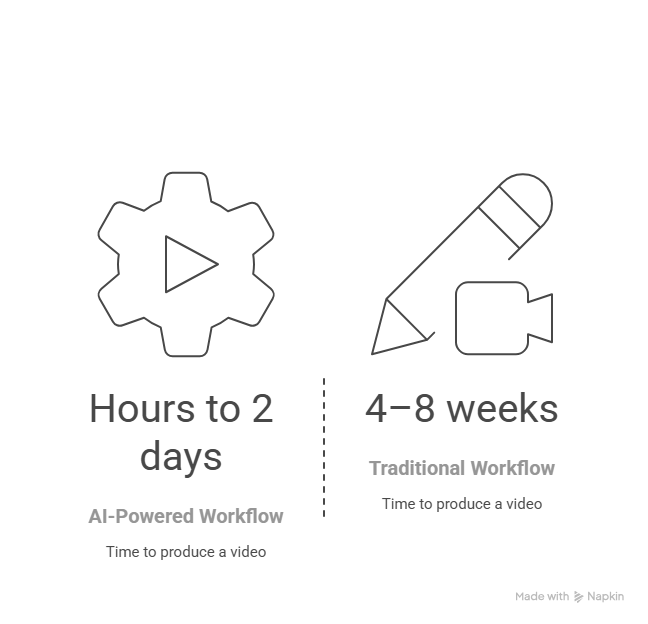
The Traditional Workflow: High Control, High Cost
The manual production process has been the industry standard for years, and for good reason. When done well, it produces polished, emotionally nuanced videos that reflect genuine creative craft.
Here's what the typical workflow looks like:
- Briefing & Scripting — Aligning stakeholders on messaging, drafting the script, and going through multiple rounds of feedback. Realistically, this takes four to five days minimum.
- Recording — Capturing screen recordings, coordinating voice talent, and setting up the right environment. Add another five to seven days.
- Post-Production — Manual editing, color correction, sound mixing, caption adding, and final review cycles. Another six to eight days.
- Review & Publish — Final stakeholder approvals, format exports, and platform uploads.
All in? You're looking at four to eight weeks from brief to published asset and anywhere from $5,000 to $25,000 per video, depending on production quality.
That's a significant investment for a single asset. And the moment your product UI changes, which in SaaS happens constantly, you're starting the process over.
The AI-Powered Workflow: High Speed, High Scale
This is where the game has genuinely changed. AI-powered demo creation has compressed what used to take weeks into a matter of hours without sacrificing the quality that enterprise buyers expect.
Here's what the modern workflow looks like with a tool like Puppydog.io:
- Input — Upload your screen recording or screenshots, add your product narrative or key talking points.
- AI Generation — The platform automatically structures your content into logical scenes, generates a tailored script, adds a professional voiceover, and applies captions and transitions.
- Personalization — Generate multiple variants for different personas, industries, or funnel stages — all from the same source material.
- Publish — Export and embed in minutes.
The entire process can go from raw input to publish-ready SaaS demo video in under a day. For teams running account-based marketing campaigns or outbound sequences at scale, that speed is a genuine competitive advantage.
Side-by-Side Comparison
Which Approach Is Right for You?
You might be wondering whether AI-powered means lower quality? Not anymore. For most use cases, outbound sales, website demos, onboarding walkthroughs, persona-specific campaigns, and AI-generated demos are not just good enough. They're often better because they're faster to iterate, easier to personalize, and quicker to update when the product changes.
Traditional production still has its place for high-stakes brand moments, a flagship launch video, a conference keynote asset, or a cinematic brand story. But for the day-to-day demand of a modern GTM team, waiting six weeks for a demo video simply isn't viable.
Learning how to make a demo video the AI-first way isn't just a productivity hack. It's a strategic shift in how your team thinks about content at scale.
Top Tools for Creating Product Demo Videos in 2026
The demo video software market has matured significantly over the past few years. There's no shortage of tools, but they're not all built for the same purpose. Picking the wrong one for your use case can cost you time, budget, and frankly, conversions.
Here's an honest breakdown of the tools worth knowing in 2026.
Puppydog.io: AI-Powered Personalization at Scale
Puppydog.io is purpose-built for sales and marketing teams that need to produce personalized demo videos without a production team behind them. Upload a screen recording or a set of screenshots, feed in your product narrative, and the platform handles the rest. script generation, voiceover, captions, transitions, and persona-specific variants.
What sets it apart is the depth of personalization. Puppydog.io integrates directly with CRMs like Salesforce and HubSpot, enabling automated demo generation triggered by prospect behavior. For outbound sales teams and ABM campaigns, that's not a feature. It's the entire strategy.
If you're evaluating a product demo video maker that scales with your GTM motion, this is the one to start with.
Best for: Outbound sales, ABM campaigns, PLG onboarding, persona-specific demos. Key differentiator: AI script generation + CRM integration + automated personalization
Loom: Quick, Human, Asynchronous
Loom remains the go-to for teams that need speed and authenticity over polish. Hit record, walk through your product, share the link. It's frictionless, personal, and surprisingly effective for one-to-one sales follow-ups where a human touch matters more than production value.
The limitation is obvious. Loom doesn't scale. You can't generate a hundred personalized demos from a single Loom recording. But for SDRs sending targeted outreach or customer success teams walking a client through a new feature, it's hard to beat.
Best for: One-to-one sales outreach, async internal communication, quick product updates. Key differentiator: Friction-free recording and sharing with a personal, human feel
Synthesia: Avatar-Led Video at Global Scale
Synthesia specializes in photorealistic AI avatars that deliver scripted content, no camera, no studio, no voice talent required. Its real strength is localization; with support for over 130 languages and lip-synced avatars, it's a powerful tool for enterprise teams operating across global markets.
It's less suited for product-specific demos where showing real UI is critical, but for top-of-funnel explainer videos and corporate training content, it's genuinely impressive.
Best for: Global localization, corporate training, top-of-funnel explainers. Key differentiator: 130+ languages with lip-synced AI avatars
Camtasia: The Manual Editing Workhorse
Camtasia is the longtime standard for teams that want full creative control over their screen recording and editing workflow. It's powerful, flexible, and produces high-quality output, but it requires time, skill, and patience to use well.
For teams with a dedicated video editor or a slower, more deliberate content production process, Camtasia delivers. For fast-moving GTM teams producing content at scale, the manual overhead can become a bottleneck quickly.
Best for: Detailed tutorial content, training videos, teams with dedicated editing resources. Key differentiator: Deep editing control and high production flexibility
Quick Comparison
For a deeper dive into how these tools stack up across specific campaign types, check out this roundup of the best 7 product demo tools for campaigns.
Conclusion: Your Product Demo Video Is Worth Getting Right
A great product demo video doesn't just explain your product. It does the selling for you. It travels into rooms you'll never enter, speaks to stakeholders you'll never meet, and builds trust long before a sales rep picks up the phone.
The 12 best practices we've covered aren't theoretical. They're the difference between a demo that gets clicked away in fifteen seconds and one that shortens your sales cycle, influences pipeline, and turns enterprise buyers into paying customers.
To recap what moves the needle most: lead with outcomes, not features. Personalize for every stakeholder on the buying committee. Match your video length to the funnel stage. Show real UI. Gate strategically. And always, always tie your performance metrics back to the pipeline, not just views.
The good news? You don't need a production team, a six-week timeline, or a $20,000 budget to get this right anymore.
Puppydog.io was built specifically for this. Upload your screenshots or screen recording, and walk away with a polished, personalized, publish-ready demo video in minutes, not weeks.
🎬 Create your first AI-powered product demo video in 5 minutes. No editing skills. No production team. Just results. Start Free with Puppydog.io →

Sarah Thompson is a storyteller at heart and Business Developer at PuppyDog.io. She’s passionate about creating meaningful content that connects people with ideas, especially where technology and creativity meet.