Demo Follow-Up Email: 9 Templates That Close Deals (2026)

Your prospect just sat through a great demo. They nodded, asked good questions, and seemed excited. Then your follow-up email hits their inbox the next afternoon and gets buried under three competitor pitches and a Slack notification.
That gap kills deals faster than a bad product.
A Workato study of 114 B2B companies found that 63% never responded to inbound demo requests at all. The average personalized response took around 12 hours. Meanwhile, companies that follow up within five minutes close at a 32% rate. Wait 24 hours, and that rate drops to 12%.
Speed matters. But so does what you say.
Most reps send long, formal recaps that read like meeting minutes. Buyers do not read those. They skim. They delete. They move on. According to sales engagement data, emails under 80 words drive a 78% higher positive reply rate than long-form alternatives.
The fix is not a better template. It is a better understanding of what your buyer needs right after the demo ends.
Takeaway: Slow, generic follow-ups are the number one reason deals go cold after a strong demo.
The Perfect Demo Follow-Up Email Structure
A high-converting post-demo follow-up email does not need to be clever. It needs to be fast, clear, and easy to act on.
Here is the structure that works:
- Subject line: Specific, not clever. Reference the company name, the topic discussed, or a direct question.
- Opening line: Skip the "hope this finds you well." Start with something specific from the call.
- Value recap: Three bullet points max. Each one ties a product feature to a pain point the buyer mentioned.
- Next step: One clear ask. Not "let me know your thoughts." A binary question or a direct calendar link.
- Signature: Name, title, and one link. That is it.
The biggest mistake reps make is cramming everything into one email. A proposal, a case study, a pricing table, and a scheduling link all in the same message creates decision paralysis. Pick one ask per email.
Takeaway: Every demo follow-up email should have one job. One recap. One ask. One link.
9 Demo Follow-Up Email Templates: Just Copy and Paste
1. Same-Day Thank-You Recap
Use this within 12 hours of the demo. Keep it brief and tie it to what you actually discussed.
Subject: [First Name], recap from today's [Product] demo
Hi [First Name],
Thanks for walking through [specific workflow] with me today. Based on what you shared about [pain point], here is how [Product] fits:
- [Value prop 1 tied to their pain]
- [Value prop 2 tied to their goal]
- [Expected outcome or timeline]
I will send the tailored proposal by [date]. Reply here if anything comes up before then.
[Your name]
2. Recap with Personalized Video

Use this for mid-market or enterprise deals where you want to stand out. Record a 60-second screen walkthrough referencing their company by name.
Subject: Quick video recap for [Company Name]
Hi [First Name],
I recorded a short walkthrough of the setup we mapped out today: [Video link]
In it, I cover how [specific process] moves to [Product] in under 14 days without disrupting your team.
Let me know if the timeline works for your schedule.
[Your name]
3. Decision-Maker Loop-In

Use this when your champion needs to bring in a VP, CFO, or IT lead.
Subject: [Company Name] + [Your Company] quick summary for your team
Hi [First Name],
Here is a jargon-free summary you can forward to [executive name] or share with the wider team:
- The challenge: [Main operational problem from the demo]
- The solution: [How your product solves it in plain terms]
- Expected impact: [Outcome, timeframe, or metric]
I am holding [date/time] for a 20-minute review with your technical team. Does that still work?
[Your name]
4. Pricing Question Follow-Up

Use this when pricing came up on the call, but you did not have full details ready.
Subject: Got your answer on pricing, [First Name]
Hi [First Name],
I pulled the numbers for the setup we discussed. Here is what it looks like for [Company Name]:
- [Plan or tier]: [Price and what it includes]
- [Key add-on or limit]: [Brief note]
Happy to walk through the ROI breakdown on a quick 15-minute call. Would [date] work?
[Your name]
5. Silent Prospect Re-Engage

Use this 10 to 14 days after the demo when a prospect has gone quiet.
Subject: Quick question about [Company Name]'s timeline
Hi [First Name],
Rather than guess where things stand, I wanted to ask directly:
What is the biggest concern or roadblock that came up since our demo?
I would rather address it or pause our outreach if the timing is off. Either way is fine.
[Your name]
6. Lost Deal Revival
Use this 30 to 60 days after a deal went cold or closed lost.
Subject: Things may have changed since we last spoke
Hi [First Name],
When we spoke in [month], the timing was not right. That is completely fair.
A few things have changed on our end that might be relevant now: [one-line product update or new use case].
Worth a 20-minute conversation? No pressure either way.
[Your name]
7. Procurement Objection Handler
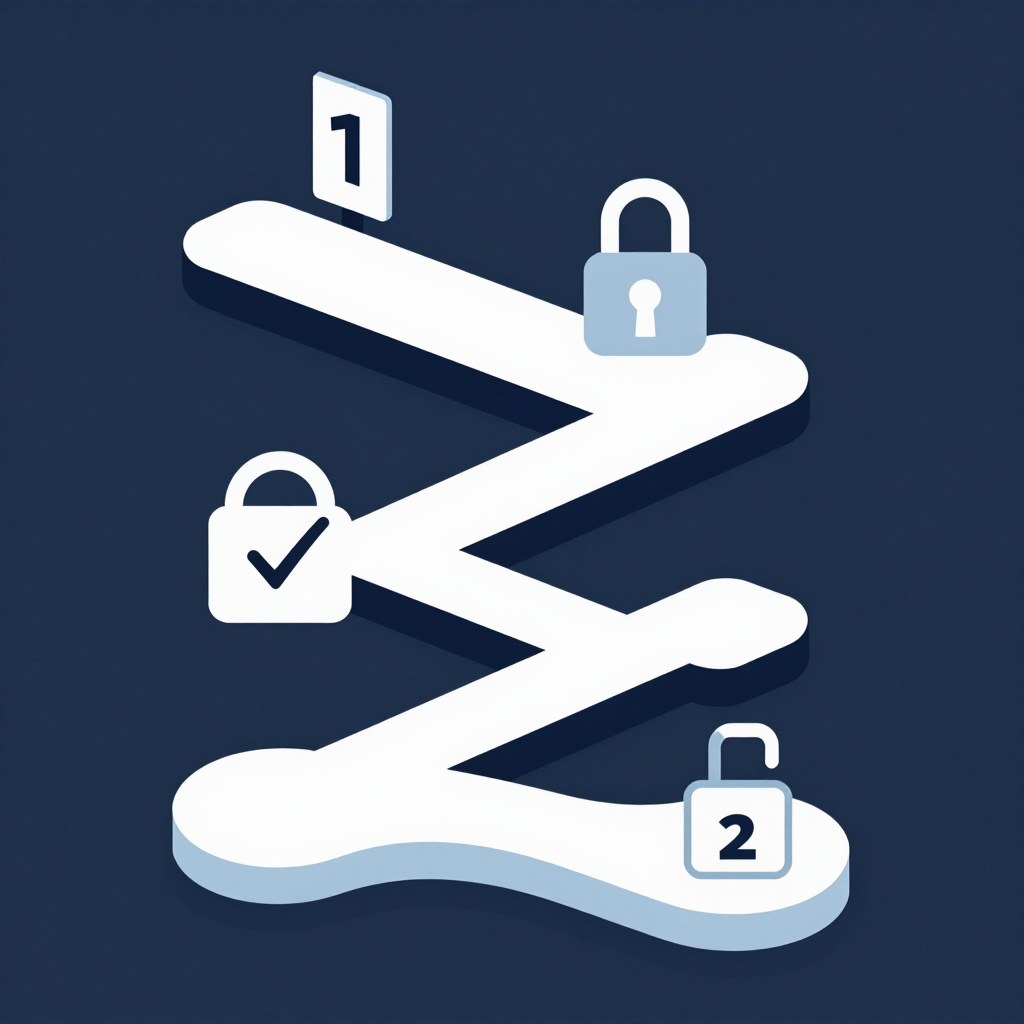
Use this when a deal stalls in legal or procurement after a strong demo.
Subject: Next steps for [Company Name]'s evaluation
Hi [First Name],
To keep the evaluation on track for your [target date], here is where we stand:
- Step 1 (Done): Demo and technical walkthrough
- Step 2 (In progress): Custom proposal by [date]
- Step 3 (Pending you): IT security sign-off by [date]
- Step 4 (Both): Procurement review by [date]
All security docs are in your shared workspace here: [link]
Does this timeline match your internal review process?
[Your name]
8. Trial Nudge

Use this when a product-led trial is about to expire.
Subject: Your free trial ends in 2 days
Hi [First Name],
Your trial of [Product] wraps up in 48 hours. Here is what your team built this week:
- workflows automated
- [Y] hours of manual work cut
Upgrading keeps everything live with one click: [link]
Need a few more days to evaluate? Reply here, and I will extend it.
[Your name]
9. Final Break-Up Email
Use this 21 or more days into a silent sequence. This is the last email. Make it count.
Subject: Should I close your file?
Hi [First Name],
Since I have not heard back after our [Product] demo, I am assuming priorities have shifted. That is completely fine.
I am going ahead and closing your file so I stop cluttering your inbox.
If things change down the road, feel free to reach out anytime.
[Your name]
When to Send Each Follow-Up (Timing Table)
Research shows that 80% of sales require at least five follow-up touches to close, yet nearly half of all reps quit after one unanswered email. Do not be that rep. Space your outreach and switch channels after Day 10.
Takeaway: Timing matters as much as copy. The right email sent too late is still the wrong email.
How to Add a Personalized Demo Recap Video
Text recaps are fine. Video recaps close deals.
Vidyard's 2025 State of Sales Technology report found that emails with a video thumbnail generate 3x more clicks than text-only emails. Loom's internal benchmarks show personalized video sequences improve reply rates by 4x. Companies using video across their sales teams report 25% higher close rates and a 46% increase in post-demo meeting bookings.
That is not a small edge. That is a different conversion category entirely.
Here is what makes a post-demo video work:
- Say the prospect's name and their company context in the first five seconds
- Keep the video under 60 seconds. Videos under 60 seconds receive 42% more engagement
- Record your screen with their website or workflow visible in the background. This alone generates a 16x lift in email open rates
- Use the video link as the central CTA in your follow-up, not an afterthought
Puppydog makes this even easier. Instead of recording a new video from scratch, you can turn your screen recording or screenshots from the actual demo into a personalized product walkthrough. Your prospect gets a clean, branded recap they can share internally with decision-makers who were not on the call.
That is the gap most sales teams miss. The champion loved the demo. But the CFO never saw it. A personalized demo video fixes that. You can tailor product demos to show exactly what each stakeholder cares about, without scheduling another live session.
If you want to see how personalized sales demos help shorten the sales cycle, this is the tool built for that exact workflow.
Takeaway: A personalized video recap is the single highest-ROI addition to any post-demo follow-up sequence.
Subject Line Examples That Get Opens
Your email is dead if it never gets opened. Here are subject lines that work across the nine templates above:
- [First Name], recap from today's [Product] demo
- Quick video recap for [Company Name]
- Got your answer on [specific question from call]
- Should I close your file?
- Quick question about [Company Name]'s timeline
- Your free trial ends in 2 days
- Things may have changed since we last spoke
- Next steps for [Company Name]'s evaluation
Avoid vague lines like "Following up" or "Checking in." They signal that you have nothing new to offer. Buyers delete them instantly.
Takeaway: The best subject lines are specific, relevant, and tied to something the prospect actually said or did.
Mistakes That Kill Your Reply Rate
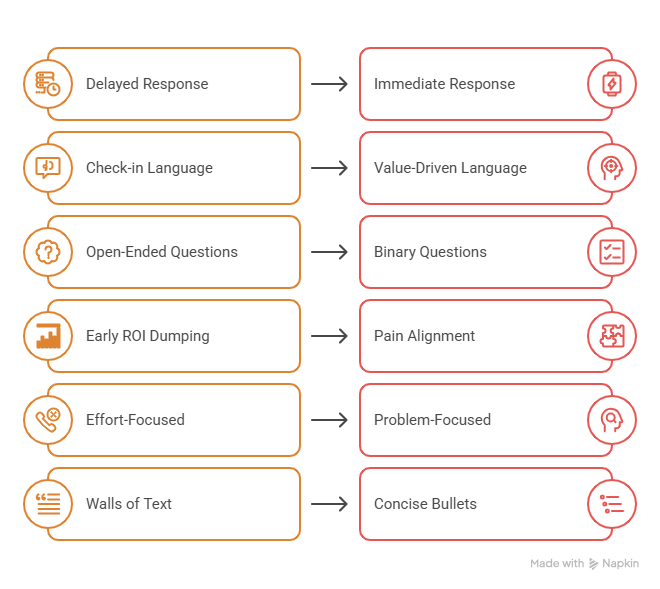
Even great templates fail when paired with these habits:
- Sending too late. Waiting 24 hours to follow up means competing with three other vendors who already landed in the inbox. Send the same day.
- Using "check-in" language. "Just circling back" and "touching base" are widely disliked by B2B buyers. They signal low value. Cut them.
- Asking "what are your thoughts?" This open-ended question adds cognitive load. It decreases meeting bookings by 20%. Ask a specific binary question instead.
- Dumping ROI numbers too early. Buyers make emotional decisions first, then validate with logic. Leading with ROI before establishing pain alignment actually reduces bookings.
- Referencing missed calls. Saying "I tried calling you" reduces meeting bookings by 14%. The buyer does not care about your effort. They care about their problem.
- Sending walls of text. Long emails get skimmed and deleted. Keep it under 80 words when possible. Use bullets for everything that can be bulleted.
Takeaway: Most follow-up emails fail because of what is in them, not what is missing.
FAQs
How soon should I send a demo follow-up email?
Send it within 12 hours of the demo. Same-day is best. Salesforce data shows that 77% of B2B buyers expect immediate engagement after interacting with a brand. Waiting even one business day means you are competing with fresh outreach from competitors.
What is the ideal length for a sales demo follow-up email template?
Keep it under 80 words. Research across millions of B2B emails shows that short, scannable follow-ups drive a 78% higher positive reply rate compared to long-form alternatives. Use three bullet points, one ask, and one link.
How many follow-up emails should I send after a demo?
For deals under $10,000 ACV, a three-touch email sequence is the standard. For larger enterprise deals, a five to seven-touch multi-channel sequence is more appropriate. Sending more than three emails in a short window triples the spam complaint rate, so diversify across phone, LinkedIn, and SMS after Day 10.
What should a demo recap email include?
A demo recap email should include a brief value summary tied to the prospect's specific pain points, a clear next step, and one link. For high-value deals, add a personalized video walkthrough. Avoid attaching large PDFs or slide decks, as these can trigger spam filters.
Why do deals go cold after a "great" demo?
Usually because the champion was excited but had no budget authority. The decision-maker never saw the product. Providing your champion with an executive-ready video recap and a simple internal summary doc makes it easier for them to sell internally. Personalized sales demos are a proven way to bridge that gap.
What is an "interest CTA" and why does it work?
An interest CTA asks a low-friction question like "Would you be open to exploring how this fits your current workflow?" instead of demanding calendar space. Gong Labs found that interest-based CTAs generate a 20% lift in meeting bookings compared to time-based CTAs.
What is the break-up email and does it really work?
The break-up email is the last message in a sequence, sent 21 or more days after a demo when the prospect has gone silent. Its goal is to trigger loss aversion by signaling that you are closing their file. Used correctly, this approach generates a 76% response rate from cold prospects.
Can I use these templates for enterprise deals?
Yes, but personalize them. Enterprise deals have multiple stakeholders, longer procurement cycles, and stricter security reviews. Templates 3, 5, and 7 are specifically built for those scenarios. You should also include a mutual action plan and a shared workspace link to keep the evaluation on track.
Conclusion
The demo went well. Now comes the part most reps mess up.
A strong demo follow-up email does not need to be long, clever, or packed with value propositions. It needs to be fast, specific, and easy to act on. The nine templates above cover every stage of the post-demo sequence, from the same-day recap to the final break-up email that brings cold prospects back to life.
One thing the templates alone cannot do: show your product to stakeholders who were not on the call. That is where a personalized demo recap video changes everything. It gives your champion something concrete to share internally, and it keeps your product visible long after the live session ends.
Puppydog turns your screen recordings and screenshots into personalized product videos your buyers can watch, share, and act on. No editing skills needed. No new recording session required.
Start your free trial and send your next post-demo follow-up with a video that actually gets watched.

Sarah Thompson is a storyteller at heart and Business Developer at PuppyDog.io. She’s passionate about creating meaningful content that connects people with ideas, especially where technology and creativity meet.