AI Video Production Time: Make a Demo in Under an Hour


Published: July 6, 2026
Here's the answer, no runaround: traditional B2B product demo videos take two to eight weeks and cost $3,000–$8,000 through an agency, while an AI-assisted workflow capture, AI narration, branding, and export can get a finished demo published in under an hour. That's not a marginal improvement. It's a different category of speed, and it's why Puppydog.io exists: to turn a screen recording or a handful of screenshots into a polished, on-brand demo video without the weeks-long production queue.
If you've ever sat in a Monday standup and heard "we need a demo for the launch on Friday" and felt your stomach drop because you know what that actually takes, the old way is for you.
Why Buyers Are Forcing This Shift (Not Just Marketing Teams)
This isn't really a story about video tools getting faster for the sake of it. It's a story about B2B buying committees getting bigger and less patient. Forrester's State of Business Buying 2026 puts the average complex-purchase buying group at 13 internal stakeholders plus 9 external participants, calling it upwards of 20 people who each want to see the product do the thing before they'll sign off. Gartner's B2B buying journey research finds buyers now complete roughly 60% of their evaluation before ever speaking to a salesperson, and by the time they do reach out, the vendor already on their shortlist wins the deal about 80% of the time.
Translation: If your demo isn't ready when the buyer is looking, you're not late. You're invisible. TrustRadius data shows product demos remain the single most-used self-serve resource, cited by 58% of B2B buyers as a top decision-making input. A two-week production queue simply doesn't match that timeline anymore.
Why Has AI Video Production Time Collapsed in 2026?
The short version: three stages that used to require separate specialists now happen inside one automated pipeline.
Scripting used to mean a copywriter, a review cycle, and a sign-off. AI narration tools generate voiceover copy directly from what's on screen, cutting that stage from days to minutes.
Voice recording used to mean booking a voice actor and a studio slot. Text-to-speech has gotten good enough that AI-generated narration is now standard for product demo content — no studio, no scheduling, no re-takes because someone flubbed a line at 4 pm.
Manual editing used to mean 2–4 hours of shot selection, syncing, and color work per finished minute. Independent research backs this up directly: a peer-reviewed study on automated video editing (Schön, 2024) measured a 90% drop in production time for short-form video, compressing a 2-hour manual edit down to 15–25 minutes using an automated pipeline. Separately, industry data compiled by Vivideo and Ngram found the average production time for a 60-second marketing video fell from 13 days to 27 minutes with AI tools in the mix.
Multi-format export used to mean a separate render per platform. One source asset, multiple exports — LinkedIn-ready, square for social, whatever your sales team needs for a follow-up email — generated simultaneously instead of one painful render at a time.
Stack those three eliminations together, and you get the collapse. It's not one miracle feature. It's removing the handoffs between people who used to work in sequence.
How to Make a Product Demo Video in Under an Hour (Step by Step)
Here's the actual workflow, the same one built into how Puppydog turns screen recordings into demo videos, not just the promise of speed. This assumes you're starting from a screen recording or a set of screenshots of the feature you want to demo.
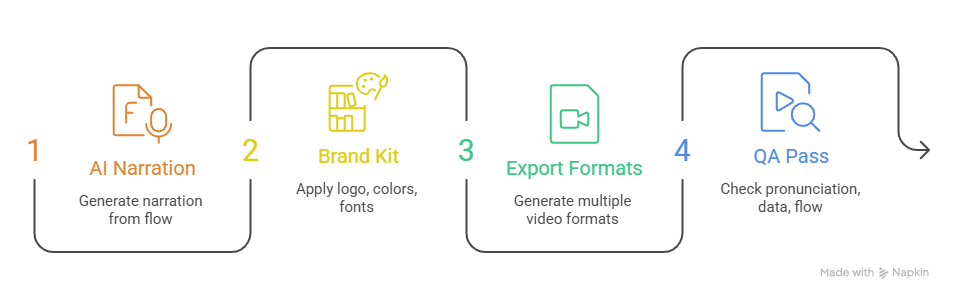
- Capture your raw footage or screenshots (5–10 minutes). Record the flow you want to show — a feature walkthrough, an onboarding step, whatever the ask is. Keep it tight; you can trim later, but you can't un-record a rambling 12-minute session without paying for it in edit time.
- Generate AI narration from the captured flow (5–10 minutes). Instead of writing a script from scratch, let the tool draft narration based on what's actually happening on screen, then edit for tone and accuracy. This is the step that used to take days with a human copywriter and voice actor. Now it's a first draft you refine, not a blank page you fill.
- Apply your brand kit (5 minutes). Logo, colors, fonts, intro/outro locked in once, reused every time. This is also where you catch generic AI-voice pacing issues before they go further (more on that below).
- Export in multiple formats simultaneously (5–10 minutes). Landing page embed, social cutdown, sales follow-up link generated from the same source instead of separate manual renders.
- Run your QA pass (10–15 minutes). This is the step people skip when they're excited about speed, and it's the one that protects your brand. Check pronunciation on product names and acronyms, confirm no sensitive data is visible in the captured screens, and watch the whole thing once at normal speed before you hit publish.
Add it up, and you're looking at a finished, published demo in well under an hour, not the 2–3 week traditional cycle, and not some untested rough cut, either.
Time-Per-Stage: Traditional vs. AI-Assisted Production (Verified July 2026)
How Does Production Time Vary by Demo Type?
Not every demo is the same job, and treating them like they are is how teams either waste time over-producing a throwaway social clip or under-invest in the asset that's actually going to close deals. Rough guardrails based on published video-length benchmarks:
- 30-second social cutdown: Fastest to produce, lowest complexity. Wyzowl's 2026 data shows content under 60 seconds generates 2.5x more engagement per impression than longer formats, so don't over-engineer this one. A quick capture-to-export pass is the right amount of effort.
- 60–90-second feature demo: The workhorse format. Wistia's platform-wide data (13M+ videos analyzed) puts videos in the 1–5 minute "educate and explain" range at over 50% average engagement. This is your landing page and pricing page asset, and it's worth the full QA pass.
- Multi-step onboarding walkthrough (2–5+ minutes): More capture, more narration, more review, but the same core workflow, just repeated across more segments. If you're building an interactive click-through instead of a linear video, benchmarks suggest capping it at around 8–12 steps (roughly a 40% completion rate at that length) before splitting into chapters.
The workflow doesn't change by type. The time investment in each stage for a 30-second social clip needs a fraction of the QA time a customer-facing onboarding series does.
Does Faster AI Video Sacrifice Quality?
Let's be honest, because Arcade and every other vendor in this space tend to wave past this question: yes, AI-generated video introduces quality risks that manual production doesn't have, and pretending otherwise does nobody any favors.
The real, documented issues:
- Pronunciation problems. Text-to-speech engines routinely mangle acronyms and numbers, reading "NYC" as one garbled word instead of three letters, or a product code as a giant number instead of digit-by-digit.
- Pacing that feels flat or rushed. Synthetic narration doesn't always know where the emphasis should land.
- Visual artifacts in fully AI-generated video, melting shapes, inconsistent backgrounds, though this is far less of an issue for screen-capture-based demos, where you're recording your actual product UI rather than generating synthetic visuals from scratch.
Here's the QA checklist that actually matters before you publish:
The pattern that works: automate the mechanical stuff (editing, formatting, syncing), keep a human in the loop at the two points that actually matter. Script sign-off and final visual check. That's not a compromise on the speed story. It's what makes the speed story sustainable instead of a one-time stunt that embarrasses your brand the first time an acronym gets butchered in front of a prospect.
How Much Time Does a Team Save Per Quarter?
Single-asset speed is the headline, but the real ROI shows up at the team level. Here's a simple model, using a standard $50/hour labor rate:
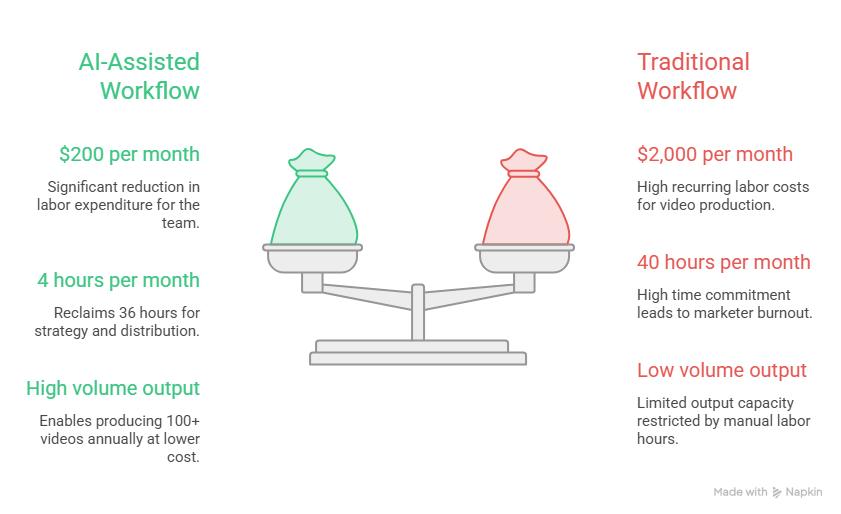
A team producing 20 product demo/tutorial videos per month, traditional workflow:
- 2 hours per video × 20 videos = 40 hours/month
- 40 hours × $50/hour = $2,000/month in labor
Same team, AI-assisted workflow at roughly 10–15 minutes per video:
- ~0.2 hours × 20 videos ≈ 4 hours/month
- 4 hours × $50/hour = ~$200/month in labor
That's a reclaimed 36 hours a month for one team time that goes back into strategy, distribution, or just not burning out your one video-literate marketer. Annualized, that's over $21,000 in labor cost alone, before you even factor in agency fees you're no longer paying at all.
Other companies in adjacent spaces have published similar math: Five Below's talent development team went from spending $60,000/year on five agency-produced training videos to producing 100+ videos annually for $40,000 total after adopting AI video tools, a 97% per-video cost reduction. New York Life reported creators saving an average of 41.6 hours per month after automating documentation workflows. The pattern holds across company size and use case: the savings compound with volume, not just speed.
When Is Traditional Production Still Worth It?
Not every asset belongs in a fast workflow, and pretending AI video replaces everything would be its own kind of dishonesty.
- Hero brand films and flagship launch videos. If you're producing a 30-second cinematic piece with custom motion graphics and original score that's going to run for a year, the traditional timeline is a reasonable trade for the craft.
- Live-action customer testimonials and founder keynote footage. AI video doesn't generate these. You need a camera, a person, and a location, full stop.
- Anything where the emotional weight of real human presence is the point, rather than the clarity of a product walkthrough.
For product demos, sales follow-ups, onboarding walkthroughs, and pricing-page conversion assets, the volume workhorses most PMM and sales enablement teams actually need week over week, the AI-assisted path wins on speed at every scale, and increasingly on cost, too. (If you're weighing this against your current production spend, Puppydog's pricing is worth a side-by-side look against your last agency invoice.)
Frequently Asked Questions
How long does it take to make an AI product demo video?
For a standard 60–90-second product demo, the full workflow- capture, AI narration, branding, export, and QA typically takes under an hour. Shorter social cutdowns can move faster; multi-step onboarding walkthroughs take proportionally longer because there's simply more to capture and review.
How do you make a product demo video fast?
Capture your screen recording or screenshots first, generate AI narration from that footage instead of scripting from a blank page, apply a pre-built brand kit, export in multiple formats at once, and run a focused QA pass before publishing. The speed comes from removing handoffs between separate specialists, not from skipping steps.
Does AI video sacrifice quality vs. traditional production?
It can, if you skip the QA step. Common issues include mispronounced acronyms and product names, flat narration pacing, and, for fully AI-generated (non-screen-capture) video, visual inconsistencies. A short human review pass focused on script accuracy and visual check catches nearly all of it.
How much does AI video production save vs. an agency?
Traditional agency production runs $3,000–$8,000 per finished video with a 2–3 week timeline. AI-assisted workflows cut both dramatically. Teams producing video in-house at scale have reported per-video cost reductions in the 80–97% range compared to agency pricing, depending on complexity and volume.
What's the fastest stage to automate in demo production? Manual editing and voiceover recording. Traditional post-production editing alone consumes 35–45% of a project's total timeline, and independent research has measured up to a 90% reduction in editing time using automated pipelines, making it the single highest-leverage stage to hand off to AI.
Methodology note:
Traditional production timelines and cost figures are drawn from published industry benchmarks across freelance, agency, and in-house production models, not a single vendor's internal data.

Sarah Thompson is a storyteller at heart and Business Developer at PuppyDog.io. She’s passionate about creating meaningful content that connects people with ideas, especially where technology and creativity meet.